This blog post, the fifth in a series about Google AdWords tools, delves into using the Google Keyword Tool effectively for your campaigns. Previous posts covered the change history tool, the AdWords conversion tab, Google Analytics Reporting within AdWords, and Google Website Optimizer.
Understanding the Google Keyword Tool
Google’s Keyword Tool provides advertisers with insights into valuable keywords for their campaigns. Let’s weigh its pros and cons:
Advantages:
- Access to Google’s Data: The tool leverages Google’s vast search query data, a significant advantage. However, other keyword tools can access this data through an API and combine it with third-party sources for a more comprehensive approach.
- AdWords Specific: The data is tailored for AdWords, which is beneficial for optimizing AdWords campaigns.
- Seamless Integration: The tool integrates seamlessly with your Google account, allowing easy keyword addition to AdWords.
Disadvantages:
- Potential Bias towards Google: The tool’s suggestions might favor Google’s interests by highlighting more commercial and competitive terms, potentially overlooking more profitable niche opportunities for your business. Third-party tools often aim to bridge this gap.
- Approximate Estimations: The traffic estimations are broad approximations, not reflecting the complexities of keyword performance. The tool cannot predict actual conversions, highlighting the importance of analyzing your data.
While imperfect, the tool offers valuable insights for your AdWords campaigns.
Utilizing the AdWords Keyword Tool for PPC Campaigns
The AdWords Keyword Tool provides various options for generating keyword ideas:
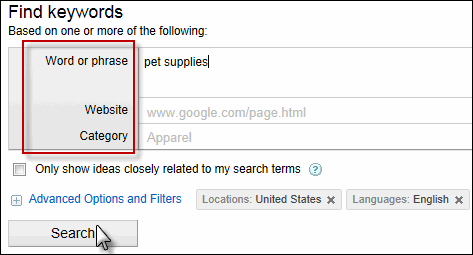
You can search for keywords based on:
- Word or Phrase: Input a keyword (like “pet supplies”) to receive related suggestions.
- Website: Use your or a competitor’s website to get keyword ideas relevant to that site’s content.
- Category: Explore Google’s predefined categories for topical keyword suggestions, although these might be too broad for practical use.
Using a specific keyword or phrase generally yields the most actionable results.
You can refine your keyword selection with filters:
- Ideas Closely Related to Search Terms: Generates closely related terms for tightly focused ad groups.
- Advanced Filters: Refine your search by location, language, device targeting, and search volume thresholds.
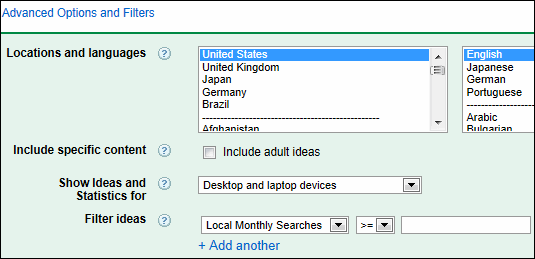
Once you’ve chosen a term, you’ll see a list of potential keywords for your campaign, which you can add directly to AdWords or export for further refinement.
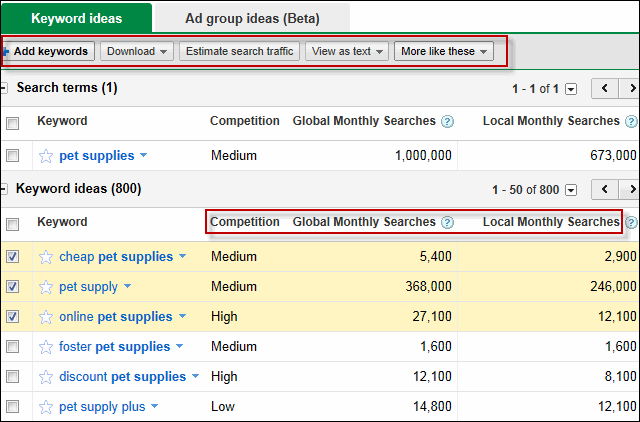
The tool provides metrics to evaluate these suggestions:
- Competition: Indicates the number of advertisers bidding on a term and their aggressiveness.
- Global Monthly Searches: The average monthly global searches for a term over the past year.
- Local Monthly Searches: The average monthly searches for a term within your selected target location.
AdWords now offers a beta ad group ideas tool, suggesting keyword clusters for specific ad groups:
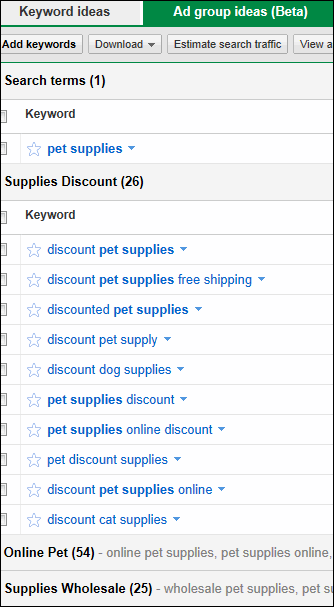
These lists can enhance existing ad groups or inspire new ones.
While the keyword suggestions provide a helpful starting point, it’s crucial to continuously monitor your campaigns, adjust bids, pause ineffective keywords, and add new ones based on performance data.