TikTok is a platform built for sharing, connecting, and fostering communities. Its potential for rapid growth makes it an excellent starting point for building an audience. Riding the wave of a new trend, when done right, can catapult your account to influencer status and lead to selling out your products. Among its many collaborative features, Stitch stands out as a key driver of such growth.
Table of contents:
- What is Stitch on TikTok
- How to Stitch on TikTok
- How to turn Stitch off or on
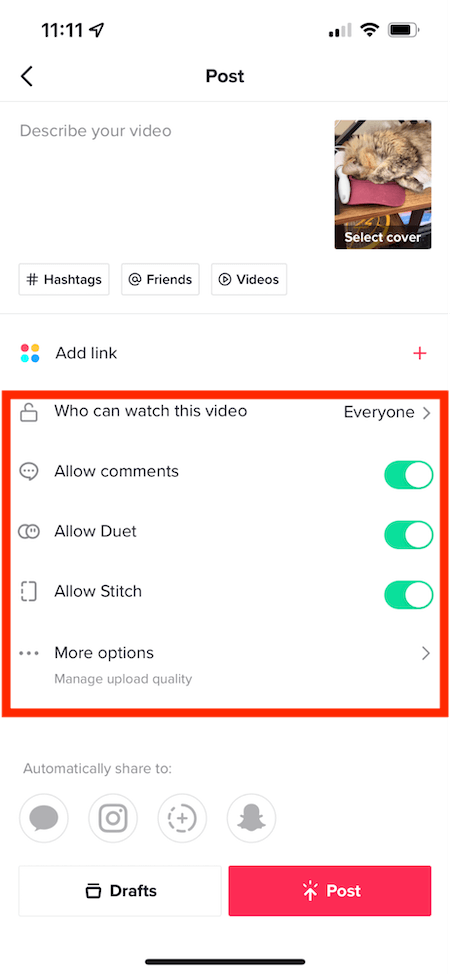
- Disabling Stitch on individual videos
- Stitching with saved videos
- TikTok Stitch examples and ideas
- Stitch FAQs
What is Stitch on TikTok?
Stitch enables TikTok users to incorporate snippets from other users’ videos into their own. This allows for easy referencing of existing content, either for commenting or reinterpreting the original idea.
Users who Stitch expand the conversation to a broader audience. Since Stitch automatically credits and links back to the original creator, it can drive significant attention their way.
How to stitch on TikTok
The Stitch feature is very user-friendly. Here’s a step-by-step guide:
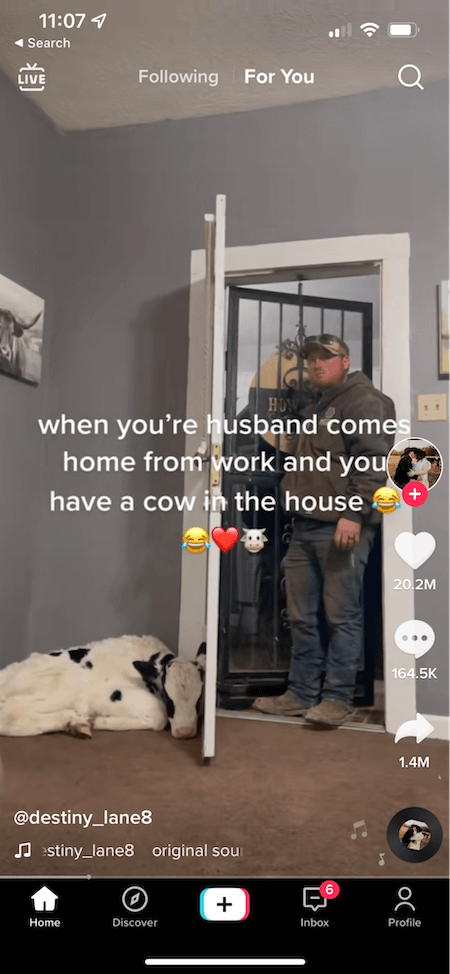
- Navigate to the desired TikTok video and tap the “Send to” button.
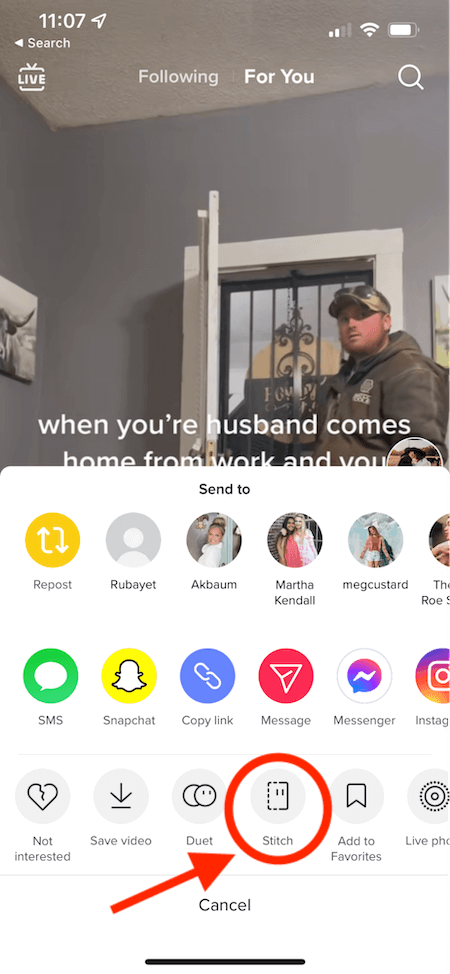
- Press the “Stitch” button.
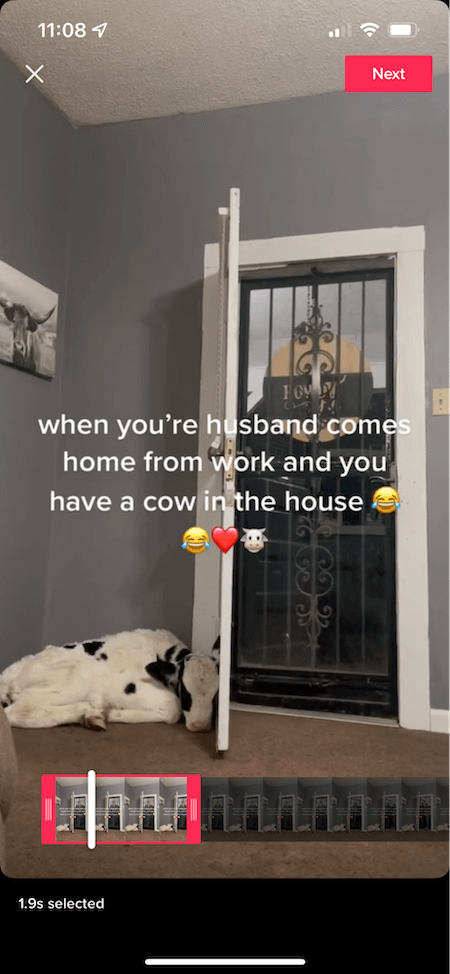
- Choose the desired clip (up to five seconds) from the original video.
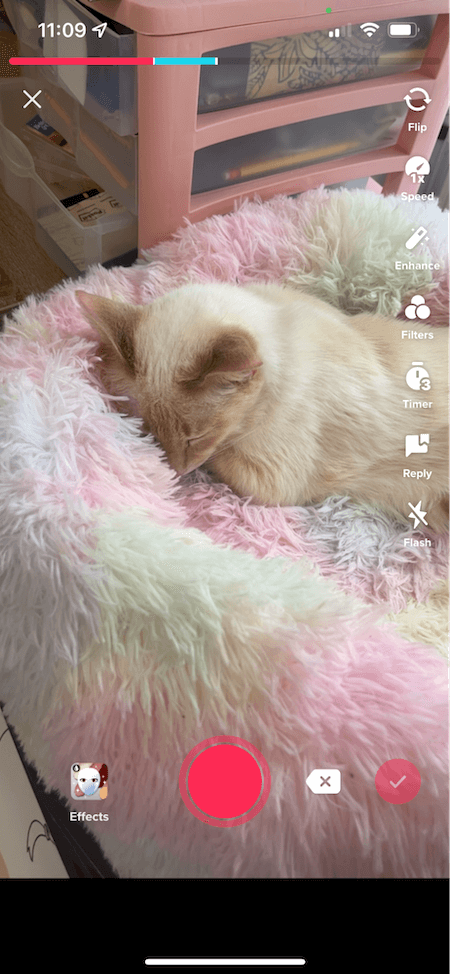
- Record your response or addition to the Stitched clip.
- Post your video and watch the engagement unfold.
Here’s a visual guide with screenshots: Step #1: Open TikTok, locate the video you wish to Stitch, and tap the “Send to” button.
Step #2: Select “Stitch” from the menu.
 Step #3: Select the segment (up to five seconds) you want to include in your video.
 Step #4: Record your response or addition to the Stitched clip. During recording, red signifies the original content, while blue represents your addition. Stitched videos can still utilize editing tools, timers, effects, filters, voiceovers, text, etc.
 Step #5: Post your creation and watch the conversation grow.
How to turn Stitch off and on
Allowing others to Stitch your videos opens the door for potentially millions to directly engage with your content. This can amplify your video’s reach and engagement, potentially landing it on the coveted For You Page (FYP) or even going viral.
However, the internet can be daunting. Opening the door to collaborations invites potential criticism. Since responses are unpredictable, those prioritizing privacy or wishing to avoid negativity might prefer to disable this feature.
Fortunately, you can easily manage these permissions through the “Settings and Privacy” section under “Privacy and Safety”. Here, you can enable or disable Stitch for all videos on your account.
Disabling or enabling Stitch: a step-by-step guide
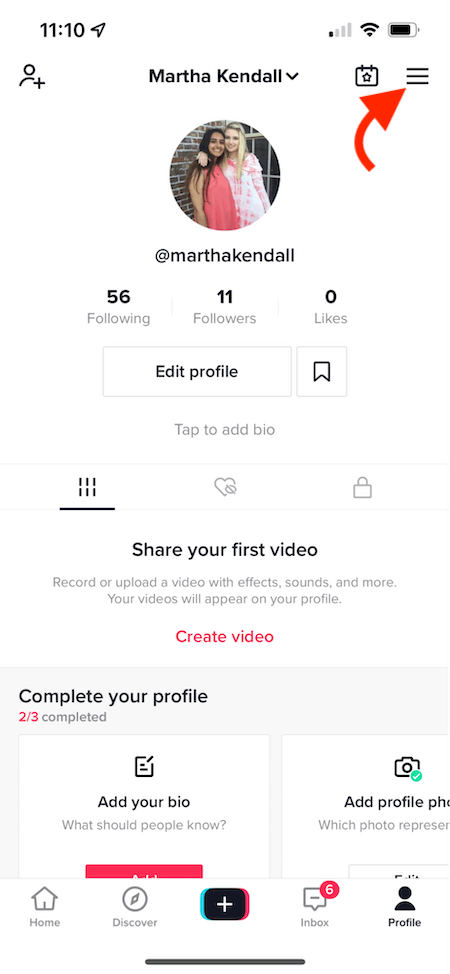
- Go to your profile and tap the three dots in the upper right corner.
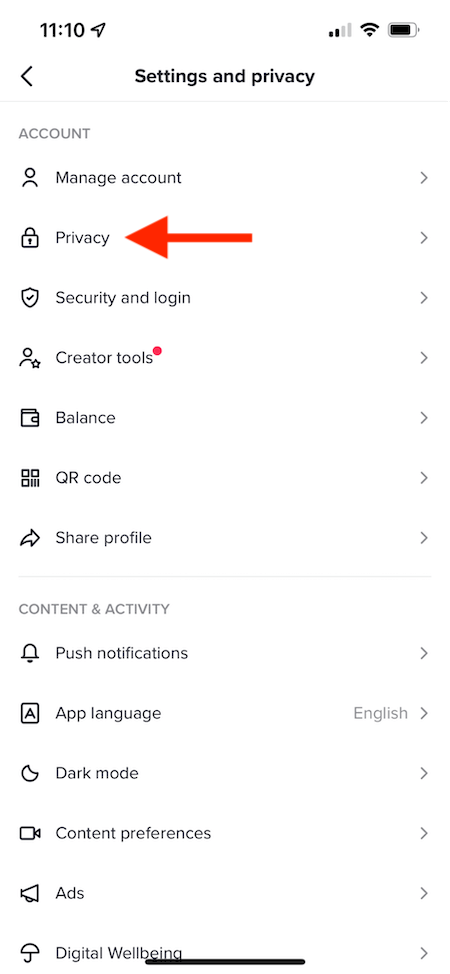
- Under the Account tab, select “Privacy”.
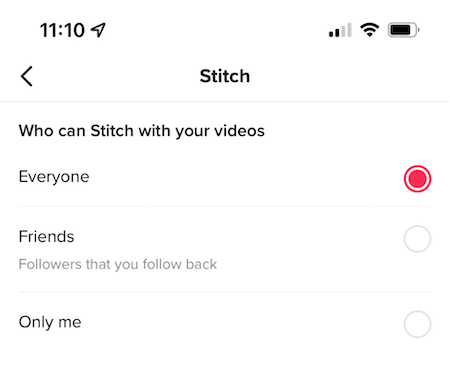
- Tap “Who can Stitch with your videos.
- Choose from “Everyone”, “Friends”, or “No one”.
Step #1: Go to your profile and tap the three lines at the top right corner.
Step #2: In the Account tab, select “Privacy”.
 Step #3: Tap “Who can Stitch with your videos” and choose between Everyone, Friends, or No one.
How to disable Stich for individual videos
You can also enable or disable Stitch for individual videos during the posting process. Simply toggle the “Allow Stitch” button on or off right before hitting “Post”.
Can you Stitch on TikTok with a saved video?
The Stitch feature is limited to existing TikToks and freshly recorded videos. You can Stitch with any video on TikTok, even from your Saved folder (provided the creator allows it), but your response must be recorded within the app.
In essence, you can’t upload pre-existing content from your camera roll as a Stitch. If you want to use something from your camera roll to respond to a video, you’ll need to download the video you want to Stitch with and then edit it together with your response as a regular TikTok video. Keep in mind that this won’t automatically link to or be recognized as a Stitch by the algorithm.
TikTok Stitch ideas & examples for inspiration
Stitch offers numerous ways to boost your TikTok likes and engagement. Let’s explore some:
Propelling products to viral fame
@Cindilooblink182 stitched @Snackqueen666’s video to express her admiration for the Urban Decay lipstick featured in the original post. Stitch is a driving force behind products going viral on TikTok, and this video exemplifies how. Users spark a chain reaction, trying products and stitching their reactions.
Showcasing your unique talents
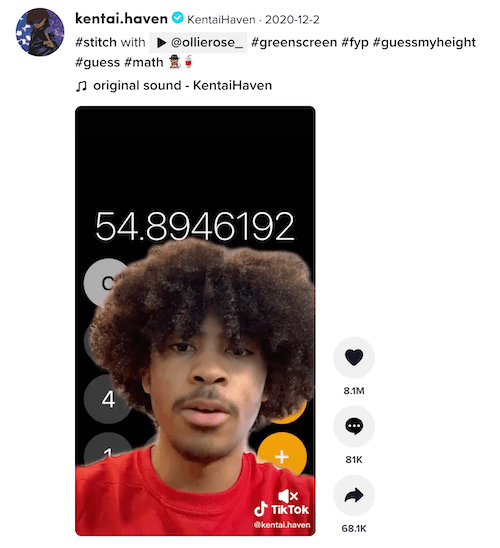
@Ollierose_ inquired about the tag for someone who “figures out people’s height.” @Kentai.haven’s followers enthusiastically requested he respond, generating over 1,000 mentions overnight. He obliged by demonstrating his unique ability to estimate heights based on objects in videos and a healthy dose of math.
Participating in trends
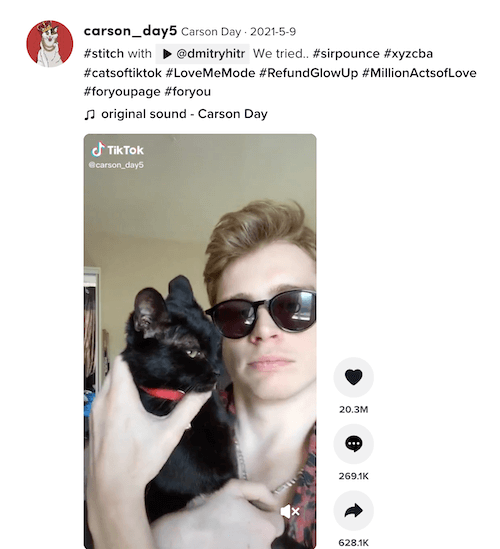
@Carson_day5 courageously stitches @dmitryhitr’s video featuring a cat meowing along to Justin Bieber’s “Peaches” and provides some assistance. @Carson_day5’s cat seemed unimpressed, but I certainly wasn’t.
Engaging with open-ended questions
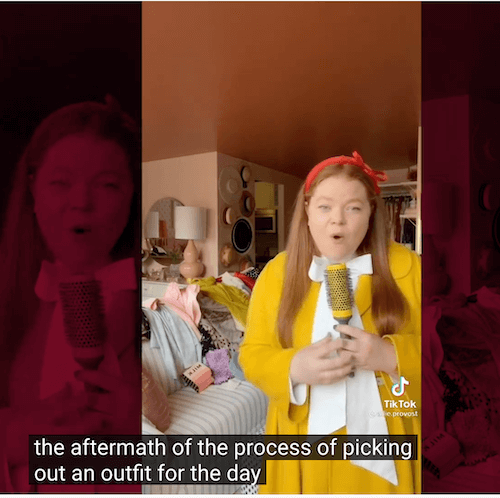
This amusing TikTok Stitch compilation poses the prompt: “In your best reporter voice, report on your most mundane activity around the house.”
Additional ideas
- Challenge your audience with “Tell me you’re [a fan of my business/something relevant to your audience] without telling me you’re [same thing].”
- Encourage followers to share questions, concerns, or stories via video, and respond by stitching in your replies.
- Stitch your reaction or perspective on a video discussing current events within your industry or niche.
- Post a video and invite viewers to Stitch their reactions to their favorite part.
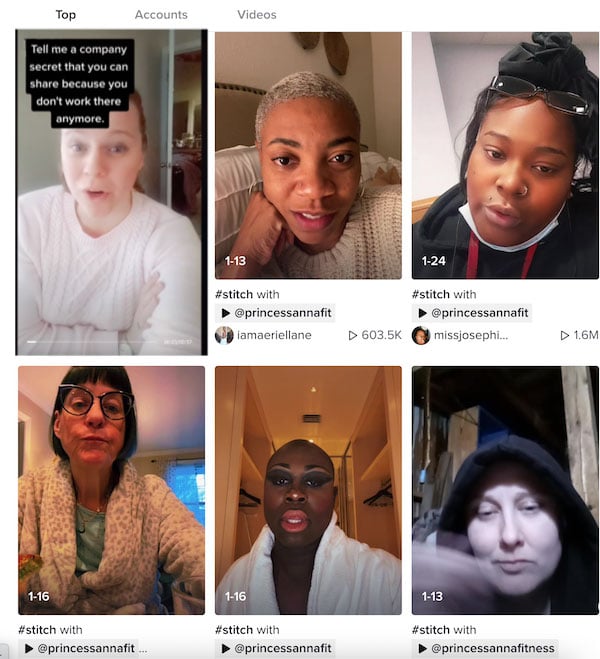
- Pose an open-ended question and encourage followers to Stitch in their answers.
How to Stitch on TikTok: FAQs
Are all videos stitchable? No, not all videos are stitchable. Users have the option to enable or disable the feature. If Stitch is disabled by the creator, you won’t be able to Stitch their video. Can I Stitch using a pre-existing video? Stitching with content from your camera roll is not possible. Additionally, the TikTok Sound library is off-limits for Stitched videos. What’s the distinction between Stitch and Duets? Stitch is often confused with Duet. Duet allows you to record a video that plays alongside another video. Your video appears on the left and the original on the right, playing simultaneously.
 Watch the duet here.
Stitch, conversely, integrates the borrowed clip directly into your video, playing it sequentially as part of your content rather than side-by-side.
Watch the duet here.
Stitch, conversely, integrates the borrowed clip directly into your video, playing it sequentially as part of your content rather than side-by-side.
Master the art of Stitching on TikTok
Beyond its entertainment value and user-friendly editing, TikTok’s Stitch feature is a powerful tool for expanding your reach, boosting engagement, and potentially going viral. For brands aiming to grow on TikTok, utilizing Stitch is a no-brainer.
Seeking further TikTok advice? Discover how to go live on TikTok [here](link to TikTok Live article).