Google faces a challenge with its AdWords platform, needing to balance the needs of two distinct user groups: casual advertisers with smaller budgets, and power users who contribute the majority of AdWords revenue. Google strives to make the platform user-friendly and encourage spending from smaller advertisers, while also providing advanced tools for optimization to retain their high-value clients. This approach, however, might be a factor in the platform’s significant churn rate among small businesses.
A prime example of this dynamic is the AdWords IP Exclusion Tool. This useful feature allows advertisers to block unwanted clicks and impressions, but its obscure location and somewhat clunky interface highlight Google’s prioritization of spending over cost control. This post will explain what the tool does, where to locate it, and the reasons you might want to utilize it.
What is the AdWords IP Exclusion Tool?
The AdWords IP Exclusion Tool is essentially a section within the AdWords platform where you can specify IP addresses you don’t want your ads to be displayed on.
Why Would I Want to Use the IP Exclusion Tool?
Utilizing the IP exclusion tool allows you to eliminate clicks originating from IP addresses you’ve identified as malicious or irrelevant. This translates to both direct and indirect cost savings:
- Hard Cost – By eliminating irrelevant clicks, you directly reduce your advertising expenditure.
- Soft Cost – By eliminating irrelevant impressions, you improve your click-through rates, which in turn, improves your Quality Score. This results in lower costs per click and improved ad ranking.
When Should I Use the IP Exclusion Tool?
There are various situations where using the IP Exclusion Tool might be beneficial. Some of the most common reasons include:
- Click Fraud – While more common on the content network (where you’d want to use placement exclusion), you might observe a sudden increase in clicks from a single IP address, potentially indicating a competitor or malicious actor trying to deplete your AdWords budget.
- Competitive Intelligence – Blocking a competitor’s IP address can prevent them from viewing your ads, especially if you’re bidding on keywords related to their brand.
- Limit Impressions from Your Company – Blocking your own company’s IP address can prevent impressions being served to your employees, which could negatively impact your quality score and potentially incur unnecessary costs.
There are certainly other reasons why you might choose to block a specific IP address. (Feel free to share interesting reasons or examples in the comments!)
Where Do I Find the AdWords IP Exclusion Tool?
This is where Google’s conflicting priorities become apparent: the IP exclusion tool is tucked away within the “opportunities” tab.
Before you can access the IP exclusion tool, you need to navigate through Google’s opportunity tab, which primarily focuses on suggesting ways to increase your advertising spending, such as:
- Increasing your budget
- Bidding on new keywords
- Exploring new keyword ideas
The underlying theme of these recommendations is “increase traffic,” which translates to more clicks and higher revenue for Google.
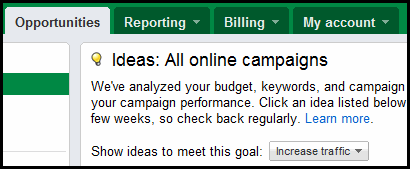
Similar to their emphasis on click-through rates, the only guaranteed beneficiary of increased traffic to your website is Google.
But let’s return to our main topic: to find the IP exclusion tool, scroll down the page until you reach the tools section, located on the left side of your screen, below your campaign navigation:
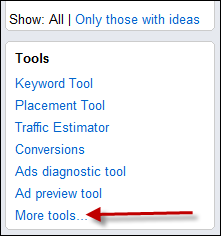
Click on more tools to be presented with a more comprehensive list of AdWords tools, including the IP exclusion tool:
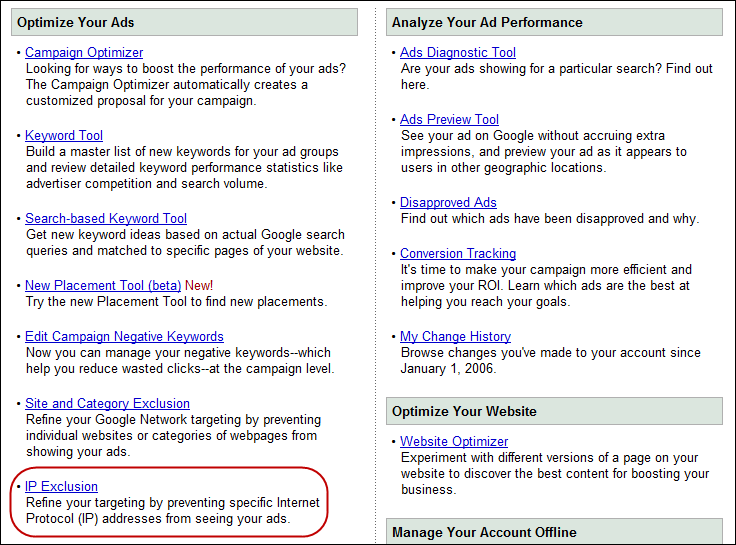
Selecting the IP exclusion tool will prompt you to choose a campaign. Unfortunately, you can’t exclude an IP address at the account level, which can be tedious if you manage numerous campaigns within your account. Choose the relevant campaign and click Go:
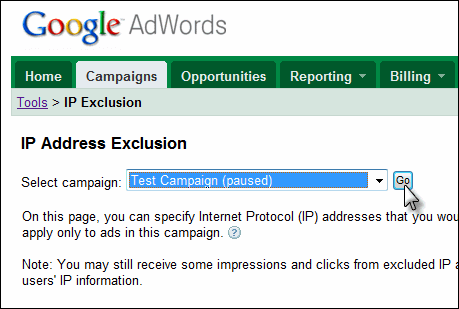
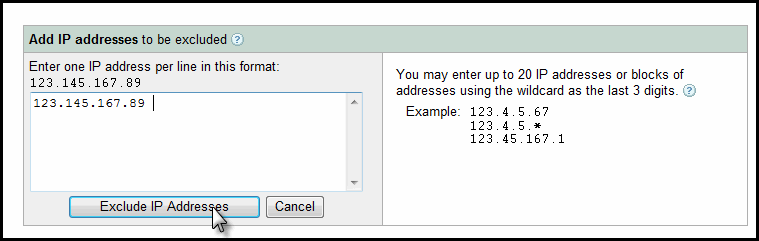
Next, enter the IP address you want to block into the tool and click Exclude IP Addresses:
You’ll now see a list of all the IP addresses you’ve excluded:

That’s it! You’re now equipped to prevent unwanted impressions and clicks by excluding specific IP addresses. While this might not be ideal from Google’s perspective, it can be a valuable tool for controlling your advertising costs!