Monitoring your customers’ conversion paths gives you valuable insights into the steps they take before making a purchase. Understanding this customer journey is crucial because it highlights the areas you should prioritize to enhance and expedite conversions. So, what exactly are conversion paths, and how can you effectively track them? Continue reading to discover how to establish successful conversion paths in Google Analytics and drive more leads and sales.
Table of contents
- What is a conversion path in Google Analytics?
- Why are conversion paths important?
- How to set up conversion paths in Google Analytics
- Understanding the Top Conversion Paths report
- Understanding the Assisted Conversions report
What is a conversion path in Google Analytics?
A conversion path outlines the sequence of interactions a new visitor makes on your website before completing a targeted action, known as a conversion. This action could involve filling out a form, clicking a button, making a purchase, or similar engagements. For instance, if your website aims to generate leads through an ebook, a conversion path would reveal the interconnected channel of clicks that visitors take to provide their contact details. Take a look at these examples of common conversion paths:
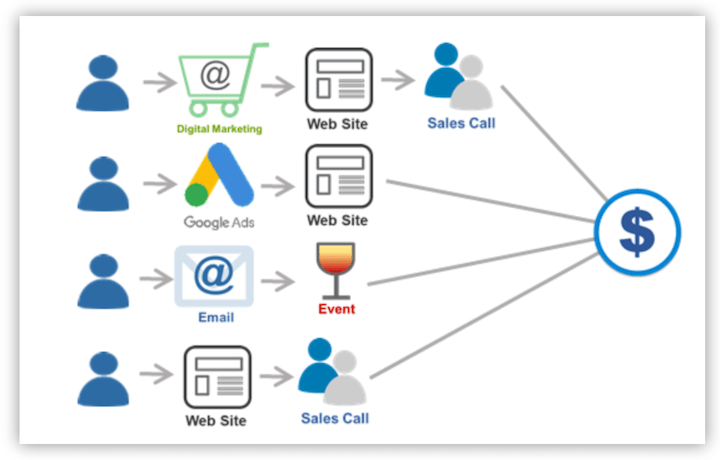
Image source Typically, conversion paths involve elements like a landing page, a content offer, and a call-to-action button. You can also integrate thank you pages into your path.
Why are conversion paths important?
If you want to improve conversion on your website, it’s essential to understand what leads to those conversions. Given that customers often engage in multiple actions before converting, comprehending these behaviors is critical. Let’s delve into the reasons why tracking conversion paths is vital for establishing and maintaining a marketing action plan.
- Identify strengths and weaknesses: By understanding the behavior patterns of your leads and customers, you can pinpoint effective campaigns and touchpoints, allowing you to allocate your budget and resources strategically. For example, you might discover that more conversion paths originate from PPC ads compared to social media ads, leading you to increase your PPC budget for improved sales.
- Uncover funnel bottlenecks: Conversion paths help you spot any leaks in your funnel. You can identify drop-offs for specific offers, perhaps due to technical glitches, tracking issues, or areas needing improvement (like mobile optimization, reducing form fields, etc.).
- Gain deeper audience insights: You can gather insights about factors like location, income, and gender to gain a better understanding of your target audience. For instance, you might notice a high cart abandonment rate in a particular region, leading you to investigate the possibility of lacking localized payment methods – an improvement that can enhance customer experience and subsequently boost conversion rates.
- Streamline campaign reporting: Clear conversion paths make it easier to collect metrics across channels, allowing for more accurate analysis of cross-channel marketing performance and improved ROI.
 Free guide >> 25 Ways to Get More Traffic to Your Website
How to set up conversion paths in Google Analytics
Now that you understand the importance of conversion paths, let’s explore how to set them up effectively in Google Ads and Google Analytics.
1. Set up your conversion tracking
To leverage conversion paths in Google Analytics, you need to define your conversions. Based on your marketing strategies, you can achieve this through Google Ads conversion tracking, Google Analytics goal setup, or both. In Google Ads:
- Navigate to Tools and settings > Measurement > Conversions
- Click on +New Conversion Action.
- Select Website
- Enter your website’s URL
- Click on Scan
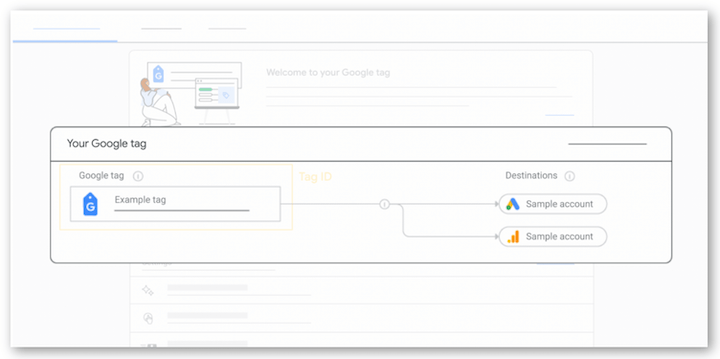
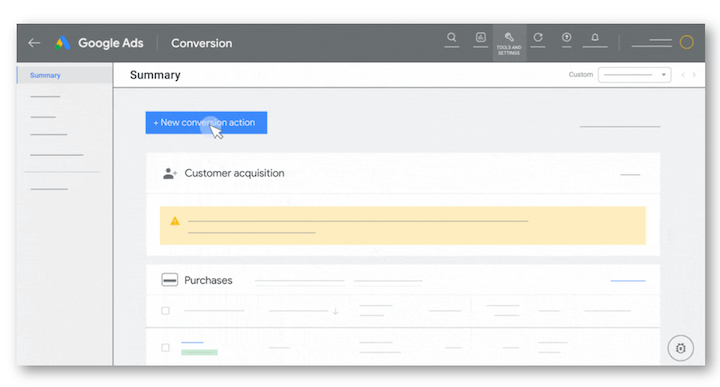 Next, set up your Google Tag as demonstrated below, then enter the tag name and choose the desired destination accounts.
Set up your goals
You’ll also need to configure goals in Google Analytics. This setup differs in GA4, but here’s how it works in Universal Analytics: Click Admin in the bottom left corner.
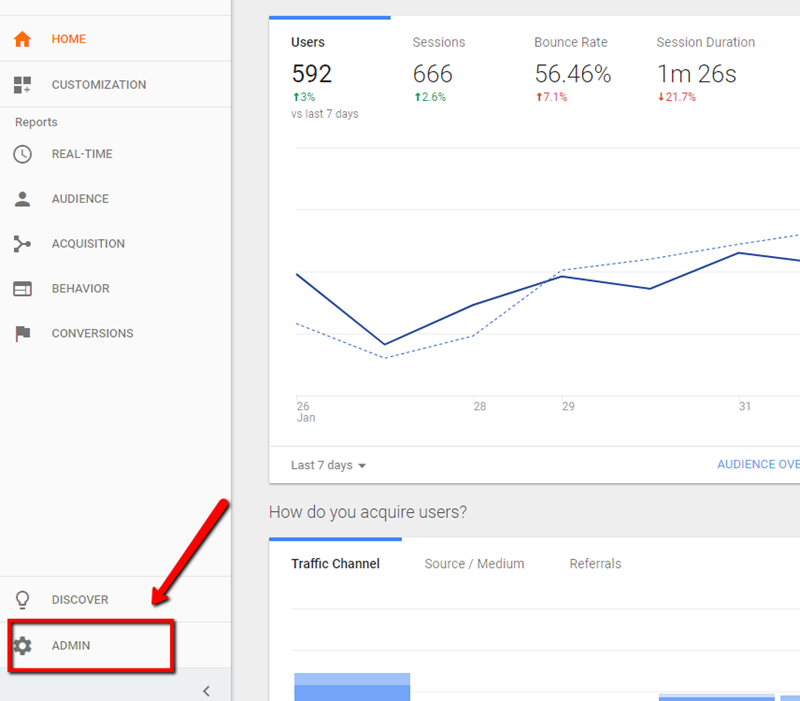 Click on Goals
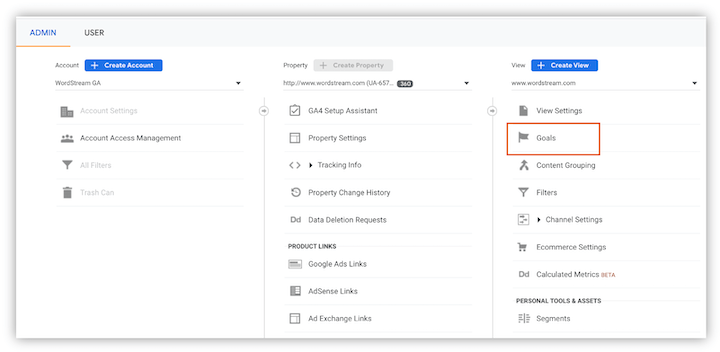 Next, choose the custom option to establish a new goal and provide your goal description and details, including a name and goal type, as illustrated below.
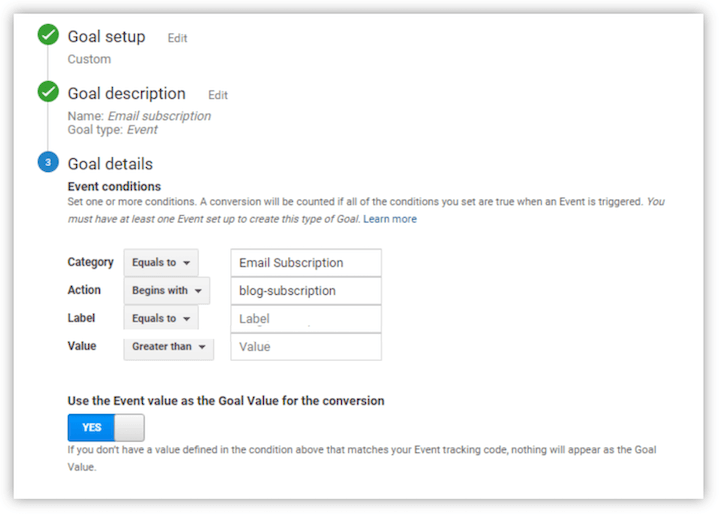 While there are four primary types of Google Analytics goals, your chosen goal type will depend on your desired conversion action.
- Duration: This type tracks how long users remain on your website before leaving, providing insights into engagement.
- Destination: Destination goals track when a specific page loads on your website, often used to track conversions like email newsletter signups or order confirmations.
- Pages per visit: These goals track the number of pages visitors navigate before exiting, offering valuable SEO metrics.
- Events: Event goals track user interactions not usually recorded by Google, such as PDF downloads, button clicks, outbound link clicks, or even actions like downloading pricing quotes. After inputting your goal details, click the “Value” button to assign a monetary value to your goal. Finally, click “Verify” and save your settings.
Set up an attribution project
To utilize the conversion path report in Google Analytics, you must first create an Attribution project. Navigate to Explore > Conversion Paths and follow the prompts to configure your project.
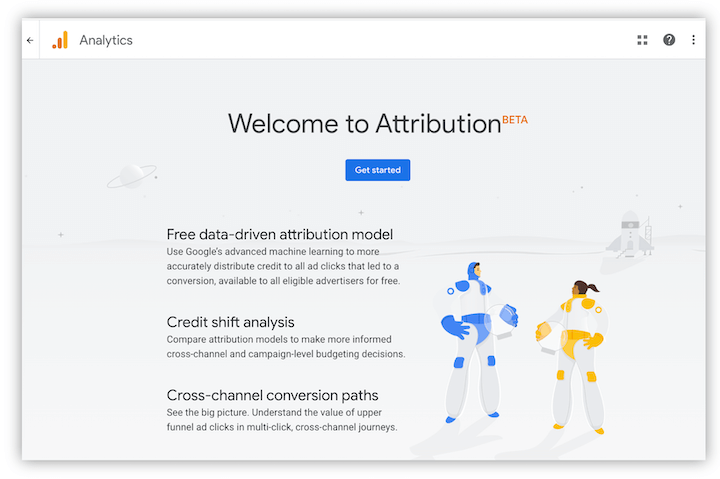 Once your project is set up, you can proceed to create a conversion segment.
Create a conversion segment
Go to Conversions » Multi-Channel Funnels » Top Conversion Paths and click on Conversion Segments.
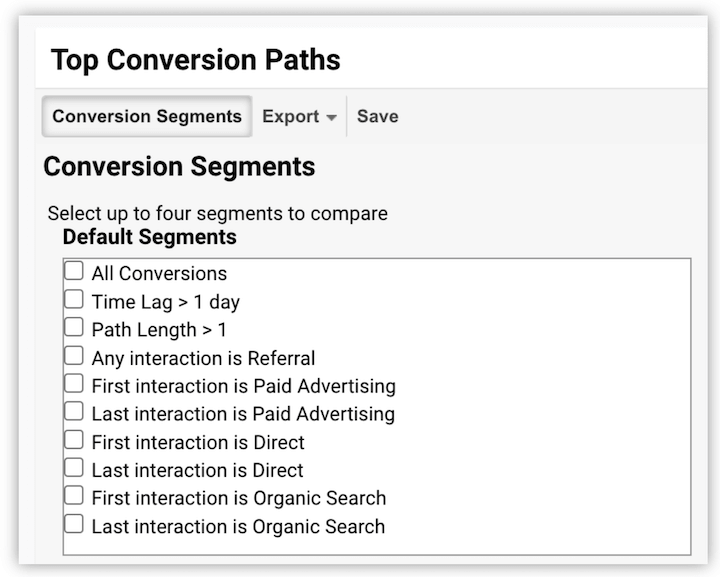 Click on Create New Conversion Segment. You can define your new segment based on criteria such as geographic location or product line preferences.
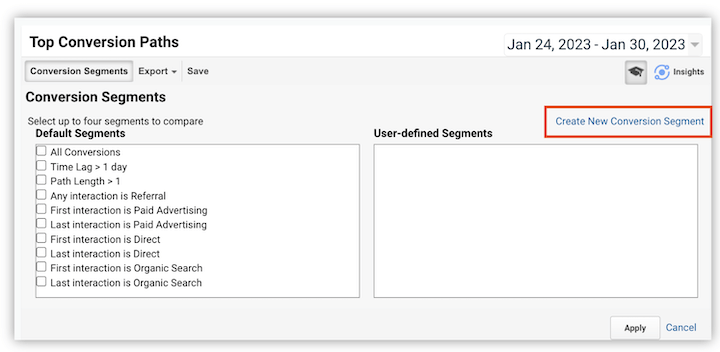 Define and name your new conversion segment to ensure consistency between your Google Analytics and Data Studio reports.
Click Apply, then Save. This will create a new conversion segment and apply it to your conversion path report.
You’re all set!
Define and name your new conversion segment to ensure consistency between your Google Analytics and Data Studio reports.
Click Apply, then Save. This will create a new conversion segment and apply it to your conversion path report.
You’re all set!
Understanding the Top Conversion Paths report
With your conversion paths configured, you can now use the Multi-Channel Funnels report in Google Analytics to gain a better understanding of your marketing attribution. This report reveals the channels that contribute to conversions on your website, including organic search, direct traffic, paid advertising, referrals, and more. To view these paths, navigate to Conversions » Multi-Channel Funnels » Top Conversion Paths.
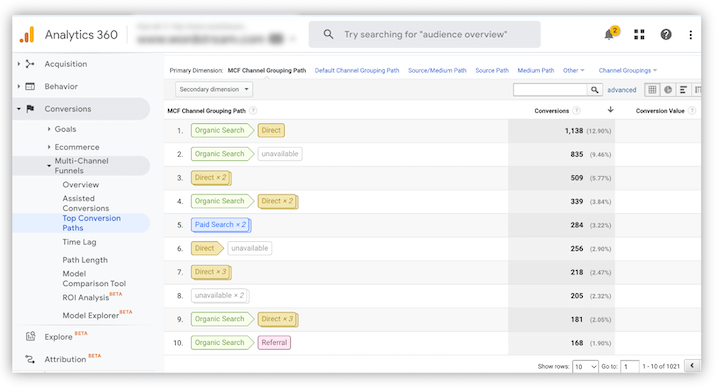 Pro tip: Set the date range to the last three months. Remember that the time lag to conversion can span days or weeks, so a longer date range provides more actionable data.
Understanding the Assisted Conversions report
Within the same Google Analytics tab, you’ll find another attribution modeling tool: the Assisted Conversions report. This report identifies channels that contributed to conversions but weren’t the final interaction. For example, a user might scan a QR code for an app download but choose not to download it immediately. Later, they download the app through a link on your social media. While the social media link receives credit for the last-click conversion, the QR code played an assisted role, which traditional conversion metrics might overlook. The following flowchart further illustrates assisted interactions:
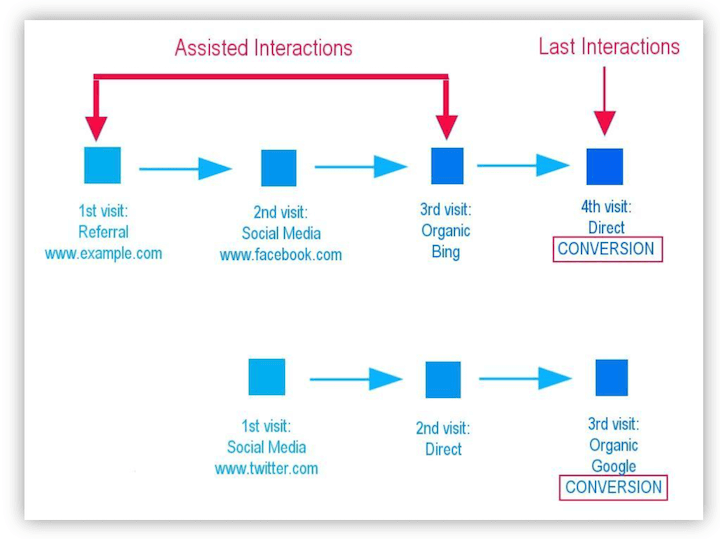 Image source
Understanding assisted conversions is crucial for identifying channels that introduce customers to your product. This allows you to tailor marketing strategies to attract quality leads from these channels and ultimately boost conversion rates.
By analyzing assisted conversions, you can also attribute value to the clicks and interactions that lead to the final conversion, such as referral links and ads, as shown in the report below:
Image source
Understanding assisted conversions is crucial for identifying channels that introduce customers to your product. This allows you to tailor marketing strategies to attract quality leads from these channels and ultimately boost conversion rates.
By analyzing assisted conversions, you can also attribute value to the clicks and interactions that lead to the final conversion, such as referral links and ads, as shown in the report below:
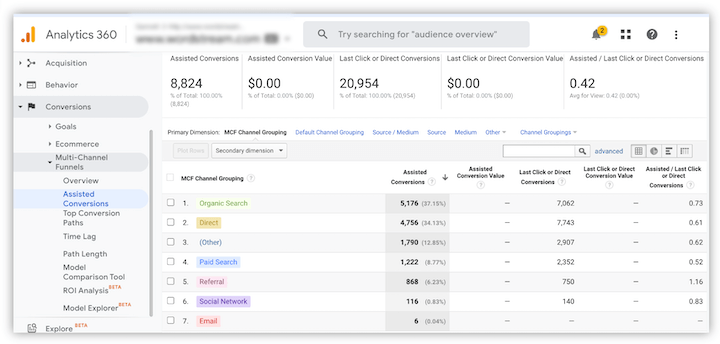 This not only clarifies the role of various assisted conversion channels but also provides beyond the last-click conversion a comprehensive view of your campaign performance and the overall customer journey.
Get your conversion paths set up today
Setting up conversion paths in Google Analytics allows you to track user activity on your website, analyze campaign performance, and gain valuable insights into your best-performing marketing channels. These insights empower you to optimize resource allocation, identify areas for improvement, and ultimately enhance your conversion rates. Now, consider exploring the useful AI features in GA4.