In the world of advertising, understanding the impact of your campaigns on your bottom line is crucial. While metrics like clicks and impressions have their place, conversions are the true measure of success. However, accurately tracking conversions can be challenging.
Google’s enhanced conversions feature for Google Ads offers a solution by enhancing the precision of conversion tracking. This article will delve into what Google Ads enhanced conversions are, their mechanics, their importance in the current digital landscape, and a step-by-step guide to setting them up using Google Tag Manager.
Demystifying Enhanced Conversions in Google Ads
Introduced by Google to help advertisers achieve greater accuracy in conversion measurement within Google Ads, enhanced conversions enhance the precision of conversion tracking by supplementing existing conversion tags with hashed first-party customer data from websites.
This feature sheds light on user actions after clicking your ad, such as form submissions, newsletter sign-ups, or purchases.
Unveiling the Mechanics of Enhanced Conversions in Google Ads
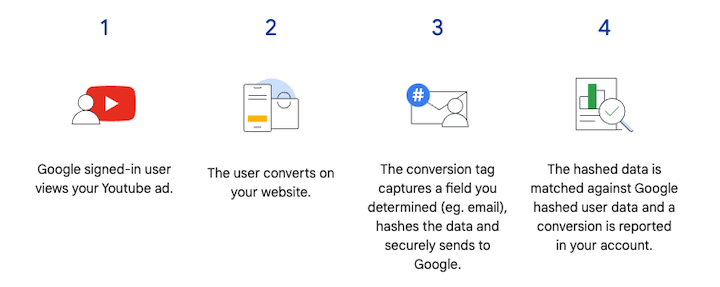
When a customer interacts with a website and converts, data such as email address, name, home address, or phone number might be gathered and stored in the website’s conversion tracking tags. This data, before being sent to Google, undergoes hashing using a secure one-way algorithm called SHA256, transforming it into a unique string of characters. This ensures data privacy and security during transmission.
The hashed data is then sent to Google, where it is matched with signed-in Google accounts to attribute campaign conversions to specific ad events like clicks or views. This process allows advertisers to track conversions accurately without compromising user privacy.
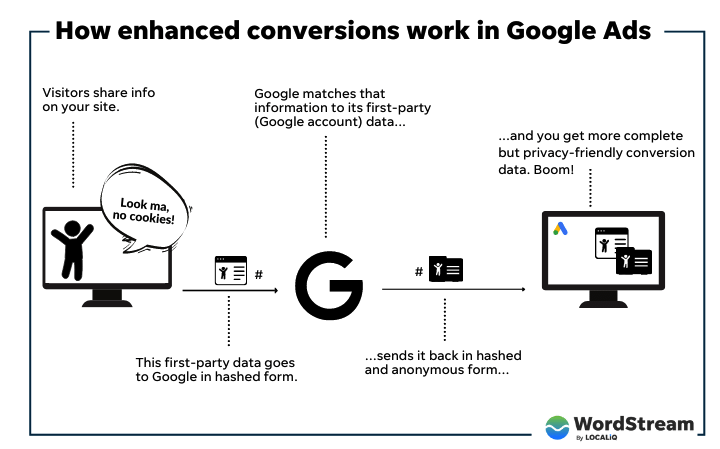 Moreover, this feature empowers advertisers to utilize the hashed data for creating custom audiences for advertising. By building custom audiences based on hashed customer data, advertisers can deliver targeted ads while respecting user privacy.
The Need for Enhanced Conversions
Data privacy has taken center stage in recent years, becoming a paramount concern for both users and businesses. The emergence of data privacy laws like GDPR and CCPA, coupled with browser updates such as Safari’s ITP and Firefox’s ETP, has made user data tracking more complex for advertisers and marketers.
Consequently, features like Google’s enhanced conversions have become indispensable for ensuring accurate conversion tracking while upholding user privacy.
Let’s take a look back at the evolution of enhanced conversions and how they fit into the landscape of data privacy regulations and browser updates.
GDPR: A New Era of Data Protection
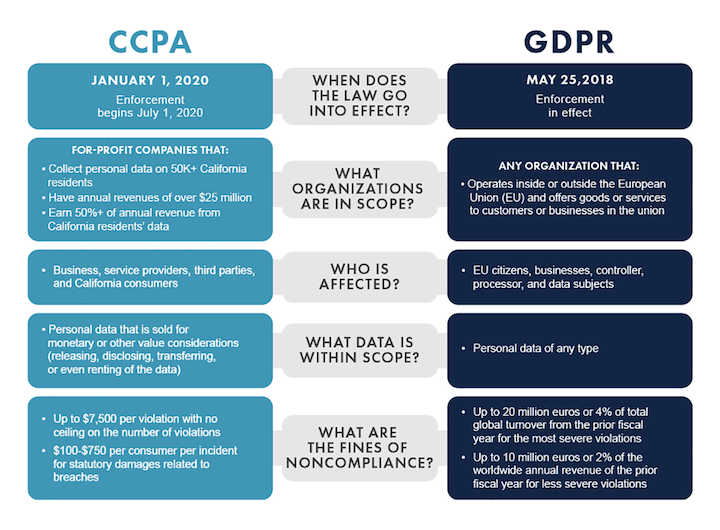
The General Data Protection Regulation (GDPR), implemented by the European Union (EU) in May 2018, and the California Consumer Privacy Act (CCPA), introduced by California in January 2020, are two pivotal data privacy laws that have reshaped the digital landscape.
GDPR aims to grant EU citizens greater control over their personal data and its usage by companies. Its jurisdiction extends to all companies processing the personal data of EU citizens, irrespective of their geographical location. The regulation mandates that companies obtain explicit consent from users before data collection and processing, and provide users with access to, deletion of, or modification of their data. GDPR also enforces substantial penalties on non-compliant companies.

CCPA: Empowering Californian Consumers
CCPA’s objective is to provide Californians with greater control over their personal data and its utilization by businesses. It applies to all companies operating in California and meeting specific criteria related to revenue and data processing. The act compels companies to disclose the categories of personal data they collect, offer users the option to opt out of data selling, and delete user data upon request. CCPA, similar to GDPR, imposes significant fines for violations.
Both GDPR and CCPA have significantly influenced how businesses collect and process user data, ushering in greater transparency and user control. However, they have also introduced challenges for companies in accurately tracking user data.
Consequently, features like Google’s enhanced conversions have gained importance for ensuring accurate conversion tracking while safeguarding user privacy and operating within restricted data processing frameworks.
Safari ITP: Enhancing User Privacy
Safari’s Intelligent Tracking Prevention (ITP), launched in 2017 with Safari 11.0, and Firefox’s Enhanced Tracking Protection (ETP), introduced in 2018 with Firefox 63.0, are browser updates that have made user data tracking more challenging for advertisers and marketers.
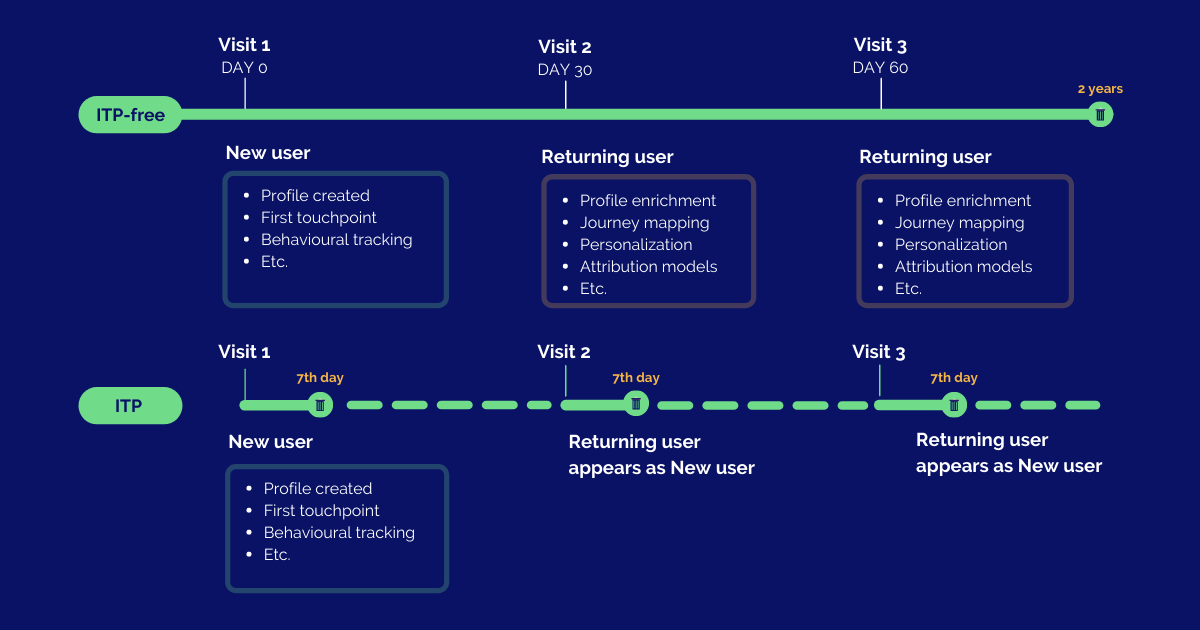
ITP in Safari, designed to enhance user privacy by limiting the tracking capabilities of third-party cookies across websites, deletes these cookies after 24 hours of inactivity or 30 days, depending on the cookie type. Moreover, it restricts third-party cookie access to first-party cookies, making cross-website user tracking difficult.
Firefox ETP: Strengthening Privacy Controls
ETP in Firefox bolsters user privacy by blocking third-party tracking cookies and other tracking technologies by default. It utilizes a list of known tracking domains to block such technologies.
Additionally, ETP thwarts fingerprinting, a technique used to track users based on their unique browser configurations.
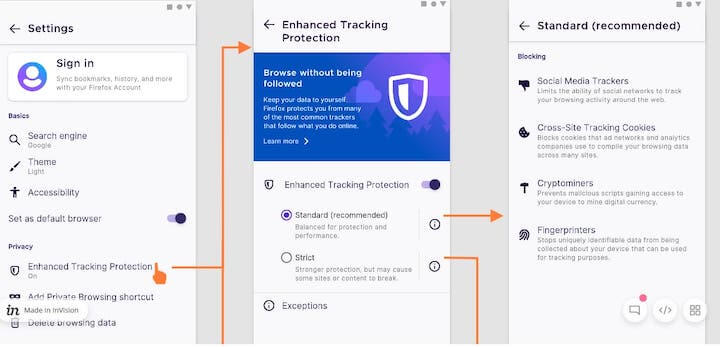 Image source
Both ITP and ETP have undergone multiple updates since their inception, each iteration further curbing the tracking capabilities of third-party cookies and other tracking technologies. These updates have amplified the need for first-party data and the implementation of features like Google Ads enhanced conversions.
Image source
Both ITP and ETP have undergone multiple updates since their inception, each iteration further curbing the tracking capabilities of third-party cookies and other tracking technologies. These updates have amplified the need for first-party data and the implementation of features like Google Ads enhanced conversions.
Implementing Enhanced Conversions with Google Tag Manager
Before embarking on the journey of setting up enhanced conversions, it’s crucial to ensure you have the following prerequisites in place:
- Access to the relevant Google Ads and Google Tag Manager accounts.
- The ability to place test orders or simulate lead actions.
- Availability of first-party data on the page (or within the dataLayer) where the conversion tag is triggered.
- The capacity (yours or your web developer’s) to make minor modifications to the website or the dataLayer events.
It’s also imperative to review Google’s customer data policies and agree to the enhanced conversions terms of service and policies within Google Ads to ensure compliance and appropriate usage.
Step 1: Enabling Enhanced Conversions
Navigate to the “Conversions” tab within the desired Google Ads account where you wish to implement enhanced conversions (EC).
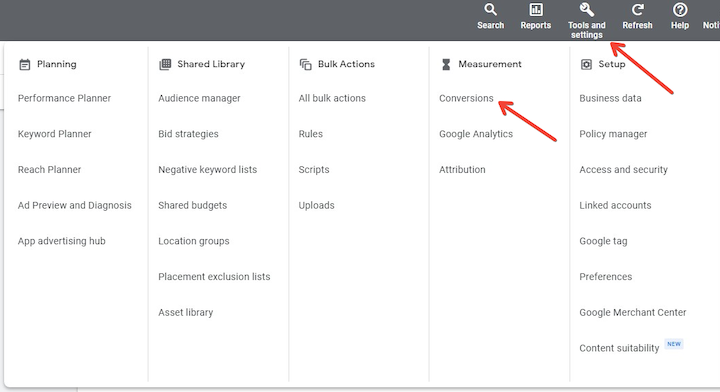
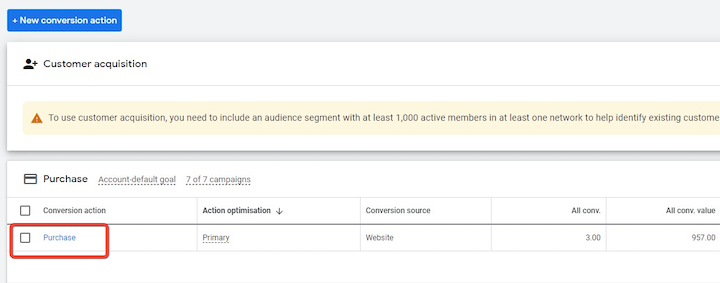
Select the specific conversion action for EC implementation.
Within the conversion action settings, locate the “Enhanced conversions” drop-down menu.
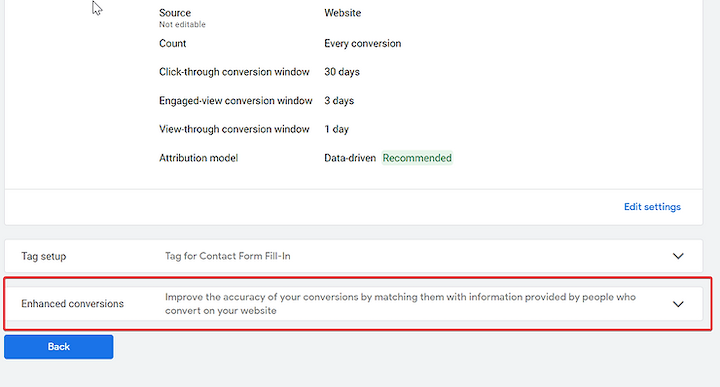
Click on “Turn on enhanced conversions.”
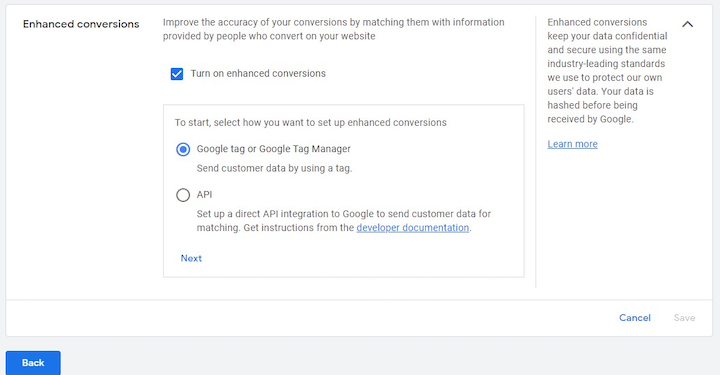
Accept the Google Terms and select “Global site tag or Google Tag Manager.”
Click “Next.”
Provide your website URL and click “Check URL.” Proceed to your Google Tag Manager account for the remaining setup.
Step 2: Implementation within Google Tag Manager
Note: This assumes the Google Ads Conversion Tag is already operational within your GTM account. If not, a dedicated video tutorial is available to guide you through the process.
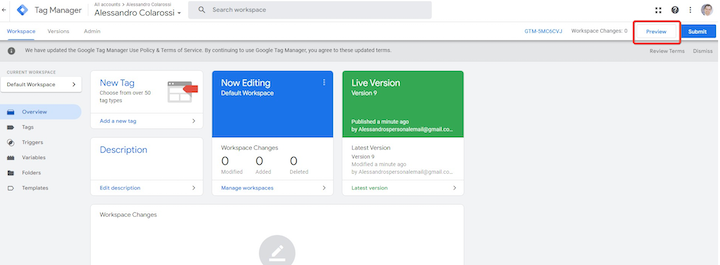
Step 3: Test Order Execution Using GTM Preview Mode
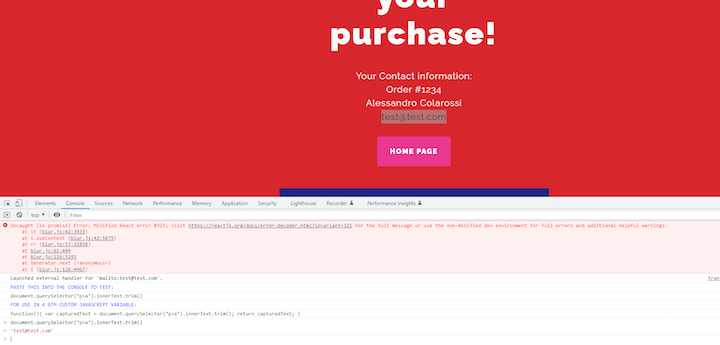
Using a test e-commerce site (accessible at here) with an “Order Confirmation Page,” you can extract the email using a custom Chrome extension (available for free at here).
 Email Extraction from Order Confirmation Page:
Right-click on the page and select “Inspect.”
Open the “Console” tab.
Highlight the email address.
Utilize the Chrome extension to generate JavaScript code for email extraction.
Successful extraction will be indicated by green text under “FOR USE IN A GTM CUSTOM JAVASCRIPT VARIABLE.” Copy this text for creating a GTM custom JavaScript variable.
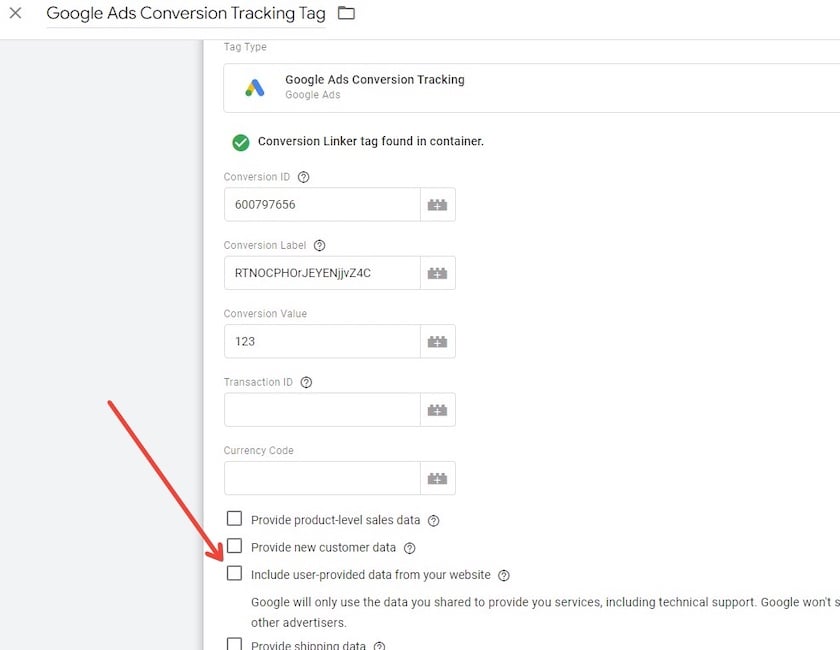
Within GTM, locate your Google Ads Conversion Tracking tag and enable the designated checkbox.
Create a new variable by opening the dropdown menu, selecting “New Variable,” naming it, navigating to the “Email” section, and clicking “New Variable” to create a sub-variable.
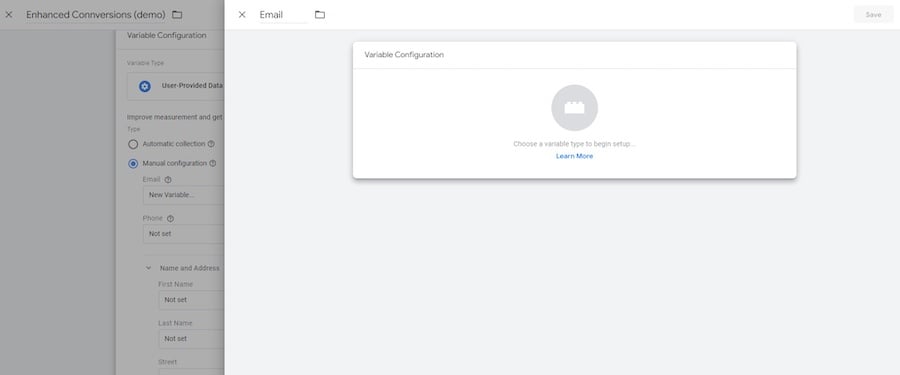
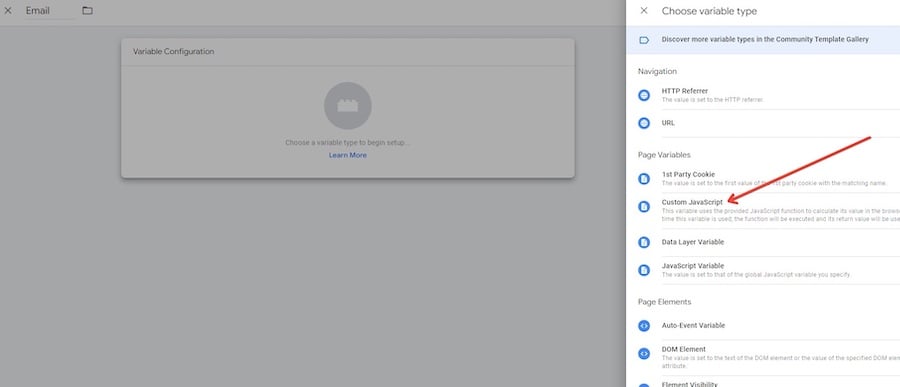
Click the lego block icon and select “Custom JavaScript.”
Paste the copied green text under “FOR USE IN A GTM CUSTOM JAVASCRIPT VARIABLE” here.
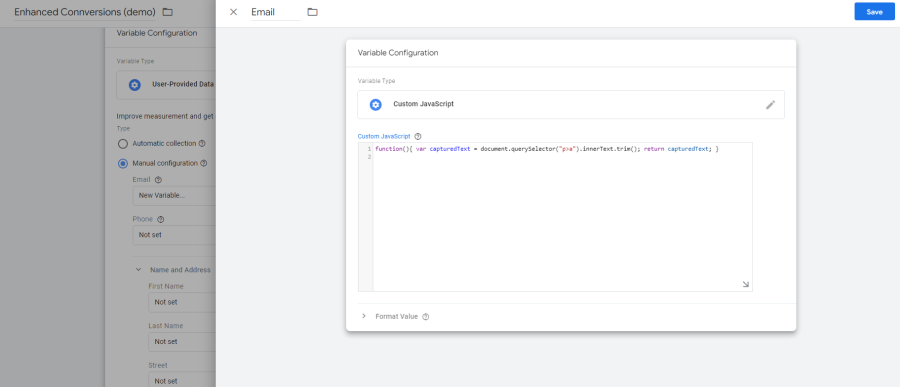
Save your changes. You’ve successfully implemented enhanced conversions.
A comprehensive YouTube video tutorial illustrating these steps is also available.
Step 4: Variable Testing in GTM
Before publishing, utilize GTM’s preview mode to verify email capture through the newly created variable.
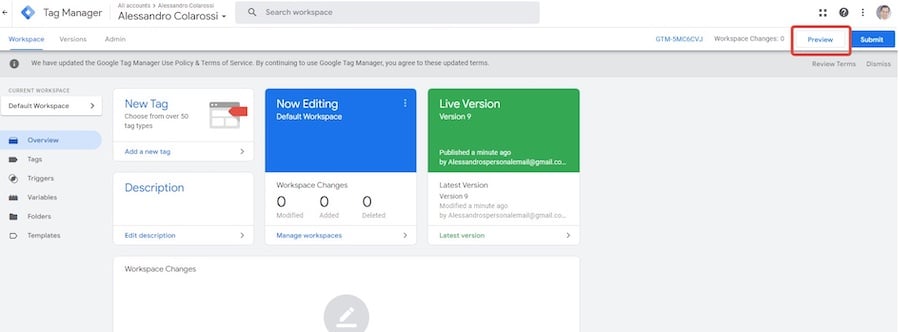
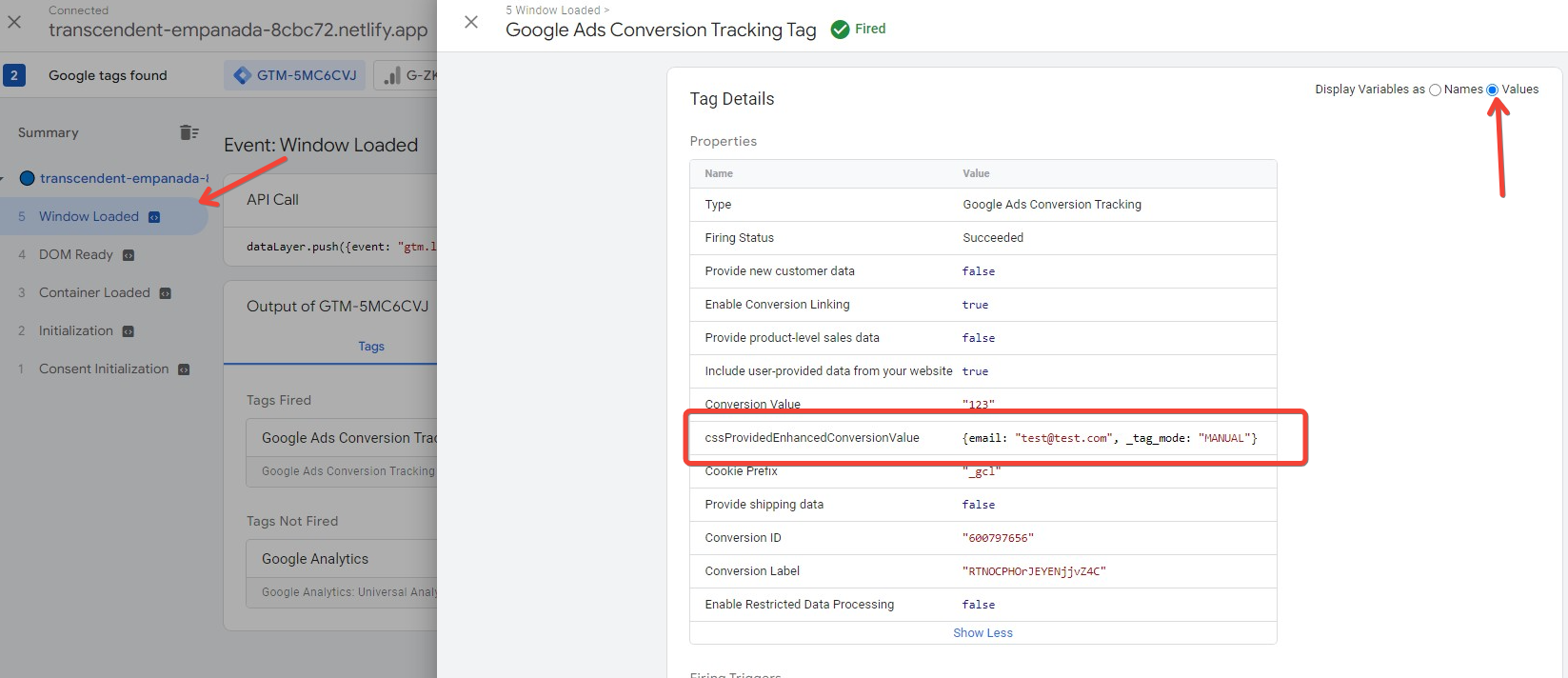
Click on the triggered Conversion Tracking Tag under the “Tags” tab to view the email value in the tag output. The email should be captured in the designated email variable.
Select the “Values” radio button in the top right corner to display the values. Note that variables are populated on Window Loaded.
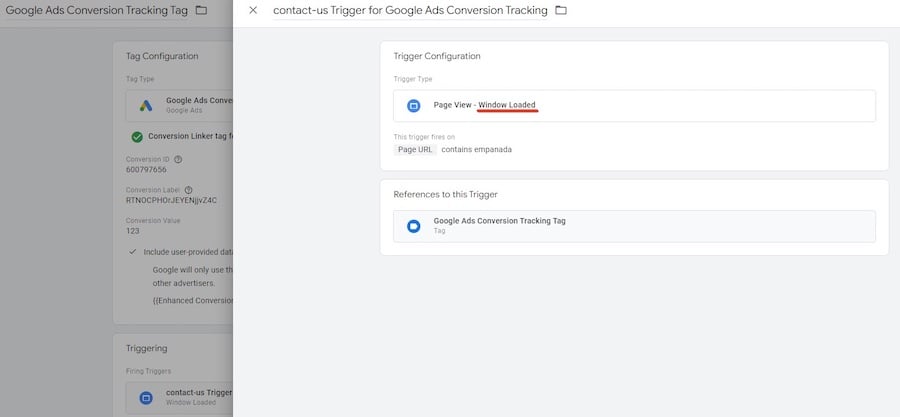
Ensure your Conversion Tracking Trigger is set to fire upon the same “Window Loaded” event if applicable to your site.
Embracing Google Ads Enhanced Conversions
Implementing Google Ads enhanced conversions within Google Tag Manager is a strategic move for businesses seeking a more accurate understanding of their conversions. This feature empowers you to enhance data-driven decision-making and optimize Google Ads campaigns effectively.
By following the steps outlined in this tutorial, you can ensure precise conversion data collection from your Google Ads campaigns. As you optimize your campaigns based on this data, you’ll witness improvements in conversion rates and, ultimately, your return on ad spend (ROAS).