Utilizing the stale-while-revalidate HTTP Cache-Control extension is a widely used method. It entails using stored (stale) resources if they exist in the cache and then validating the cache, updating it with a newer resource version if necessary. This is why it’s called stale-while-revalidate.
Functionality of stale-while-revalidate
Upon the first request, the browser caches it. Subsequent identical requests result in a cache check. If the request’s cache is available and valid, the cache is returned as the response. The cache is then checked for staleness and updated if stale. The staleness of a cache is determined by the max-age value within the Cache-Control header, along with stale-while-revalidate.
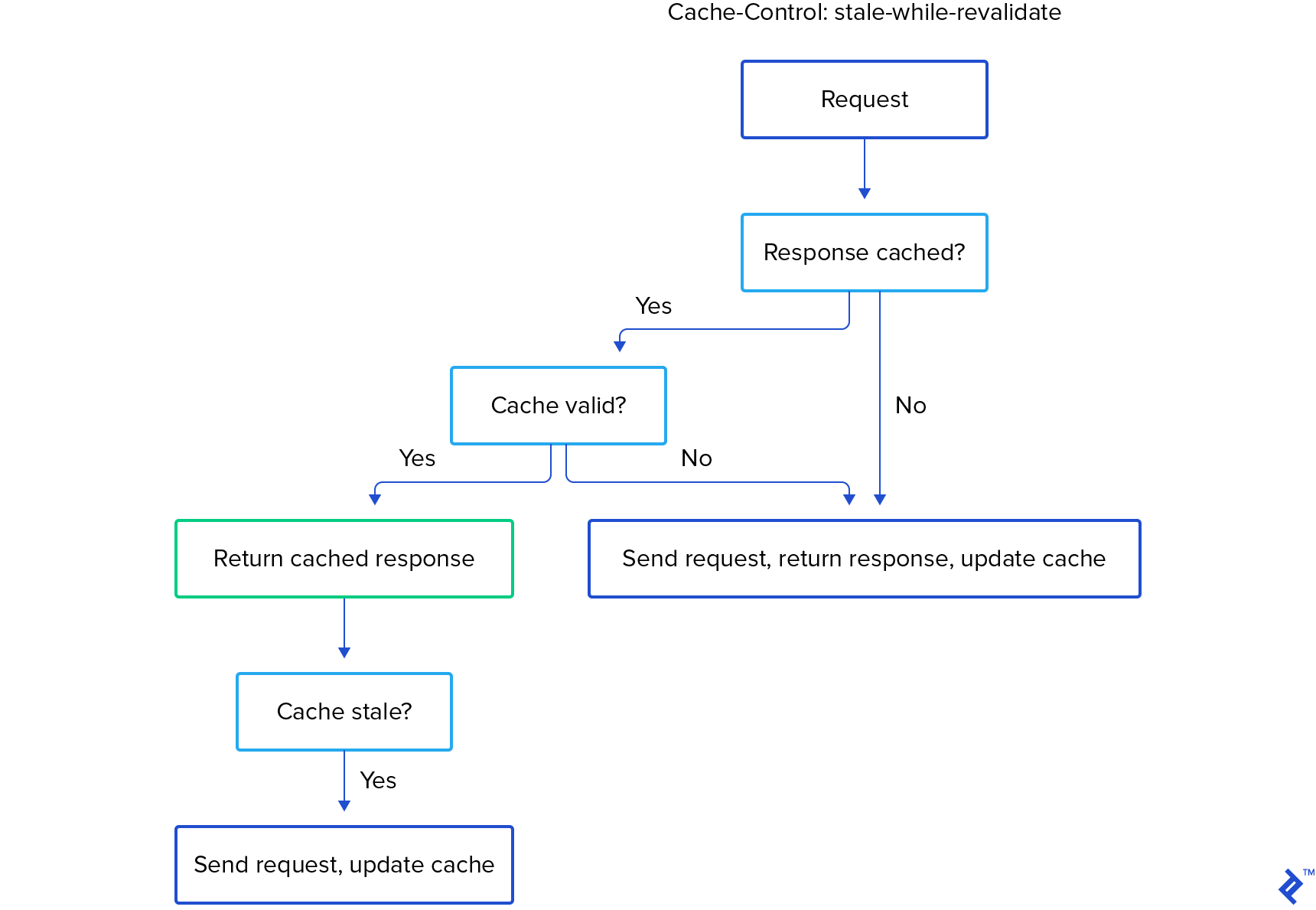
This method facilitates faster page loads since cached resources are not in the critical path, loading instantly. Developers can control the cache’s usage and update frequency, preventing browsers from displaying outdated data to users.
You might wonder, if server-side headers and browser handling are sufficient, why use React and Hooks for caching?
The server-browser approach excels with static content caching. However, using stale-while-revalidate for dynamic APIs presents challenges in determining suitable max-age and stale-while-revalidate values. Often, invalidating the cache and fetching fresh responses for every request is optimal, essentially negating caching. React and Hooks offer a better solution.
stale-while-revalidate for APIs
HTTP’s stale-while-revalidate isn’t ideal for dynamic requests like API calls.
Even when used, the browser returns either the cache or the fresh response, not both. This doesn’t suit API requests, where fresh responses are preferred for each request. However, awaiting fresh responses hinders app usability.
So, how do we proceed?
By implementing a custom caching mechanism that returns both the cache and the fresh response. In the UI, the cached response is replaced with the fresh response upon its arrival. The logic is as follows:
- Cache and return the response for the initial request to the API server endpoint.
- For subsequent identical API requests, use the cached response immediately.
- Asynchronously send the request to fetch a new response. Upon arrival, asynchronously propagate UI changes and update the cache.
This approach allows for instant UI updates (due to caching) and eventual UI correctness by displaying fresh response data.
This tutorial provides a step-by-step implementation guide. We’ll call this approach stale-while-refresh since the UI is refreshed with the fresh response.
Prerequisites: The API
We’ll use a mock API service to fetch data, specifically reqres.in.
We’ll fetch a user list with a page query parameter:
| |
This code’s output, in a non-repetitive format, is:
| |
This simulates a real API with pagination. The page query parameter controls the page, and we have two pages in the dataset.
API Integration in a React App
Let’s use the API in a React app and then implement caching. We’ll use a class component:
| |
The page value is received via props, and the componentDidUpdate function refetches API data whenever this.props.page changes.
Currently, it displays six users, as the API returns six items per page:

Integrating Stale-while-refresh Caching
To add stale-while-refresh caching, our app logic needs to:
- Uniquely cache a request’s response after its initial fetch.
- Return the cached response instantly if found. Then, send the request, asynchronously return the fresh response, and cache it.
We’ll use a global CACHE object to store the cache uniquely, using this.props.page as the key. Then, we’ll code the algorithm:
| |
Returning the cached response immediately and using setState for the fresh response ensures seamless UI updates with no waiting time from the second request onwards. This is the essence of stale-while-refresh.
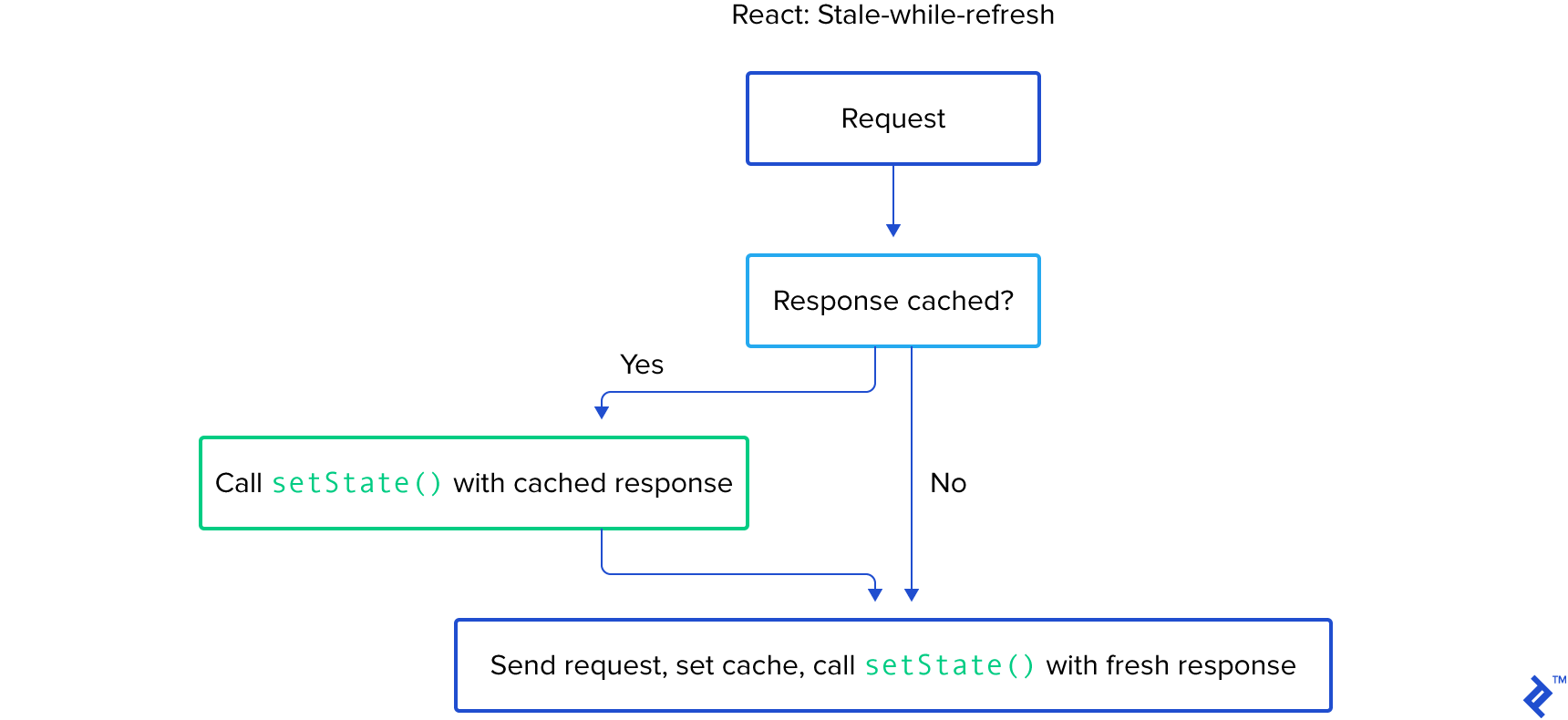
The apiFetch function wraps fetch to demonstrate caching benefits in real-time by adding a random user and random delay to the API response:
| |
The getFakeUser() function creates a fake user object.
These changes make our API more realistic:
- It has a random response delay.
- Identical requests yield slightly different data.
Changing the Component’s page prop in our main component showcases API caching. Try toggling the Toggle button in this CodeSandbox every few seconds to observe:

Observe the following:
- Initially, we see seven users. Note the last user, which will be randomly modified in the next request.
- The first Toggle click takes time (400-700ms) and updates the list to the next page.
- On the second page, note the last user again.
- Clicking Toggle again returns to the first page. The last entry remains as noted in Step 1, then changes to the new (random) user. This is due to the initial cache display, followed by the actual response.
- Clicking Toggle again repeats the phenomenon. The cached response loads instantly, followed by new data, updating the last entry from Step 3’s observation.
This is stale-while-refresh caching in action. However, this approach suffers from code duplication. Let’s examine its impact with another data-fetching component with caching. This component will display items differently.
Adding Stale-while-refresh to Another Component
We can copy the logic from the first component. Our second component displays a cat list:
| |
The component logic closely mirrors the first component, differing only in the requested endpoint and list item display.
We now display both components side by side. Observe they behave similarly:

This result required significant code duplication. Multiple components would exacerbate this issue.
A Higher-order Component for fetching, caching, and passing data as props could reduce duplication, but isn’t ideal. Multiple Higher-order Components for multiple requests in a component would become cumbersome.
The render props pattern, suitable for class components, is prone to “wrapper hell” and context binding, hindering developer experience and potentially causing bugs.
This is where React Hooks excel. They encapsulate component logic for reusability. React Hooks introduced in React 16.8, work exclusively with function components. Before delving into React cache control, specifically caching content with Hooks, let’s examine simple data fetching in function components.
API Data Fetching with Function Components
useState and useEffect hooks enable API data fetching in function components.
useState mirrors class components’ state and setState, providing atomic state containers within function components.
useEffect acts as a lifecycle hook, analogous to a combination of componentDidMount, componentDidUpdate, and componentWillUnmount. Its second parameter, the dependency array, triggers the callback (first argument) when changed.
Here’s how we use these hooks for data fetching:
| |
Specifying page as a useEffect dependency makes React run the callback whenever page changes, similar to componentDidUpdate. useEffect also runs initially, like componentDidMount.
Stale-while-refresh in Function Components
Knowing useEffect’s similarity to lifecycle methods, we can modify its callback for stale-while-refresh caching. Only the useEffect hook changes:
| |
Stale-while-refresh caching now works in our function component.
We can replicate this for the second component, converting it to a function and implementing caching. The result will be identical to the class-based version.
However, this doesn’t surpass class components. Let’s leverage custom hooks to create modular, reusable stale-while-refresh logic.
A Custom Stale-while-refresh Hook
First, let’s identify the logic for our custom hook: the useState and useEffect portion. We aim to modularize:
| |
For genericity, the URL needs to be dynamic, hence url as an argument. Caching logic needs updating, as multiple requests can share the same page value. Fortunately, combining page with the endpoint URL creates a unique key for each request. We can use the entire URL for caching:
| |
Wrapping this in a function creates our custom hook:
| |
We added a defaultValue argument for customization, as API call defaults can vary across components.
The data key in newData can be handled similarly. Returning newData instead of newData.data allows component-side traversal for hooks returning diverse data.
Here’s how our custom hook integrates into our components, significantly reducing code:
| |
The second component follows suit:
| |
The boilerplate reduction is evident, improving code readability. To see the app in action, visit this CodeSandbox.
Adding a Loading Indicator to useStaleRefresh
Let’s enhance our hook with an isLoading value, true when a unique request is sent without cached content.
We’ll use separate state for isLoading, toggling it based on the hook’s state. If no cached web content exists, isLoading is true; otherwise, false.
Here’s the updated hook:
| |
We can now use isLoading in our components:
| |
Notice that with that done displays “Loading” for initial unique requests without cached content.

Generalizing useStaleRefresh for Any async Function
Let’s empower our hook to support any async function, not just GET requests. The core idea remains:
- Call an async function within the hook, returning a value after a delay.
- Cache each unique async function call.
Concatenating function.name and arguments provides a simple cache key. Here’s the updated hook:
| |
We use the function name and stringified arguments for unique identification and caching. This suffices for our app, but might lead to collisions and slow comparisons in real-world applications (and won’t work with unserializable arguments). A robust hashing algorithm is recommended for production.
Note the use of useRef. useRef persists data throughout the component’s lifecycle. Since args is an array (an object in JavaScript), re-renders change its reference pointer. As args is in the first useEffect’s dependency list, its change might trigger unnecessary re-runs. We use isEqual for deep comparison, only running the useEffect callback when args truly changes.
Here’s the new useStaleRefresh hook in action. Note the changed defaultValue, as our general-purpose hook doesn’t assume a data key in the response:
| |
The complete code is available in this CodeSandbox.
Optimize User Experience: Effective Cache Content Use with Stale-while-refresh and React Hooks
The useStaleRefresh hook demonstrates React Hooks’ potential. Experiment with the code and explore its integration into your applications.
Alternatively, leverage stale-while-refresh via popular, well-maintained open-source libraries like swr](https://github.com/zeit/swr) or react-query. These robust libraries offer comprehensive features for API requests.
React Hooks are transformative, enabling elegant component logic sharing. This was previously unattainable due to class components tightly coupling component state, lifecycle methods, and rendering. Hooks allow modularization, enhancing composability and code quality. Embrace function components and hooks for new React code for a superior development experience.