It’s no secret that Shopping Campaigns can be incredibly effective for ecommerce businesses. In this article, we’ll delve into some powerful tips and tricks to help you maximize their potential.

Time to up your shopping game!
Demystifying Google’s Merchant Center
If your experience is primarily with search campaigns and keyword bidding, Shopping Campaigns, especially the mysterious Merchant Center, can seem intimidating. So, what exactly is Google’s Merchant Center? Think of Google Merchant Center as the heart of your Shopping Campaigns. It’s where you house your product data feed, a comprehensive list of everything you sell. However, this isn’t just any ordinary list; it needs to adhere to Google’s specific format and include a variety of attributes that provide detailed information about your products (imagine a meticulously organized spreadsheet!). Here are some essential attributes you’ll need to include in your product data feed:
- ID: A unique identifier for each product.
- Title: Your product’s name, which will be displayed in your ad.
- Description: A concise yet informative description of your product, visible upon clicking the ad.
- Product category: Select the most appropriate category from Google’s predefined options.
- Product type: A category defined by you for further product classification.
- Link to item’s page on your website: The direct URL to the product page on your website.
- Availability status: Specify whether the product is in stock.
- Price: The current selling price of the product.
- Sale price: If applicable, the discounted price of the product. Unlike search campaigns, there’s no need to craft text ads; shopping ads are automatically generated based on the information provided in your product data feed. MORE: The nexus-security Guide to Product Marketing
Best Practices for Maintaining Your Product Feed
Before you even consider launching a Shopping Campaign in Google Ads, it’s crucial to have a well-defined product data feed and a system in place to keep it updated as product details, availability, and pricing fluctuate. Maintaining data accuracy is paramount because if your data feed doesn’t match your website, Google won’t display your product ads.
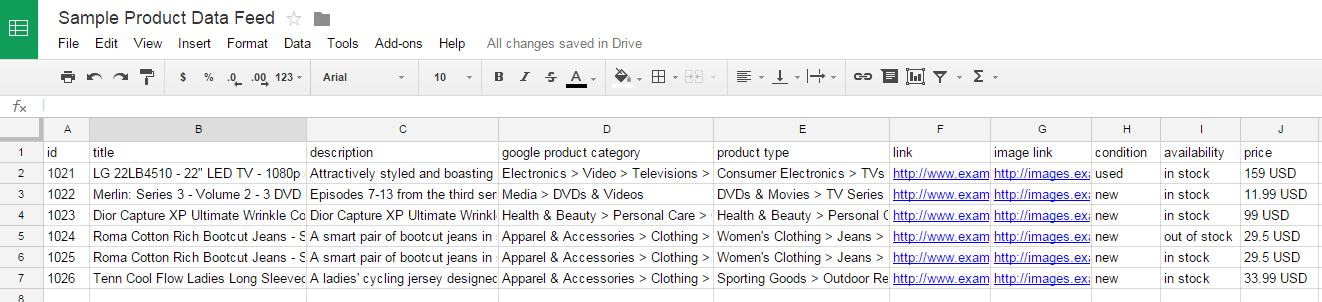
Various methods exist for managing your product data feed. Some companies manually update Google spreadsheets, others utilize third-party services, and some employ specialized software integrated into their websites to ensure data consistency and synchronization. While Google spreadsheets offer the highest level of control, they might not be practical for managing thousands of products. A high-quality data feed is a cornerstone of successful Shopping Campaigns. Here are some critical points to remember:
- Unlike search campaigns, Shopping campaigns don’t rely on keywords for relevancy. Therefore, prioritize product titles and descriptions that are both keyword-rich and enticing to potential customers. Google uses this information to assess the relevance of your products to search queries.Pro Tip: While keywords aren’t used for relevancy, you can still employ negative keywords to filter out unwanted traffic. However, exercise caution to avoid inadvertently excluding valuable traffic.
- Maintain absolute price accuracy, especially when dealing with international currencies. Google won’t hesitate to suppress your products if pricing discrepancies are detected.
- If you’re targeting multiple countries, you’ll need a separate product data feed for each country. Shopping Campaigns in AdWords are country-specific, so create a distinct campaign for each target market.
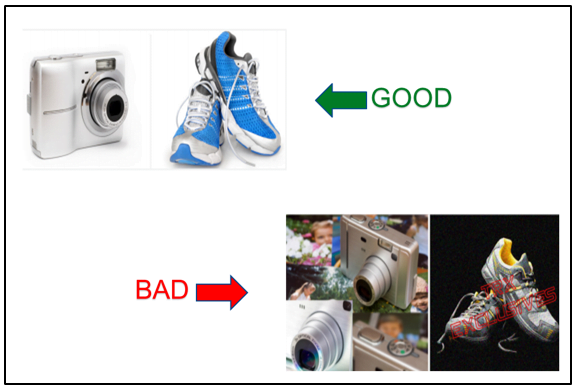
- High-quality product images are non-negotiable. Ensure your images are clear, visually appealing, and accurately represent the product. Avoid using edited or watermarked images; the focus should solely be on the product you’re selling. Opt for “family-friendly” images to minimize the risk of suspension.
- Double-check that all destination URLs lead to active pages, not broken links or 404 errors. Google won’t display products associated with dead links.Pro tip: If you’re new to Shopping Campaigns, consider starting with a smaller product data feed featuring high-margin products. This approach allows you to familiarize yourself with the platform before scaling up.
Setting Up Your Shopping Campaigns
Once your product data feed is in excellent shape and your AdWords account is linked to your Merchant Center, you’re ready to create Shopping Campaigns. The process itself is relatively straightforward; the primary difference lies in selecting a Merchant Center product feed and a target country. After creating your campaign, consider how you want to structure your Ad Groups. Keep in mind that Ad Groups in Shopping campaigns primarily serve organizational purposes:
- For businesses with limited product catalogs (under 200 products), creating a single Ad Group is often sufficient.
- Companies with larger inventories might opt to divide their Ad Groups by brand or category for enhanced organization. Additionally, explore different Shopping campaign structures, such as the priority bidding structure. Unlock the potential of profitable Google Shopping campaigns. Download our free guide to Google Shopping and start boosting your revenue today!
Unraveling the Mechanics of Shopping Campaign Bidding
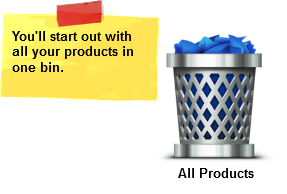
With your Ad Groups established, it’s time to delve into the realm of product ad bidding. Remember, your feed data powers your product ads, eliminating the need for manual ad creation within AdWords. Unlike search campaigns, Shopping Campaign bidding operates on a different principle. Keywords are irrelevant here! Instead of bidding on keywords, Shopping campaigns empower you to set bids on the products themselves. You have the flexibility to set bids for individual products or groups of products, collectively known as “Product Groups.” Imagine all your products in a single container—this is what Google refers to as the “All Products” product group. While you could assign a single bid to this entire group, it’s generally not the most strategic approach. Different products have varying profit margins and face different levels of competition. Ideally, your bids should reflect these factors. Google allows you to subdivide this massive container into smaller ones, enabling you to set bids for these more granular groups. If needed, you can further refine these smaller groups for even more precise bid management. To create these subgroups (product groups), you’ll utilize the attributes you defined in your product feed to segment your products. This concept tends to be the most challenging aspect of Shopping Campaign setup. To illustrate, let’s visualize it:
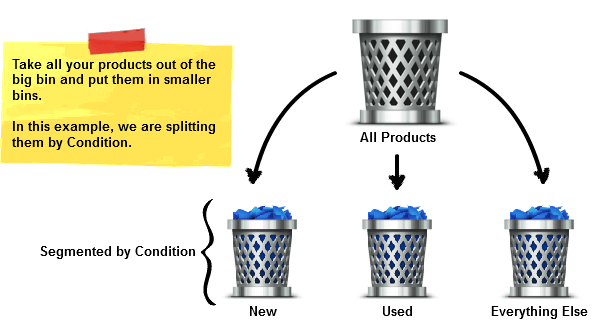
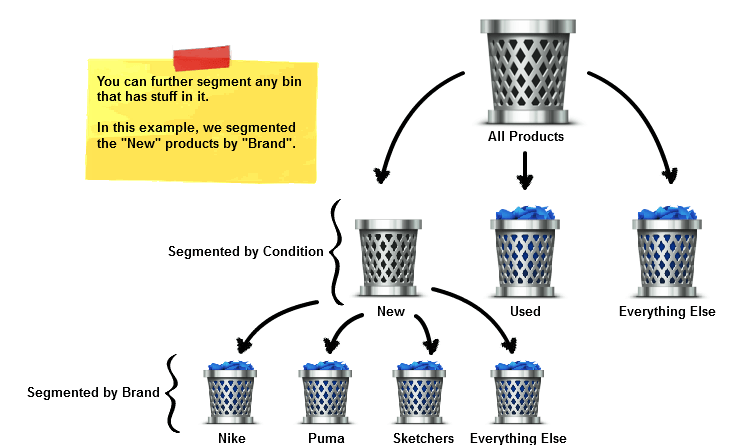
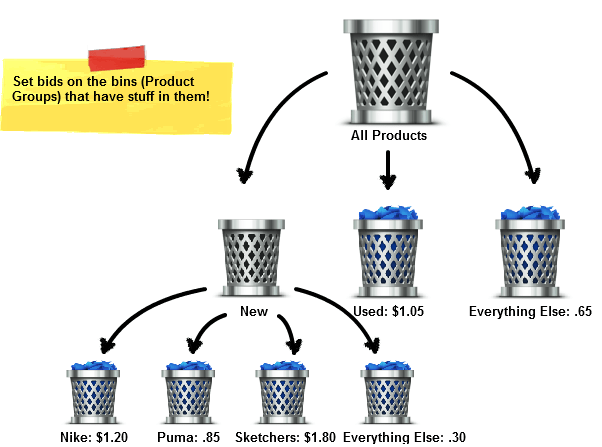
You’ll notice that each time you segment a product group, an “Everything Else” group is automatically generated. This acts as a catch-all for products that don’t fit into your defined categories.
Mastering Product Group Organization in Shopping Campaigns
Now that you understand the fundamentals of product groups, let’s explore some tips for optimal organization. Remember: ROI is paramount! Determine the maximum amount you’re willing to spend on an ad for a specific product.
- For smaller data feeds (under 200 products), aim to segment down to the item ID level. This allows you to set bids on a product-by-product basis. Start by segmenting by brand or category, then refine further by product ID.Pro Tip: Let your website’s navigation guide your initial segmentation. Since your products are already organized on your website, replicate that structure within your product groups.
- If you manage a large data feed where product-level bidding is impractical, group similar products with comparable profit margins. This could be based on brand, category, product type, or any other relevant attribute.
- The way you structure your product groups has no impact on Google’s assessment of your product’s relevance to a search query. Product groups are solely for bid management.Pro Tip: As your Shopping campaign matures, consider isolating your top-performing products into their own campaigns or ad groups. This allows for closer monitoring and optimization of your most profitable items.
Advanced Product Group Bidding Strategies
Once your product groups are structured, you can start assigning bids. Here are some valuable tips to set you on the right path:
- Begin with lower bids than you would typically use for search campaigns. Start with $0.50 to $1.00 and closely observe their performance. Bid adjustments can have a rapid impact on campaign performance.
- Set lower bids for “Everything Else” product groups compared to more specific named groups. This ensures that traffic and data for relevant products are directed to their designated groups rather than being lumped into the catch-all category.
- Leverage geographic bid modifiers to increase bids in high-traffic, high-value regions and decrease bids in low-traffic, low-value areas.
- While it’s generally advisable to enable mobile bidding initially, monitor its performance closely. Many businesses find mobile PPC less profitable, especially for higher-priced products ($100 or more).
- The Search Impression Share metric provides insights into the growth potential of specific product groups. Track this metric to gauge your performance relative to competitors selling similar products.Pro Tip: While Shopping Campaign benchmarks offer useful starting points and estimates, don’t treat them as absolute targets. Cost per Conversion is often the most reliable metric for optimization. Finally, when running special promotions, leverage Google’s feature to append promotional text to your shopping ads. This could include offers like “Free Shipping,” “5% off,” or seasonal promotions like “Winter Blowout Sale! 25% Off!”
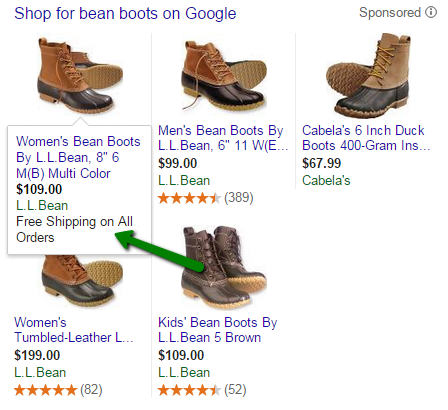
Ensure that these promotions are accurate and align with your website; otherwise, Google may disapprove your ads! You’re now equipped to launch your first Shopping Campaign. Remember, starting small and gradually scaling up as you gain experience is perfectly acceptable. As you become more comfortable, you can experiment with split testing and advanced optimization techniques. Happy selling!