As AdWords approaches its 16th birthday, it’s undergoing significant transformations, much like any teenager. Notably, text ads have expanded, display ads have been revamped with responsive formats, and the platform is becoming more intelligent with refined bidding strategies tailored to different demographics and devices.
Amidst these changes and the daily demands of account management, advertisers might feel overwhelmed. However, Google recently announced another significant shift: AdWords is moving beyond the “converted clicks” metric used for the past 15 years. This metric will be phased out after September, requiring advertisers to adopt the more advanced “conversions” metric.
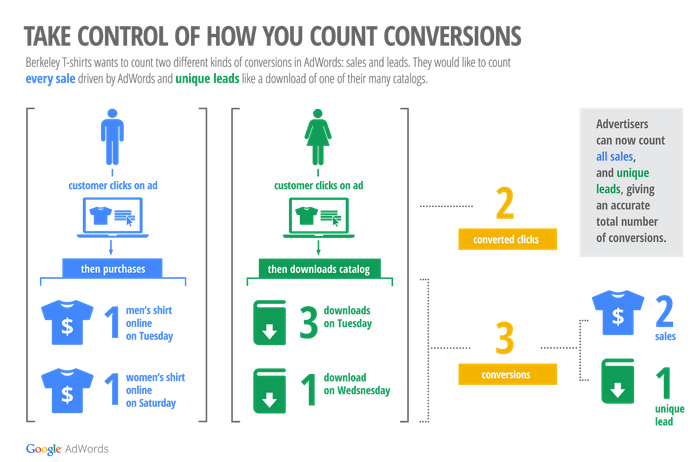
Google explained that the “converted clicks” metric, introduced in 2001, was initially a basic way to track meaningful user actions after clicking an ad. However, as both advertisers and Google became more sophisticated in conversion tracking, this metric’s limitations became apparent.
To address this, Google introduced the “conversions” metric. For example, while “converted clicks” couldn’t differentiate between multiple goals, “conversions” could. Additionally, it enables tracking conversions across devices and browsers and facilitates more complex attribution modeling.
Transition Timeline
Starting September 6, Google will automatically incorporate cross-device conversions into the “conversions” metric. This change will likely lead to a noticeable increase in reported conversions, particularly for clients with robust mobile PPC strategies.
Subsequently, on September 21, Google will officially discontinue the “converted clicks” metric across all accounts. Accounts using this metric for bidding and reporting will transition to the new “conversions” metric, potentially resulting in a significant rise in measured conversions.
Google encourages advertisers still using the “converted clicks” metric to migrate manually beforehand. They’ve provided an easy tool within the tools tab to simplify this process:
- Navigate to “Conversions.”
- Click on the “Converted Clicks is going away” notification (highlighted in green).

Google will provide an estimate of the discrepancy between the “converted clicks” and “conversions” measurements in your account, helping you understand the impact of this change.
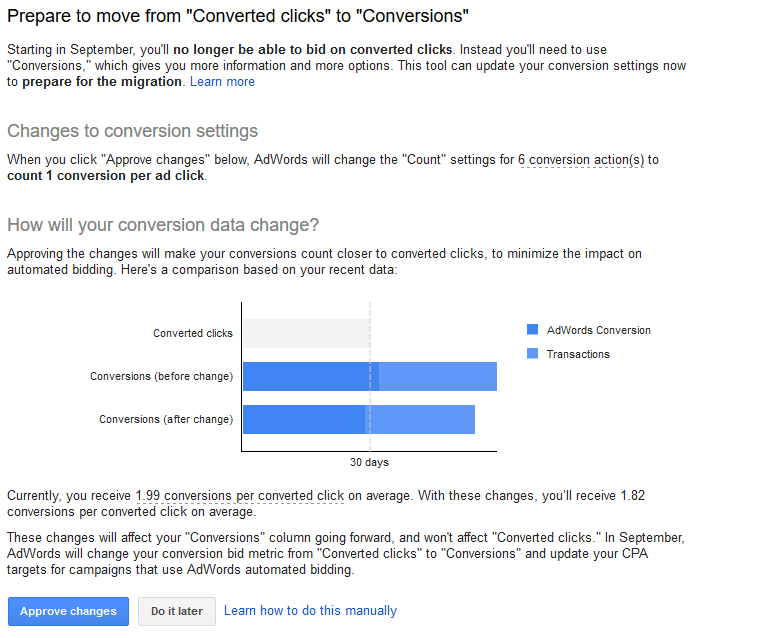
You can either immediately approve these changes and migrate or receive guidance on minimizing the difference between the two metrics.
Impact of the Change
The shift will primarily affect clients who were using “converted clicks” or not incorporating cross-device conversions. They will experience an increase in reported conversions by September’s end.
Moreover, accounts reliant on automated bidding strategies or rules based on CPA might see fluctuations in their campaigns. With increased reported conversions and a lower CPA, automated strategies might raise CPC bids, potentially leading to higher costs. Reviewing campaign settings for enhanced CPC (eCPC) or CPA-based bidding and adjusting targets in advance is crucial.
Minimizing Discrepancies
While most advertisers have transitioned to “conversions,” some are apprehensive about losing the “converted clicks” metric.

Their primary concern is the potential over-counting of conversions after the migration.
Fortunately, there are steps to minimize discrepancies and maintain accurate reporting: 1. Eliminate Duplicate Goals: Review conversion goals under “Conversions” in the tools bar, ensuring you’re not tracking the same goal through both Google Analytics and AdWords conversion pixels, which could lead to overcounting.
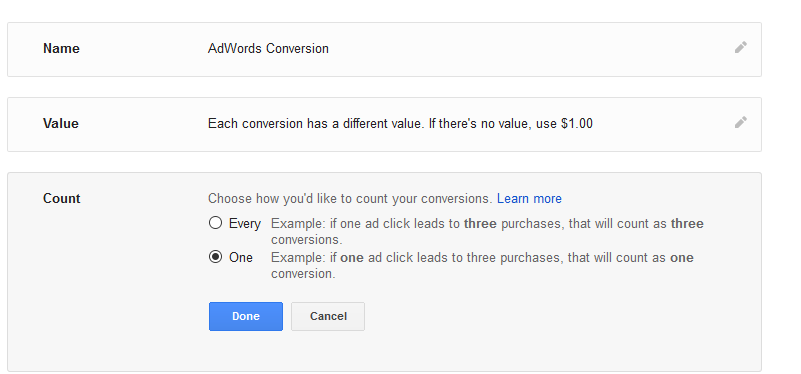
2. “One” Count Setting: Change the conversion goal setting from “Every” to “One” to prevent multiple counts for the same action performed multiple times. This can be adjusted within the existing conversion goal settings.
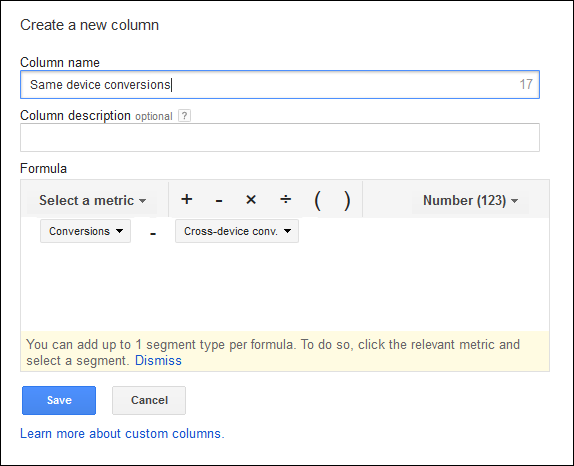
3. Cross-Device Conversion Tracking: While automatically included in the “conversions” metric from September 6 onward, you can still monitor cross-device conversions for reporting. Add the “cross-device conversions” metric in the AdWords UI.
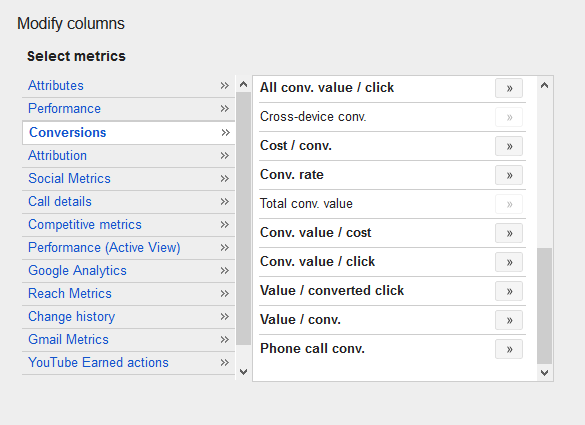
Subtracting cross-device conversions from the total reported conversions will provide your previous “conversion” metric. This can be achieved by creating a custom column variable within the UI.
In Summary
Although met with mixed reactions, the upcoming mandatory migration necessitates a review of your current AdWords conversion measurement approach. Understanding its impact on performance evaluation is crucial. One thing is certain: In the coming months, AdWords will attribute more conversions to numerous accounts, and many will be surprised by the increased conversions attributed to advanced attribution models and cross-device conversions.