Google is at it again, giving advertisers more space on the search engine results page (SERP). The company has officially rolled out Structured Snippets, a new ad extension that was previously in beta. You might have noticed its predecessor, Dynamic Structured Snippets, which automatically pulled content from your website. This new version gives you the reins—you choose and write the text you want to highlight. As is typical with new Google features, Structured Snippets are being released gradually, so don’t be surprised if you don’t see them in your account just yet.

What Exactly are Structured Snippets?
Structured Snippets live under your ad copy and above any sitelinks you’ve created, as shown here:
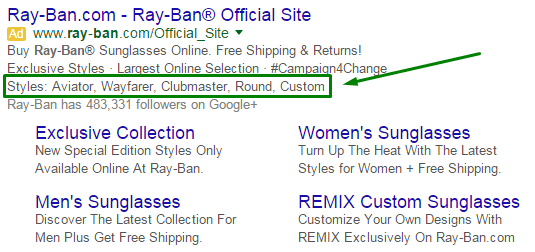
Let’s break down what you need to know:
- Think of these extensions like Callout extensions—they’re not clickable but provide additional context for potential customers.
- There’s a catch: You have to pick a “Header” from a predetermined list of 12 categories.
- Once you’ve got your header, you can add up to 10 “Values” (though 4 is the sweet spot) that fit under that umbrella. Each value has a 25-character limit.
- The same rules that apply to sitelinks and callout extensions also apply to Structured Snippets, plus one more: Your values need to align with your chosen header. The finished ad will display your header, followed by a colon and your carefully chosen values. This is why a header-value match is so crucial!
For a visual example, let’s look at our client Namely, an HR tech company:
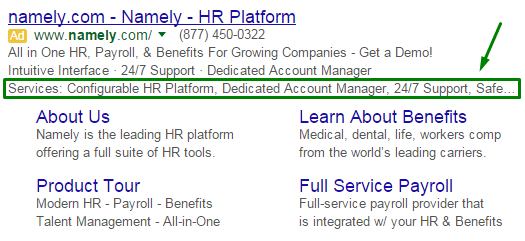
They’re using the “Services” header to give searchers a snapshot of what they offer, like having a dedicated account manager and round-the-clock support. As you can see, this extension can spotlight both offerings and benefits.
Proceed with Caution: Bias in the Header Choices
Remember that predefined header list we mentioned? Here it is in full:
- Amenities
- Brands
- Courses
- Degree programs
- Destinations
- Featured hotels
- Insurance coverage
- Neighborhoods
- Service catalog
- Shows
- Styles
- Types
Notice anything? These headers seem pretty geared towards industries that shell out big bucks for clicks. For instance, “Insurance coverage” is a huge one—insurance keywords are some of the priciest in Google Ads (formerly Google AdWords), sometimes costing advertisers a whopping $55 per click. Travel and accommodations snag four spots on the list, which aligns with Google’s push in other products like Google Flights (think shopping ads for flights) and feeds that dynamically display Hotel & Rental options.
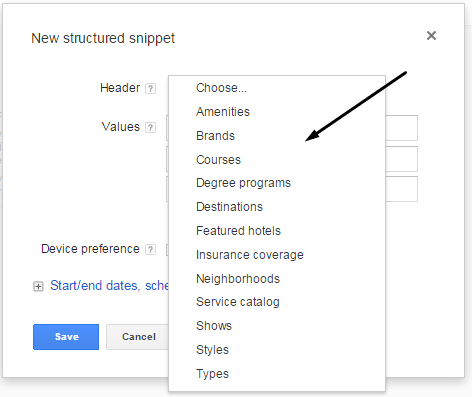
And let’s not forget education, another big spender in the world of online advertising, nabbing two header slots. Retail also gets some love—companies can give more details about their brands or product styles without eating into precious ad text space.
However, if your industry doesn’t align with any of these headers, this extension won’t be very useful.
Structured Snippets: Pros and Cons
Like all ad extensions, Structured Snippets have their upsides and downsides.
On the plus side:
- Increased ad real estate
- A potential Quality Score boost by increasing ad relevance and click-through rate (CTR)
- A chance to highlight key aspects of your product or service that you couldn’t fit in your ad copy or simply want to emphasize.
- The ability to give potential customers more insight into what you offer
- Compatibility with other live ad extensions
- Account-level implementation
The main drawback? Those pesky header limitations. If you can’t find a header that fits your business, you’ll have to get creative or hope that Google expands its options down the road.
Should You Jump on the Structured Snippets Bandwagon?
Our take? Absolutely! More ad extensions generally translate to greater visibility and improved ad rank and Quality Score. Remember back in 2013 when Google revamped its Ad Rank formula to include ad extensions? That’s because extensions have such a clear impact on CTR. The only reason to skip this extension is if none of the headers align with your business.
Want a step-by-step guide to setting up Structured Snippets? Head over to Google’s support documentation.