Let’s dive into this week’s digital advertising news! We’ll cover Google Ads discontinuing Enhanced CPC as a portfolio bid strategy, the introduction of monthly campaign budgets for certain advertisers, enhancements to their mobile app, and much more.
Google Ads says goodbye to portfolio bid strategies
In a move towards simplified bidding processes, Google has announced that Enhanced CPC will no longer be available as a portfolio bid strategy. As a quick refresher:
- A portfolio bid strategy lets you optimize bids across multiple campaigns.
- Enhanced CPC is a semi-automated bid strategy used with manual CPC bidding. It adjusts your bids in real time based on the likelihood of a click turning into a conversion. Imagine setting a $2 bid for the keyword “men’s running shoes.” Enhanced CPC could increase your bid beyond $2 if a user likely to convert searches that term, boosting your chances of securing the conversion.
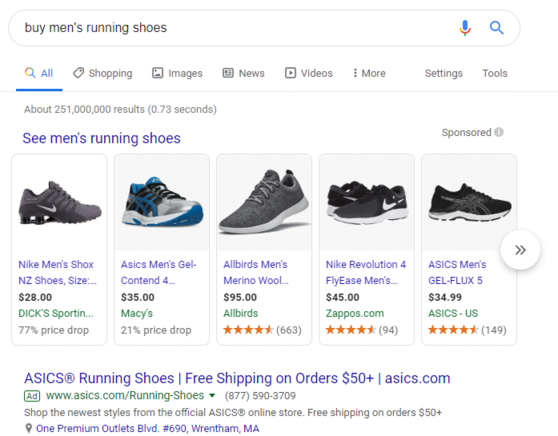
Just to clarify, I’m talking about the ASICS text ad here. Shopping ads aren’t connected to keywords.
Google’s decision comes as very few advertisers use Enhanced CPC at the portfolio level, making it impractical to keep it. If you’re still using it at this level later this year, Google will automatically shift it to the individual campaign level.
In other portfolio bid strategy news, Google is also retiring the target spend setting for Maximize Clicks portfolios. This means you’ll no longer be able to set a single target spend across all campaigns in a Maximize Clicks portfolio. Instead, you’ll need to set individual daily budgets for each campaign. Speaking of which…
Monthly campaign budgets arrive in Google Ads
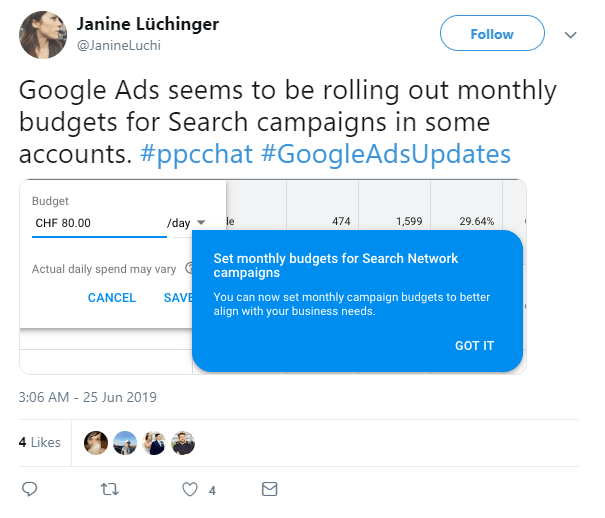
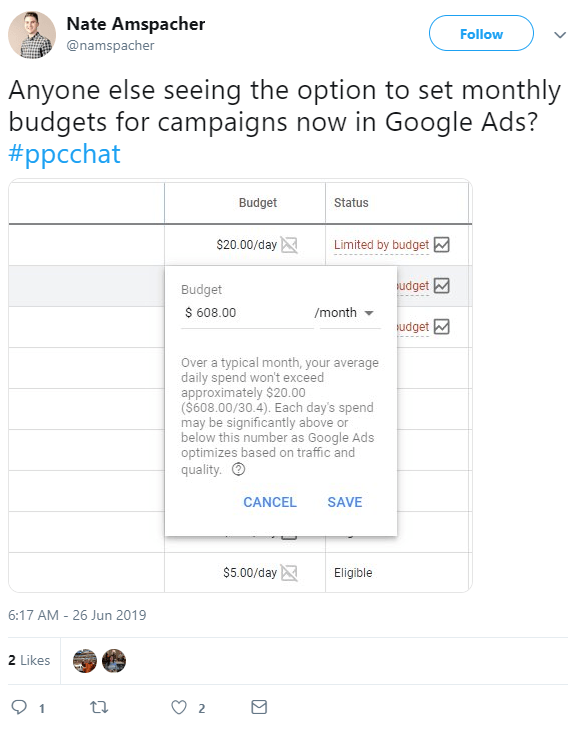
Several members of our agency team have spotted a small but significant change in the Google Ads interface: the option to set campaign budgets on an average daily or monthly basis. Currently, this feature is only available in select Google Ads accounts.
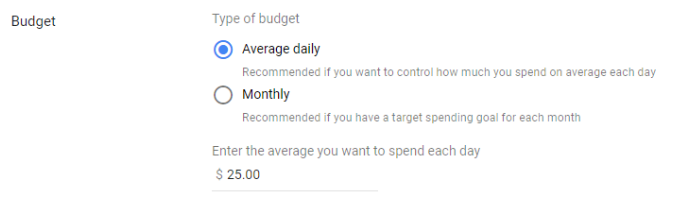
Previously, you could only provide Google Ads with an average daily budget, calculated by dividing your desired monthly spend by 30.4 (the average days in a month). While Google Ads ensured you never exceeded your monthly budget, daily spending could fluctuate if a particular day presented excellent conversion opportunities.
This new option to choose between average daily and monthly budgets suggests Google is trying to eliminate the confusion that often arises from these daily spend variations. Rest assured, average daily budgets aren’t going anywhere for now.
Here’s what the PPC community has to say about this development:
Google My Business gets a major upgrade
Last week, Google announced a range of new features and tools designed to help local businesses enhance and promote their Google My Business profiles. Let’s start with the new profile features before exploring the updated promotion tools.
New profile features
At the heart of the improved Google My Business experience lies a collection of features designed to make profiles more reflective of a business’s brand:
- Company logo: If your core listing information (address, business hours, etc.) is current, you can now add your company logo to the top-right corner of your profile.
- Cover photo: Make a strong first impression by adding a banner image to the top of your profile.
- Photo carousel: Give users a better feel for your business by uploading a series of photos they can browse through. Soon, you’ll even be able to add captions to each picture.
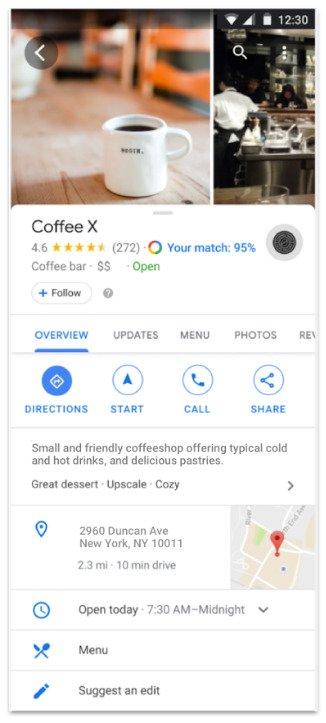
Image courtesy of Google.
New promotion tools
Beyond enhancing your profile’s visual appeal and brand consistency, you can now utilize new promotional tools to attract and retain customers:
- Welcome offers: When a user chooses to follow your business (essentially subscribing to updates in the “For You” section of Google Maps), you can show your appreciation with a one-time welcome offer. For example, an ice cream shop might offer a free cone to new followers.
- Short name and custom URL: Google is making it even easier for loyal customers to find your GMB profile with short, searchable names (coming soon to Maps) and customizable URLs.
- “Local Favorite” designation: Google will recognize businesses in the top 5% of each category—those consistently delivering exceptional user experiences—with a “Local Favorite” badge on their profiles. The specific criteria for selection haven’t been disclosed yet.
Facebook phases out info sections on business pages
As highlighted by various Twitter users, including social media strategy expert Matt Navarra, Facebook has alerted business page administrators about the upcoming removal of several information sections from their pages starting August 1st. These sections are:
- Mission
- Company overview
- Biography
- Affiliation
- Personal interests In place of an official announcement, Facebook simply stated: “Consider adding [the information in these sections] to your Page description.”
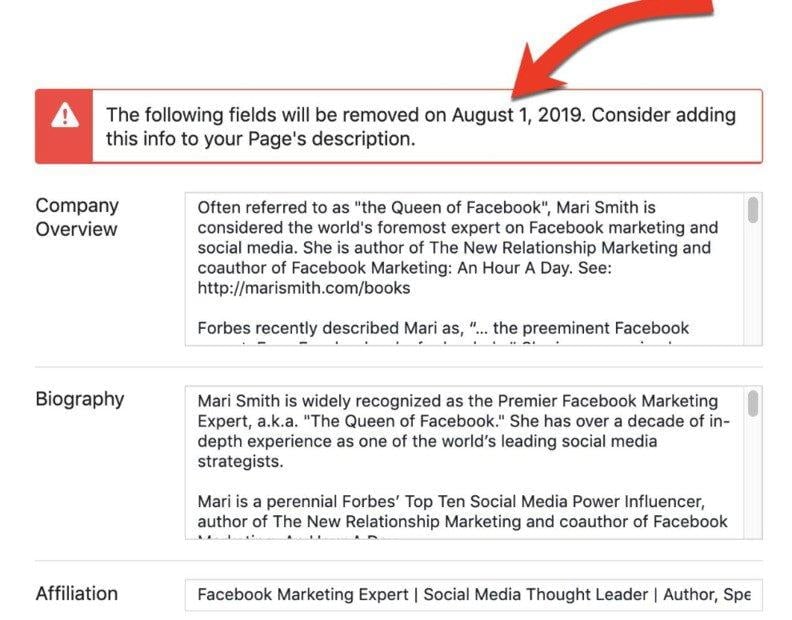
This decision to remove these sections seems to stem from their perceived redundancy. While your company’s mission and overview can easily be incorporated into your page description, elements like your biography and personal interests are less relevant. After all, Facebook’s ability to match users with suitable business pages hinges on data quality. Superfluous information like biographies and personal interests could hinder these algorithms. In any case, ensure all essential information about your business is included in your page description.
Landing pages report now includes Shopping data
Ecommerce advertisers who prioritize optimizing their prospects’ post-click experiences have reason to celebrate: The landing pages report in Google Ads now incorporates now includes data from Shopping campaigns. You can now use this report to evaluate how effectively your website converts clicks into sales.
As shown in the screenshot below, the report presents several valuable metrics for each of your Shopping landing pages. For conversion rate optimization, focus primarily on gross conversions and conversion rate.
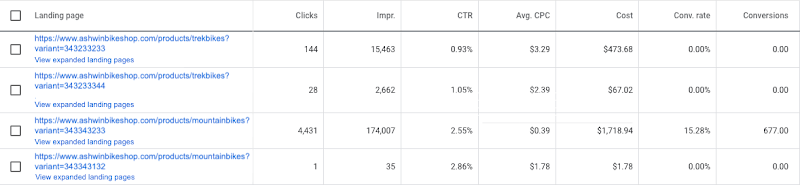
Image courtesy of Google. Centralized access to this performance data offers a couple of key benefits. First, it helps prioritize optimization efforts. If your average Shopping landing page converts at 12%, but one page lags behind at 3%, it’s a clear sign to focus your attention there. Second, it allows you to address issues proactively. A sudden drop in conversion rate on your top Shopping landing page from 18% to 4% signals a potential problem requiring immediate attention.
Microsoft Advertising unveils parallel tracking
In a recent blog post, two program managers from Microsoft Advertising (formerly Bing Ads) announced a development that could significantly enhance your conversion rate optimization efforts: Parallel tracking is now available as a beta feature.
For the uninitiated, parallel tracking offers an alternative to sequential tracking. With sequential tracking, users who click your ad are directed through multiple redirects before reaching your landing page (the final URL). In contrast, when parallel tracking is enabled—as it has been for Google Ads users for a while now—users are taken directly to the final URL while click measurement happens in the background. Here’s a helpful visual from Microsoft illustrating the difference between these two systems:
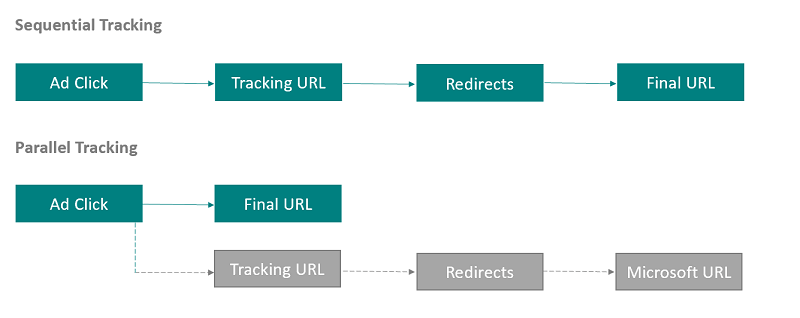
Image courtesy of Microsoft. Your first reaction to this news might be: Interesting, but how much time does parallel tracking actually save? It’s a fair question; we’re talking about a second or two at most. However, saving your prospects those precious seconds can lead to significant improvements in your paid search conversion rates. Even recovering a single extra conversion each month through parallel tracking can be incredibly valuable.
If you want to experiment with parallel tracking before its full release, reach out to your Microsoft Advertising representative reach out.
Google Ads mobile app gets new functionality
As of last week, the Google Ads mobile app is more powerful than ever, offering a whole lot more. Here’s what’s new:
- Create and edit responsive search ads. Previously, the mobile app only allowed pausing or enabling existing responsive search ads.
- Add, review, and edit negative keywords. This functionality was previously limited to desktop users.
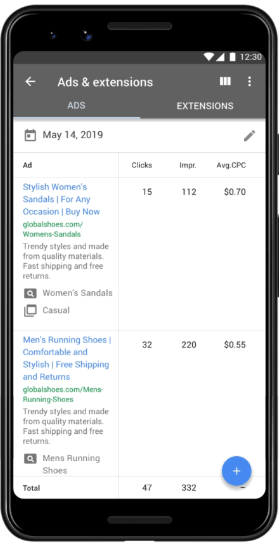
Image courtesy of Google. These updates to the mobile app prioritize convenience above all else. Sometimes you need to optimize your campaigns on the go, and these improvements address the limitations advertisers faced when away from their computers. Hopefully, we’ll see even more mobile app updates soon!