While somewhat overshadowed by slightly more interesting tech news yesterday, the Google Analytics blog announced a significant development: multi-channel funnels are now accessible to all users. This is particularly good news for Google AdWords professionals. This is likely due to the fact that before making this feature available to the public, particularly high-budget spenders, Google probably wanted to ensure the data reflected positively on paid search traffic, especially AdWords. This also likely holds true for search engine traffic in general, meaning those involved in website optimization for paid or organic search now have a valuable new tool at their disposal. This is a game-changer, enhancing their already impressive analytics suite. Attribution is a key concern for anyone trying to pinpoint which channels or keywords are driving conversions and understand how users interact with their website.
How Do Google Analytics Multi-Channel Funnels Work?
First things first: what are we dealing with here? Centering around sales and conversions (usually leads or sales, but essentially any goal defined in your analytics account), multi-channel funnels illustrate how users convert on your website and the pathways they took. This is crucial information for multi-touch attribution modeling.
Google Analytics Multi-Channel Overview Report
Let’s begin by examining the overview reporting functionality:
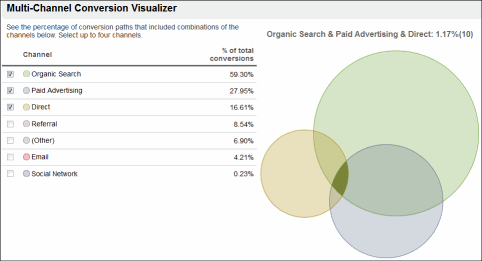
This report is quite useful - it provides a quick view of the channels involved in various conversion processes. While it doesn’t offer much in terms of immediate tactical actions, it’s beneficial for those new to an account (such as a client account). It gives you a sense of the prominence of different channels and how they influence each other. Intriguing data indeed!
Google Analytics Assisted Conversions Report
This is an excellent report with a high degree of versatility. Let’s break down some of its components:
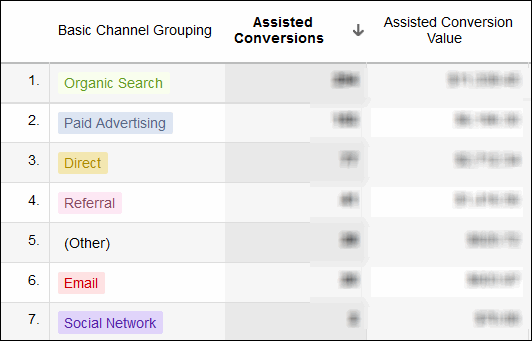
This report is very helpful in demonstrating your channel’s value. You can now show your boss or client the number of conversions your channel contributes to beyond the basic “last touch” conversions.
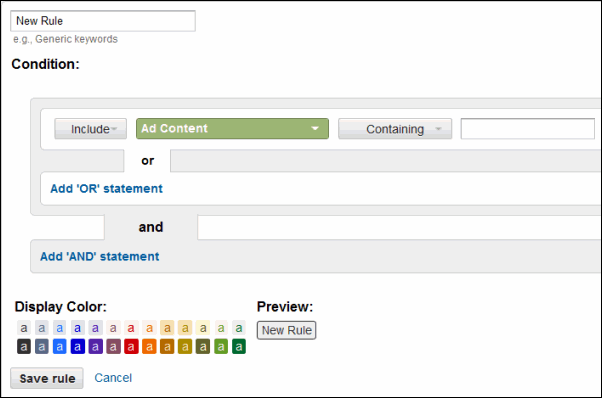
You can also define a specific rule or segment of your traffic for deeper analysis. This could be a particular banner campaign, email blast, webpage, or even matched search query. This is incredibly powerful because it allows you to examine a specific action or traffic source in detail. This could be a blog post you’ve written or a specific search query or keyword whose true value you’ve been struggling to determine.
Google Analytics Top Conversion Paths Report
The top conversions path report is also noteworthy for its ability to quickly visualize user journeys to your site. It reveals which channels generate first-touch interactions that convert effectively and which channel combinations are most successful:
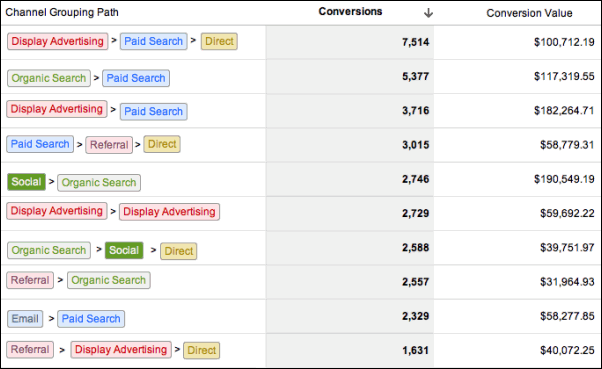
For example, you might discover that your display campaigns are generating substantial awareness. You can then align your other messaging with those campaigns more effectively. Or you might find that organic search drives a lot of paid search traffic. This might lead you to investigate which queries are driving assisted conversions but not direct conversions. These queries could be prime candidates for some landing page optimization.
Google Analytics Path Length Report & Time Lag Report
Finally, you can generate reports on time length and path length. These provide valuable insights into the actual length of your sales cycle and the number of touches required to convert visitors:
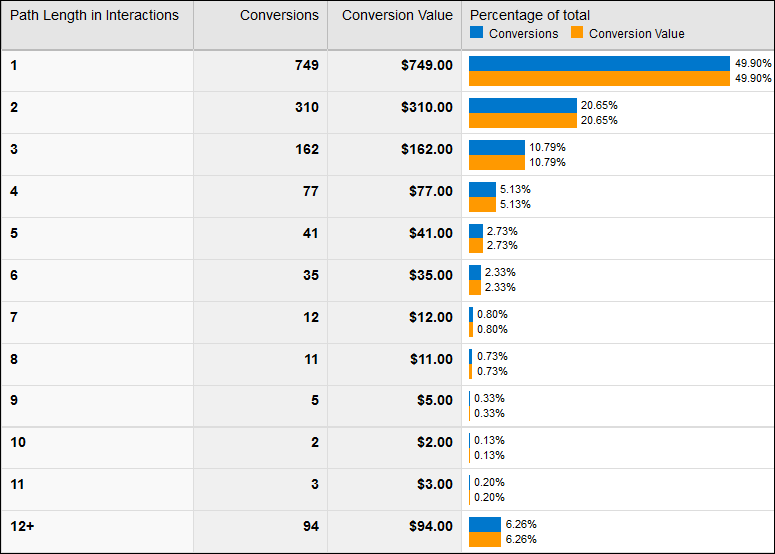
This can help you understand the distribution of your conversions based on the number of interactions needed to convert a visitor or the time elapsed between their initial visit and conversion.
What Can You Do with This Information?
This feature becomes extremely powerful when applied to:
- Specific campaigns
- Specific keywords
- Specific content pieces and types Why? Because it allows for more accurate valuation of different types of traffic, content, and segments of your SEO and PPC campaigns. Understanding which initial actions generally lead to which subsequent actions enables you to start strategically aligning the campaigns that interact most frequently. You’ll also want to start tagging different campaigns more meticulously to unlock the full potential of this new feature set. We’re often critical of new Google features on this blog, but this is a truly valuable addition to Google Analytics. It offers a wealth of data and should be a section of analytics you regularly leverage in your optimization efforts.