Now that Performance Max has been around for a bit and we’ve had a chance to experiment with it, we’re uncovering the complexities and nuances of this new Google Ads campaign type.
Performance Max presents a blend of brand-new features and familiar concepts. URL expansion and auto-generated video assets are entirely new, while elements like responsive ads and conversion-only bidding ring a bell.
 Having worked with Performance Max campaigns across numerous accounts over the past six months, I’ve compiled my top 10 recommendations, cautions, and strategies for achieving success with PMax.
Should you be using Google Ads Performance Max?
Opinions on Google Ads Performance Max are varied. Overall, I suggest that ecommerce businesses begin testing Performance Max right away. However, I wouldn’t recommend it for lead generation businesses unless they have robust conversion tracking in place (refer to the first tip below).
Regardless of your business goals, don’t consider testing Performance Max unless you’re ready to invest at least $50-100 daily for a minimum of one month. Without adequate investment, you’re unlikely to gather enough data for the format to function effectively.
10 tips for Performance Max success
Here are my top 10 tips, encompassing recommendations, cautions, and workarounds, to optimize your Performance Max campaigns:
1. DO  set up comprehensive and accurate conversion tracking
Performance Max heavily relies on automated bidding and targeting, much like its predecessors: App campaigns, Smart Display, and Local campaigns. While conversion tracking is always crucial in Google Ads, it’s paramount in Performance Max. This is fairly straightforward for ecommerce, but I’ve observed many lead generation businesses struggling with lead quality.
In my view, this isn’t a flaw of the format. It underscores the importance of tools like enhanced conversions, offline conversion tracking, CRM integration, and more.
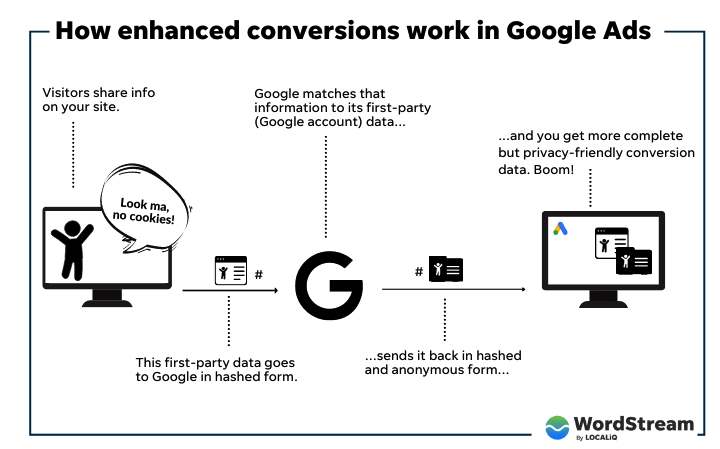 Automation in PPC will only become more important, so now is the time to address and resolve any conversion tracking issues you’ve been putting off.
2. WORKAROUND  : Improve reporting with a PMax segment in Google Analytics
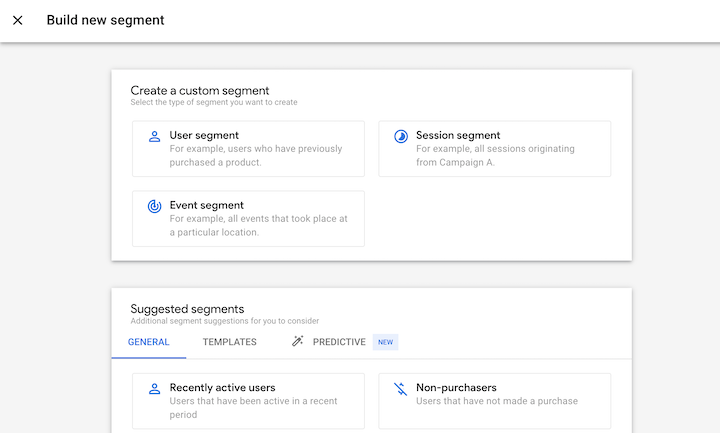
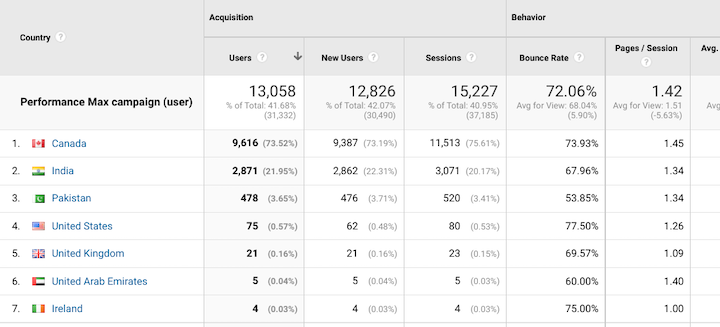
Several Google Ads reporting features aren’t available in Performance Max yet, such as landing page reports or precise geographic reports. However, I’ve found Google Analytics to be a useful workaround.
By creating a user segment where the acquisition campaign includes Performance Max (or your chosen naming convention), you can gain deeper insights into how users engage with your business. For instance, you can apply this Google Analytics segment to the Landing Page Report to see where the campaign is directing users and if you need to adjust URL exclusions or disable URL expansion (see the next section).
3. WATCH OUT  for URL expansion
Performance Max campaigns are like a fusion of many Google Ads formats: Search, Display, Discovery, Video, Shopping, Local – almost everything except App campaigns (for now). So, it’s no surprise that some Performance Max features are “borrowed” from the quirks of other campaigns.
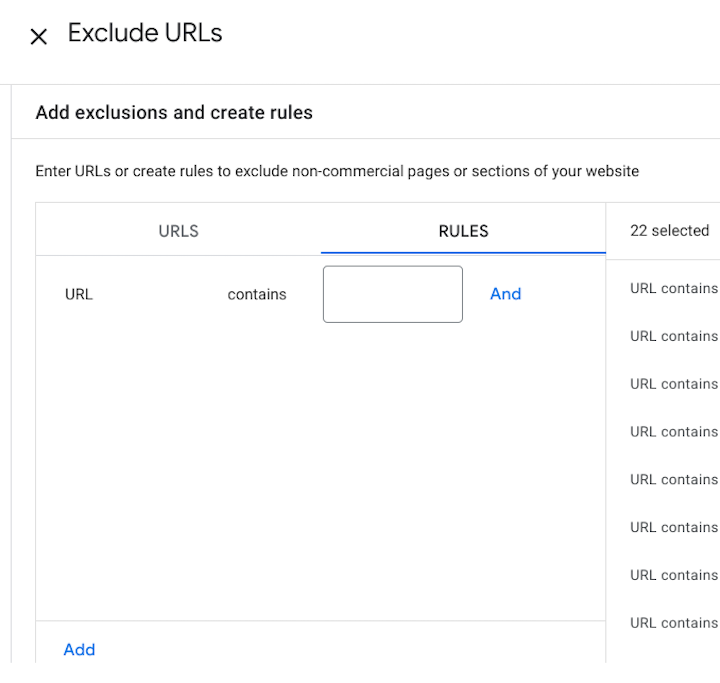
URL expansion, PMax’s version of Dynamic Search Ads, is one such quirk that’s easy to overlook. Performance Max campaigns have URL expansion enabled by default. This means that unless deactivated, the campaign can send users to landing pages other than your final URL, similar to a dynamic ad group.
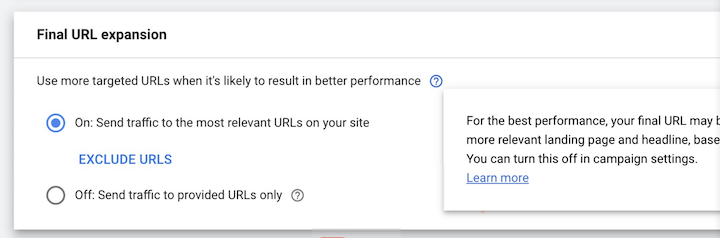 However, the crucial difference is that in a dynamic ad group, you control ad targets - the specific landing pages for your campaign traffic. You can achieve this by listing specific webpages or creating rules like “URL contains product.”
With Performance Max, you can only set exclusions - the landing pages where you don’t want to drive traffic. Exclusion rules function similarly but require a slight logic reversal for proper setup.
4. DON’T  neglect adding at least one video asset
One of the trickiest aspects of setting up a Performance Max campaign isn’t the bidding strategy or audience signals; it’s supplying enough assets for this format. Since it covers so many inventory types, you’ll need to provide ample text, image, and video assets.
If you’ve set up a Display campaign before, you know video assets are optional. Not so in PMax. Or rather, if you don’t provide any, Google Ads will generate them for you. While I’m confident these templates will improve over time, right now they’re not ideal. Advertisers lacking video assets but keen on using Performance Max can leverage free tools like Canva to transform their static images into short videos.
 Like all Google Ads campaigns, your video must be uploaded to YouTube before use. Select “Unlisted” visibility if you prefer the video ad not to be publicly visible on your YouTube channel.
5. WATCH OUT  for tricky location settings
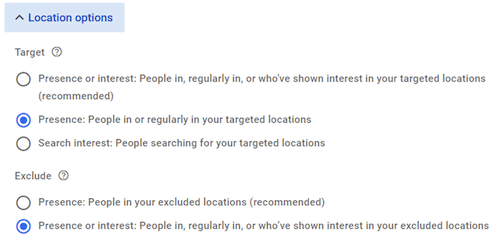
When targeting by location, you can choose between “Presence or interest” (people in or interested in the location) and “Presence” only. I recommend “Presence” only to avoid showing ads to people outside your target locations.
However, Google defaults to “Presence or interest.” Be sure to change this
 If you’ve been running your campaign with the wrong setting, that Google Analytics segment we discussed earlier proves helpful, revealing which locations drive traffic.
6. DO  stick to conversion goals for Performance Max
Like Discovery campaigns, Performance Max only allows bidding for Conversions or Conversion Value. We might see “Awareness Max” someday, but for now, this format suits conversion-based objectives.
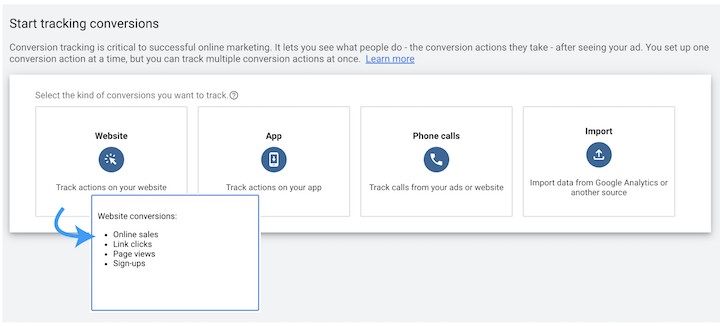
If you want to use Performance Max for mid-funnel or upper-funnel objectives, you can configure conversion actions at the campaign level. For instance, if you’re set on testing PMax for awareness, create a “Page View” conversion action and set the campaign to optimize for Page Views only.
7. DO  establish an audience signal
Performance Max brought with it the seemingly novel concept of an audience signal.
Traditionally, you control targeting by adding audiences to your campaign, specifying the user types you want to reach.
Creating an audience signal in Performance Max means giving Google Ads a starting point for serving ads. It uses these audience segments initially but then expands beyond your signal as it gathers data, showing ads to users exhibiting conversion-prone behaviors.
This is how optimized targeting works in Display, Discovery, and conversion-focused Video campaigns: you pick audience segments, but Google ultimately displays ads to those deemed most likely to convert. Rebranding “optimized targeting” as an “audience signal” seems wise, as it implies more user control instead of unchecked automation.
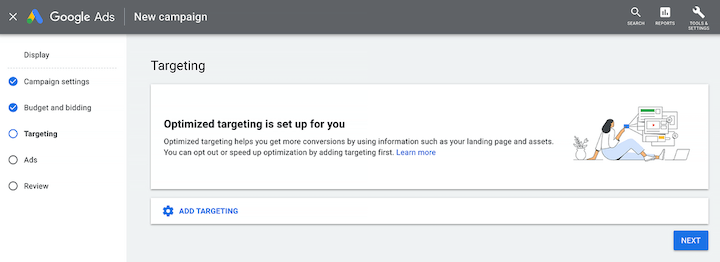 Image source
To point your audience signal in the right direction, add two types of audience segments: Remarketing and a Custom audience. For Remarketing, a customer list is ideal, but pixel-based website remarketing works too. For the Custom audience, I suggest using your top-converting Search & Shopping search terms.
Image source
To point your audience signal in the right direction, add two types of audience segments: Remarketing and a Custom audience. For Remarketing, a customer list is ideal, but pixel-based website remarketing works too. For the Custom audience, I suggest using your top-converting Search & Shopping search terms.
All audience signals within a Google Ads account reside in a dedicated tab within Audience Manager, separate from your data segments. This means even those created within a Performance Max campaign are accessible at the account level. This suggests Google has bigger plans for the audience signal beyond PMax, so stay tuned.
8. DO  leverage the Insights tab for reporting transparency
Performance Max has received criticism for its lack of reporting transparency. While somewhat valid, the Insights tab actually offers valuable information.
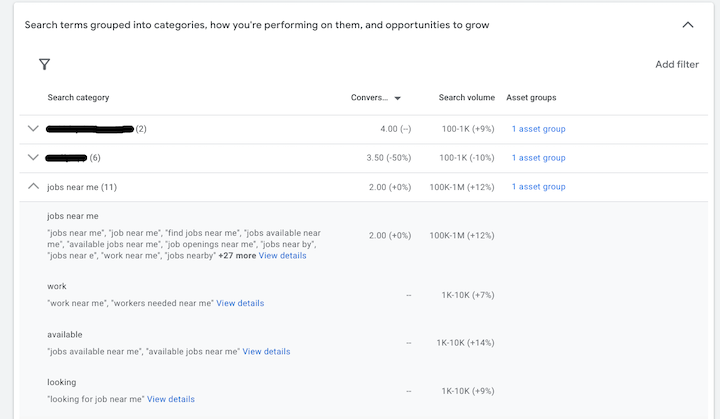
After your campaign runs for a few days or weeks (depending on budget), you’ll start seeing top-performing “Search categories” and “Audience segments.”
A search category groups similar search terms. Though not as detailed as a search terms report, it answers two crucial questions:
- Is PMax concentrating on brand or non-brand searches?
- Is PMax discovering new searches or targeting existing ones from your search campaigns?
In one example, the top search category included existing high-performing search terms, the second had brand terms, while the third was previously untargeted – and this unearthed a significant incremental opportunity.
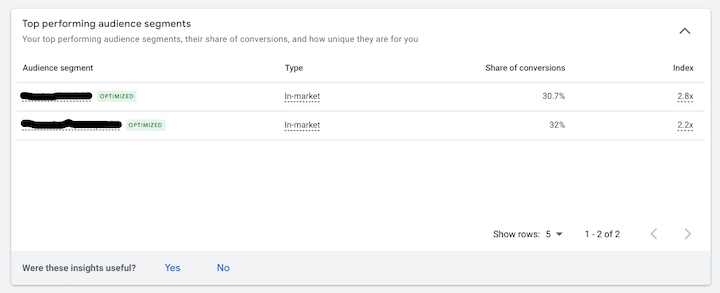
 The audience segments report reveals which Google audiences your converting users fall under, helping assess if your Performance Max campaign’s Video/Display component is reaching the right people. In one instance, two in-market audience segments responsible for 60% of conversions were spot-on for the advertiser.
9. DON’T  replicate Merchant Center feed images as image assets
Connecting your Google Merchant Center feed to Performance Max means that, like Shopping campaigns, it will use your feed data (titles, prices, images, availability, etc.) to generate ads.
Therefore, I advise against adding your “ecommerce images” as separate image assets within your Performance Max asset group. The campaign already sources these from your feed, making it redundant.
Instead, incorporate lifestyle images portraying your products or services being used by real people. Google’s own guidance for Discovery assets offers excellent tips for high-performing images, such as:
- Minimize or avoid overlaid text.
- Showcase images in real-life settings rather than sterile, “stock” backgrounds.
- Feature a single focal point, centrally framed, occupying 30% to 40% of the image.
- Include humans; images with people outperform those without.
10. WATCHOUT  for customer acquisition rules
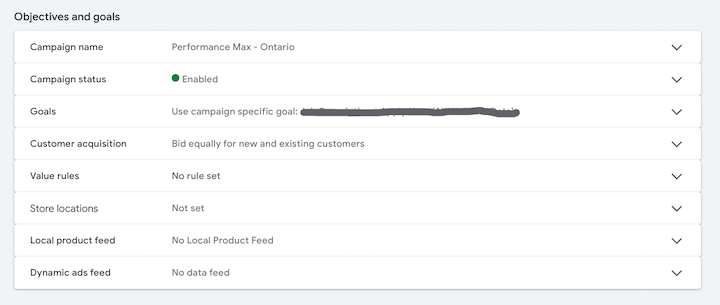
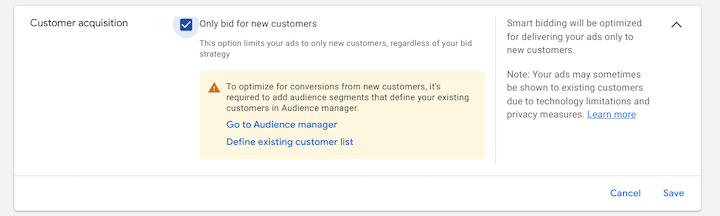
Performance Max replaced Smart Shopping, but the legacy of customer acquisition rules remains. Your PMax campaign settings offer the option to bid solely for new customers.
Bidding for new customers is beneficial if your Performance Max campaign focuses on branded search and remarketing, allowing you to leverage the format for acquisition. However, adjust your performance expectations accordingly. A PMax campaign centered on acquisition won’t perform as “well” as one focused on bottom-funnel conversions, as converting new users into customers takes more time and potentially more ads.
Getting Performance Max campaigns right
I believe ecommerce businesses should definitely begin experimenting with PMax. Lead generation businesses can too, provided their conversion tracking is top-notch. Be ready to commit enough budget for Google to learn and optimize effectively. To sum up the 10 tips:
- Ensure accurate and comprehensive conversion tracking.
- Utilize a PMax segment in Google Analytics to enhance reporting.
- Employ URL exclusions strategically.
- Always include at least one video asset.
- Pay close attention to default location settings.
- Reserve Performance Max for conversion-oriented goals.
- Define your target audience with an audience signal.
- Mine the Insights tab for valuable data and improved transparency.
- Avoid duplicating images already present in your Merchant Center feed.
- Be mindful of the implications of customer acquisition rules on performance.