I’m sitting on a little secret that could save your clients a bundle, make their websites Fort Knox secure, and give them built-in backups. Ready for it?
Here’s the scoop: I build their websites static. Then, I house and host them on GitHub, using Cloudflare as my trusty sidekick to serve them up over HTTPS, making them lightning fast. My clients only shell out for their domain name, but they walk away feeling like they just hit the jackpot.
Why Static Content Rocks My World
Static sites are the cheetahs of the web – insanely fast because there’s no server processing time to slow them down. Plus, with a codebase of static assets nestled in a git repository, rolling back changes is as simple as turning back the hands of time – just revert to a previous commit. Backups? Just a quick git push away. You’re essentially serving your entire website from the cache, meaning your server can basically clock out because it rarely has to lift a finger (or process a request) again.
Need to build a killer UI?
No problem! With the dynamic duo of front-end frameworks like React and its buddies, you can whip up incredible experiences armed with nothing more than HTML/CSS and JavaScript. You’ll need to separate your back-end logic from your front-end, but even Ruby on Rails is on board with an API mode these days.
Whenever I snag a website gig, the first question I ask myself is whether a static site will cut it for my client’s needs. You’d be surprised how often the answer is a resounding “Yes!”
Curious about the kinds of situations where I wave my static site magic wand? Let’s dive into some scenarios where going static can be a lifesaver for both your time and your client’s budget.
Brochureware Websites – Keep It Simple
Brochureware websites are like the online brochures of the internet – they’re all about providing basic info about a business and don’t usually go through major overhauls. Using a dynamic application for these types of sites is like using a sledgehammer to crack a nut – way overkill. And since these sites often languish in the digital wilderness, rarely getting updates, they’re prime targets for hackers looking for an easy mark.
Static HTML templates are light on the wallet compared to their CMS cousins and are a breeze to tweak down the line. When developers get called in for updates, they don’t need a PhD in a specific CMS to get the job done. My rule of thumb? Brochureware sites? Always go static.
Bonus Points: Small businesses do a happy dance when they don’t have to shell out recurring monthly hosting fees. Sure, hosting isn’t going to break the bank, but it’s a beautiful thing when clients can just pay for their domain and call it a day.
Single-Page Applications – Already Halfway There
Have a sleek, sexy new app that relies on the latest and greatest front-end frameworks?
Guess what? Your app is practically already static! Just take a few extra steps to isolate any server-side logic into its own separate little world, and bam! You get to enjoy all the perks of having your app served directly from Cloudflare’s cache.
It’s like having your app on call 24/7 – always ready to go.
Blogs – Don’t Knock It Till You Try It
This is where I usually get some raised eyebrows. It’s a tough crowd when it comes to convincing people that static sites can handle blogs. But hear me out – I haven’t lost my marbles.
Blogs are basically just content dressed up with some fancy templates. You don’t need a whole complicated application analyzing every request and spitting out a new page. A static site is like the Goldilocks solution – just right.
Take Jekyll for example. You feed it your Liquid templates and some Markdown content, and it magically combines them into a beautiful static website. No more on-the-fly processing, and your blog suddenly transforms from a lumbering snail to a lean, mean, speed machine.
This approach is a game-changer because GitHub pages are BFFs with Jekyll builds. Suddenly, blog posts can be submitted via pull requests, and all your content is safely tucked away in version control. Even non-developers can get in on the action by publishing their Markdown masterpieces through Stackedit.
Case in point – I’m using Stackedit to write this very post right now!
And if you’re a fan of getting chatty with your readers, Disqus has your back with a powerful comment system that you can easily add with a snippet of JavaScript.
See that comment section below? Yep, that’s Disqus in action.
GitHub Pages – Your Free Hosting Haven
GitHub Pages is like the knight in shining armor for project pages – it lets you serve up any static website directly from your repository. And since it’s all about that custom domain life, you can host your static site on GitHub pages without spending a dime, deploying straight from Git like a boss.
Deploying to GitHub Pages – Let’s Get Down to Business
Enough chit-chat, let’s see this baby in action!
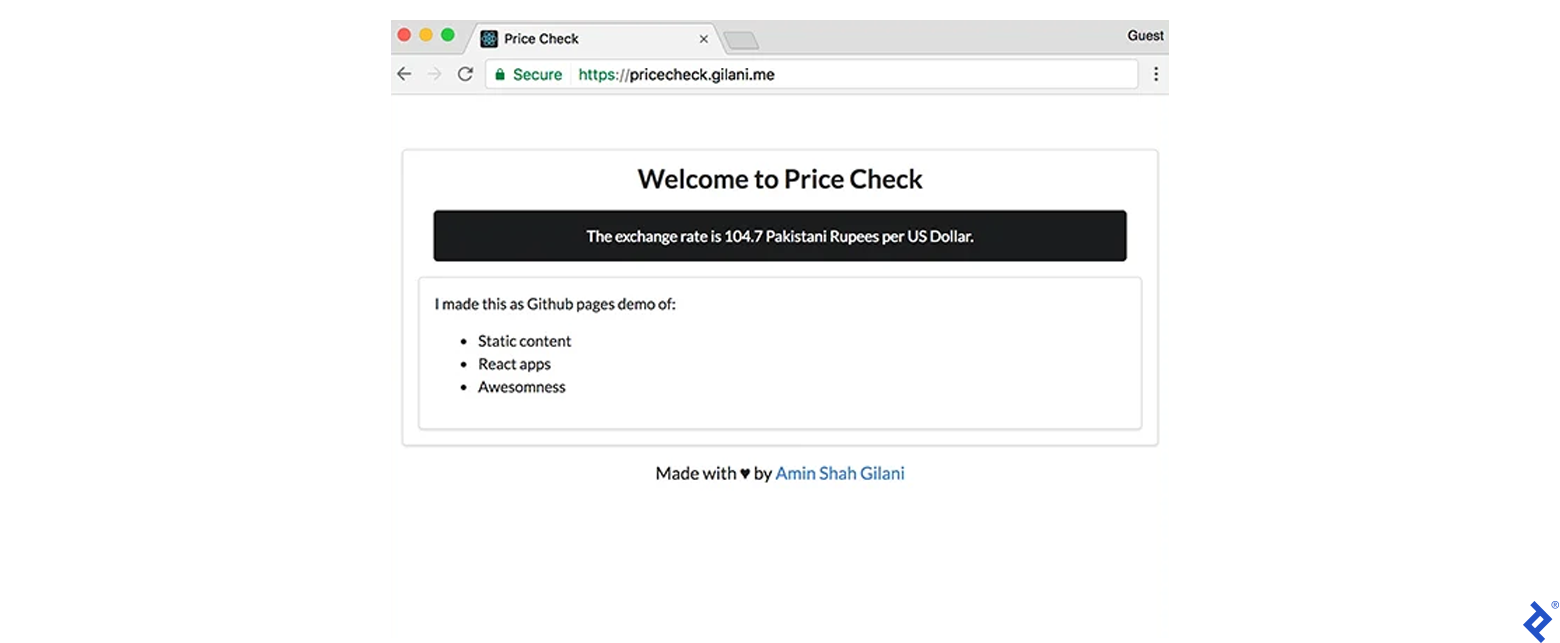
I’ve whipped up a simple single page React app that grabs and displays the current exchange rate for the Pakistani Rupee from a publicly available API. Our mission? Deploy this bad boy to GitHub Pages.
First things first, let’s create a brand new GitHub repository.

Remember, GitHub pages like to hang out on a branch called gh-pages, so let’s create one for our project.
| |
Now, let’s send our site soaring into the cloud:
| |
Boom! We’re done! Our website is officially live at https://amingilani.github.io/price-check, complete with free SSL:

Key Things to Remember:
- GitHub pages always serves up the
index.htmlfile from your project’sgh-pagesbranch. - The website’s home sweet home is
USERNAME.github.io/REPOSITORY-NAME.
Custom Domain Name – Ditch the Generic Look
Hosting on GitHub is great and all, but let’s be real – every self-respecting website needs its own custom domain name. Luckily, GitHub believes in letting you bring your own domain to the party!
Step one: create a special CNAME file and give it your domain name. This is like sending GitHub a friendly memo letting them know which domain name should lead to your repository.
| |
Step two: point a CNAME for your subdomain to GitHub’s DNS at USERNAME.github.io:

Word to the Wise: Resist the urge to do this for an apex domain! Adding a CNAME record to your domain’s root will obliterate your MX and TXT records. Save this move for your subdomain. We’ll cover apex domains later.
At this point, our website should be up and running on our custom domain, using HTTP:
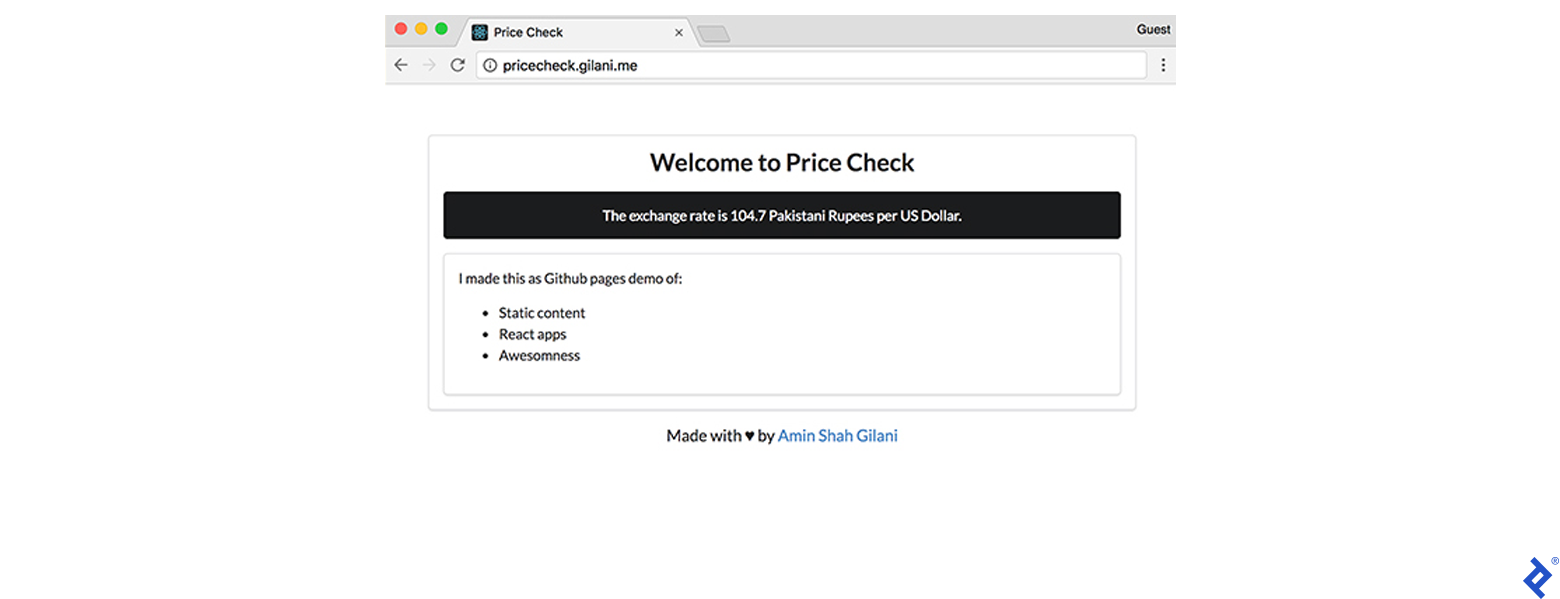
Things to Keep in Mind:
- The default
*.github.iodomain is all about that HTTPS life. - Our custom domain name is rolling old school with insecure HTTP.
- Don’t even think about using a
CNAMErecord on your apex domain unless you’re itching to kiss your emails goodbye.
Limitations of GitHub Pages:
- Repos can’t be bigger than a gigabyte.
- Websites also need to stay under the 1 GB size limit.
- Monthly Bandwidth is capped at 100 GB. Don’t worry, we’ll find a way around this later.
Taming the Apex Domain
The easiest way to sidestep this limitation is to make www your trusty sidekick subdomain and redirect all HTTP traffic from the apex to www. In my case, I’d send gilani.me over to www.gilani.me, which points to my static site. But where’s the fun in easy, right?
If you’re dead set on using an apex domain, check if your DNS provider is cool with ANAME records. They’re basically like the lovechild of CNAME records (letting you point to domains) and A records (because they don’t mess with other records in the same zone).
No ANAME love? Time to switch to a DNS provider that’s hip to the game, and that’s where Cloudflare swoops in to save the day. Cloudflare lets you create CNAME flattening on apex domains, which is basically like an ANAME record in disguise. Might as well make the switch now since we’ll be hanging out with Cloudflare in the next section anyway.
TLDR: Jump ship to Cloudflare’s free DNS and set up a CNAME on your apex domain. They’ve got some special sauce that makes it work.
SSL and Cloudflare – Security Dream Team
Welcome to the world after Snowden. All our worst nightmares about government spying and rampant hacking are real, and everyone’s scrambling to lock down their data like it’s a matter of national security.
As a web admin worth their salt, you’re expected to provide at least SSL on your website, with a big, fat “no” to any mixed content.
It’s gotten to the point where Google Chrome marks plain HTTPS websites as insecure and Google Search is beginning to favor HTTPS websites more favorably in their rankings. We’ll dive deeper into more front-end security strategies later, but for now, let’s focus on SSL.
Thankfully, we have a superhero in our midst – Let’s Encrypt.
This non-profit, automated Certificate Authority (CA) lets you easily issue short-term, 90-day SSL certificates for any domains you control. It’s like a walk in the park to use, it’s open source, and it has the backing of some serious heavy hitters, including Mozilla and the Electronic Frontier Foundation.
Unleashing Cloudflare’s Powers
Cloudflare is like the Swiss Army knife of web services – it’s a DNS, CDN, and DDoS protection all rolled into one.
It takes your website, makes copies of it (like a digital cloning machine), and then serves those copies to users from servers strategically located around the world, making your website ridiculously fast. And as an added bonus, it helps you stay on GitHub’s good side by keeping you under the 100GB bandwidth limit. Even if your website becomes the next viral sensation, most requests will be handled by the cache, so your server can just chill and relax.
But wait, there’s more! Cloudflare offers a service called Universal SSL, where they hook you up with a free SSL certificate from their CA buddies. That means you get HTTPS without spending a dime… forever and ever.
Why Cloudflare Rocks My Socks Off
I know what you’re thinking: Gilani, you just finished singing Let’s Encrypt’s praises. What’s the deal with Cloudflare? Well, my friend, it all boils down to one beautiful word: simplicity.
Imagine, if you will, setting up a bunch of Nginx caches and reverse proxies across the globe, giving them all valid SSL certificates, and then having them serve up web pages from the locations closest to your users.
Exhausted yet? That’s what Cloudflare does for you – it ensures your website is served via SSL even if your origin server is slacking without an SSL certificate. Cloudflare even gives you special self-signed certificates that you can use on your origin server to secure the connection all the way to their servers. That’s what you get with their free plan, and you don’t even have to deal with the hassle of renewing certificates every 90 days.
As a freelancer, I deal with a lot of clients who just want their sites up and running yesterday. They don’t have the time or the desire to wrap their heads around complicated security issues or encryption jargon. Some of them break out in a cold sweat when they have to pay a $15 annual fee just to keep their website alive. Try explaining to them why they need to shell out for a cluster of reverse proxies to protect their website when the hosting itself is free.
Cloudflare SSL – Time to Get Our Hands Dirty
Enough talk, let’s dive back into the trenches. First things first, let’s redirect all our traffic to flow through Cloudflare:
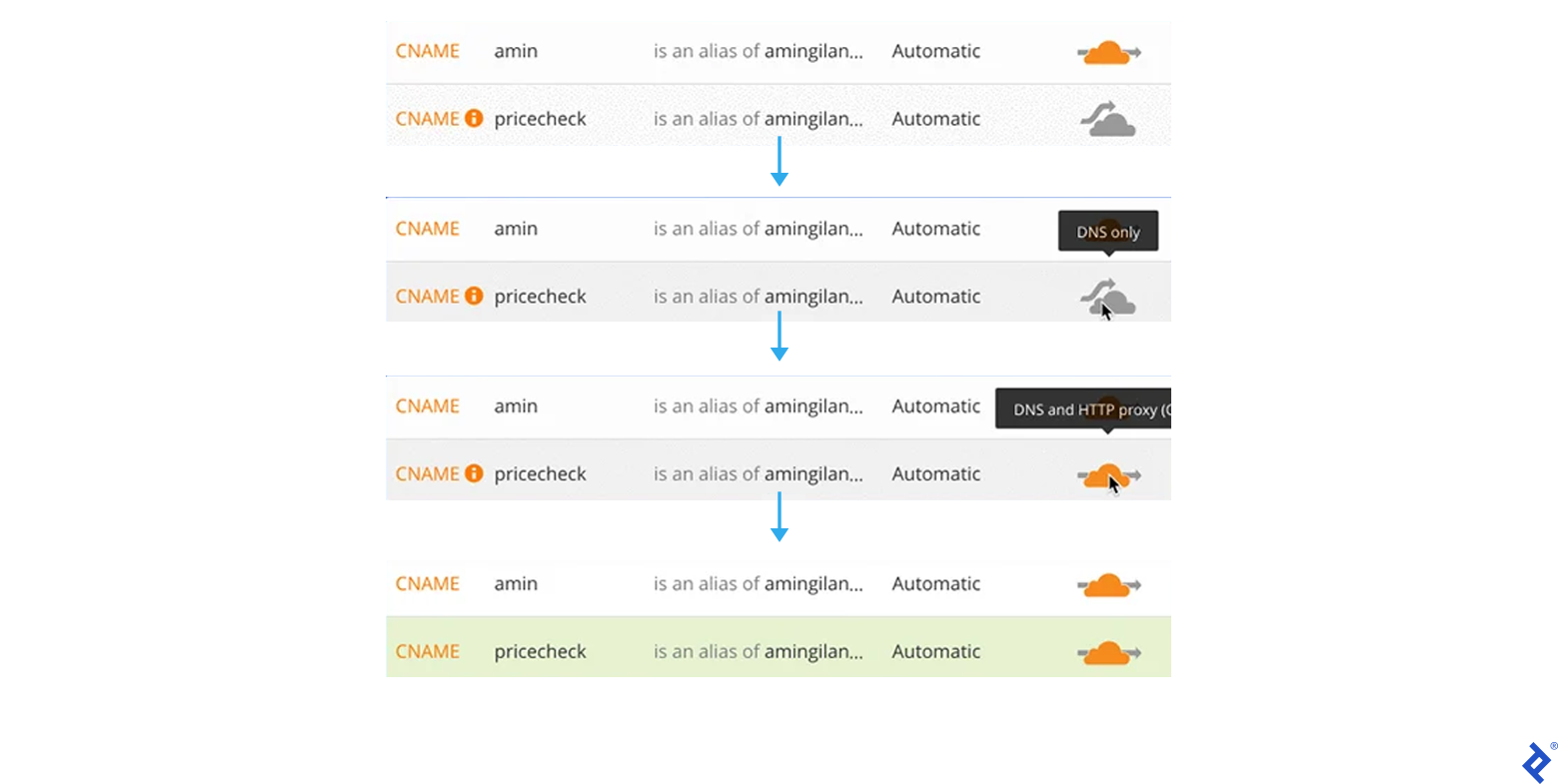
Next, head over to the “Crypto” section and set the SSL level to “Full.”
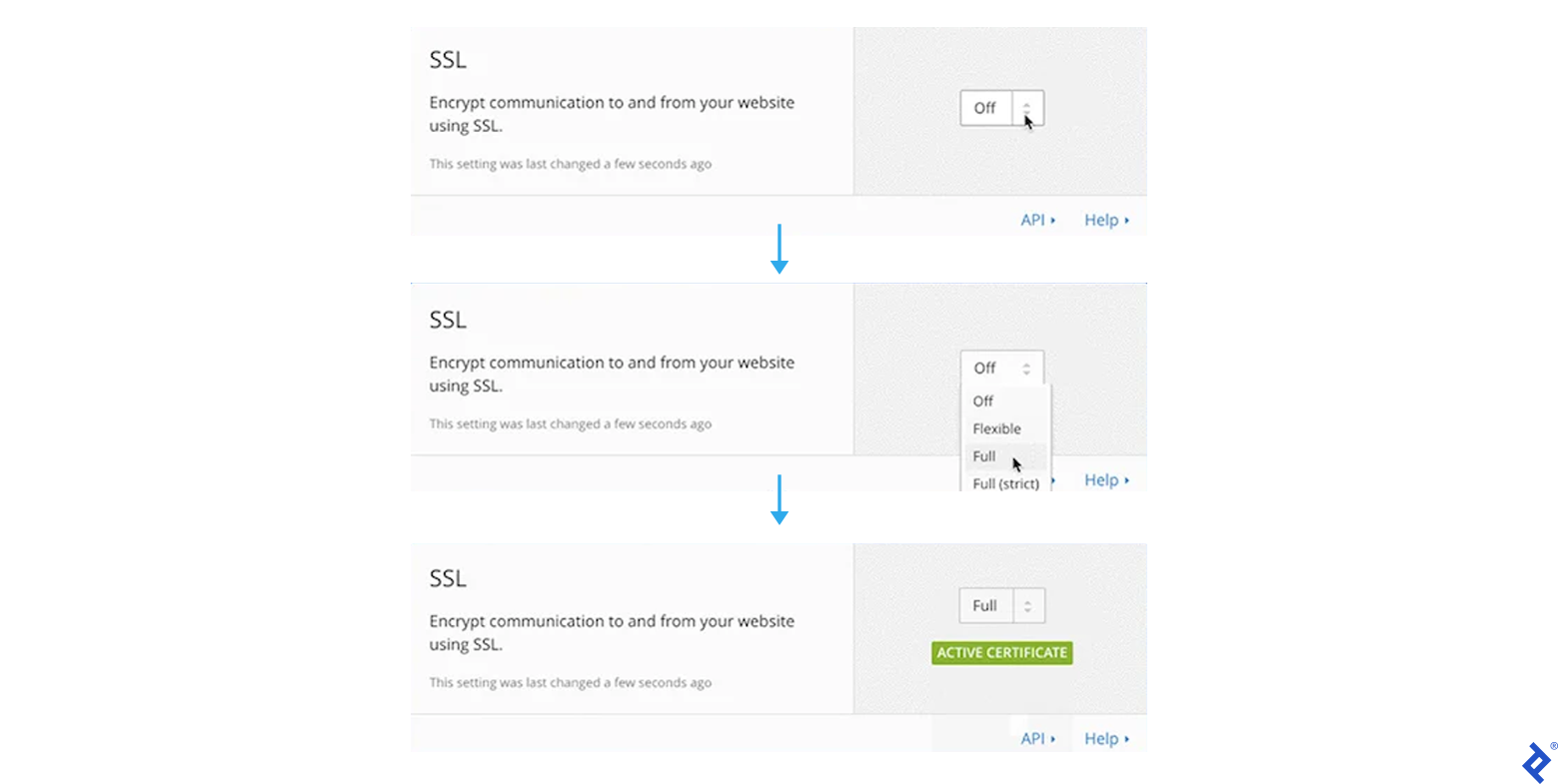
Flip the switch on “Automatic HTTPS Rewrite” to silence those pesky mixed content warnings.
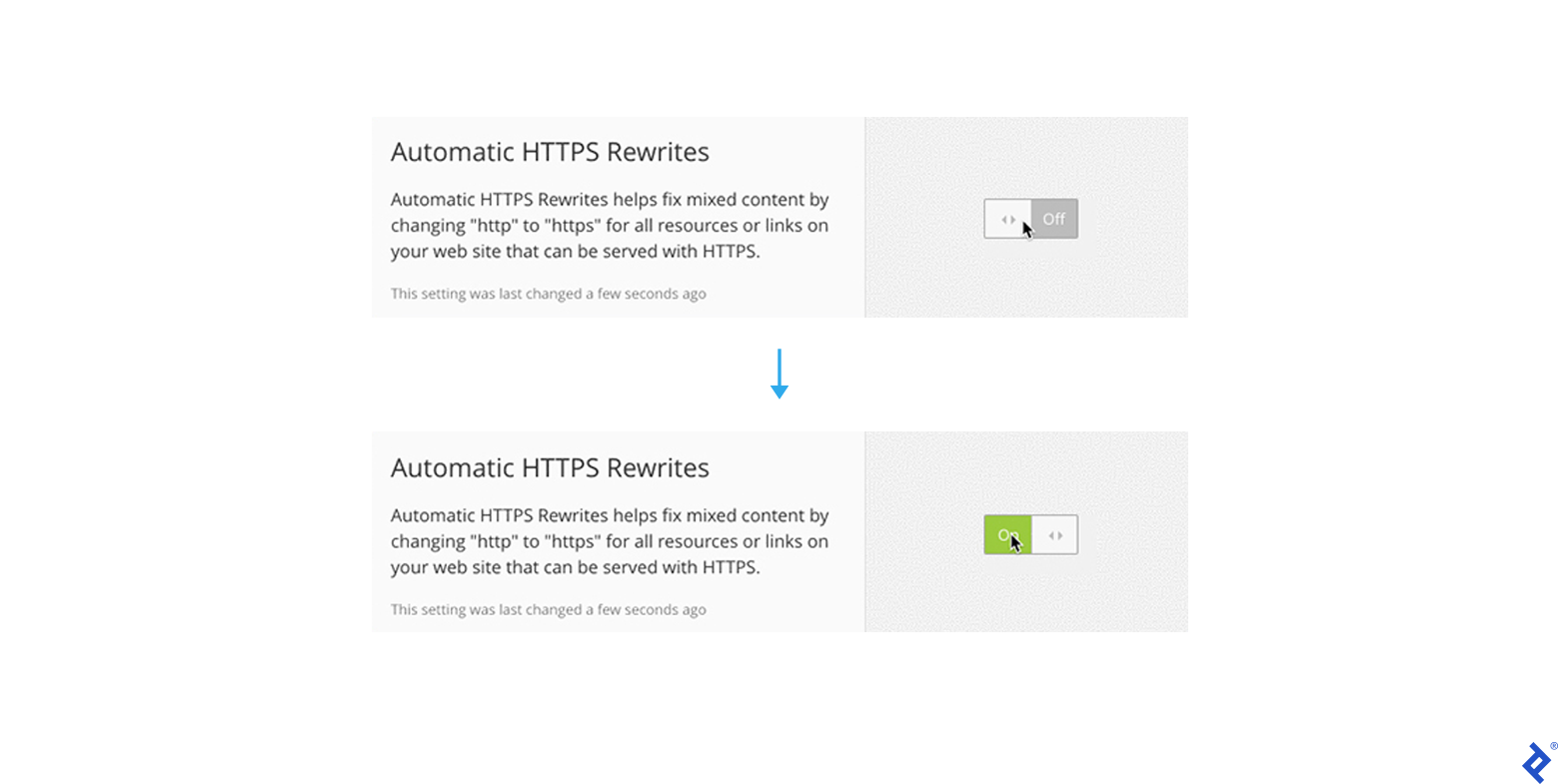
Now our website is bilingual – it speaks both HTTP and HTTPS. Let’s make HTTPS the official language for our domain.
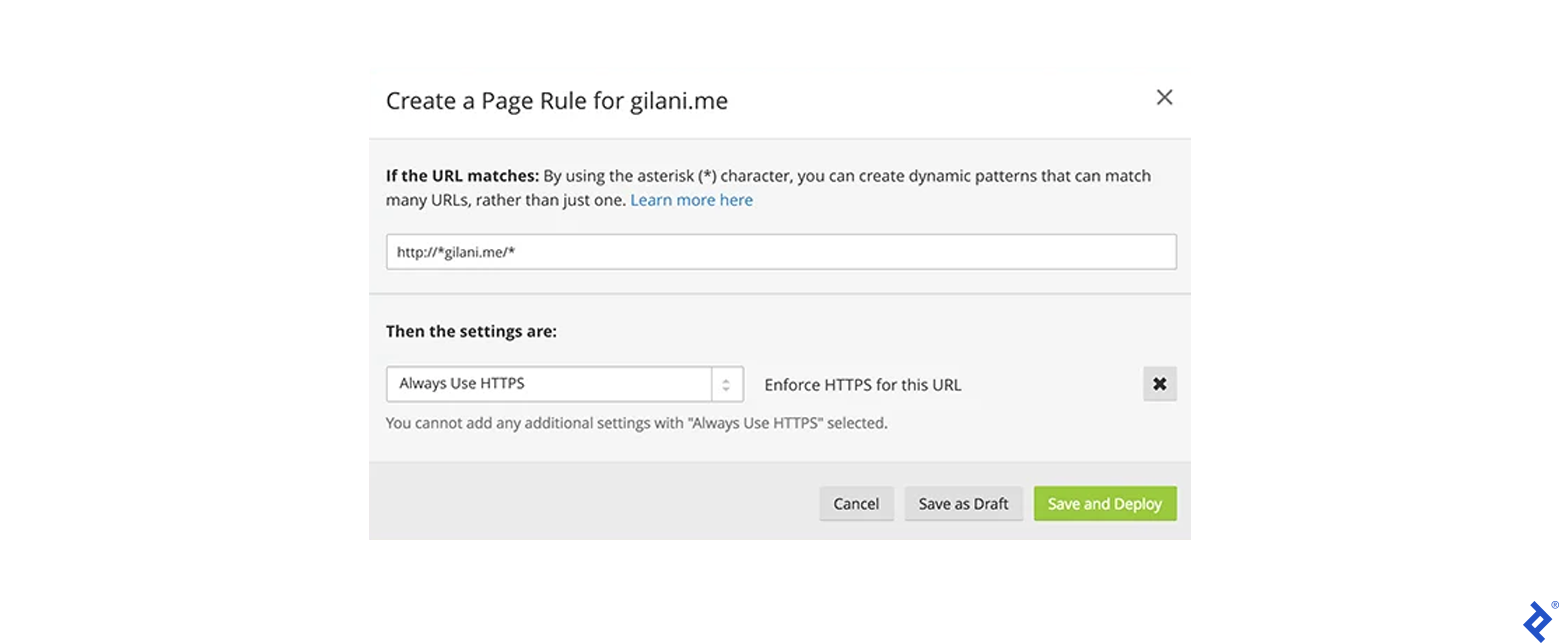
And there you have it! Our website should now always load securely over HTTPS, complete with a shiny green “Secure” badge of honor in Chrome.
Final Thoughts and Security Considerations
We’ve covered a lot of ground, but there are a few loose ends I want to tie up.
Those of you with a keen eye for security might have noticed a couple of potential vulnerabilities in our setup, specifically the lack of secure HTTP headers like:
Content-Security-Policy: this one’s all about keeping things on lockdown by only loading scripts and assets from a pre-approved list of hosts. It can even put a stop to inline JavaScript shenanigans.X-Frame-Options: this header is like the bouncer at a club – it prevents your website from being loaded inside an iframe, keeping those pesky XSS attacks at bay.
And you’re right to be concerned. Both GitHub pages and Cloudflare are a bit stubborn when it comes to letting you customize your HTTP headers. But don’t despair, we can still set a CSP using the handy HTML meta tag.
Just slip this into your web page:
| |
Now, here’s the catch – there’s no elegant way to set the X-Frame-Options header on GitHub pages. That means a sneaky attacker could potentially load your webpage into a specially crafted iframe and launch an XSS attack. But fear not! You can fight back by requiring users to enter their password or 2FA token for sensitive actions or by passing a CSRF token with every authenticated request.
Another concern that pops up is the whole public repository thing on GitHub. Some people worry that by hosting their website and source code publicly, anyone can just waltz in, fork it, or download it. But here’s the thing – that concern is a bit misplaced.
Static content isn’t really “source code” in the traditional sense. It’s not compiled or processed like a script before it’s served up to the user. So if someone runs a web crawler on your site, they’ll get the exact same static copy that they would if they downloaded it from your repository. Hosting your code on GitHub might make it slightly more convenient to grab a copy of your website, but it’s not exposing anything that wasn’t already publicly accessible.
Scaling to Infinity and Beyond
The beauty of the ideas we’ve explored today is that they’re not just limited to free web hosting for small-time projects.
You can build a sophisticated front-end layer powered by a cutting-edge JavaScript framework, connect it to a robust cloud-based Backend-as-a-Service (BaaS) like Firebase, and create impressive applications without losing sleep over servers, uptime, or other infrastructure headaches.
Building the next big web-based game? GameSparks has got you covered.
Confession Time and Useful Links
Okay, time to come clean. I might have made it seem like I manually published my React app to gh-pages, but that’s not entirely true. I was working on the master branch, and when it was time to deploy, I just ran npm run deploy, which triggered a build script that took care of pushing the build to gh-pages. If you’re curious about the behind-the-scenes magic, check out the master branch of my repository.
Key Takeaways
The Good Stuff:
- Deployments that happen at the snap of a finger
- Collaboration so easy, it practically feels like cheating
- A secure hosting environment that’ll give you peace of mind
Things to Keep in Mind:
- You’re at the mercy of GitHub and Cloudflare when it comes to HTTP headers.
- Downloading a copy of your website is pretty darn easy.
- You’ll need to be comfortable with GitHub.
- You’re relying on external vendors.
Links to Fuel Your Curiosity:
- The source code for my app is hanging out at amingilani/price-check
- The app itself is alive and kicking at pricecheck.gilani.me, and it should be sticking around for the foreseeable future.