Many recent articles discuss the pros and cons of monorepos, but most are biased. This guide explains how and when to use monorepo architecture effectively for code management.
What Is a Monorepo?
A mono repository, as the name suggests, is an architectural concept. Instead of managing multiple repositories, you store all isolated code components within one repository. It’s crucial to note the word “isolated”—monorepo architecture is not synonymous with monolithic apps. You can keep various logical apps within a single repository; for instance, a website and its corresponding iOS app.
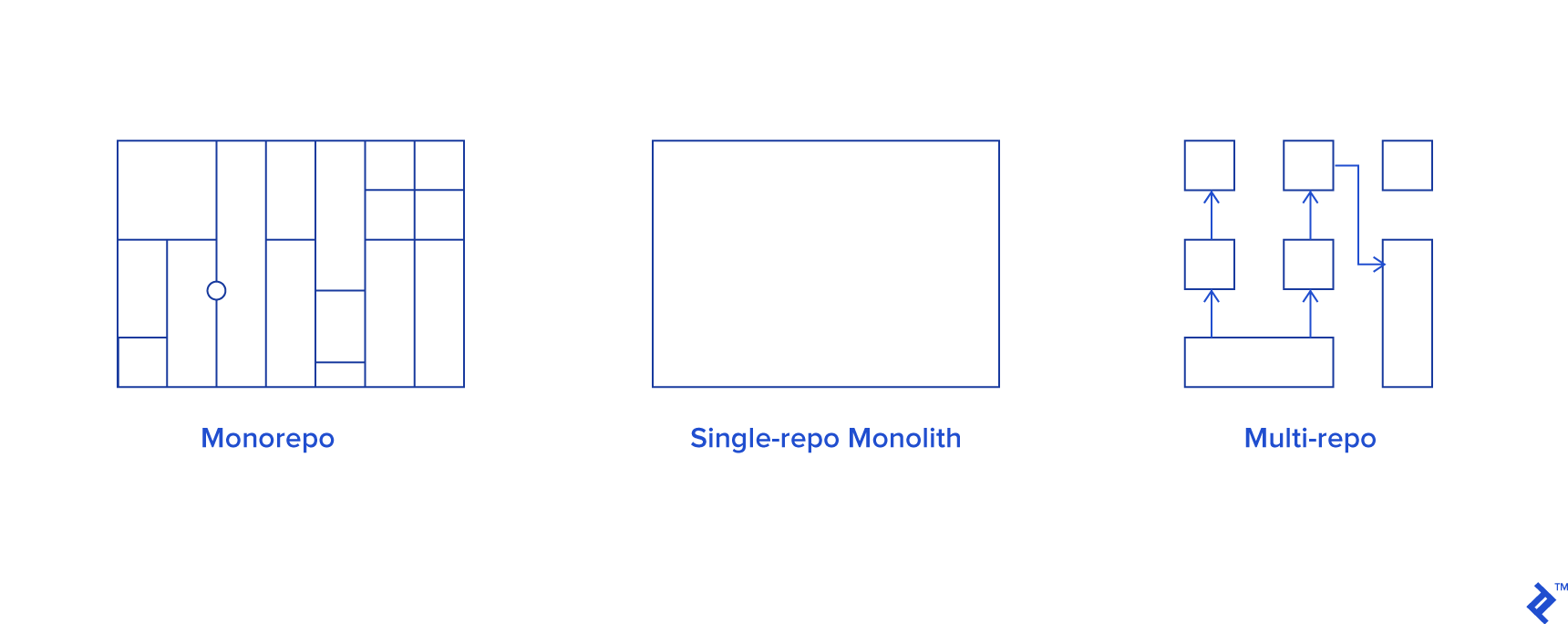
While this concept originated about a decade ago with companies like Google, its widespread adoption has only recently become a hot topic. This resurgence is largely attributed to significant advancements in the past 5-6 years. Tools like ES6, SCSS preprocessors, task managers, and npm have drastically changed the development landscape. Maintaining even a small React-based app now involves managing project bundlers, test suites, CI/CD scripts, Docker configurations, and more. Imagine scaling this to a large platform with numerous functionalities. When considering architecture, two primary goals emerge: separating concerns and eliminating code duplication.
A common approach is to isolate large features into packages and access them through a single entry point in the main app. However, managing these packages becomes challenging with individual workflows, configurations, and build processes. Creating a new package shouldn’t mean replicating configurations and slowing down development. This is where monorepos shine.
A monorepo consolidates everything into a single source of truth, eliminating redundant configurations for testing, building, and deployment. This approach offers scalability, separation of concerns, code sharing through common packages, and numerous other benefits. However, there are drawbacks to consider. Let’s examine the pros and cons of using monorepos in practical scenarios.
Monorepo Advantages:
- Centralized Configuration and Testing: With everything in one repo, you configure CI/CD, bundlers, and testing once, reusing them across all packages. This simplifies the build process and ensures consistent testing across the project.
- Atomic Commits for Global Feature Refactoring: Implementing global changes becomes streamlined. Instead of multiple pull requests and build order complexities, a single atomic pull request encapsulates all feature-related commits.
- Streamlined Package Publishing: Introducing features within interdependent packages becomes effortless. A single command, requiring minimal additional configuration (discussed in the tooling section), manages dependencies and publishing. Tools like Lerna, Yarn Workspaces, and Bazel provide robust support for this.
- Simplified Dependency Management: A single
package.jsoneliminates the need to update dependencies across multiple repositories. - Code Reusability with Isolation: Monorepos enable code sharing through packages while maintaining separation. You can choose between referencing remote packages or utilizing local symlinks for local development, facilitated by tools like Lerna or custom scripts.
Monorepo Disadvantages:
Granular Access Control Limitations: Sharing specific parts of a monorepo is impossible. Granting access means exposing the entire codebase, potentially leading to security concerns.
Performance Bottlenecks in Large Projects: In projects with millions of commits and hundreds of developers working concurrently, Git’s performance can suffer. Git’s Directed Acyclic Graph (DAG) structure for history representation becomes sluggish with massive commit histories. Additionally, a large number of refs (branches/tags) and tracked files exacerbate the issue, although solutions like Git LFS can mitigate the file weight problem.
Note: Facebook is actively addressing VCS scalability issues by patching Mercurial, so this might become less of a concern soon.
Extended Build Times: A centralized codebase inevitably leads to longer CI build times due to the increased volume of source code requiring processing.
Tool Review
The ecosystem of monorepo management tools is constantly expanding. While this repo provides an overview of popular solutions, let’s focus on those widely used in the JavaScript realm:
- Bazel: Google’s monorepo-focused build system (More details: awesome-bazel)
- Yarn: A JavaScript dependency manager supporting monorepos through workspaces.
- Lerna: A Yarn-based tool for managing JavaScript projects with multiple packages.
While these tools share similarities, nuances set them apart.
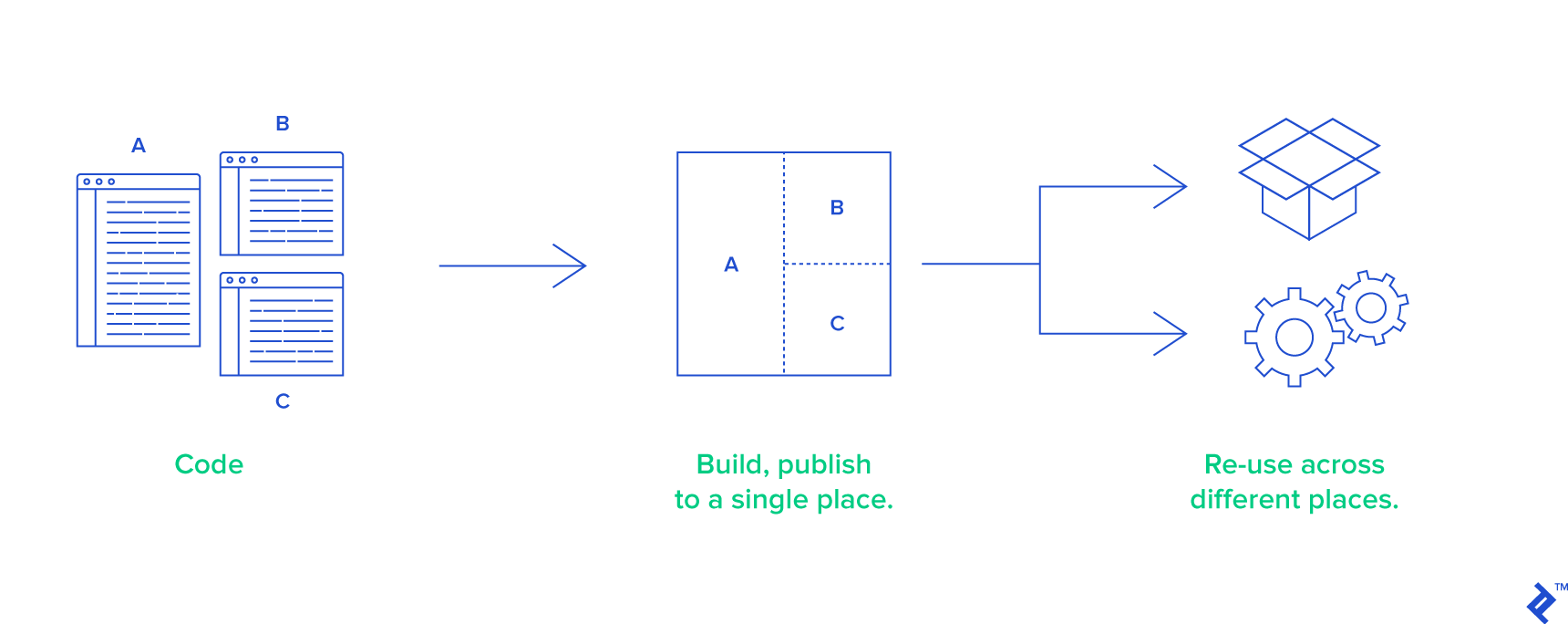
Part 2 of this article will delve deeper into Lerna’s workflow and other tools. For now, here’s a brief overview:
Lerna
Lerna simplifies managing semantic versions, setting up build workflows, publishing packages, and more. It assumes a “packages” folder containing all isolated code modules, alongside a main app (e.g., in the “src” folder). Lerna iterates through these packages, performing actions like version bumping, dependency updates, and builds.
Lerna offers two package usage approaches:
- Without Remote Publishing (NPM): This approach utilizes local package references, eliminating the need for symlinks.
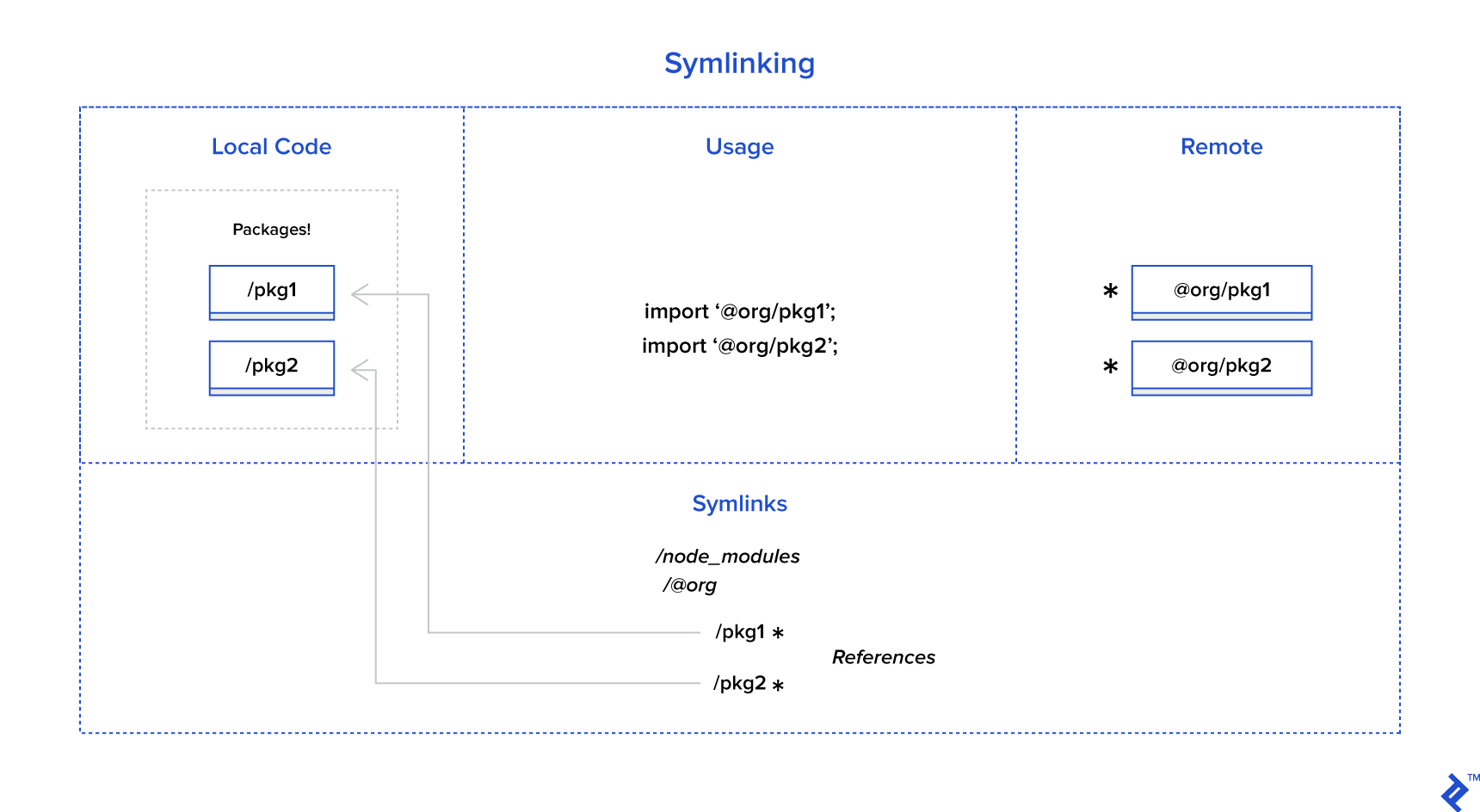
- With Remote Publishing: Packages are imported from remote sources (e.g.,
import { something } from '@yourcompanyname/packagename;). Local development requires symlinks to prioritize local packages overnode_modules/. Lerna simplifies this withlerna bootstrap, automatically linking packages before launching Webpack or similar bundlers.
Yarn
Initially, Yarn was solely an NPM dependency manager. However, version 1.0 introduced Workspaces, bringing monorepo support. While initially unstable, it has matured for production use.
A Workspace is essentially a package with its own package.json and specific build rules (e.g., a separate tsconfig.json for TypeScript projects). While achievable with bash scripts, Yarn Workspaces simplify dependency installation and updates within each package.
Yarn Workspaces offer several key benefits:
- Centralized
node_modules: All package dependencies reside in a single root folder, unlike Lerna’s approach. - Dependency Symlinking: Facilitates local package development.
- Unified Lockfile: A single lockfile manages all dependencies.
- Focused Dependency Updates: The
-focusflag limits dependency reinstallation to specific packages. - Lerna Integration: This popular setup leverages Yarn’s installation and symlinking capabilities, leaving publishing and version control to Lerna, simplifying the development process.
Useful links:
Bazel
Designed for large-scale applications, Bazel handles multi-language dependencies across various programming languages (Java, JS, Go, C++, etc.). While often overkill for small to medium-sized JS projects, Bazel’s performance shines in larger projects.
Similar to Make, Gradle, and Maven, Bazel relies on a BUILD file within the workspace. This file, written in a human-readable build language resembling Python (Starlark), defines build rules and project dependencies.
While the BUILD file involves boilerplate, readily available configurations ease the process. Bazel’s build process comprises:
- Loading: Relevant BUILD files based on the target.
- Analyzing: Inputs and their dependencies are analyzed, applying build rules to generate an action graph.
- Executing: Build actions are executed on the inputs until the final outputs are generated.
Useful links:
- JavaScript and Bazel – Setting up a Bazel project for JS from scratch.
- JavaScript and TypeScript rules for Bazel – JS boilerplate.
Conclusion
Monorepos are a tool with ongoing debates about their future. Nevertheless, they excel in specific scenarios, providing an efficient solution. Recent years have brought significant improvements, enhancing flexibility, addressing issues, and simplifying configurations.
While challenges like Git performance in large-scale projects persist, ongoing efforts like Facebook’s work on VCS scalability offer promising solutions.
If you’re interested in building a robust CI/CD pipeline, check out How to Build an Effective Initial Deployment Pipeline with GitLab CI.