Mobile and web applications typically need a back-end server. Web applications use web servers to deliver content. Applications also store user information and media like images and videos. Communication between the application and the server often happens through an API, which is typically REST-based.
Applications are built using different programming languages. iOS apps are written in Swift or Objective-C, while Android apps use Java or Kotlin. Web applications leverage HTML, CSS, JavaScript, and frequently utilize complex frameworks like Angular or React. Front-end developers must be skilled in these languages and their corresponding development tools.
Back-end servers utilize languages such as Go, Java, PHP, and Python. Each language has its own set of libraries for building intricate applications.
Many developers specialize as either front-end or back-end developers. Full-stack developers, proficient in both, are less common.
Running and maintaining back-end servers presents challenges. Servers require building, updating, backing up, and securing to prevent data loss or unauthorized access. They also need hostnames and IP addresses for connectivity.
What Is Firebase?
Firebase](https://firebase.google.com/) began as a mobile messaging framework acquired by Google. It has since become a comprehensive suite of over 25 components integrated with the [Google Cloud Platform.
Firebase provides software development kits (SDKs), enabling mobile and web developers to leverage cloud capabilities simply, securely, and reliably. These SDKs automatically handle poor network connections. Firebase offers a web console for managing and securing components, along with command-line tools and REST APIs for advanced use.
Some Firebase components are more popular than others. Dependencies between components are minimal, allowing for gradual adoption of features. Firebase authentication and analytics are the most widely used.
Firebase has become a platform for mobile and web front-end developers to create complete applications without managing back-end servers. Recent advancements have significantly simplified serverless solutions, providing a practical, scalable, and cost-effective alternative to Cloud Virtual Machine server solutions.
Firebase Pricing and Billing Plans
Firebase’s basic plan, Spark, is free. While cloud resource usage is limited, the allowances are generous, allowing small applications to run without cost.
Websites up to 1GB with less than 10GB/month transfers, Firestore databases up to 1GB with 10GB/month network traffic, and Cloud storage up to 5GB with 1GB/day downloads are covered under the Spark plan.
Applications requiring more resources can opt for a paid plan like “pay as you go.” Spark plan limits still apply, and billable charges are minimal. Pricing details are available at the Firebase pricing page.
Virtual machines in the cloud incur charges even when idle. Firebase’s serverless solutions “scale to zero,” meaning resources run only when actively used, ideal for businesses with fluctuating activity.
How to Set Up Firebase
An email account, preferably Gmail, is needed for authentication. Create one at https://mail.google.com.
A Google Cloud Platform (GCP) account is also necessary. A free trial with $300 credit for a year is available here. Credit card verification is required, and Google may place a temporary $1 charge. Monthly charges apply if billing is enabled and resources are used. Alternatively, Google provider companies offer billing intermediation with their own plans and potential free trials.
Regularly monitoring the Cloud Console’s billing section is crucial to track usage and avoid unexpected costs from idle resources.
Firebase projects are also GCP projects. You can create a GCP project and import it to Firebase, or create a Firebase project, which automatically creates a GCP project. The Firebase console is at here.
Setup differs for Android, iOS, and web applications. Instructions are available in the official Firebase Guides.
The Firebase Command Line Interface (CLI) tools are necessary for some tasks and require Node.js and npm. On macOS or Linux, use sudo with npm commands:
sudo npm install -g firebase-tools
Authentication and Authorization
Firebase authentication, a widely used component, allows users to choose from various authentication methods: email/password, phone numbers, or federated identity providers like Google, Facebook, Twitter, and GitHub. Multiple methods can be enabled.
The Firebase UI presents authentication options:
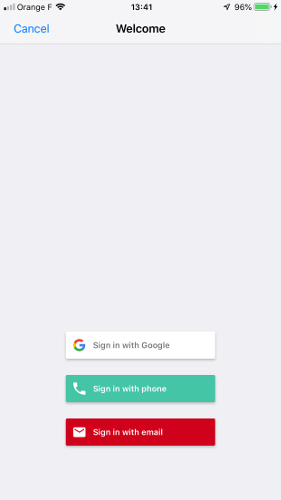
Firebase provides user interfaces for authentication, invoked with a few lines of client-side code. APIs are also available for manual authentication. Upon successful authentication, an identity token is generated for back-end verification.
APIs enable programmatic user management, including:
- Creating, updating, and deleting users
- Searching users by email or phone number
- Accessing account creation, last login date/time
- Validating email addresses and phone numbers
Many applications desire numerous user sign-ins. For instance, Google Mail users can authenticate to any app allowing Google authentication. Authorization restricts app access to specific users by storing email-role associations. Upon successful authentication, the email is checked against stored data, granting access based on roles.
Firebase Hosting
Firebase Hosting serves static web content, including JavaScript, without needing a web server. Content is cached globally via a Content Delivery Network (CDN) for fast access worldwide.
Multiple websites can be hosted by adding them to a Firebase project’s Hosting section in the Firebase Console. Content is delivered securely over SSL using two URLs: [https://site-name.web.app] and https://site-name.firebaseapp.com, where site-name is the project name or a custom name.
Using your domain name is simple if you can modify DNS records. Add your domain to a Firebase Console site, obtain a DNS TXT record, and add it to your domain’s DNS to verify ownership. Once visible, obtain DNS A records for the site. An SSL certificate is automatically provisioned. The process can take up to several hours but often completes within 20 minutes.
To add content, create a site directory, navigate to it in the command line, and initialize the Firebase project:
| |
Select the project and required client services (services can be added later).
Create firebase.json to define the website root directory and excluded files. Also, create a .gitignore file to exclude files from version control:
| |
Copy static content into the “public” directory and deploy the site:
| |
Content updates involve changing files and redeploying. Each deployment is versioned in the Firebase Console, allowing rollback to previous versions.
Firebase Hosting can rewrite URIs to files, Cloud Functions, and Cloud Run, simplifying domain assignments. Add a “rewrites” section to firebase.json (deployment fails if the service is nonexistent):
| |
Data Storage
Firebase provides client APIs for accessing cloud data storage, offering three types:
- Realtime Database
- Cloud Firestore
- Cloud Storage
This enables mobile and web clients to manage data without a server.
Realtime Database
Realtime Database is a cloud-hosted NoSQL database that synchronizes data in real-time across connected devices, supporting Android, iOS, and web. Data is stored in a JSON tree structure, and security rules manage data access.
Each device maintains a local database copy, ensuring data availability offline. Upon reconnection, local and cloud copies synchronize.
Applications read data using listeners attached to JSON tree nodes. When data changes, listeners receive callbacks with updated values. Realtime Database supports queries, returning a node and its children.
Default security rules restrict all data access. Rules, applied globally or to individual nodes, control read/write access and perform validation.
Realtime Database suits small data sets with simple structures. The free limit is 1GB.
Cloud Firestore
Considered the successor to Realtime Database, Cloud Firestore expands its functionality. Data is organized in a hierarchical collection of documents, each containing key-value pairs and optional sub-documents. Queries allow complex filtering and sorting, returning only complete documents, not sub-documents.
Cloud Firestore is set to replace Cloud Datastore and can operate in Datastore or native mode. Datastore applications will be migrated automatically.
Cloud Firestore is suitable for relatively small data sets with potentially complex structures. The free limit is 1GB.
Cloud Storage
Cloud Storage handles files like images and videos. Clients can upload and download files directly to/from the cloud without a server. The free limit is 5GB.
Cloud Functions
Cloud Functions are crucial for serverless applications. Written in JavaScript, TypeScript, Python, or Go, they are deployed directly to the Google cloud. Triggers include HTTP requests or cloud events like writing to Cloud Storage.
Cloud Functions handle one request at a time, but the cloud automatically scales by replication. Python functions use Flask to manage HTTP requests. Functions receive a request object and return the response body.
A basic Python Cloud Function requires a working directory with the entry point in main.py:
| |
Dependencies managed by pip are listed in requirements.txt:
| |
Deployment uses the gcloud tool, specifying function name, language, and trigger:
| |
The function URL, displayed upon deployment, can be retrieved using the “describe” command:
| |
Cloud Functions call Google Cloud and Firebase APIs for back-end functionality. Logging provides execution details, and additional logging is easily added. Logs are accessible via the Stackdriver Logging UI or the gcloud tool:
| |
Functions can be managed and deleted in the Google Cloud Console:
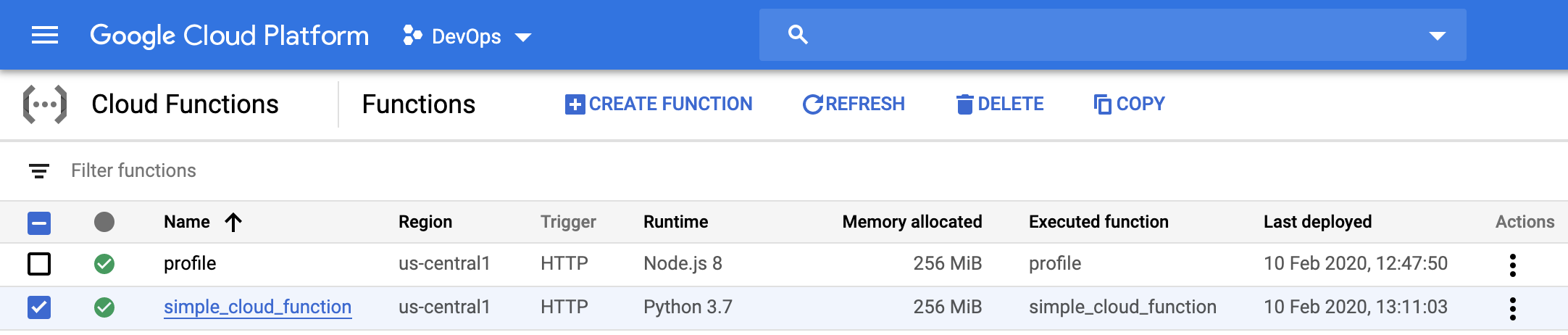
Cloud Functions are best for infrequent operations, like generating thumbnails upon image uploads. The free limit is 125,000 monthly invocations.
Cloud Run
Cloud Run simplifies serverless deployments by running Docker containers in the cloud without complex infrastructure setup. It offers managed mode using the Knative runtime (built on Kubernetes) and Anthos (Kubernetes-based, allowing container deployment across clouds and data centers). Kubernetes cluster setup and management are automated.
Cloud Run manages any application packaged as a Docker image, automatically scaling containers based on demand and scaling down to zero when idle. Unused services incur no charges.
Containers need a web server for HTTP request handling. Python services typically use Flask, with the entry point in app.py:
| |
A Dockerfile defines the image creation:
| |
Cloud Run containers are deployed directly:
| |
Missing service details like name, platform, region, or authentication settings are prompted for during deployment. The service URL, displayed upon completion, can also be obtained using the gcloud command:
| |
Firebase Hosting’s rewrite rules simplify URL management, avoiding complex random numbers in service URLs.
Services can be managed and deleted in the Google Cloud Console:
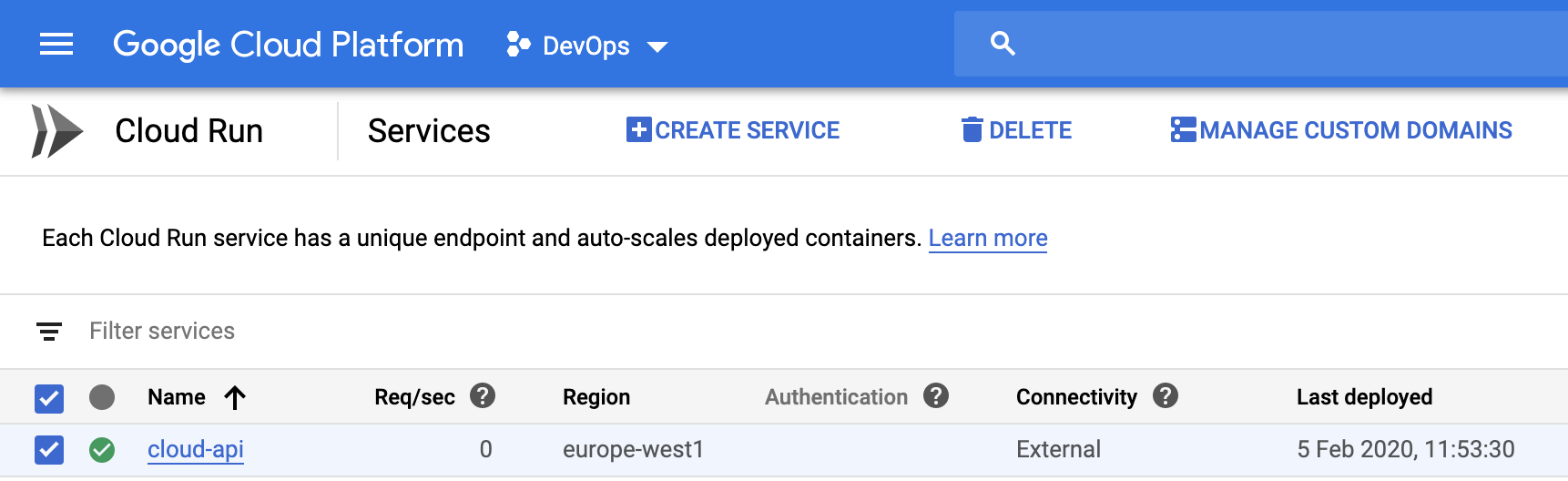
Cloud Run is well-suited for hosting REST APIs. Free monthly limits include 180,000 CPU seconds, 360,000 GB-seconds of memory, 2 million requests, and 1GB network egress (egress limit applies to North America deployments).
Authentication
Cloud Functions and Cloud Run containers are publicly accessible by default. IAM rules in the Cloud Console restrict access to project members, Google Groups, or specific emails.
Restricted services require an identity token in request headers for authorized access. Obtain the token using the gcloud command or during Firebase authentication:
| |
An Authorization header is required:
| |
Summary
Google Cloud Platform and Firebase offer tools that streamline mobile and web application development. The need for back-end servers can be eliminated by allowing clients direct access to cloud services or by deploying serverless back-end code using Cloud Functions or Cloud Run.
Migrating existing applications to serverless architectures can be done incrementally. This evolving technology may eventually replace traditional server solutions.