Google made waves at Google Marketing Live in May with its latest updates. Now that things have calmed down, I want to highlight what I consider the sleeper hit: the new campaign-level conversion setting for bid management.
This guide covers everything you need to know about this new bid setting. Before diving into the novità, let’s recap how conversion tracking worked before the announcement.
What is conversion tracking?
Conversion tracking allows advertisers to pinpoint and log actions valuable to their business within Google Ads. By setting it up, advertisers give the Google algorithm the information needed to understand what leads to success in an account.
How does the algorithm gather these signals?
Advertisers manage their conversion tracking in the Google Ads measurement section:
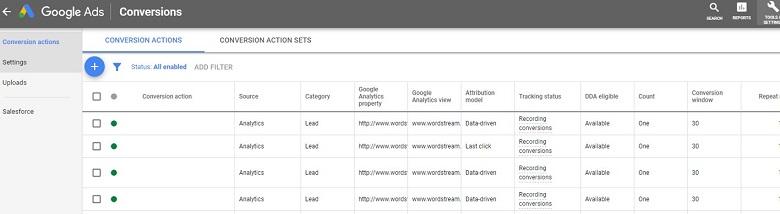
Conversion actions can be imported from Google Analytics or tracked using the Google Ads pixel. Advertisers can add as many valuable actions as they need, regardless of the tracking method. Once defined, Google records a conversion every time a user performs one of those actions.
What does the algorithm do with these signals?
As your account accumulates conversion data, the algorithm learns which signals lead to success. With enough learning, the algorithm optimizes your ad delivery, influencing your eligibility for placements in the ad auction. Without this data, the algorithm remains unaware of what matters most to advertisers: growing their business or their clients’ accounts through optimized Google Ads delivery. One constant remains: Conversion tracking is critical for a successful Google Ads account. However, the account-level conversion setting had a gap—it lacked the ability to tell Google which conversion action is most important for a specific campaign.
Introducing campaign-level conversion setting
“New bidding controls to help meet your goals” was among the 10 announcements made at Google Marketing Live. While this announcement encompasses several innovations, campaign-level conversion setting immediately grabbed my attention. Why did Google introduce this bidding change? Google states that over 70% of their advertisers are using automated bidding today. They elaborate:
“And while many of you have told us that Smart Bidding has helped drive better performance, you’ve also asked for more flexibility to reach your business goals.”
What is campaign-level conversion setting?
Campaign-level conversion setting allows advertisers to specify which conversion actions the algorithm should track and optimize for a given campaign.

So, what’s different?
Previously, with account-level conversion settings, all conversion actions within an account contributed to your overall conversion metrics. Now, campaign-level conversion settings empower advertisers to define which specific action(s) should be reflected in their conversion data. This means the new setting provides Google with greater clarity regarding which conversion actions are most relevant for tracking and optimization. In essence, you can now tell Google what truly matters for your business objectives. Let’s compare the two settings using a scenario from our account. Here’s an example of one of our ads designed to drive prospects to sign up for a free trial:

Imagine a user clicks this ad, lands on our page, but leaves and later converts by downloading a whitepaper. With the account-level conversion setting, this would count as a conversion, just like a trial signup. Conversely, using the campaign-level conversion setting focused on free trials, this wouldn’t register as a conversion. With this setting, the algorithm only receives positive signals when a user starts a free trial. Let’s illustrate this with a real-life analogy: My objective is to exercise, with a sub-objective of running marathons. Every time I set this objective, I get this reminder from our very own Mikayla Wyman:

To reach my main objective (exercise), I plan and track various exercises as part of a training plan, including yoga, weightlifting, soccer, spinning, kickboxing, and running. However, to progress towards my sub-objective (marathons), I need a tailored schedule focused on long-distance runs. While other workouts are beneficial, completing long runs is the most crucial action for marathon preparation. How does this relate to conversion tracking? While training, tracking my runs is the most valuable metric. Tracking every workout—yoga, soccer, spinning, and running—as a conversion wouldn’t accurately reflect my marathon readiness. Therefore, for this sub-objective, the campaign-level conversion setting is ideal—exclusively tracking and improving my runs. TL;DR: While switching to campaign-level conversion settings might reduce the quantity of conversions, it should enhance the algorithm’s ability to deliver the conversions most relevant to your campaign.
Setting up campaign-level conversion tracking
To utilize this new setting, go to your campaign settings and access the conversion dropdown:
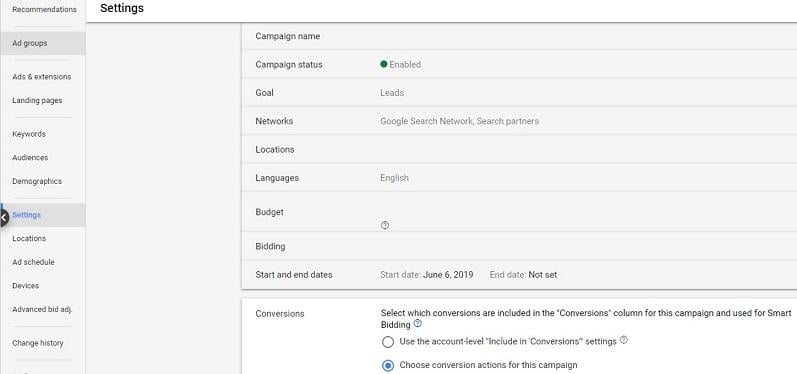
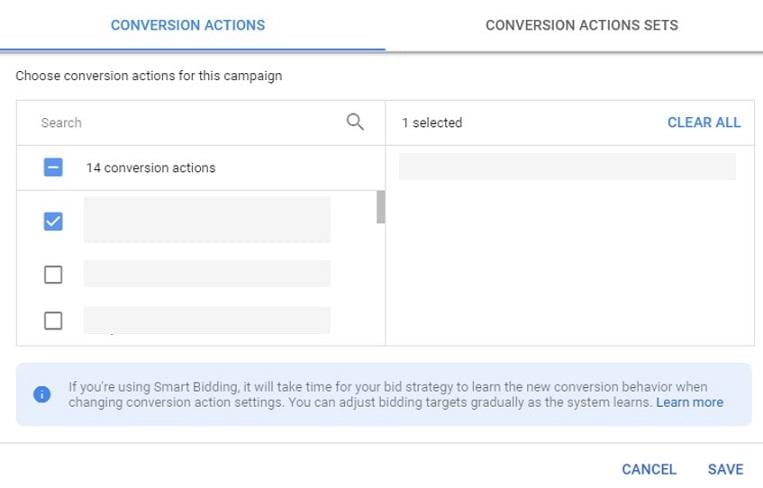
Selecting “choose conversion action for this campaign” reveals all your conversion actions, allowing you to choose the specific one(s) you want to track:
How does this new bid optimization perform?
I was excited about this new setting’s potential impact. We quickly set up experiments, and I have some data to share. Disclaimer: I won’t disclose specific campaign/conversion action details, but this data is pulled directly from our account’s tests.
Campaign #1
Experiment: Campaign-level conversion setting with conversion action ABC Results:
| Campaign: | Conversion action: | CPA | CNVR |
| Original | ALL | $28 | 6.35% |
| Original | Conversion action ABC Segmented campaign by conversion action | $62 | 2.9% |
| Experiment | Conversion action ABC | $42 | 3.31% |
| Campaign: | Conversion action: | CPA | CNVR |
| Original | ALL | $104 | 4.2% |
| Original | Conversion action XYZ Segmented campaign by conversion action | $165 | 2.6% |
| Experiment | Conversion action XYZ | $178 | 2.3% |