Is debugging your web front-end a constant struggle with intricate event chains? Have you ever attempted to refactor a UI built on jQuery, Backbone.js, or other popular JavaScript frameworks?
The most frustrating part is often tracing these unpredictable event sequences and preemptively addressing all potential issues. A true nightmare!
I’ve always sought ways to escape this dreaded aspect of front-end development. While Backbone.js provided much-needed structure, its verbosity for simple tasks wasn’t ideal.
Then I discovered Elm.
Based on Haskell, Elm is a statically typed functional language with a simpler specification. Its Haskell-built compiler translates Elm code into JavaScript.
Initially designed for front-end development, Elm has found its way into server-side programming as well.
This article explores how Elm revolutionizes front-end development and introduces its functional programming basics. We’ll build a simple shopping cart application to illustrate.
Why Elm?
Elm boasts numerous advantages for clean front-end architecture, offering better HTML rendering performance advantages compared to popular frameworks, even React.js. It empowers developers to write code that practically eliminates common runtime exceptions plaguing dynamically typed languages like JavaScript.
The compiler automatically infers types and provides user-friendly error messages, highlighting any potential issue during development.
With 36,000 lines of Elm in production for over a year, NoRedInk hasn’t encountered a single runtime exception. [Source]
You don’t need to convert your entire JavaScript application to experiment with Elm. Its excellent JavaScript interoperability allows you to rewrite even small sections in Elm.
Elm also has excellent documentation that not only explains its features but also guides you in building front-ends using The Elm Architecture, promoting modularity, code reuse, and testing.
Building a Simple Cart
Let’s start with a concise Elm code snippet:
| |
Text preceded by
--denotes a comment in Elm.
We define a cart as an item list, each a record with two fields: product and quantity. Products are records with name and price.
Adding a product involves checking for its existence in the cart. If present, we do nothing; otherwise, we add it as a new item. This check involves filtering the list, matching items with the product, and checking if the resulting list is empty.
The subtotal calculation iterates over cart items, multiplying quantities by prices and summing the results.
This represents a minimalistic cart and its functions. We’ll gradually enhance it into a complete web component, or “program” in Elm terms.
Let’s begin by adding types to our identifiers. While Elm infers types, explicit annotations maximize the compiler’s capabilities.
| |
Type annotations enable the compiler to catch potential runtime exceptions early.
However, Elm’s benefits extend further. The Elm Architecture provides a simple yet familiar pattern for structuring front-ends:
- Model: Represents the application’s state.
- View: Provides a visual representation of the state.
- Update: Offers a way to modify the state.
If you consider the update component as the controller, it resembles the Model-View-Controller (MVC) paradigm.
As a pure functional language, Elm enforces data immutability, preventing model modification. Instead, we create new models based on previous ones using update functions.
This immutability eliminates function side effects, unlocking possibilities like Elm’s time-traveling debugger, discussed later.
Views re-render whenever model changes necessitate UI updates, ensuring consistent results for the same model data, much like pure functions returning consistent outputs for identical inputs.
Starting with the Main Function
Let’s implement the HTML view for our cart application.
Those familiar with React will appreciate Elm’s package for defining HTML elements. This eliminates reliance on external templating languages.
The Html package provides wrappers for HTML elements:
| |
All Elm programs begin execution with the main function:
| |
Here, main initializes the program with models, a view, and an update function. We define products and their prices, assuming an unlimited supply for simplicity.
A Simple Update Function
The update function brings our application to life.
It receives a message and modifies the state accordingly. We define it as a function taking two parameters (message and current model) and returning a new model:
| |
Currently, we handle a single message, Add product, calling the add method on cart with the product.
The update function’s complexity will grow with the application.
Implementing the View Function
Next, we define the cart’s view.
This function translates the model into HTML. However, it’s not merely static; it emits messages back to the application based on user interactions and events.
| |
The Html package provides familiarly named functions for common elements (e.g., section generates a <section> element).
The style function (from Html.Attributes) generates an object applicable to the section function for setting the element’s style attribute.
For reusability, it’s advisable to split the view into separate functions.
We embed CSS and layout attributes directly into the view code for simplicity. However, libraries exist to streamline process of styling from Elm code.
Note the button element and its associated Add product message for the click event.
Elm handles callback function binding, event generation, and update function invocation with relevant parameters.
Finally, let’s implement the remaining view component:
| |
This renders the cart’s contents. While it doesn’t emit messages, it must return Html Msg to qualify as a view.
The view not only lists items but also calculates and displays the subtotal based on the cart’s contents.
The complete Elm code is available here.
run the Elm program now would yield something like this:
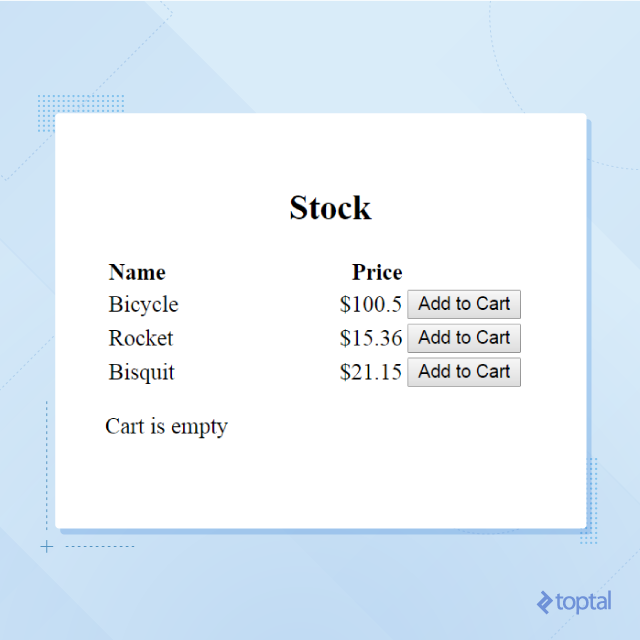
How does it work?
The main function initializes the program with an empty cart and hardcoded products.
Each “Add to Cart” button click sends a message to the update function, which modifies the cart and creates a new model. Model updates trigger view function invocation to regenerate the HTML tree.
Elm’s Virtual DOM approach (similar to React) ensures only necessary UI changes are applied for optimal performance.
Beyond Type Checking
Elm’s static typing enables the compiler to verify much more than just types.
Let’s modify our Msg type and observe the compiler’s response:
| |
We’ve added a new message type for changing product quantity. However, running the program without handling this message in the update function results in the following error:

Towards a More Functional Cart
We used a string for the quantity value previously, as it originates from an <input> element.
Let’s add a changeQty function to the Cart module, encapsulating implementation for potential future modifications without impacting the module’s API.
| |
We avoid assumptions about function usage. While qty is guaranteed to be an Int, its value is unknown. We validate the value and report an error if invalid.
We update the update function accordingly:
| |
The string quantity parameter from the message is converted to a number before use. Invalid number strings are reported as errors.
Here, we maintain the model upon encountering an error. Alternatively, we could update it to display the error as a message in the view:
| |
We use the Maybe String type for the error attribute in our model. Maybe either holds Nothing or a specific type’s value.
After updating the view function:
| |
You should see this:
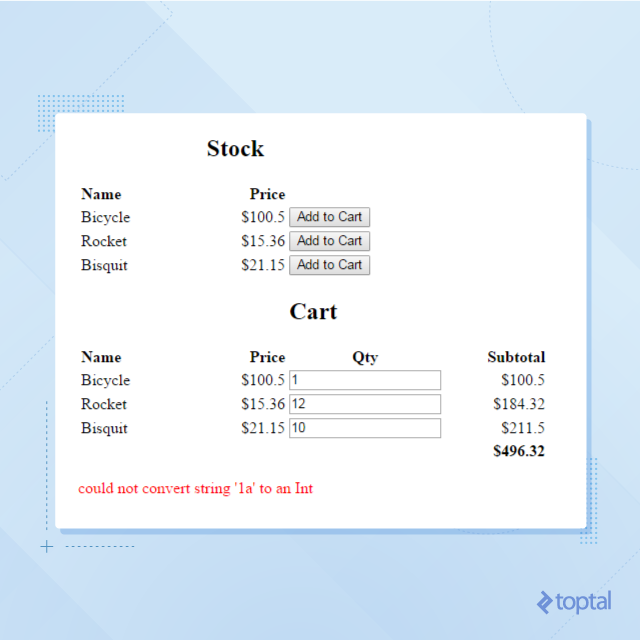
Entering a non-numeric value (e.g., “1a”) now triggers an error message, as shown in the screenshot.
Leveraging Packages
Elm has its own repository of open-source packages. The Elm package manager simplifies leveraging this resource. While smaller than repositories for languages like Python or PHP, the Elm community actively contributes new packages.
Notice the inconsistent decimal places in our view’s rendered prices?
Let’s replace our rudimentary toString usage with the superior numeral-elm package.
| |
We utilize the format function from the Numeral package. This formats numbers in a typical currency format:
| |
Automatic Documentation
Package publication to the Elm repository triggers automatic documentation generation based on code comments. See this in action with our Cart module documentation here. These were generated from comments within this file: Cart.elm.
A True Front-end Debugger
The compiler detects and reports most obvious issues. However, logical errors can still occur.
Elm’s immutable data and message-driven update function allow representing the entire program flow as a series of model changes. The debugger treats Elm like a turn-based strategy game, enabling features like time travel. It traverses the program flow by jumping between model changes throughout the program’s lifecycle.
Learn more about the debugger here.
Back-end Integration
You might wonder about Elm’s practicality beyond toy examples. Rest assured, it’s fully capable.
Let’s connect our cart front-end to an asynchronous back-end. For a unique twist, we’ll enable real-time inspection of all carts and their contents. In a real-world scenario, this could power marketing/sales features, provide user suggestions, estimate stock requirements, and more.
We’ll store the cart client-side and update the server in real-time.

We’ll use Python for our back-end for simplicity. The complete back-end code is available here.
It’s a basic web server using a WebSocket to track cart contents in memory. For simplicity, we’ll render everyone’s cart on the same page. This could easily be separated into different pages or Elm programs. Currently, users can view a summary of other users’ carts.
With the back-end established, let’s update our Elm app to exchange cart updates with the server. We’ll utilize JSON for payload encoding, which Elm handles seamlessly.
CartEncoder.elm
We’ll implement an encoder to convert our Elm data model into a JSON string. This requires the Json.Encode library.
| |
The library provides functions like string, int, float, and object to convert Elm objects into JSON encoded strings.
CartDecoder.elm
Implementing the decoder is more intricate due to Elm’s typed data. We need to map JSON values to their corresponding Elm types:
| |
Updated Elm Application
The final Elm code is more extensive and can be found here. Here’s a summary of the front-end application’s modifications:
We’ve wrapped the original update function to send cart content changes to the back-end upon each update:
| |
We’ve added a new message type, ConsumerCarts String, to receive server updates and update the local model accordingly.
The view now renders other users’ cart summaries using the consumersCartsView function.
A WebSocket connection subscribes to the back-end for updates to other users’ carts.
| |
The main function has also been updated. We now use Html.program with additional init and subscriptions parameters. init sets the initial model, while subscription specifies a list of subscriptions.
Subscriptions instruct Elm to listen for changes on specific channels and forward messages to the update function.
| |
Finally, we handle decoding the ConsumerCarts message received from the server, ensuring data integrity.
| |
Maintaining Front-end Sanity
Elm is different, requiring a shift in developer mindset.
Those accustomed to JavaScript might find themselves adapting to Elm’s approach.
However, Elm excels where other frameworks, even popular ones, often falter. It provides a way to build robust front-end applications without succumbing to verbose code.
Elm’s smart compiler and powerful debugger abstract away many JavaScript-related challenges.
It’s the answer to front-end developers’ long-standing desires. Now that you’ve seen it in action, give it a try and experience the benefits of building your next web project with Elm.