Running A/B tests on your ads is a fundamental aspect of managing pay-per-click (PPC) campaigns. While we typically experiment with different versions of headlines and descriptions, any method that strengthens the bond with our target demographic is a valuable asset. Should you find yourself seeking fresh ideas to test in your Microsoft Ads campaigns, consider experimenting with IF functions.
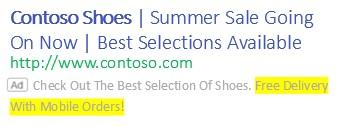
An example of an ad with IF functions via Microsoft Advertising. IF functions empower advertisers to tailor ad messages for specific user segments within a single text ad. This guide will illustrate how to implement IF functions in your Microsoft text ads and present audience-based testing concepts.
Setting up IF functions in text ads
IF functions fall under the umbrella of ad customizers within Microsoft Ads. When crafting a new expanded text ad for your search campaigns, you can activate the ad customizer selector using an opening curly brace “{” symbol. Since IF functions are not the sole ad customizer offered by Microsoft Ads, you’ll encounter additional options.
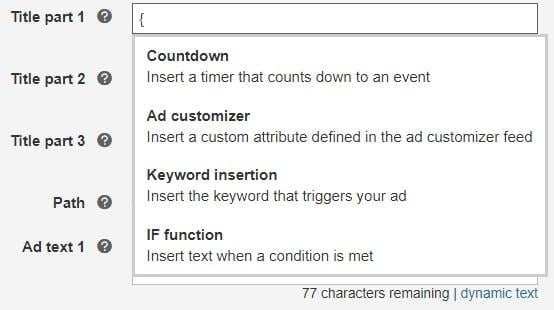
Upon selecting the IF function, you can customize your ad copy based on the user’s device or their audience affiliation. We’ll delve into each aspect subsequently.
Device-centric IF functions
User behavior patterns differ between mobile and desktop platforms. The user’s search intent on Bing might necessitate adapting the tone of our ad copy to better resonate with them, depending on their device. This is where IF functions shine by dynamically altering your message without requiring campaign segmentation by device. Consider this scenario:
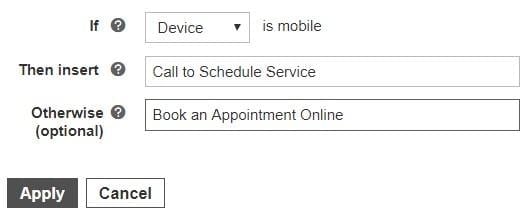
This example illustrates how an ad can adjust its call-to-action headline based on the device. If the advertiser observes that mobile users are more inclined to schedule appointments via calls, they can configure Microsoft Ads to display the headline “Call to Schedule Service” to this segment. Conversely, users accessing the ad from desktop devices will see the headline “Book an Appointment Online.”
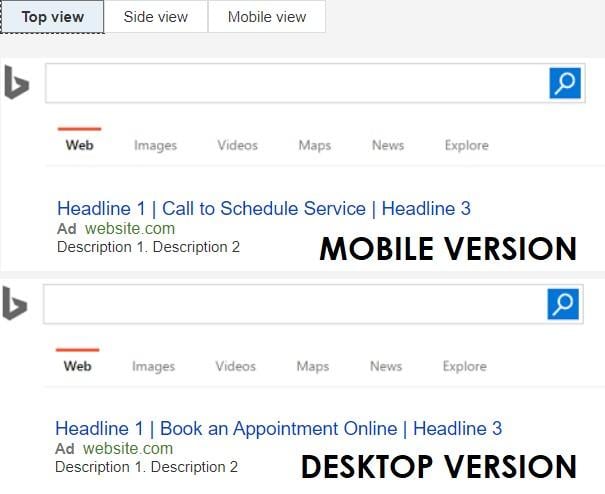
The primary rationale for implementing device-based IF functions stems from user behavior. Individuals searching on Bing using their smartphones are statistically more likely to initiate a call with a single click compared to desktop users, who would need to switch devices. Another consideration is the landing page’s user experience. A desktop environment might offer a smoother experience when filling out appointment booking forms (though optimizing landing pages for mobile is crucial). As such, prompting mobile users to call upon seeing your ad sets realistic expectations. This is merely one illustration of Microsoft IF functions. When analyzing your own search campaigns in Microsoft Ads, factor in your existing mobile performance, user intent, and mobile user experience. These elements significantly influence the ad copy you choose to test with IF function-based ad experiments.
Audience-centric IF functions
This is where we can truly explore novel combinations and testing strategies for our text ads. Instead of device targeting, advertisers can segment their ad messages by audience. Microsoft Ads provides an array of audience options for IF function testing. Here are the choices available when configuring your text ad:
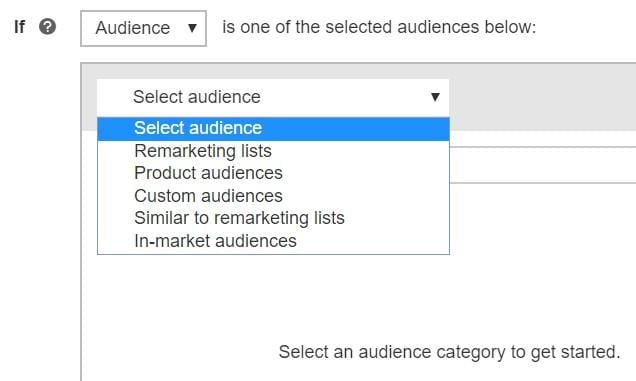
We can target audiences derived from remarketing lists, product audiences (users who recently interacted with products on your website), custom audiences (utilizing first-party customer data), similar audiences, and Microsoft’s in-market audiences. These options unlock a plethora of opportunities for PPC advertisers to test new ad copy variations in their search campaigns. Let’s examine some examples of leveraging audiences in Microsoft IF functions. Remarketing presents the most accessible option for immediate experimentation across accounts. Any remarketing audience established in the Shared Library can be incorporated into your IF function ads. It’s highly likely that you’d tailor your message for returning visitors compared to those entirely unfamiliar with your brand.
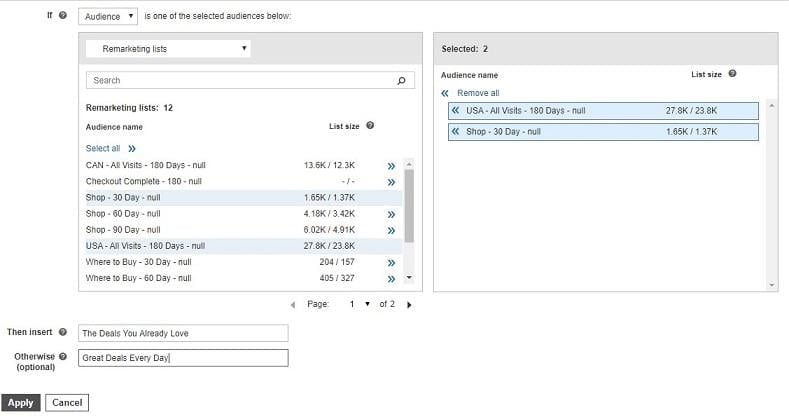
The example above demonstrates the use of multiple audiences within a single IF function. Here, I’ve instructed Microsoft Ads to present the headline “The Deals You Already Love” to users belonging to either of these two audiences. Since they are already customers or familiar with my brand, they might already be aware of our special offers. Conversely, individuals potentially encountering my brand for the first time will see the headline “Great Deals Every Day,” aiming to pique their interest with a compelling value proposition. Ecommerce accounts can benefit significantly from testing product audiences. Before utilizing these audiences, you must first define them within the Shared Library. Here are the product audience options available in Microsoft Ads:
- Individuals who have searched for the same product within the past (up to) 180 days.
- Visitors to your product pages within the past (up to) 180 days.
- Shopping cart abandoners or users who added products to their cart on your website within the past (up to) 180 days.
- Customers who made a purchase within the past (up to) 180 days. With these product audience options at your disposal, you can start brainstorming potential applications for IF functions. How would you address someone with an item in their cart, ready to purchase, compared to a newcomer to your brand? In a brand awareness campaign, would you modify your message for recent buyers versus those yet to convert? If so, you have the tools to personalize your text ads for these specific segments. When discussing audiences in PPC, it’s easy to focus solely on remarketing. However, Microsoft’s in-market audiences empower us to connect with users actively researching products or services within particular categories. Here’s how we can leverage in-market audiences in our IF function ads:
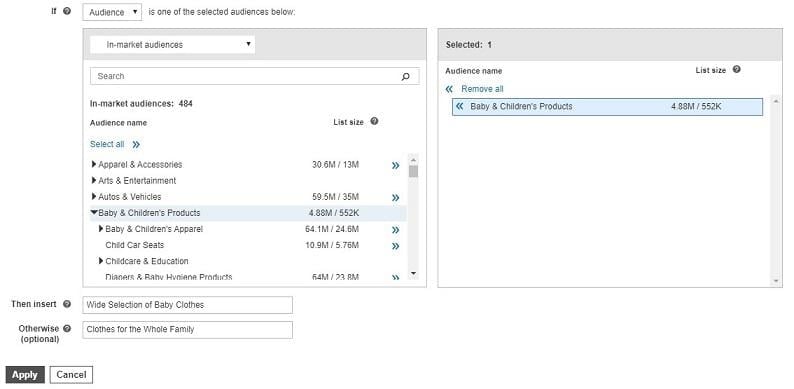
Referring to the image above, imagine you operate a retail store catering to a diverse customer base. Upon analyzing your data, you discover that baby products are your top-performing category. It might be beneficial to tailor your ad copy to directly address the audience most likely to purchase these best-selling items. Meanwhile, users outside the “Baby & Children’s Products” audience will still recognize that you offer apparel for the entire family.
Maximizing the potential of Microsoft IF functions
While the previous examples illustrated the setup of IF function customizers and available options within your text ads, they didn’t encompass their full potential. Before concluding, let’s delve into details about how IF functions can be fully utilized for A/B testing in your search campaigns.
- All examples showcased IF function implementations within ad headlines. However, you can use them in any section of your text ad except for URL fields. While headlines arguably hold the most weight, don’t hesitate to experiment with IF functions in descriptions if you seek fresh testing grounds.
- It’s important to note that you cannot combine device and audience syntax within a single IF function. It’s an either/or scenario.
- When employing an audience for your IF function, ensure that the audience name doesn’t contain curly braces “{” or “}”.
- IF functions are incompatible with responsive search ads, and rightfully so. Responsive search ads already offer a multitude of potential combinations when maximizing all ad copy fields. Introducing IF functions would further complicate the task of identifying truly resonant copy.
- Nesting IF functions within one another is not supported.
- All your text ads in Google Ads utilizing IF functions can be seamlessly imported to Microsoft Ads via the interface or editor tool. The only caveat arises if you’re using audiences within your IF functions. Any audience name discrepancies between the two platforms will result in import errors.
- Google Ads allows IF functions within Dynamic Search Ads descriptions since we lack control over headlines. Conversely, Microsoft Ads doesn’t support IF functions for DSA ads. This is another factor to remember when creating ads within the interface or importing campaigns from Google Ads.
Integrating IF function testing into your campaigns
Whether you manage an ecommerce or lead generation account, with a small or large audience, consider the various ways to customize your ads. Some combinations might outperform others, but by constantly seeking ways to better connect with your target audience, you increase the likelihood of generating relevant clicks and ultimately, boosting conversion rates with copy that speaks directly to user needs.