Building APIs is really popular right now. There are tons of ways to create and launch them, and big companies have made huge tools to help you get your application up and running quickly.
However, most of these options miss a key part: managing the development process. So, developers spend time building great APIs but then struggle with how their code naturally changes over time and how even a small API tweak impacts the core code.
In 2016, Raphael Simon](https://twitter.com/rgsimon) created Goa, a framework for API [development in Golang that prioritizes API design throughout the development process. In Goa, your API design isn’t just written in code; it’s the blueprint from which your server code, client code, and documentation are all generated. This means your code is outlined in your API design using a Golang Domain Specific Language (DSL), then created using the goa command-line tool, and implemented separately from your application’s main code.
This is why Goa is so powerful. It provides a structured development process that relies on best practices for generating code (like separating different areas and functions into layers, so things like how data is transported don’t mess with the core logic of your application). It follows a clean architecture pattern where modular components are generated for the transport, endpoint, and business logic layers of your application.
As described by the official website, some key features of Goa include:
- Composability. The package, the code generation processes, and the generated code itself are all designed to be modular.
- Transport-agnostic. Since the transport layer is detached from how the service actually works, the same service can be accessed through multiple methods, like HTTP and/or gRPC.
- Separation of concerns. How the service actually works is kept separate from the code that handles transport.
- Use of Go standard library types. This makes it smoother to connect with code written outside of Goa.
In this article, we’ll create an application and go through each stage of the API development lifecycle. Our application will manage information about clients—things like their name, address, phone number, social media, etc. By the end, we’ll try expanding it and adding new features to see how the development lifecycle works in action.
Let’s get going!
Setting Up Your Workspace
First, we’ll create the repository and enable support for Go modules:
1
2
3
| mkdir -p clients/design
cd clients
go mod init clients
|
Your repository should now be structured like this:
1
2
3
4
| $ tree
.
├── design
└── go.mod
|
Planning Your API
Your design definition is the ultimate guide for your API. The documentation says, “Goa lets you think about your APIs without worrying about how they’ll be implemented and then review that design with everyone involved before you start writing code.” This means every part of the API is defined here first, before any of the application code is actually generated. But enough talk—let’s see it!
Open the file clients/design/design.go and add the following:
  1
  2
  3
  4
  5
  6
  7
  8
  9
 10
 11
 12
 13
 14
 15
 16
 17
 18
 19
 20
 21
 22
 23
 24
 25
 26
 27
 28
 29
 30
 31
 32
 33
 34
 35
 36
 37
 38
 39
 40
 41
 42
 43
 44
 45
 46
 47
 48
 49
 50
 51
 52
 53
 54
 55
 56
 57
 58
 59
 60
 61
 62
 63
 64
 65
 66
 67
 68
 69
 70
 71
 72
 73
 74
 75
 76
 77
 78
 79
 80
 81
 82
 83
 84
 85
 86
 87
 88
 89
 90
 91
 92
 93
 94
 95
 96
 97
 98
 99
100
101
102
103
| /*
This is the design file. It contains the API specification, methods, inputs, and outputs using Goa DSL code. The objective is to use this as a single source of truth for the entire API source code.
*/
package design
import (
. "goa.design/goa/v3/dsl"
)
// Main API declaration
var _ = API("clients", func() {
Title("An api for clients")
Description("This api manages clients with CRUD operations")
Server("clients", func() {
Host("localhost", func() {
URI("http://localhost:8080/api/v1")
})
})
})
// Client Service declaration with two methods and Swagger API specification file
var _ = Service("client", func() {
Description("The Client service allows access to client members")
Method("add", func() {
Payload(func() {
Field(1, "ClientID", String, "Client ID")
Field(2, "ClientName", String, "Client ID")
Required("ClientID", "ClientName")
})
Result(Empty)
Error("not_found", NotFound, "Client not found")
HTTP(func() {
POST("/api/v1/client/{ClientID}")
Response(StatusCreated)
})
})
Method("get", func() {
Payload(func() {
Field(1, "ClientID", String, "Client ID")
Required("ClientID")
})
Result(ClientManagement)
Error("not_found", NotFound, "Client not found")
HTTP(func() {
GET("/api/v1/client/{ClientID}")
Response(StatusOK)
})
})
Method("show", func() {
Result(CollectionOf(ClientManagement))
HTTP(func() {
GET("/api/v1/client")
Response(StatusOK)
})
})
Files("/openapi.json", "./gen/http/openapi.json")
})
// ClientManagement is a custom ResultType used to configure views for our custom type
var ClientManagement = ResultType("application/vnd.client", func() {
Description("A ClientManagement type describes a Client of company.")
Reference(Client)
TypeName("ClientManagement")
Attributes(func() {
Attribute("ClientID", String, "ID is the unique id of the Client.", func() {
Example("ABCDEF12356890")
})
Field(2, "ClientName")
})
View("default", func() {
Attribute("ClientID")
Attribute("ClientName")
})
Required("ClientID")
})
// Client is the custom type for clients in our database
var Client = Type("Client", func() {
Description("Client describes a customer of company.")
Attribute("ClientID", String, "ID is the unique id of the Client Member.", func() {
Example("ABCDEF12356890")
})
Attribute("ClientName", String, "Name of the Client", func() {
Example("John Doe Limited")
})
Required("ClientID", "ClientName")
})
// NotFound is a custom type where we add the queried field in the response
var NotFound = Type("NotFound", func() {
Description("NotFound is the type returned when " +
"the requested data that does not exist.")
Attribute("message", String, "Message of error", func() {
Example("Client ABCDEF12356890 not found")
})
Field(2, "id", String, "ID of missing data")
Required("message", "id")
})
|
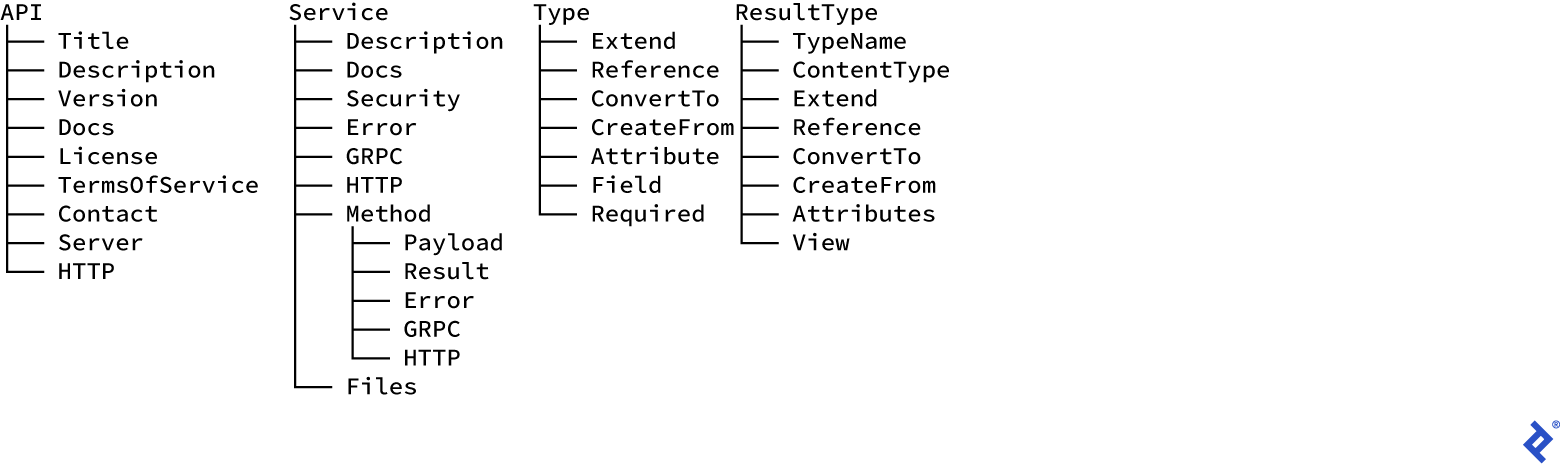
You’ll notice the DSL above is a set of Go functions that can be combined to describe a remote service API. We put these functions together using anonymous function arguments. Within these DSL functions, there are some that shouldn’t be nested inside others, which we call top-level DSLs. Here’s a sample set of DSL functions and how they’re organized:
So, our initial design has an API top-level DSL describing our client API, one service top-level DSL describing the main API service (clients) and serving the API swagger file, and two type top-level DSLs for describing the object view type used in the transport payload.
The API function is an optional top-level DSL that lists the API’s global properties like its name, a description, and one or more servers that might offer different sets of services. We only need one server, but you could have different servers for different environments, like development, testing, and production.
The Service function defines a group of methods that might map to a resource in how the data is transported. A service can also define common error responses. We describe the service methods using Method. This function outlines the data types for the method’s input (payload) and output (result). If you don’t specify payload or result types, it uses the built-in Empty type, which translates to an empty body in HTTP.
Finally, Type or ResultType functions define custom types. The main difference is that a result type also defines a set of “views.”
In our example, we’ve described the API and how it should be served. We’ve also created the following:
- A service called
clients - Three methods:
add (to create a client), get (to retrieve a client), and show (to list all clients) - Our own custom types, which will be helpful when we connect to a database, and a custom error type
Now that our application is designed, we can generate the basic code structure. We’ll use the following command, which takes the design package import path as an argument. It can also take the path to the output directory as an optional flag:
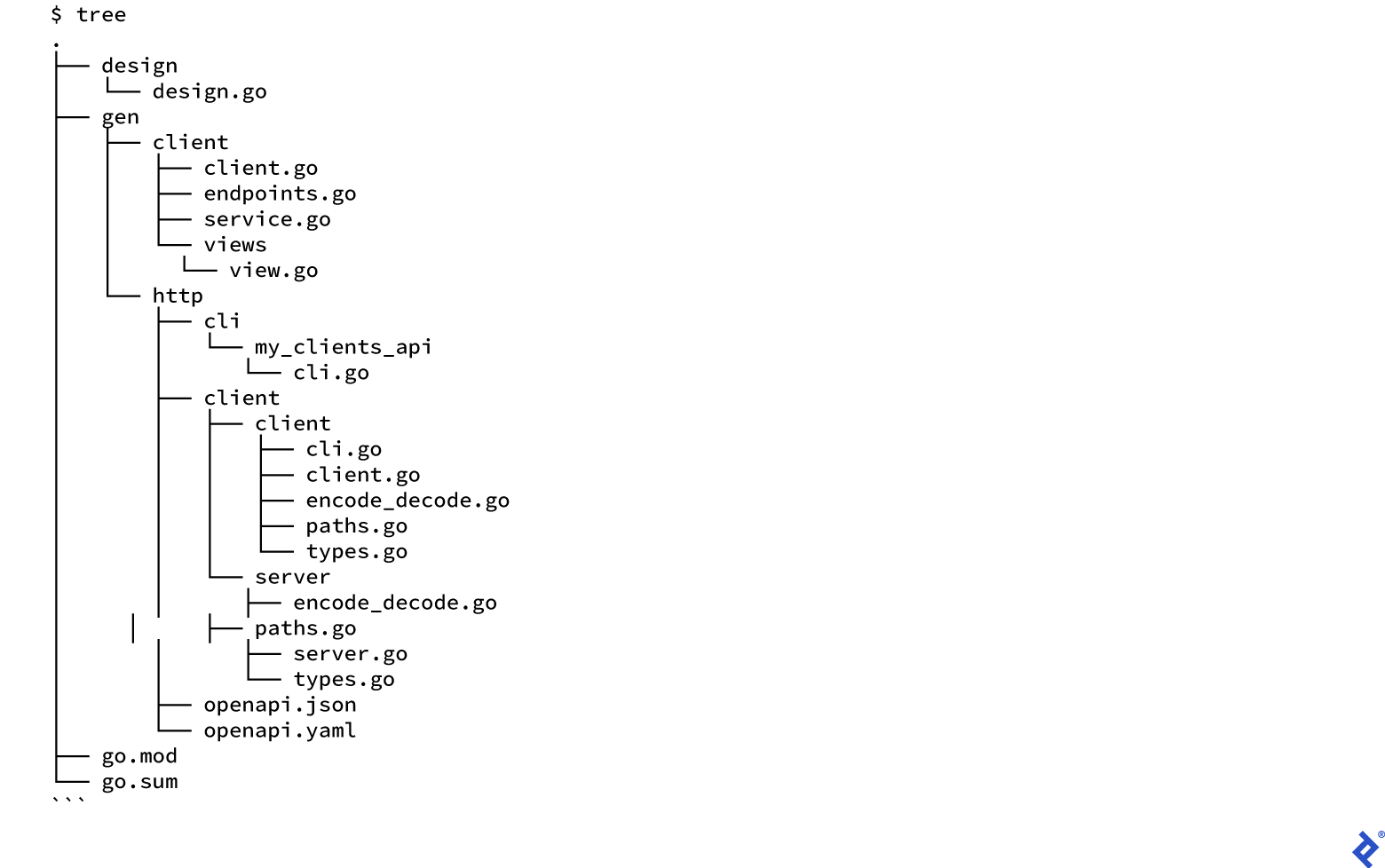
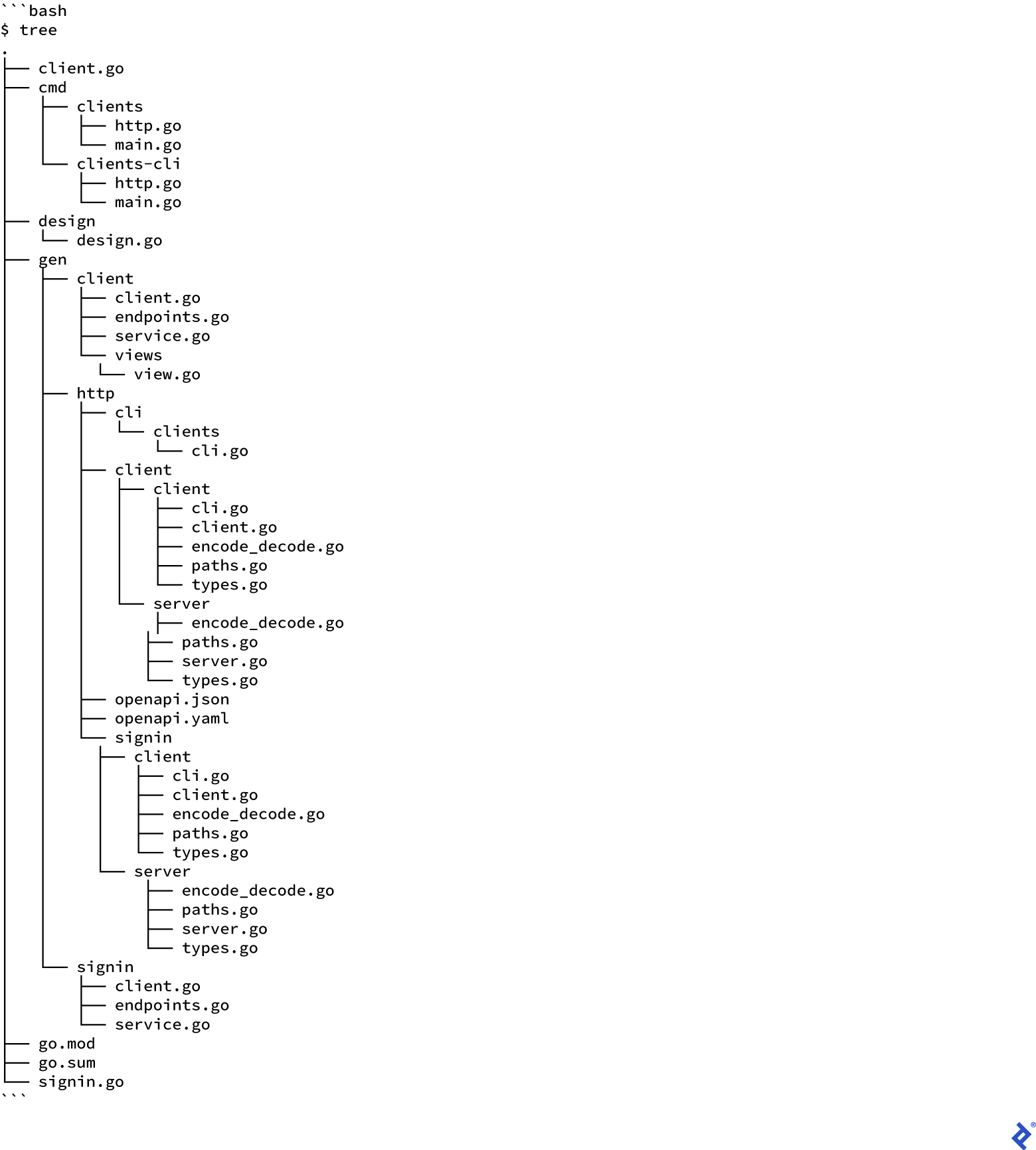
The command will list the names of the files it creates. The gen directory will contain the application name subdirectory, which holds the code for the service that doesn’t depend on how data is transported. The http subdirectory describes the HTTP transport (we have server and client code to encode and decode requests and responses, and code for the command line to build HTTP requests). It also has the Open API 2.0 specification files in both JSON and YAML formats.
You can take the content of a swagger file and put it into any online Swagger editor (like the one at swagger.io) to visualize your API specification documentation. These editors support both YAML and JSON formats.
We’re now ready for the next step in building our API.
Bringing Your API to Life
Now that the basic code structure is in place, it’s time to add the logic that will make our application work. Here’s what your code should look like now:
Goa manages and updates each file above whenever we use the CLI. So, as the architecture changes, your design will change with it, and so will your source code. To implement the application, we’ll run the command below (it will generate a basic implementation of the service, along with server files you can build that start goroutines to run an HTTP server and client files that can send requests to that server):
1
| goa example clients/design
|
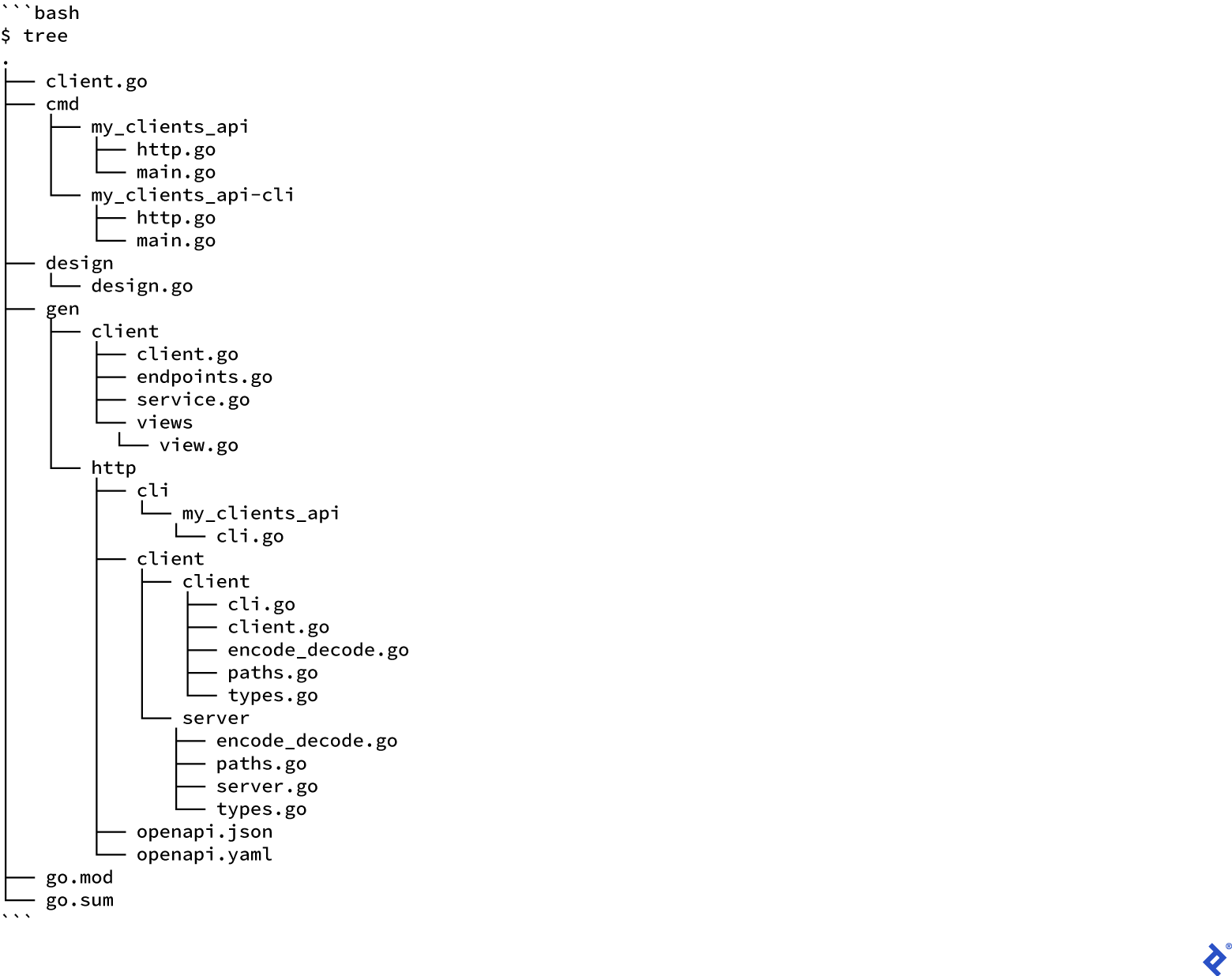
This creates a cmd folder with source files you can build for both the server and client. These files represent your application, and you’ll be responsible for maintaining them after Goa generates them.
Goa’s documentation states: “This command generates a starting point for the service to help bootstrap development - in particular it is NOT meant to be re-run when the design changes.”
Your code will now look like this:
Here, client.go is an example file with a placeholder implementation of the get and show methods. Let’s add some real logic!
To keep things simple, we’ll use SQLite instead of an in-memory database and Gorm as our Object-Relational Mapping (ORM) tool. Create a file named sqlite.go and add the following code, which will handle the database logic for creating records and listing one or more rows from the database:
 1
 2
 3
 4
 5
 6
 7
 8
 9
10
11
12
13
14
15
16
17
18
19
20
21
22
23
24
25
26
27
28
29
30
31
32
33
34
35
36
37
38
39
40
41
42
43
44
45
46
47
48
49
50
51
52
53
54
55
56
57
58
| package clients
import (
"clients/gen/client"
"github.com/jinzhu/gorm"
_ "github.com/jinzhu/gorm/dialects/sqlite"
)
var db *gorm.DB
var err error
type Client *client.ClientManagement
// InitDB is the function that starts a database file and table structures
// if not created then returns db object for next functions
func InitDB() *gorm.DB {
// Opening file
db, err := gorm.Open("sqlite3", "./data.db")
// Display SQL queries
db.LogMode(true)
// Error
if err != nil {
panic(err)
}
// Creating the table if it doesn't exist
var TableStruct = client.ClientManagement{}
if !db.HasTable(TableStruct) {
db.CreateTable(TableStruct)
db.Set("gorm:table_options", "ENGINE=InnoDB").CreateTable(TableStruct)
}
return db
}
// GetClient retrieves one client by its ID
func GetClient(clientID string) (client.ClientManagement, error) {
db := InitDB()
defer db.Close()
var clients client.ClientManagement
db.Where("client_id = ?", clientID).First(&clients)
return clients, err
}
// CreateClient created a client row in DB
func CreateClient(client Client) error {
db := InitDB()
defer db.Close()
err := db.Create(&client).Error
return err
}
// ListClients retrieves the clients stored in Database
func ListClients() (client.ClientManagementCollection, error) {
db := InitDB()
defer db.Close()
var clients client.ClientManagementCollection
err := db.Find(&clients).Error
return clients, err
}
|
Next, we’ll edit client.go to update all the methods in the client service, implementing the database calls and building the API responses:
 1
 2
 3
 4
 5
 6
 7
 8
 9
10
11
12
13
14
15
16
17
18
19
20
21
22
23
24
25
26
27
28
29
30
31
32
33
34
35
36
37
38
39
40
41
42
43
44
45
| // Add implements add.
func (s *clientsrvc) Add(ctx context.Context,
p *client.AddPayload) (err error) {
s.logger.Print("client.add started")
newClient := client.ClientManagement{
ClientID: p.ClientID,
ClientName: p.ClientName,
}
err = CreateClient(&newClient)
if err != nil {
s.logger.Print("An error occurred...")
s.logger.Print(err)
return
}
s.logger.Print("client.add completed")
return
}
// Get implements get.
func (s *clientsrvc) Get(ctx context.Context,
p *client.GetPayload) (res *client.ClientManagement, err error) {
s.logger.Print("client.get started")
result, err := GetClient(p.ClientID)
if err != nil {
s.logger.Print("An error occurred...")
s.logger.Print(err)
return
}
s.logger.Print("client.get completed")
return &result, err
}
// Show implements show.
func (s *clientsrvc) Show(ctx context.Context) (res client.ClientManagementCollection,
err error) {
s.logger.Print("client.show started")
res, err = ListClients()
if err != nil {
s.logger.Print("An error occurred...")
s.logger.Print(err)
return
}
s.logger.Print("client.show completed")
return
}
|
The first version of our application is ready to be compiled! Run the following command to create the server and client binaries:
1
2
| go build ./cmd/clients
go build ./cmd/clients-cli
|
To start the server, simply run ./clients. Leave it running for now. You should see it running without any errors, like this:
1
2
3
4
5
6
| $ ./clients
[clients] 00:00:01 HTTP "Add" mounted on POST /api/v1/client/{ClientID}
[clients] 00:00:01 HTTP "Get" mounted on GET /api/v1/client/{ClientID}
[clients] 00:00:01 HTTP "Show" mounted on GET /api/v1/client
[clients] 00:00:01 HTTP "./gen/http/openapi.json" mounted on GET /openapi.json
[clients] 00:00:01 HTTP server listening on "localhost:8080"
|
Now we can test our application. Let’s try out all the methods using the command line:
1
2
3
4
5
6
7
8
9
10
11
12
13
14
15
| $ ./clients-cli client add --body '{"ClientName": "Cool Company"}' \
--client-id "1"
$ ./clients-cli client get --client-id "1"
{
"ClientID": "1",
"ClientName": "Cool Company"
}
$ ./clients-cli client show
[
{
"ClientID": "1",
"ClientName": "Cool Company"
}
]
|
If you run into any errors, check the server logs. Make sure the SQLite ORM logic is correct and that you’re not getting any database errors, like an uninitialized database or queries that aren’t returning any rows.
Growing Your API
The framework supports plugins that make it easy to extend your API and add more features. Goa has a repository for plugins created by the community.
As we discussed earlier, Goa lets us easily expand our application as part of the development lifecycle. We can go back to the design definition, update it, and regenerate our code. Let’s see how plugins can help by adding CORS (Cross-Origin Resource Sharing) and authentication to our API.
Update the clients/design/design.go file with the following content:
1
2
3
4
5
6
7
8
9
10
11
12
13
14
15
16
17
18
19
20
21
22
23
24
25
26
27
28
29
30
31
32
33
34
35
36
37
38
39
40
41
42
43
44
45
46
47
48
49
50
51
52
53
54
55
56
57
58
59
60
61
62
63
64
65
66
67
68
69
70
71
72
73
74
75
76
77
78
79
80
81
82
83
84
85
86
87
88
89
90
91
92
93
94
95
96
97
98
99
100
101
102
103
104
105
106
107
108
109
110
111
112
113
114
115
116
117
118
119
120
121
122
123
124
125
126
127
128
129
130
131
132
133
134
135
136
137
138
139
140
141
142
143
144
145
146
147
148
149
150
151
152
153
154
155
156
157
158
159
160
161
162
163
164
165
166
167
168
169
170
171
172
173
174
175
176
177
178
179
180
181
182
183
184
185
186
187
188
189
190
191
192
193
194
195
196
197
198
199
200
201
202
203
204
205
206
207
208
209
210
211
212
213
214
215
216
217
218
219
220
221
222
223
224
225
226
| /*
This is the design file. It contains the API specification, methods, inputs, and outputs using Goa DSL code. The objective is to use this as a single source of truth for the entire API source code.
*/
package design
import (
. "goa.design/goa/v3/dsl"
cors "goa.design/plugins/v3/cors/dsl"
)
// Main API declaration
var _ = API("clients", func() {
Title("An api for clients")
Description("This api manages clients with CRUD operations")
cors.Origin("/.*localhost.*/", func() {
cors.Headers("X-Authorization", "X-Time", "X-Api-Version",
"Content-Type", "Origin", "Authorization")
cors.Methods("GET", "POST", "OPTIONS")
cors.Expose("Content-Type", "Origin")
cors.MaxAge(100)
cors.Credentials()
})
Server("clients", func() {
Host("localhost", func() {
URI("http://localhost:8080/api/v1")
})
})
})
// Client Service declaration with two methods and Swagger API specification file
var _ = Service("client", func() {
Description("The Client service allows access to client members")
Error("unauthorized", String, "Credentials are invalid")
HTTP(func() {
Response("unauthorized", StatusUnauthorized)
})
Method("add", func() {
Payload(func() {
TokenField(1, "token", String, func() {
Description("JWT used for authentication")
})
Field(2, "ClientID", String, "Client ID")
Field(3, "ClientName", String, "Client ID")
Field(4, "ContactName", String, "Contact Name")
Field(5, "ContactEmail", String, "Contact Email")
Field(6, "ContactMobile", Int, "Contact Mobile Number")
Required("token",
"ClientID", "ClientName", "ContactName",
"ContactEmail", "ContactMobile")
})
Security(JWTAuth, func() {
Scope("api:write")
})
Result(Empty)
Error("invalid-scopes", String, "Token scopes are invalid")
Error("not_found", NotFound, "Client not found")
HTTP(func() {
POST("/api/v1/client/{ClientID}")
Header("token:X-Authorization")
Response("invalid-scopes", StatusForbidden)
Response(StatusCreated)
})
})
Method("get", func() {
Payload(func() {
TokenField(1, "token", String, func() {
Description("JWT used for authentication")
})
Field(2, "ClientID", String, "Client ID")
Required("token", "ClientID")
})
Security(JWTAuth, func() {
Scope("api:read")
})
Result(ClientManagement)
Error("invalid-scopes", String, "Token scopes are invalid")
Error("not_found", NotFound, "Client not found")
HTTP(func() {
GET("/api/v1/client/{ClientID}")
Header("token:X-Authorization")
Response("invalid-scopes", StatusForbidden)
Response(StatusOK)
})
})
Method("show", func() {
Payload(func() {
TokenField(1, "token", String, func() {
Description("JWT used for authentication")
})
Required("token")
})
Security(JWTAuth, func() {
Scope("api:read")
})
Result(CollectionOf(ClientManagement))
Error("invalid-scopes", String, "Token scopes are invalid")
HTTP(func() {
GET("/api/v1/client")
Header("token:X-Authorization")
Response("invalid-scopes", StatusForbidden)
Response(StatusOK)
})
})
Files("/openapi.json", "./gen/http/openapi.json")
})
// ClientManagement is a custom ResultType used to
// configure views for our custom type
var ClientManagement = ResultType("application/vnd.client", func() {
Description("A ClientManagement type describes a Client of company.")
Reference(Client)
TypeName("ClientManagement")
Attributes(func() {
Attribute("ClientID", String, "ID is the unique id of the Client.", func() {
Example("ABCDEF12356890")
})
Field(2, "ClientName")
Attribute("ContactName", String, "Name of the Contact.", func() {
Example("John Doe")
})
Field(4, "ContactEmail")
Field(5, "ContactMobile")
})
View("default", func() {
Attribute("ClientID")
Attribute("ClientName")
Attribute("ContactName")
Attribute("ContactEmail")
Attribute("ContactMobile")
})
Required("ClientID")
})
// Client is the custom type for clients in our database
var Client = Type("Client", func() {
Description("Client describes a customer of company.")
Attribute("ClientID", String, "ID is the unique id of the Client Member.", func() {
Example("ABCDEF12356890")
})
Attribute("ClientName", String, "Name of the Client", func() {
Example("John Doe Limited")
})
Attribute("ContactName", String, "Name of the Client Contact.", func() {
Example("John Doe")
})
Attribute("ContactEmail", String, "Email of the Client Contact", func() {
Example("john.doe@johndoe.com")
})
Attribute("ContactMobile", Int, "Mobile number of the Client Contact", func() {
Example(12365474235)
})
Required("ClientID", "ClientName", "ContactName", "ContactEmail", "ContactMobile")
})
// NotFound is a custom type where we add the queried field in the response
var NotFound = Type("NotFound", func() {
Description("NotFound is the type returned " +
"when the requested data that does not exist.")
Attribute("message", String, "Message of error", func() {
Example("Client ABCDEF12356890 not found")
})
Field(2, "id", String, "ID of missing data")
Required("message", "id")
})
// Creds is a custom type for replying Tokens
var Creds = Type("Creds", func() {
Field(1, "jwt", String, "JWT token", func() {
Example("eyJhbGciOiJIUzI1NiIsInR5cCI6IkpXVCJ9." +
"eyJzdWIiOiIxMjM0NTY3ODkwIiwibmFtZSI6IkpvaG4gRG9" +
"lIiwiYWRtaW4iOnRydWV9.TJVA95OrM7E2cBab30RMHrHD" +
"cEfxjoYZgeFONFh7HgQ")
})
Required("jwt")
})
// JWTAuth is the JWTSecurity DSL function for adding JWT support in the API
var JWTAuth = JWTSecurity("jwt", func() {
Description(`Secures endpoint by requiring a valid
JWT token retrieved via the signin endpoint. Supports
scopes "api:read" and "api:write".`)
Scope("api:read", "Read-only access")
Scope("api:write", "Read and write access")
})
// BasicAuth is the BasicAuth DSL function for
// adding basic auth support in the API
var BasicAuth = BasicAuthSecurity("basic", func() {
Description("Basic authentication used to " +
"authenticate security principal during signin")
Scope("api:read", "Read-only access")
})
// Signin Service is the service used to authenticate users and assign JWT tokens for their sessions
var _ = Service("signin", func() {
Description("The Signin service authenticates users and validate tokens")
Error("unauthorized", String, "Credentials are invalid")
HTTP(func() {
Response("unauthorized", StatusUnauthorized)
})
Method("authenticate", func() {
Description("Creates a valid JWT")
Security(BasicAuth)
Payload(func() {
Description("Credentials used to authenticate to retrieve JWT token")
UsernameField(1, "username",
String, "Username used to perform signin", func() {
Example("user")
})
PasswordField(2, "password",
String, "Password used to perform signin", func() {
Example("password")
})
Required("username", "password")
})
Result(Creds)
HTTP(func() {
POST("/signin/authenticate")
Response(StatusOK)
})
})
})
|
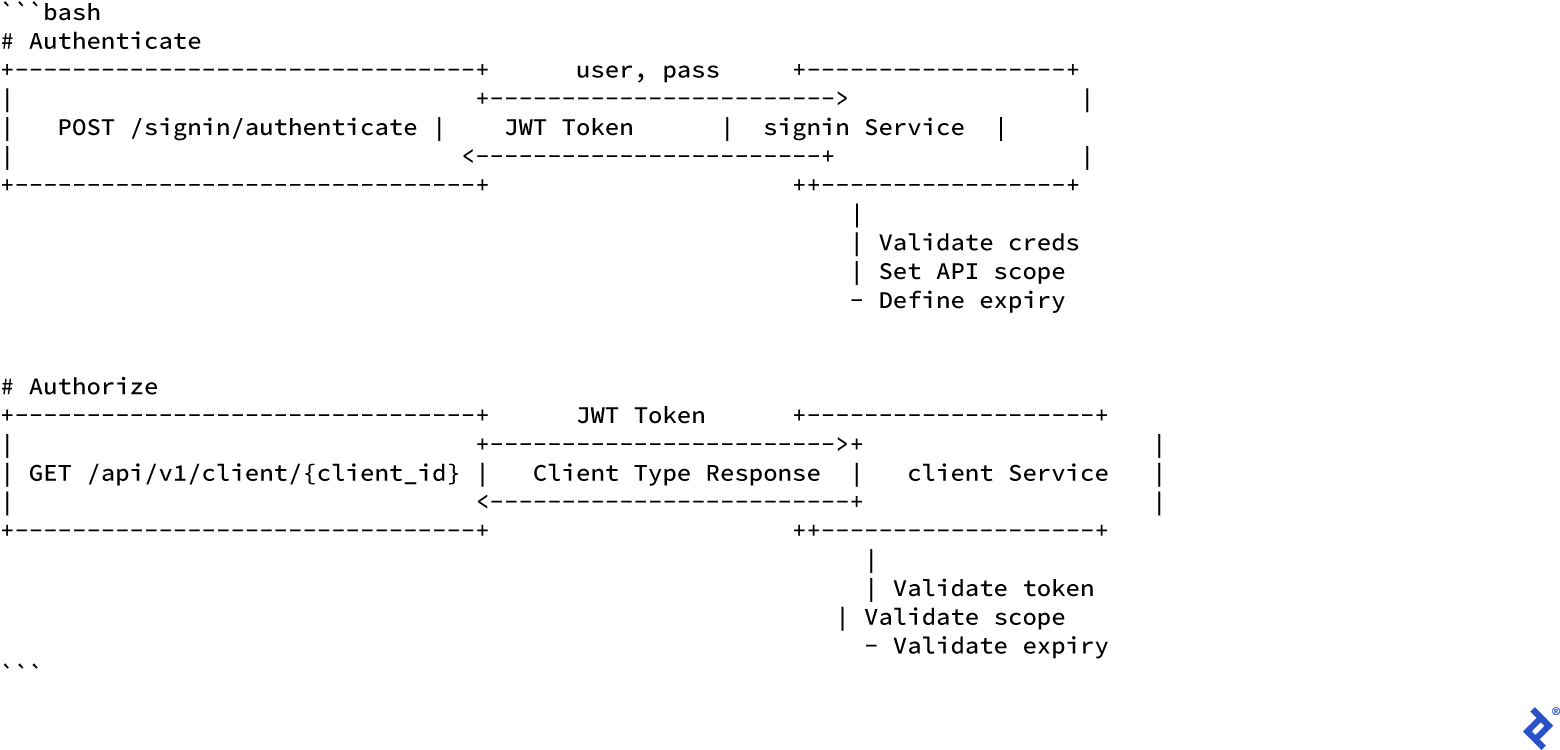
You’ll see two main changes in this new design. We’ve added a security scope to the client service, allowing us to check if a user is allowed to call the service. We’ve also created a second service called signin, which we’ll use to authenticate users and generate JSON Web Tokens (JWTs). The client service will use these tokens to authorize calls. We’ve also added more fields to our custom client type. It’s common when building an API to need to change how data is structured or organized.
These might seem like simple design changes, but they involve a lot of small features to achieve. For example, here’s a diagram showing the architecture for authentication and authorization using our API methods:
These are all new features our code doesn’t have yet. This is another area where Goa shines. Let’s implement these features on the transport side by regenerating the source code with this command:
If you’re using Git, you’ll notice new files and some that have been updated. This is Goa automatically updating the boilerplate code behind the scenes to reflect our changes.
Now, we need to implement the code for the service itself. In a real-world app, you’d manually update the application after updating the source code to match the design changes. That’s the approach Goa recommends. However, to save time, I’m going to delete the example application and regenerate it. Run the commands below to do this:
1
2
| rm -rf cmd client.go
goa example clients/design
|
Your code should now look like this:
There’s a new file in our example application: signin.go, which contains the logic for the signin service. You’ll also see that client.go has been updated with a JWTAuth function for validating tokens. This matches what we defined in the design, so every call to any method in client will be checked for a valid token and only allowed through if the token and scope are correct.
Now, we need to update the methods in our signin service inside signin.go to add the logic for generating tokens for authenticated users. Copy and paste the following code into signin.go:
1
2
3
4
5
6
7
8
9
10
11
12
13
14
15
16
17
18
19
20
21
22
23
24
25
26
27
28
29
30
31
32
33
34
35
36
37
38
39
40
41
42
43
44
45
46
47
48
49
50
51
52
53
54
55
56
57
58
59
60
61
62
63
64
65
| package clients
import (
signin "clients/gen/signin"
"context"
"log"
"time"
jwt "github.com/dgrijalva/jwt-go"
"goa.design/goa/v3/security"
)
// signin service example implementation.
// The example methods log the requests and return zero values.
type signinsrvc struct {
logger *log.Logger
}
// NewSignin returns the signin service implementation.
func NewSignin(logger *log.Logger) signin.Service {
return &signinsrvc{logger}
}
// BasicAuth implements the authorization logic for service "signin" for the
// "basic" security scheme.
func (s *signinsrvc) BasicAuth(ctx context.Context,
user, pass string, scheme *security.BasicScheme) (context.Context,
error) {
if user != "gopher" && pass != "academy" {
return ctx, signin.
Unauthorized("invalid username and password combination")
}
return ctx, nil
}
// Creates a valid JWT
func (s *signinsrvc) Authenticate(ctx context.Context,
p *signin.AuthenticatePayload) (res *signin.Creds,
err error) {
// create JWT token
token := jwt.NewWithClaims(jwt.SigningMethodHS256, jwt.MapClaims{
"nbf": time.Date(2015, 10, 10, 12, 0, 0, 0, time.UTC).Unix(),
"iat": time.Now().Unix(),
"exp": time.Now().Add(time.Duration(9) * time.Minute).Unix(),
"scopes": []string{"api:read", "api:write"},
})
s.logger.Printf("user '%s' logged in", p.Username)
// note that if "SignedString" returns an error then it is returned as
// an internal error to the client
t, err := token.SignedString(Key)
if err != nil {
return nil, err
}
res = &signin.Creds{
JWT: t,
}
return
}
|
Finally, we added more fields to our custom type, so we need to update the Add method in the client service in client.go to reflect those changes. Copy and paste the following code to update your client.go:
1
2
3
4
5
6
7
8
9
10
11
12
13
14
15
16
17
18
19
20
21
22
23
24
25
26
27
28
29
30
31
32
33
34
35
36
37
38
39
40
41
42
43
44
45
46
47
48
49
50
51
52
53
54
55
56
57
58
59
60
61
62
63
64
65
66
67
68
69
70
71
72
73
74
75
76
77
78
79
80
81
82
83
84
85
86
87
88
89
90
91
92
93
94
95
96
97
98
99
100
101
102
103
104
105
106
107
108
109
110
111
112
113
114
115
116
117
118
119
120
121
| package clients
import (
client "clients/gen/client"
"context"
"log"
jwt "github.com/dgrijalva/jwt-go"
"goa.design/goa/v3/security"
)
var (
// Key is the key used in JWT authentication
Key = []byte("secret")
)
// client service example implementation.
// The example methods log the requests and return zero values.
type clientsrvc struct {
logger *log.Logger
}
// NewClient returns the client service implementation.
func NewClient(logger *log.Logger) client.Service {
return &clientsrvc{logger}
}
// JWTAuth implements the authorization logic for service "client" for the
// "jwt" security scheme.
func (s *clientsrvc) JWTAuth(ctx context.Context,
token string, scheme *security.JWTScheme) (context.Context,
error) {
claims := make(jwt.MapClaims)
// authorize request
// 1. parse JWT token, token key is hardcoded to "secret" in this example
_, err := jwt.ParseWithClaims(token,
claims, func(_ *jwt.Token) (interface{},
error) { return Key, nil })
if err != nil {
s.logger.Print("Unable to obtain claim from token, it's invalid")
return ctx, client.Unauthorized("invalid token")
}
s.logger.Print("claims retrieved, validating against scope")
s.logger.Print(claims)
// 2. validate provided "scopes" claim
if claims["scopes"] == nil {
s.logger.Print("Unable to get scope since the scope is empty")
return ctx, client.InvalidScopes("invalid scopes in token")
}
scopes, ok := claims["scopes"].([]interface{})
if !ok {
s.logger.Print("An error occurred when retrieving the scopes")
s.logger.Print(ok)
return ctx, client.InvalidScopes("invalid scopes in token")
}
scopesInToken := make([]string, len(scopes))
for _, scp := range scopes {
scopesInToken = append(scopesInToken, scp.(string))
}
if err := scheme.Validate(scopesInToken); err != nil {
s.logger.Print("Unable to parse token, check error below")
return ctx, client.InvalidScopes(err.Error())
}
return ctx, nil
}
// Add implements add.
func (s *clientsrvc) Add(ctx context.Context,
p *client.AddPayload) (err error) {
s.logger.Print("client.add started")
newClient := client.ClientManagement{
ClientID: p.ClientID,
ClientName: p.ClientName,
ContactName: p.ContactName,
ContactEmail: p.ContactEmail,
ContactMobile: p.ContactMobile,
}
err = CreateClient(&newClient)
if err != nil {
s.logger.Print("An error occurred...")
s.logger.Print(err)
return
}
s.logger.Print("client.add completed")
return
}
// Get implements get.
func (s *clientsrvc) Get(ctx context.Context,
p *client.GetPayload) (res *client.ClientManagement,
err error) {
s.logger.Print("client.get started")
result, err := GetClient(p.ClientID)
if err != nil {
s.logger.Print("An error occurred...")
s.logger.Print(err)
return
}
s.logger.Print("client.get completed")
return &result, err
}
// Show implements show.
func (s *clientsrvc) Show(ctx context.Context,
p *client.ShowPayload) (res client.ClientManagementCollection,
err error) {
s.logger.Print("client.show started")
res, err = ListClients()
if err != nil {
s.logger.Print("An error occurred...")
s.logger.Print(err)
return
}
s.logger.Print("client.show completed")
return
}
|
And that’s it! Let’s recompile the application and test it again. Run the commands below to delete the old binaries and compile fresh ones:
1
2
3
| rm -f clients clients-cli
go build ./cmd/clients
go build ./cmd/clients-cli
|
Run ./clients again and leave it running. You should see it running successfully, but now with the new methods implemented:
1
2
3
4
5
6
7
8
9
10
11
| $ ./clients
[clients] 00:00:01 HTTP "Add" mounted on POST /api/v1/client/{ClientID}
[clients] 00:00:01 HTTP "Get" mounted on GET /api/v1/client/{ClientID}
[clients] 00:00:01 HTTP "Show" mounted on GET /api/v1/client
[clients] 00:00:01 HTTP "CORS" mounted on OPTIONS /api/v1/client/{ClientID}
[clients] 00:00:01 HTTP "CORS" mounted on OPTIONS /api/v1/client
[clients] 00:00:01 HTTP "CORS" mounted on OPTIONS /openapi.json
[clients] 00:00:01 HTTP "./gen/http/openapi.json" mounted on GET /openapi.json
[clients] 00:00:01 HTTP "Authenticate" mounted on POST /signin/authenticate
[clients] 00:00:01 HTTP "CORS" mounted on OPTIONS /signin/authenticate
[clients] 00:00:01 HTTP server listening on "localhost:8080"
|
To test it, let’s try all the API methods using the command line. Note that we’re using the hardcoded credentials:
 1
 2
 3
 4
 5
 6
 7
 8
 9
10
11
12
13
14
15
16
17
18
19
20
21
22
23
24
25
26
27
28
29
30
31
32
33
34
35
36
37
38
39
40
41
42
43
44
| $ ./clients-cli signin authenticate \
--username "gopher" --password "academy"
{
"JWT": "eyJhbGciOiJIUzI1NiIsInR5cCI6IkpXVCJ9.\
eyJleHAiOjE1NzcyMTQxMjEsImlhdCI6MTU3NzIxMzU4 \
MSwibmJmIjoxNDQ0NDc4NDAwLCJzY29wZXMiOlsiY \
XBpOnJlYWQiLCJhcGk6d3JpdGUiXX0.\
tva_E3xbzur_W56pjzIll_pdFmnwmF083TKemSHQkSw"
}
$ ./clients-cli client add --body \
'{"ClientName": "Cool Company", \
"ContactName": "Jane Masters", \
"ContactEmail": "jane.masters@cool.co", \
"ContactMobile": 13426547654 }' \
--client-id "1" --token "eyJhbGciOiJIUzI1NiIsInR5cCI6IkpXVCJ9.\
eyJleHAiOjE1NzcyMTQxMjEsImlhdCI6MTU3NzIxMzU4MSwibmJmI\
joxNDQ0NDc4NDAwLCJzY29wZXMiOlsiYXBpOnJlYWQiLCJhcGk6d3JpdGUiXX0.\
tva_E3xbzur_W56pjzIll_pdFmnwmF083TKemSHQkSw"
$ ./clients-cli client get --client-id "1" \
--token "eyJhbGciOiJIUzI1NiIsInR5cCI6IkpXVCJ9.\
eyJleHAiOjE1NzcyMTQxMjEsImlhdCI6MTU3NzIxMzU4MSwibmJmI\
joxNDQ0NDc4NDAwLCJzY29wZXMiOlsiYXBpOnJlYWQiLCJhcGk6d3JpdGUiXX0.\
tva_E3xbzur_W56pjzIll_pdFmnwmF083TKemSHQkSw"
{
"ClientID": "1",
"ClientName": "Cool Company",
"ContactName": "Jane Masters",
"ContactEmail": "jane.masters@cool.co",
"ContactMobile": 13426547654
}
$ ./clients-cli client show \
--token "eyJhbGciOiJIUzI1NiIsInR5cCI6IkpXVCJ9.\
eyJleHAiOjE1NzcyMTQxMjEsImlhdCI6MTU3NzIxMzU4MSwibmJmI\
joxNDQ0NDc4NDAwLCJzY29wZXMiOlsiYXBpOnJlYWQiLCJhcGk6d3JpdGUiXX0.\
tva_E3xbzur_W56pjzIll_pdFmnwmF083TKemSHQkSw"
[
{
"ClientID": "1",
"ClientName": "Cool Company",
"ContactName": "Jane Masters",
"ContactEmail": "jane.masters@cool.co",
"ContactMobile": 13426547654
}
]
|
There you go! 🎉 We have a simple application with proper authentication, scope authorization, and plenty of room to grow. From here, you could develop your own authentication strategy using cloud services or any other identity provider. You could create plugins for your favorite database or messaging system, or even easily integrate with other APIs.
Check out Goa’s GitHub project for more plugins, examples showcasing the framework’s capabilities, and other helpful resources.
That’s all for today. I hope you enjoyed experimenting with Goa and found this article useful. If you have any feedback, feel free to reach out on GitHub, Twitter, or LinkedIn.
We also hang out in the #goa channel on Gophers Slack, so come say hi! 👋