Optimizing SQL queries for performance can be a challenging endeavor, especially when dealing with large datasets where even small modifications can significantly impact performance, either positively or negatively.
In larger companies, Database Administrators (DBAs) typically handle SQL performance tuning. However, many developers often find themselves performing DBA-like tasks. In my experience, even when dedicated DBAs exist, collaboration between developers and DBAs can be strained due to their differing problem-solving approaches.
Furthermore, organizational structure can exacerbate these challenges. For instance, if the DBA team is situated on a different floor or even in a separate building with a distinct reporting structure from the development team, seamless collaboration becomes increasingly difficult.
This article aims to address two key points:
- Equipping developers with practical SQL performance tuning techniques they can implement in their code.
- Fostering effective collaboration between developers and DBAs.
Enhancing SQL Performance Within Your Code: The Power of Indexes
For those new to databases and wondering what SQL performance tuning entails, indexing is a potent optimization technique often overlooked during development. In simple terms, an index is a data structure that speeds up data retrieval from a database table. It achieves this by enabling quick random lookups and efficient access to ordered records, resulting in faster row selection and sorting.
Indexes are also used to establish primary keys and unique indexes, ensuring data integrity by preventing duplicate values in specific columns. Database indexing is an extensive and fascinating topic that cannot be fully covered here (but here’s a more detailed write-up).
When structuring your queries, consider this diagram, especially if you’re new to indexes:
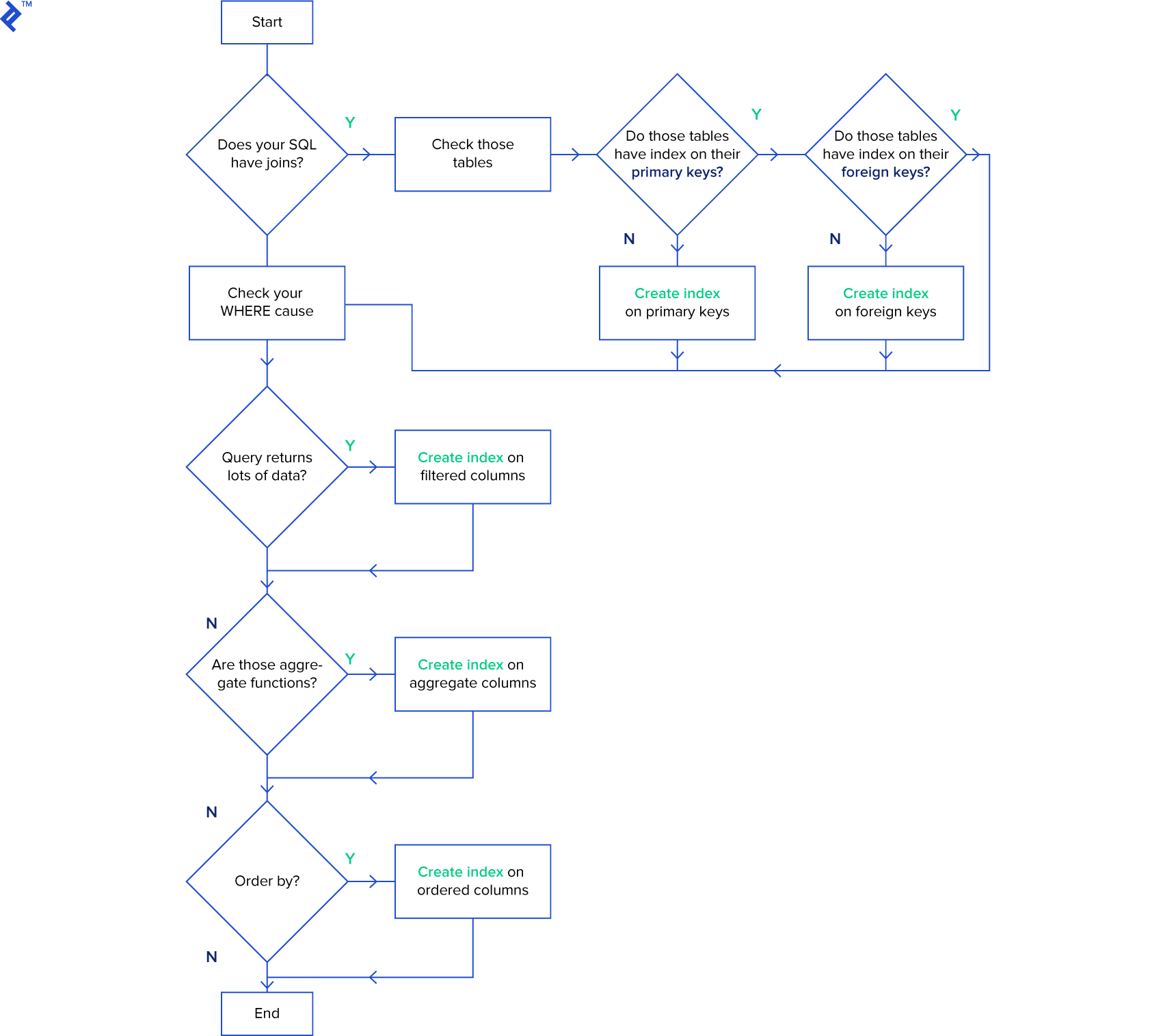
The primary objective is to index columns frequently used for searching and ordering data.
Be cautious when indexing tables subject to frequent INSERT, UPDATE, and DELETE operations. Excessive indexing can be counterproductive (decreasing performance) because indexes require modification after these operations.
DBAs often employ a strategy of dropping SQL indexes before bulk-inserting millions of rows to speed up the insertion process. After the insertion, they recreate the indexes. However, remember that dropping indexes impacts all queries on the affected table. This approach is advisable only for scenarios involving single, massive data insertions.
SQL Tuning: Leveraging Execution Plans in SQL Server
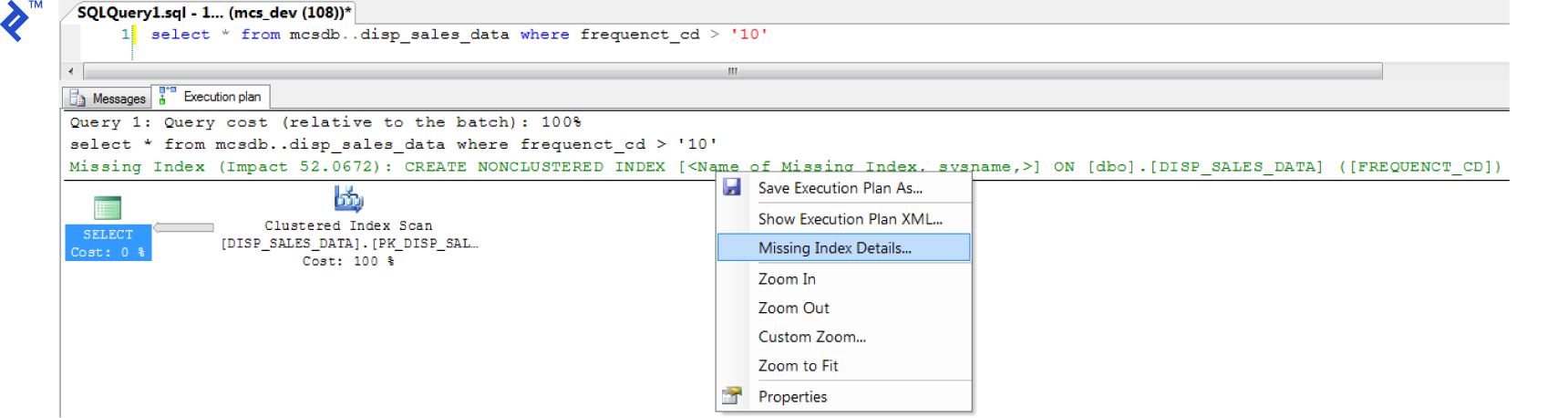
The Execution Plan tool in SQL Server can be invaluable for index creation. It visually represents the data retrieval methods employed by the SQL Server query optimizer. If you haven’t encountered them before, there’s a detailed walkthrough.
To access the execution plan in SQL Server Management Studio, enable “Include Actual Execution Plan” (CTRL + M) before executing your query.
A new “Execution Plan” tab will appear. If a missing index is detected, right-click within the execution plan and select “Missing Index Details…”. The process is quite straightforward.
(Click to zoom)
SQL Tuning: Minimizing Code Loops
Consider a scenario where 1,000 queries are executed sequentially against your database, as illustrated below:
| |
It’s crucial to avoid such loops within your code. For instance, the code snippet above can be optimized using a single INSERT or UPDATE statement with multiple rows and values:
| |
Ensure your WHERE clause prevents updating a value if it matches the existing one. This seemingly minor optimization can significantly boost SQL query performance by limiting updates to only the necessary rows. For example:
| |
SQL Tuning: The Pitfalls of Correlated SQL Subqueries
A correlated subquery relies on values from its parent query. This type of query often leads to performance bottlenecks (row-by-row as it executes once for every row returned by the outer query. Novice SQL developers often fall into this trap as it’s typically the easiest approach.
Let’s examine an example of a correlated subquery:
| |
The issue lies in the inner query (SELECT CompanyName…) executing repeatedly for each row returned by the outer query (SELECT c.Name…). Instead of repeatedly iterating through the Company table for each outer query row, we can optimize this.
A more performant approach involves refactoring the correlated subquery into a join:
| |
This way, we traverse the Company table only once at the beginning, joining it with the Customer table. Subsequently, we can efficiently retrieve the required values (co.CompanyName).
SQL Tuning: The Art of Selective Retrieval
One of my favorite SQL optimization tips is to steer clear of SELECT *. Instead, explicitly specify the required columns. While this might seem elementary, it’s a common oversight. In a table with numerous columns and millions of rows, retrieving all data when only a few columns are needed is wasteful. (For more on this, refer to here.)
For example:
| |
versus
| |
If you genuinely need all columns, enumerate them individually. This practice, more than a rule, serves as a safeguard against future system errors and simplifies performance tuning. For instance, issues might arise with INSERT... SELECT... if the source table is modified with an additional column, even if the target table doesn’t require it. Consider the following:
| |
To prevent such errors in SQL Server, declare each column explicitly:
| |
Note that there are scenarios where SELECT * might be appropriate, such as when dealing with temporary tables, which brings us to our next topic.
SQL Tuning: Using Temporary Tables (#Temp) Effectively
Temporary tables often add complexity to queries. If your code can be written clearly and concisely without them, it’s generally advisable to avoid temporary tables.
However, when dealing with stored procedures involving data manipulation that cannot be achieved in a single query, temporary tables can serve as useful intermediaries to arrive at the final result.
When joining a large table with specific conditions, improve performance by transferring the data to a temporary table and then performing the join on the temporary table. Since the temporary table will have fewer rows than the original large table, the join operation will complete faster.
While the decision isn’t always straightforward, this example illustrates situations where temporary tables can be beneficial:
Consider a customer table containing millions of records. You need to perform a join based on a specific region. This can be accomplished using a SELECT INTO statement followed by a join with the temporary table:
| |
(Note: Some SQL developers discourage using SELECT INTO for temporary table creation, claiming it locks the tempdb database, preventing other users from creating temporary tables. Fortunately, this is fixed in 7.0 and later.)
As an alternative to temporary tables, consider using a subquery as a table:
| |
However, this approach presents a challenge. As discussed earlier, subqueries should include only the necessary columns, avoiding SELECT *. Let’s refine the query:
| |
All these code snippets achieve the same outcome. However, with temporary tables, we can create indexes to further enhance performance. A good discussion about the distinctions between temporary tables and subqueries can be found here.
Finally, remember to delete your temporary tables when you’re done to release tempdb resources. Don’t rely solely on automatic deletion, which occurs when your database connection terminates:
| |
SQL Tuning: Efficiently Checking Record Existence
This optimization technique involves using EXISTS(). When checking for the existence of a record, prioritize EXISTS() over COUNT(). While COUNT() scans the entire table, tallying all matching entries, EXISTS() terminates as soon as it finds a match. This leads to better performance and clearer code.
| |
versus
| |
SQL Performance Tuning in SQL Server 2016
For DBAs working with SQL Server 2016, this version marked a significant shift in defaults and compatibility management. As a major release, it brought new query optimizations. However, control over their utilization is now streamlined through sys.databases.compatibility_level.
Optimizing SQL Collaboration: Bridging the Gap Between Developers and DBAs
DBAs and developers often encounter friction, both data-related and otherwise. Based on my experience, here are some tips for both parties to foster effective collaboration:

Database Optimization Tips for Developers:
Don’t jump to conclusions and assume database issues when your application malfunctions. The problem could lie elsewhere, such as network connectivity. Investigate thoroughly before pointing fingers at the DBA.
Even if you’re a SQL data modeling expert, seek input from DBAs when designing your relational model. They possess valuable insights and expertise.
Understand that DBAs are cautious about rapid changes. They need to analyze the database holistically and assess the impact of modifications from all angles. A seemingly minor column change might take a week to implement to prevent potential errors that could result in significant losses for the company. Exercise patience.
Avoid requesting data changes in a production environment. If you require production database access, take full responsibility for your changes.
Database Optimization Tips for SQL Server DBAs:
If constant database-related inquiries are a nuisance, provide developers with a real-time status panel. Developers often harbor concerns about database health, and a status panel can save everyone time and effort.
Assist developers in test/quality assurance environments. Facilitate the simulation of production environments with realistic data for testing. This not only benefits developers but also saves you time in the long run.
Recognize that developers operate in a world of constantly evolving business logic. Embrace flexibility and be open to bending the rules occasionally, especially in critical situations.
Acknowledge that SQL databases are not static. Data migration to newer versions is inevitable. Developers rely on new features and improvements introduced in each version. Instead of resisting change, proactively plan and prepare for these migrations.