There are two primary methods for updating a live application.
One method involves making incremental adjustments to the system’s state, such as updating files, modifying environment properties, and installing additional components. The other method involves a complete system rebuild using new images and declarative configurations, like those used in Kubernetes.
Effortless Laravel Deployment
This article primarily focuses on smaller applications, potentially not hosted in the cloud. However, I will touch upon how Kubernetes can significantly streamline deployments beyond non-cloud scenarios. Additionally, we will delve into general challenges and strategies for successful updates applicable in various situations, extending beyond Laravel deployment.
For this demonstration, I’ll use a Laravel example, but remember that similar approaches apply to any PHP application.
Versioning
Knowing the production code version is crucial. This information can be embedded in a file, folder name, or filename. Following the standard practice of semantic versioning allows us to incorporate more than just a number.
Examining two releases with this added information can provide insights into the nature of the changes between them.

Versioning begins with a version control system like Git. Assuming we have a release ready, for instance, version 1.0.3, different development styles like trunk-based development and Git flow can be adopted for organizing releases and code flow. Ultimately, we usually tag releases on our main branch.
After committing, a tag can be created:
git tag v1.0.3
Then, include tags when pushing:
git push <origin> <branch> --tags
Tags can also be added to previous commits using their hashes.
Transferring Release Files
Laravel deployment, even just copying files, takes time. Our goal is to achieve zero downtime.
To avoid modifying live files, we deploy to a separate directory and switch over only after installation is complete.
Several tools and services can help with deployments, including Envoyer.io (created by Laravel.com designer Jack McDade), Capistrano, Deployer, and more. Although I haven’t used all of them in production to offer recommendations or comparisons, I will illustrate their underlying concept. If these solutions don’t meet your needs, custom scripts can be created for automation.
For this example, let’s assume our Laravel application is served by an Nginx server from this path:
/var/www/demo/public
We need a directory for release files and a symlink pointing to the active release. /var/www/demo will be our symlink, allowing us to quickly switch releases.
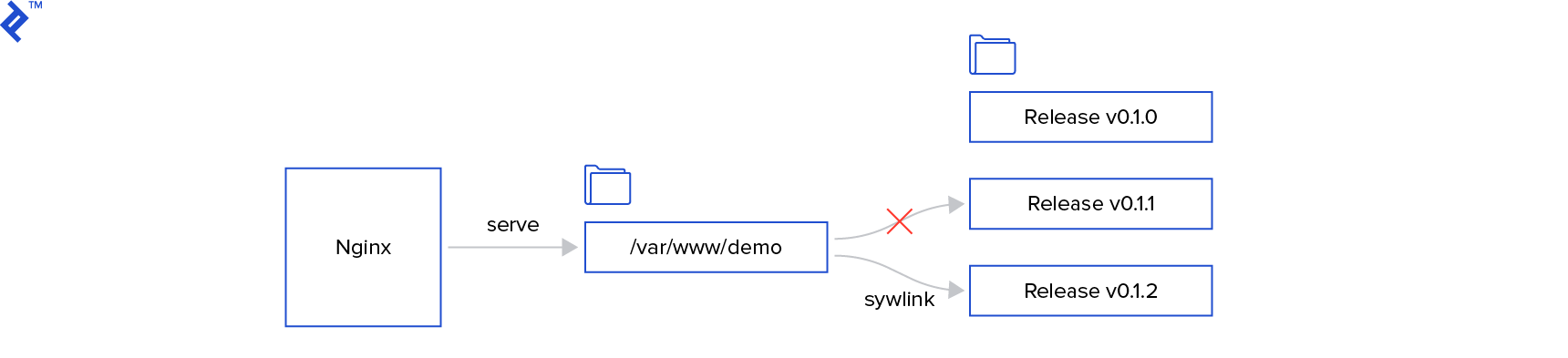
When using Apache, you might need to enable symlink following in the configuration:
Options +FollowSymLinks
Our structure could look like this:
| |
Certain files, like log files (unless using Logstash) or, in Laravel, the storage directory and .env file, need to persist across deployments. We can store them separately and use symlinks.
To retrieve release files from the Git repository, we can use clone or archive commands. While git clone fetches the entire repository before selecting the tag, git archive only fetches the archive for a specific tag, making it more efficient for larger repositories. Additionally, git archive allows us to exclude files or folders from the production environment using the export-ignore property in the .gitattributes file. The OWASP Secure Coding Practices Checklist recommends: “Remove test code or any functionality not intended for production, prior to deployment.”
Git archive and export-ignore can help us achieve this.
Let’s examine a simplified script (it would require more robust error handling in production):
deploy.sh
| |
We can deploy our release by running:
deploy.sh v1.0.3
Note: Here, v1.0.3 represents the git tag of our release.
Composer in Production?
While many articles recommend using Composer to install dependencies on production, this approach can be problematic. Ideally, a complete build should be created and tested across different environments before being deployed to production. Rebuilding the app on each stage, even if reproducible, can introduce inconsistencies. Here’s what can go wrong with running composer install in production:
- Network errors can interrupt dependency downloads.
- Library vendors may not always adhere to SemVer.
While network errors are easily detectable, a breaking change in a library, due to a vendor not properly incrementing the major version number, might be hard to identify without testing, which isn’t feasible in production. Although composer.json can use fixed versions, dependencies might use ~ and ^, relying on semantic versioning (major.minor.patch).
A better approach, if possible, is using an artifact repository (Nexus, JFrog, etc.). This involves creating a release build with all dependencies, storing it in a repository, and fetching it for testing and deployment.
Maintaining Code and Database Compatibility
One of Laravel’s strengths is its emphasis on best practices like database migrations, ensuring code and database synchronization. However, this doesn’t guarantee downtime-free deployments. Temporary inconsistencies between the application and database versions can arise, so maintaining backward and forward compatibility is essential.
For instance, splitting an address column into address1 and address2 might require multiple releases:
- Add the new columns to the database.
- Modify the application to use the new fields.
- Migrate
addressdata and drop the column.
This exemplifies the benefits of smaller, easily reversible changes. Large-scale changes over extended periods can make downtime-free updates challenging.
The Power of Kubernetes
Even if your application’s scale doesn’t necessitate cloud environments and Kubernetes, it’s worth understanding how deployments work in K8s. Instead of direct system modifications, we declare the desired state. Kubernetes then ensures the actual state aligns with the desired state.
When a new release is ready, we build and tag an image with the new files and provide it to K8s. Kubernetes then deploys the image, waits for it to become ready, seamlessly redirects traffic, and shuts down the old instance. This enables easy implementation of blue/green or canary deployments with simple commands.
For a fascinating demonstration, refer to the talk “9 Steps to Awesome with Kubernetes by Burr Sutter.”