Steve Endow, a Microsoft MVP for Dynamics GP, attended the third day of a Dynamics 365 Financials training course held by Liberty Grove.
http://libertygrove.com/services/training/dynamics-365-for-financials-training-ndpm/

Although becoming more comfortable with the user interface, he found the training’s rapid pace made it challenging to absorb the extensive new information, particularly the many unique features, terminology, and ideas within Dynamics 365 Financials.
Here are several noteworthy points from Day 3 of the training.
1. User Interface Changes.
Menus are mostly absent. Except for a few area page links on the Role Center, which acts as a home page, menus are largely gone. Interaction is primarily through Role Center actions, the window Ribbon, or the Global Search tool.
There are virtually no Save buttons. This design, while indicative of improved software that automatically saves work, feels unusual for those accustomed to manually saving. While eliminating the need for constant saving, this does mean changes are committed even if unintentional, unless the user specifically exits without saving.
The inability to resize grid columns often proves troublesome. Issues arise when column widths are insufficient for data values or header labels, creating difficulty in discerning content or meaning.
Column label is not fully visible:

Data in a row is truncated:

Numerous grids hide important or mandatory fields by default, requiring users to actively check and modify displayed columns, although preferred selections are saved for future use.


In contrast to Dynamics GP, which lacks resizing and field selection but consistently displays key fields and multi-line rows, the new system requires this extra navigation. Deleting multiple rows in grids is cumbersome, involving numerous clicks and waiting for refreshes. A multi-select function could significantly improve this process.

The “Show More” / “Show Less” functionality, although similar to Dynamics GP’s detailed windows, may confuse new users by concealing fields rather than providing them upfront.


2. Reporting Features.
A notable current limitation of D365 Financials is its inability to send reports directly to a printer. While a solution is in development, the present workaround involves using cloud-based printing services, raising potential security concerns.
The lack of direct printing was expected, as generating a PDF for user printing seemed the likely approach for a web-based system. However, the reliance on external printing services may be inconvenient for some users.

Furthermore, reports cannot be previewed within the browser and must be opened as separate files, unlike some other systems.
Report generation is typically quick, with prompt options to open or save the file.

3. Accounts Payable Processes.
Templates. Similar to Dynamics GP Vendor Classes, vendor templates in D365 Financials streamline vendor creation by providing default values. Templates are also available for customers and items.


No PM Voucher Equivalent. Unlike Dynamics GP, D365 Financials lacks a direct counterpart to a PM Voucher, which may change in future updates. The current options are limited to entering a full purchase invoice with line items (potentially based on a PO) or using a “Purchase Journal.”
The requirement to use predefined items for purchase invoice line items, each with specified inventory/service type and posting groups, is a significant limitation. This setup necessitates creating numerous item records, potentially hindering departments used to more flexible AP processes.
The “Purchase Journal” serves as a simplified sub-ledger journal entry tool.

While this journal connects to vendors and GL accounts, its sparse interface and lack of dedicated entry fields make it less intuitive than conventional transaction windows. Additionally, its flexibility allows for various actions on each line, potentially reducing control in the entry process. The Purchase Journal, in its current form, may not appeal to those accustomed to more structured tools.
4. Inventory Management.
The training provided a limited overview of the inventory features. The current “Inventory Adjustments” functionality seems like a temporary solution until the module is further enhanced within D365.
The adjustment process is rather rudimentary: open an item, click the arrow adjacent to the Quantity On Hand field, manually input the changes, and confirm.


No dedicated transaction window exists for details, notes, or descriptions. While changes are recorded as viewable “Ledger Entries,” they lack information about the author or reason.

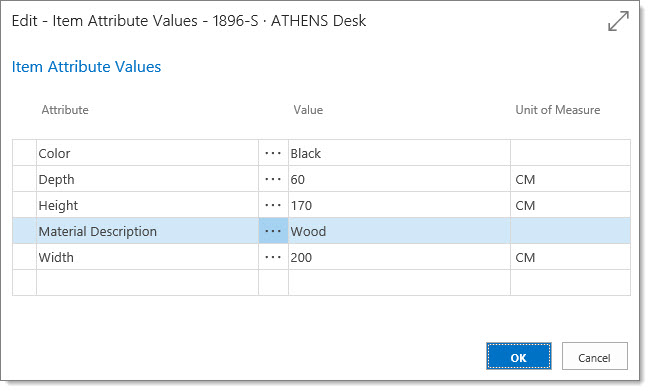
Inventory Item Limitations. Currently, Item Cards do not include fields for bins, lots, or serial tracking. While “Item Attributes” allow for dimensions, color, and size specifications, they are applied at the Item Card level and seem unsuitable for tracking individual items or batches.
This concludes the summary of Day 3’s key takeaways.
To read about Day 4 of the D365 Financials training, follow this link:
https://dynamicsgpland.blogspot.com/2017/04/dynamics-365-financials-training-day-4.html