React, Redux, and Immutable.js are very popular JavaScript libraries and are often the top choice for developers working on front-end development. While working on React and Redux projects, I have observed that many developers starting with React don’t fully grasp the framework and how to write efficient code to maximize its capabilities.
In this Immutable.js tutorial, we’re going to create a simple app using React and Redux. Along the way, we’ll highlight some common React misuses and explore ways to prevent them.
The Data Reference Problem
React is designed for performance. It’s built from the ground up to be incredibly performant, only re-rendering the absolute minimum DOM elements to accommodate data updates. A well-structured React app should primarily consist of small, simple components (often stateless functional components). These components are easy to understand, and many can have a shouldComponentUpdate function that returns false.
| |
From a performance standpoint, the shouldComponentUpdate lifecycle function is paramount. Whenever possible, it should return false. This prevents the component from re-rendering unnecessarily (except for the initial render), making your React app feel super responsive.
When we can’t avoid re-rendering entirely, our aim is to implement a lightweight equality check between the old props/state and the new props/state. If the data hasn’t changed, we can skip the re-render.
Before we go further, let’s quickly recap how JavaScript handles equality checks for various data types.
For primitive data types like boolean, string, and integer, equality checks are straightforward. They are compared by their actual value:
| |
However, equality checks for complex types such as objects, arrays, and functions work differently. Two objects are considered equal if they have the same reference (meaning they point to the same object in memory).
| |
While obj1 and obj2 might look identical, they have different references. This difference in references, when compared directly within the shouldComponentUpdate function, will lead to unnecessary component re-renders.
The key point here is that data fetched from Redux reducers, if not configured properly, will always be delivered with a different reference. This forces a component re-render every single time.
This reference issue poses a fundamental challenge in our pursuit of minimizing component re-renders.
Managing References Effectively
Let’s imagine we have deeply nested objects that need to be compared with their previous versions. We could recursively iterate through the nested object properties and compare each one. However, this approach is extremely inefficient and not a viable solution.
This leaves us with one option: checking the reference. But this introduces new hurdles:
- Maintaining the reference if the data remains unchanged.
- Updating the reference if any nested object/array property values are modified.
Achieving this in a clean, efficient, and performance-optimized manner is no easy feat. Facebook encountered this issue early on and turned to Immutable.js for a solution.
| |
Importantly, Immutable.js functions never directly modify the provided data. Instead, they internally clone the data, make the necessary mutations, and return a new reference only if changes have been made. If there are no changes, the original reference is returned. It’s crucial to explicitly set the new reference, like this: obj1 = obj1.set(...);.
React, Redux, and Immutable.js in Practice
Let’s build a simple app to illustrate the power of these libraries. And what better example than a todo app?
To keep things concise, we’ll focus on the parts of the app directly relevant to the concepts discussed. The complete source code for the app is available found on GitHub.
When the app runs, you’ll notice strategically placed console.log calls. These logs clearly demonstrate the minimal amount of DOM re-rendering happening.
As with any todo app, we need a list to display todo items. Users should be able to mark items as complete. We also need a small input field for adding new todos. Finally, let’s include three filters at the bottom, allowing users to toggle between:
- All
- Completed
- Active
Redux Reducer
In a Redux application, all data resides within a single store object. Think of reducers as a way to divide this store into smaller, manageable pieces. Since a reducer is a function, we can break it down even further.
Our reducer will consist of two parts:
- todoList
- activeFilter
| |
Connecting with Redux
Now that we have a Redux reducer using Immutable.js data, let’s connect it to a React component to pass data.
| |
Ideally, we should only establish connections in top-level route components. We extract the necessary data within mapStateToProps, and from there, it’s basic React prop passing to child components. In large applications, managing numerous connections can become difficult, so minimizing them is key.
It’s important to note that state.todos is a standard JavaScript object returned by the Redux combineReducers function (todos being the reducer name). However, state.todos.todoList is an Immutable List, and it’s essential to maintain this format until it passes the shouldComponentUpdate check.
Preventing Component Re-renders
Before we delve further, let’s clarify the type of data that should be fed to components:
- Any kind of primitive types.
- Objects/arrays strictly in immutable form.
Using these data types allows us to perform shallow comparisons of props received by React components.
Here’s a simple example demonstrating how to diff props:
| |
| |
The shallowEqual function performs a one-level deep comparison of props/state. It’s incredibly fast and works perfectly with our immutable data. However, writing this shouldComponentUpdate logic in every component would be cumbersome. Fortunately, there’s a solution.
Let’s extract shouldComponentUpdate into a dedicated component:
| |
Now, we can simply extend this logic to any component where we want to avoid unnecessary re-renders:
| |
This provides a clean and efficient way to prevent most component re-renders. If the app becomes more complex and requires a custom solution later, it’s easy to modify.
There’s a slight issue when using PureComponent and passing functions as props. Since React, with ES6 class syntax, doesn’t automatically bind this to functions, we need to handle it manually. Here are two common approaches:
- ES6 arrow function binding:
<Component onClick={() => this.handleClick()} /> - Using bind:
<Component onClick={this.handleClick.bind(this)} />
Both methods will trigger a re-render of Component because a different reference is passed to onClick each time.
We can work around this by pre-binding functions within the constructor method:
| |
If you frequently find yourself pre-binding multiple functions, consider creating and reusing a helper function:
| |
If none of these solutions work for your specific scenario, you can always manually implement shouldComponentUpdate conditions.
Working with Immutable Data Inside a Component
Now that we’ve successfully prevented unnecessary re-renders with our immutable data setup, let’s explore how to use this data within a component. A common mistake is immediately converting the data back to plain JavaScript using the Immutable toJS function.
However, using toJS for deep conversion defeats the purpose of avoiding re-renders. It’s a slow operation and should be avoided. So, how do we handle immutable data effectively?
We need to work with it directly. The Immutable API offers a variety of functions, with map and get being the most frequently used within React components. The todoList data structure from our Redux reducer is an array of objects in immutable form, where each object represents a todo item:
| |
The Immutable.js API closely resembles standard JavaScript, so we can use todoList like any other array of objects. The map function proves particularly useful in most cases.
Inside the map callback, we receive todo, which is an object still in immutable form. We can safely pass this object to our Todo component.
| |
If you need to perform multiple chained iterations over immutable data, like this:
| |
… it’s crucial to convert it to a Seq first using toSeq. After the iterations, convert it back to the desired form:
| |
Since Immutable.js always creates a new copy to avoid direct mutation, multiple iterations like this can become expensive. Seq is a lazy immutable sequence of data, meaning it minimizes operations and avoids creating intermediate copies. It’s designed for these scenarios.
Inside the Todo component, we use get or getIn to access props.
Pretty straightforward, right?
In practice, using numerous get() and especially getIn() calls can hinder readability. To strike a balance between performance and maintainability, I found that Immutable.js’s toObject and toArray functions work exceptionally well.
These functions perform a shallow conversion (one level deep) of Immutable.js objects/arrays into plain JavaScript objects/arrays. Any deeply nested data remains in immutable form, ready to be passed to child components.
While slightly slower than get(), the difference is negligible, and the code becomes much cleaner:
| |
Putting It All Together
If you haven’t already, now’s a good time to clone the code from GitHub:
| |
Starting the server is simple (ensure you have Node.js and NPM installed):
| |
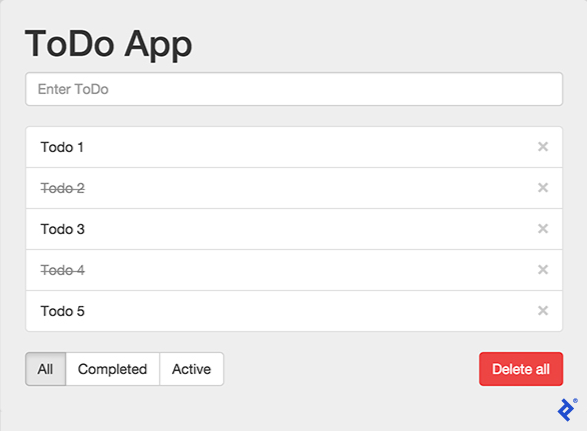
Open your web browser and navigate to http://localhost:3000. Keep an eye on the developer console logs as you interact with the app:
- Add five todo items.
- Switch the filter from ‘All’ to ‘Active’ and back to ‘All’.
- Notice there’s no todo re-render, only the filter changes.
- Mark two todo items as complete.
- Two todos re-render, but one at a time.
- Change the filter from ‘All’ to ‘Active’ and back to ‘All’.
- Only the two completed todo items are mounted/unmounted.
- Active items remain untouched.
- Delete a todo item from the middle of the list.
- Only the deleted todo item is affected; others aren’t re-rendered.
Conclusion
When used effectively, the combination of React, Redux, and Immutable.js offers elegant solutions to common performance bottlenecks encountered in large web applications.
Immutable.js enables efficient change detection in JavaScript objects/arrays without relying on expensive deep equality checks. This allows React to avoid unnecessary re-renders, resulting in smoother application performance.
I hope you found this article insightful and helpful for building performant and innovative React solutions in your future projects.