Building a Clean REST API with ASP.NET Core
This article, inspired by the “Pro ASP.NET Web API” book, CQRS principles, and my personal experience, will guide you through creating a robust REST API using .NET Core, EF Core, AutoMapper, and XUnit. We’ll explore:
- Building a REST API from scratch.
- Ensuring API functionality post-modification.
- Simplifying REST API development and maintenance.
Why Choose ASP.NET Core?
ASP.NET Core outshines ASP.NET MVC/Web API with several improvements. Notably, it unifies the framework, reducing complexity and confusion. The built-in logging and DI container eliminate the need for external libraries, allowing developers to focus on code quality.
Understanding Query Processors
Query processors encapsulate all business logic for a specific entity within a dedicated service, often named {EntityPluralName}QueryProcessor. This service may include CRUD operations for the entity, although not all methods need to be implemented. For instance, a ChangePassword method would only require specific input data. Typically, each method utilizes a separate query class, although reusing query classes is possible (though not ideal) in simple scenarios.
Defining Our Objectives
This article demonstrates building an API for a cost management system, including basic authentication and access control setup. While the authentication subsystem itself won’t be explored in-depth, we’ll cover the entire system’s business logic with modular tests and create at least one integration test per API method, using one entity as an example.
Our system should fulfill the following requirement: Users can add, edit, and delete their expenses, with visibility limited to their own expenses.
The complete codebase is available on Github.
Let’s begin designing our small yet powerful system.
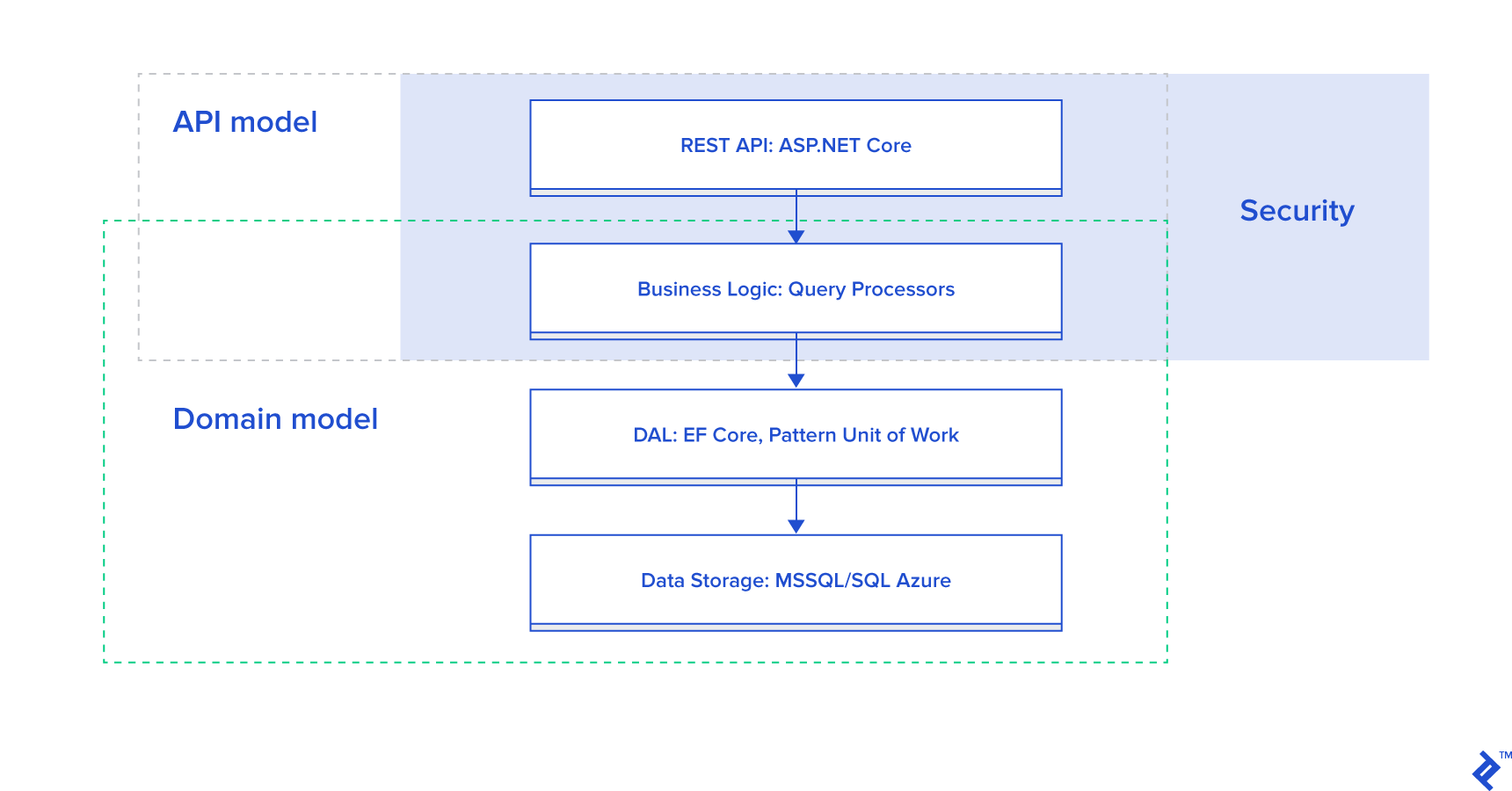
API Layers
The diagram illustrates the four layers of our system:
- Database: Exclusively for data storage.
- DAL: Employs the Unit of Work pattern with EF Core (using code-first and migration patterns) for data access.
- Business Logic: Utilizes query processors to encapsulate business logic, except for simple validations like mandatory fields, handled by API filters.
- REST API: Provides the interface for client interaction, implemented using ASP.NET Core. Route configurations are defined through attributes.
Beyond these layers, two key concepts are crucial:
- Data Model Separation: Client data models, primarily used in the REST API layer, handle query conversions to and from domain models. Query models may also be used in query processors. AutoMapper facilitates this conversion process.
- Query Parameters: Similar to OData syntax, but custom-built for this .NET Core application, query parameters are used for filtering, sorting, and pagination.
Project Structure
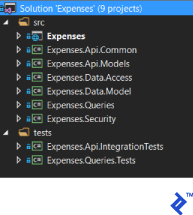
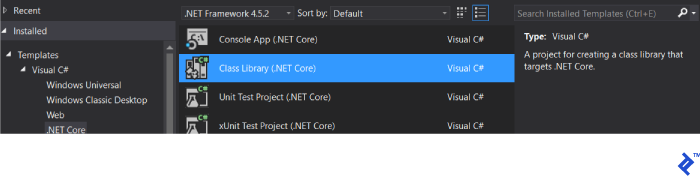
We’ll use Visual Studio 2017 Professional to structure our project, separating source code and tests into distinct folders for clarity and CI/CD efficiency. This approach aligns with Microsoft’s recommendations:
Project Breakdown:
| Project | Description |
|---|
| Expenses | Project for controllers, mapping between domain model and API model, API configuration |
|---|
| Expenses.Api.Common | At this point, there are collected exception classes that are interpreted in a certain way by filters to return correct HTTP codes with errors to the user |
|---|
| Expenses.Api.Models | Project for API models |
|---|
| Expenses.Data.Access | Project for interfaces and implementation of the Unit of Work pattern |
|---|
| Expenses.Data.Model | Project for domain model |
|---|
| Expenses.Queries | Project for query processors and query-specific classes |
|---|
| Expenses.Security | Project for the interface and implementation of the current user's security context |
|---|
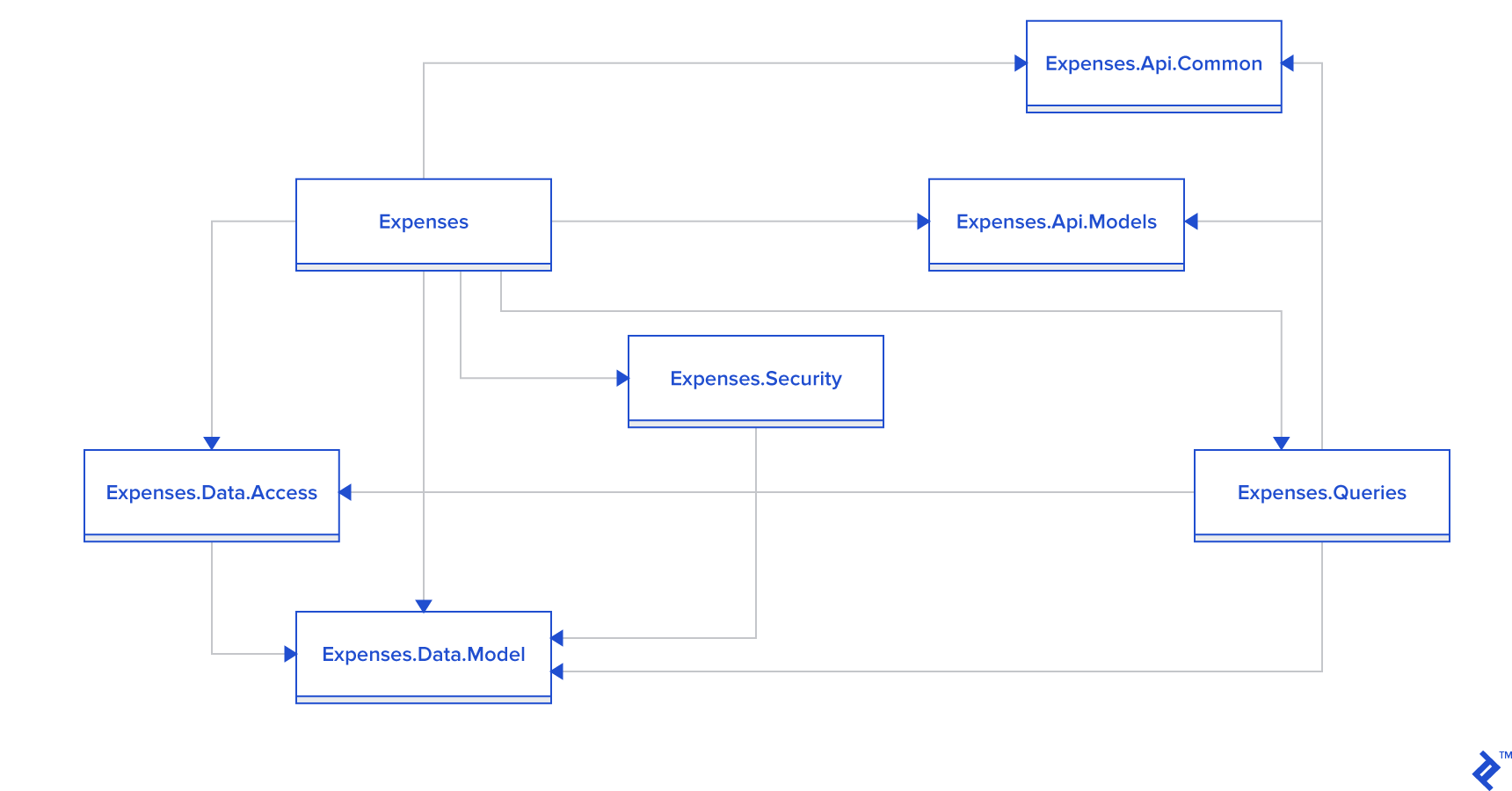
Project References:
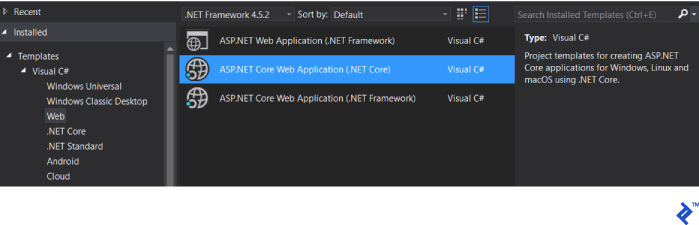
Expenses Project Components:
Additional src Folder Projects:
Tests Folder Projects:
Implementation
Note: The UI implementation will not be covered in this article.
We’ll start by defining the data model within the Expenses.Data.Model assembly:
The Expense class includes the following attributes:
 1
 2
 3
 4
 5
 6
 7
 8
 9
10
11
12
13
14
| public class Expense
{
public int Id { get; set; }
public DateTime Date { get; set; }
public string Description { get; set; }
public decimal Amount { get; set; }
public string Comment { get; set; }
public int UserId { get; set; }
public virtual User User { get; set; }
public bool IsDeleted { get; set; }
}
|
Supporting “soft deletion” through the IsDeleted attribute, this class encompasses all necessary expense data for a specific user.
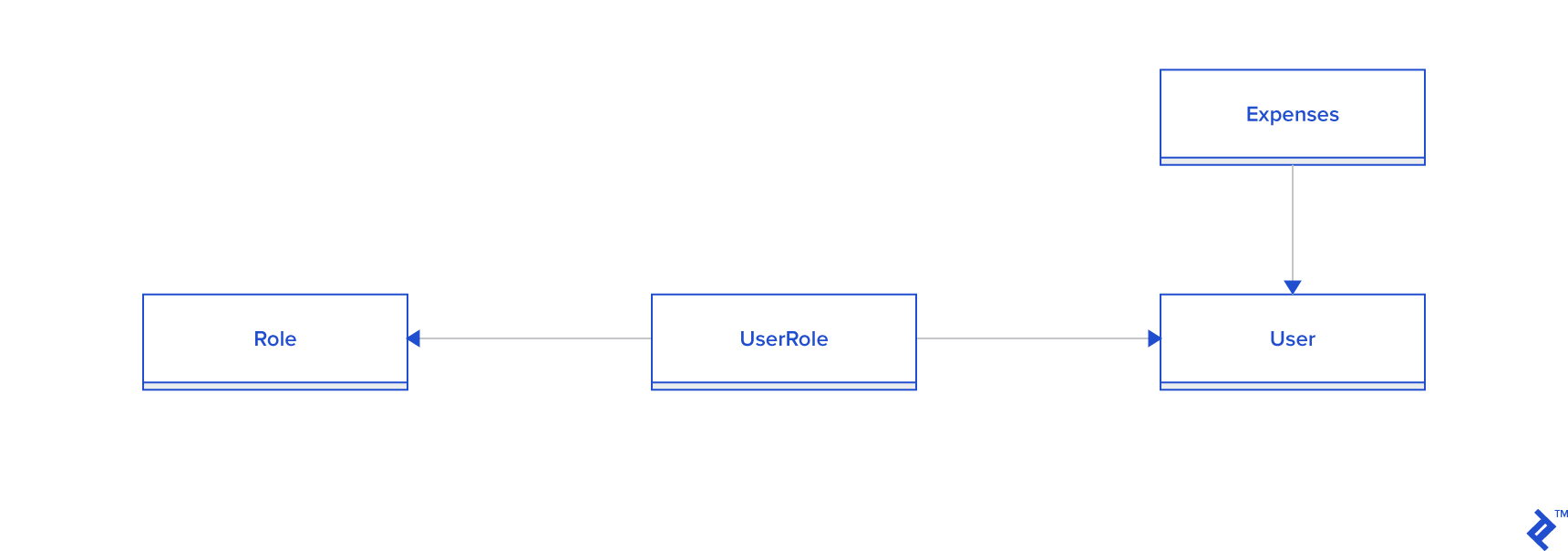
While the User, Role, and UserRole classes relate to the access control subsystem, they fall outside the scope of this article and can be replaced or enhanced without impacting the core business logic.
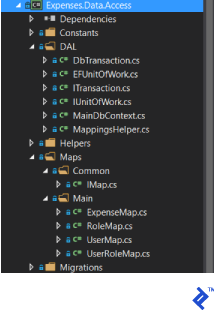
Next, we’ll implement the Unit of Work template in the Expenses.Data.Access assembly:
This assembly requires the Microsoft.EntityFrameworkCore.SqlServer library. We’ll implement an EF context that automatically discovers mappings within a designated folder:
 1
 2
 3
 4
 5
 6
 7
 8
 9
10
11
12
13
14
15
16
17
| public class MainDbContext : DbContext
{
public MainDbContext(DbContextOptions<MainDbContext> options)
: base(options)
{
}
protected override void OnModelCreating(ModelBuilder modelBuilder)
{
var mappings = MappingsHelper.GetMainMappings();
foreach (var mapping in mappings)
{
mapping.Visit(modelBuilder);
}
}
}
|
Mapping is handled by the MappingsHelper class:
 1
 2
 3
 4
 5
 6
 7
 8
 9
10
11
12
13
| public static class MappingsHelper
{
public static IEnumerable<IMap> GetMainMappings()
{
var assemblyTypes = typeof(UserMap).GetTypeInfo().Assembly.DefinedTypes;
var mappings = assemblyTypes
// ReSharper disable once AssignNullToNotNullAttribute
.Where(t => t.Namespace != null && t.Namespace.Contains(typeof(UserMap).Namespace))
.Where(t => typeof(IMap).GetTypeInfo().IsAssignableFrom(t));
mappings = mappings.Where(x => !x.IsAbstract);
return mappings.Select(m => (IMap) Activator.CreateInstance(m.AsType())).ToArray();
}
}
|
Mappings for our classes reside in the Maps folder, with the Expenses mapping as follows:
1
2
3
4
5
6
7
8
9
| public class ExpenseMap : IMap
{
public void Visit(ModelBuilder builder)
{
builder.Entity<Expense>()
.ToTable("Expenses")
.HasKey(x => x.Id);
}
}
|
The IUnitOfWork interface:
 1
 2
 3
 4
 5
 6
 7
 8
 9
10
11
12
| public interface IUnitOfWork : IDisposable
{
ITransaction BeginTransaction(IsolationLevel isolationLevel = IsolationLevel.Snapshot);
void Add<T>(T obj) where T: class ;
void Update<T>(T obj) where T : class;
void Remove<T>(T obj) where T : class;
IQueryable<T> Query<T>() where T : class;
void Commit();
Task CommitAsync();
void Attach<T>(T obj) where T : class;
}
|
Is implemented as a wrapper for EF DbContext:
 1
 2
 3
 4
 5
 6
 7
 8
 9
10
11
12
13
14
15
16
17
18
19
20
21
22
23
24
25
26
27
28
29
30
31
32
33
34
35
36
37
38
39
40
41
42
43
44
45
46
47
48
49
50
51
52
53
54
55
56
57
58
59
60
61
62
63
64
| public class EFUnitOfWork : IUnitOfWork
{
private DbContext _context;
public EFUnitOfWork(DbContext context)
{
_context = context;
}
public DbContext Context => _context;
public ITransaction BeginTransaction(IsolationLevel isolationLevel = IsolationLevel.Snapshot)
{
return new DbTransaction(_context.Database.BeginTransaction(isolationLevel));
}
public void Add<T>(T obj)
where T : class
{
var set = _context.Set<T>();
set.Add(obj);
}
public void Update<T>(T obj)
where T : class
{
var set = _context.Set<T>();
set.Attach(obj);
_context.Entry(obj).State = EntityState.Modified;
}
void IUnitOfWork.Remove<T>(T obj)
{
var set = _context.Set<T>();
set.Remove(obj);
}
public IQueryable<T> Query<T>()
where T : class
{
return _context.Set<T>();
}
public void Commit()
{
_context.SaveChanges();
}
public async Task CommitAsync()
{
await _context.SaveChangesAsync();
}
public void Attach<T>(T newUser) where T : class
{
var set = _context.Set<T>();
set.Attach(newUser);
}
public void Dispose()
{
_context = null;
}
}
|
The ITransaction interface, unused in this application:
1
2
3
4
5
| public interface ITransaction : IDisposable
{
void Commit();
void Rollback();
}
|
Is implemented as a simple wrapper for EF transactions:
 1
 2
 3
 4
 5
 6
 7
 8
 9
10
11
12
13
14
15
16
17
18
19
20
21
22
23
24
| public class DbTransaction : ITransaction
{
private readonly IDbContextTransaction _efTransaction;
public DbTransaction(IDbContextTransaction efTransaction)
{
_efTransaction = efTransaction;
}
public void Commit()
{
_efTransaction.Commit();
}
public void Rollback()
{
_efTransaction.Rollback();
}
public void Dispose()
{
_efTransaction.Dispose();
}
}
|
For unit testing purposes, we define the ISecurityContext interface (within the Expenses.Security project) to represent the API’s current user:
1
2
3
4
5
6
| public interface ISecurityContext
{
User User { get; }
bool IsAdministrator { get; }
}
|
Now, we’ll define the interface and implementation for our expense query processor, encompassing all related business logic: IExpensesQueryProcessor and ExpensesQueryProcessor:
 1
 2
 3
 4
 5
 6
 7
 8
 9
10
11
12
13
14
15
16
17
18
19
20
21
22
23
24
25
26
27
28
29
30
31
32
33
34
35
36
| public interface IExpensesQueryProcessor
{
IQueryable<Expense> Get();
Expense Get(int id);
Task<Expense> Create(CreateExpenseModel model);
Task<Expense> Update(int id, UpdateExpenseModel model);
Task Delete(int id);
}
public class ExpensesQueryProcessor : IExpensesQueryProcessor
{
public IQueryable<Expense> Get()
{
throw new NotImplementedException();
}
public Expense Get(int id)
{
throw new NotImplementedException();
}
public Task<Expense> Create(CreateExpenseModel model)
{
throw new NotImplementedException();
}
public Task<Expense> Update(int id, UpdateExpenseModel model)
{
throw new NotImplementedException();
}
public Task Delete(int id)
{
throw new NotImplementedException();
}
}
|
Next, we’ll configure the Expenses.Queries.Tests assembly by installing the Moq and FluentAssertions libraries. Within this assembly, we define the fixture for unit tests and outline the tests themselves:
  1
  2
  3
  4
  5
  6
  7
  8
  9
 10
 11
 12
 13
 14
 15
 16
 17
 18
 19
 20
 21
 22
 23
 24
 25
 26
 27
 28
 29
 30
 31
 32
 33
 34
 35
 36
 37
 38
 39
 40
 41
 42
 43
 44
 45
 46
 47
 48
 49
 50
 51
 52
 53
 54
 55
 56
 57
 58
 59
 60
 61
 62
 63
 64
 65
 66
 67
 68
 69
 70
 71
 72
 73
 74
 75
 76
 77
 78
 79
 80
 81
 82
 83
 84
 85
 86
 87
 88
 89
 90
 91
 92
 93
 94
 95
 96
 97
 98
 99
100
101
102
103
104
105
106
107
108
109
110
111
112
113
114
115
116
117
118
119
120
121
122
123
124
125
126
127
128
129
130
131
132
133
134
135
136
137
138
139
140
141
142
143
144
145
146
147
148
149
150
151
152
153
154
155
156
157
158
159
160
161
162
163
164
165
166
167
168
169
170
171
172
173
174
175
176
177
178
179
180
181
182
183
184
185
186
187
188
189
190
191
192
193
194
195
196
197
198
199
200
201
202
203
204
205
206
207
208
209
210
211
212
213
214
215
| public class ExpensesQueryProcessorTests
{
private Mock<IUnitOfWork> _uow;
private List<Expense> _expenseList;
private IExpensesQueryProcessor _query;
private Random _random;
private User _currentUser;
private Mock<ISecurityContext> _securityContext;
public ExpensesQueryProcessorTests()
{
_random = new Random();
_uow = new Mock<IUnitOfWork>();
_expenseList = new List<Expense>();
_uow.Setup(x => x.Query<Expense>()).Returns(() => _expenseList.AsQueryable());
_currentUser = new User{Id = _random.Next()};
_securityContext = new Mock<ISecurityContext>(MockBehavior.Strict);
_securityContext.Setup(x => x.User).Returns(_currentUser);
_securityContext.Setup(x => x.IsAdministrator).Returns(false);
_query = new ExpensesQueryProcessor(_uow.Object, _securityContext.Object);
}
[Fact]
public void GetShouldReturnAll()
{
_expenseList.Add(new Expense{UserId = _currentUser.Id});
var result = _query.Get().ToList();
result.Count.Should().Be(1);
}
[Fact]
public void GetShouldReturnOnlyUserExpenses()
{
_expenseList.Add(new Expense { UserId = _random.Next() });
_expenseList.Add(new Expense { UserId = _currentUser.Id });
var result = _query.Get().ToList();
result.Count().Should().Be(1);
result[0].UserId.Should().Be(_currentUser.Id);
}
[Fact]
public void GetShouldReturnAllExpensesForAdministrator()
{
_securityContext.Setup(x => x.IsAdministrator).Returns(true);
_expenseList.Add(new Expense { UserId = _random.Next() });
_expenseList.Add(new Expense { UserId = _currentUser.Id });
var result = _query.Get();
result.Count().Should().Be(2);
}
[Fact]
public void GetShouldReturnAllExceptDeleted()
{
_expenseList.Add(new Expense { UserId = _currentUser.Id });
_expenseList.Add(new Expense { UserId = _currentUser.Id, IsDeleted = true});
var result = _query.Get();
result.Count().Should().Be(1);
}
[Fact]
public void GetShouldReturnById()
{
var expense = new Expense { Id = _random.Next(), UserId = _currentUser.Id };
_expenseList.Add(expense);
var result = _query.Get(expense.Id);
result.Should().Be(expense);
}
[Fact]
public void GetShouldThrowExceptionIfExpenseOfOtherUser()
{
var expense = new Expense { Id = _random.Next(), UserId = _random.Next() };
_expenseList.Add(expense);
Action get = () =>
{
_query.Get(expense.Id);
};
get.ShouldThrow<NotFoundException>();
}
[Fact]
public void GetShouldThrowExceptionIfItemIsNotFoundById()
{
var expense = new Expense { Id = _random.Next(), UserId = _currentUser.Id };
_expenseList.Add(expense);
Action get = () =>
{
_query.Get(_random.Next());
};
get.ShouldThrow<NotFoundException>();
}
[Fact]
public void GetShouldThrowExceptionIfUserIsDeleted()
{
var expense = new Expense { Id = _random.Next(), UserId = _currentUser.Id, IsDeleted = true};
_expenseList.Add(expense);
Action get = () =>
{
_query.Get(expense.Id);
};
get.ShouldThrow<NotFoundException>();
}
[Fact]
public async Task CreateShouldSaveNew()
{
var model = new CreateExpenseModel
{
Description = _random.Next().ToString(),
Amount = _random.Next(),
Comment = _random.Next().ToString(),
Date = DateTime.Now
};
var result = await _query.Create(model);
result.Description.Should().Be(model.Description);
result.Amount.Should().Be(model.Amount);
result.Comment.Should().Be(model.Comment);
result.Date.Should().BeCloseTo(model.Date);
result.UserId.Should().Be(_currentUser.Id);
_uow.Verify(x => x.Add(result));
_uow.Verify(x => x.CommitAsync());
}
[Fact]
public async Task UpdateShouldUpdateFields()
{
var user = new Expense {Id = _random.Next(), UserId = _currentUser.Id};
_expenseList.Add(user);
var model = new UpdateExpenseModel
{
Comment = _random.Next().ToString(),
Description = _random.Next().ToString(),
Amount = _random.Next(),
Date = DateTime.Now
};
var result = await _query.Update(user.Id, model);
result.Should().Be(user);
result.Description.Should().Be(model.Description);
result.Amount.Should().Be(model.Amount);
result.Comment.Should().Be(model.Comment);
result.Date.Should().BeCloseTo(model.Date);
_uow.Verify(x => x.CommitAsync());
}
[Fact]
public void UpdateShoudlThrowExceptionIfItemIsNotFound()
{
Action create = () =>
{
var result = _query.Update(_random.Next(), new UpdateExpenseModel()).Result;
};
create.ShouldThrow<NotFoundException>();
}
[Fact]
public async Task DeleteShouldMarkAsDeleted()
{
var user = new Expense() { Id = _random.Next(), UserId = _currentUser.Id};
_expenseList.Add(user);
await _query.Delete(user.Id);
user.IsDeleted.Should().BeTrue();
_uow.Verify(x => x.CommitAsync());
}
[Fact]
public async Task DeleteShoudlThrowExceptionIfItemIsNotBelongTheUser()
{
var expense = new Expense() { Id = _random.Next(), UserId = _random.Next() };
_expenseList.Add(expense);
Action execute = () =>
{
_query.Delete(expense.Id).Wait();
};
execute.ShouldThrow<NotFoundException>();
}
[Fact]
public void DeleteShoudlThrowExceptionIfItemIsNotFound()
{
Action execute = () =>
{
_query.Delete(_random.Next()).Wait();
};
execute.ShouldThrow<NotFoundException>();
}
|
With unit tests defined, we implement the query processor:
 1
 2
 3
 4
 5
 6
 7
 8
 9
10
11
12
13
14
15
16
17
18
19
20
21
22
23
24
25
26
27
28
29
30
31
32
33
34
35
36
37
38
39
40
41
42
43
44
45
46
47
48
49
50
51
52
53
54
55
56
57
58
59
60
61
62
63
64
65
66
67
68
69
70
71
72
73
74
75
76
77
78
79
80
81
82
83
84
85
86
87
88
89
90
91
92
93
| public class ExpensesQueryProcessor : IExpensesQueryProcessor
{
private readonly IUnitOfWork _uow;
private readonly ISecurityContext _securityContext;
public ExpensesQueryProcessor(IUnitOfWork uow, ISecurityContext securityContext)
{
_uow = uow;
_securityContext = securityContext;
}
public IQueryable<Expense> Get()
{
var query = GetQuery();
return query;
}
private IQueryable<Expense> GetQuery()
{
var q = _uow.Query<Expense>()
.Where(x => !x.IsDeleted);
if (!_securityContext.IsAdministrator)
{
var userId = _securityContext.User.Id;
q = q.Where(x => x.UserId == userId);
}
return q;
}
public Expense Get(int id)
{
var user = GetQuery().FirstOrDefault(x => x.Id == id);
if (user == null)
{
throw new NotFoundException("Expense is not found");
}
return user;
}
public async Task<Expense> Create(CreateExpenseModel model)
{
var item = new Expense
{
UserId = _securityContext.User.Id,
Amount = model.Amount,
Comment = model.Comment,
Date = model.Date,
Description = model.Description,
};
_uow.Add(item);
await _uow.CommitAsync();
return item;
}
public async Task<Expense> Update(int id, UpdateExpenseModel model)
{
var expense = GetQuery().FirstOrDefault(x => x.Id == id);
if (expense == null)
{
throw new NotFoundException("Expense is not found");
}
expense.Amount = model.Amount;
expense.Comment = model.Comment;
expense.Description = model.Description;
expense.Date = model.Date;
await _uow.CommitAsync();
return expense;
}
public async Task Delete(int id)
{
var user = GetQuery().FirstOrDefault(u => u.Id == id);
if (user == null)
{
throw new NotFoundException("Expense is not found");
}
if (user.IsDeleted) return;
user.IsDeleted = true;
await _uow.CommitAsync();
}
}
|
We then write API integration tests to establish the API contract.
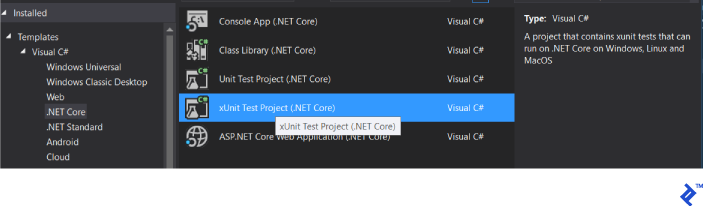
We begin by setting up the Expenses.Api.IntegrationTests project:
Install NuGet packages: FluentAssertions, Moq, Microsoft.AspNetCore.TestHost.
Establish the project structure:
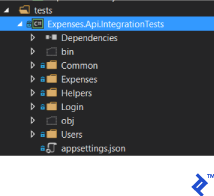
Create a CollectionDefinition to manage the test resource’s lifecycle.
1
2
3
4
5
6
| [CollectionDefinition("ApiCollection")]
public class DbCollection : ICollectionFixture<ApiServer>
{ }
~~~
And define our test server and the client to it with the already authenticated user by default:
|
public class ApiServer : IDisposable { public const string Username = “admin”; public const string Password = “admin”;
 1
 2
 3
 4
 5
 6
 7
 8
 9
10
11
12
13
14
15
16
17
18
19
20
21
22
23
24
25
26
27
28
29
30
31
32
33
34
35
36
37
38
39
40
41
42
43
44
45
| private IConfigurationRoot _config;
public ApiServer()
{
_config = new ConfigurationBuilder()
.SetBasePath(Directory.GetCurrentDirectory())
.AddJsonFile("appsettings.json")
.Build();
Server = new TestServer(new WebHostBuilder().UseStartup<Startup>());
Client = GetAuthenticatedClient(Username, Password);
}
public HttpClient GetAuthenticatedClient(string username, string password)
{
var client = Server.CreateClient();
var response = client.PostAsync("/api/Login/Authenticate",
new JsonContent(new LoginModel {Password = password, Username = username})).Result;
response.EnsureSuccessStatusCode();
var data = JsonConvert.DeserializeObject<UserWithTokenModel>(response.Content.ReadAsStringAsync().Result);
client.DefaultRequestHeaders.Add("Authorization", "Bearer " + data.Token);
return client;
}
public HttpClient Client { get; private set; }
public TestServer Server { get; private set; }
public void Dispose()
{
if (Client != null)
{
Client.Dispose();
Client = null;
}
if (Server != null)
{
Server.Dispose();
Server = null;
}
}
} ~~~
|
For streamlined HTTP request handling in integration tests, we create a helper:
 1
 2
 3
 4
 5
 6
 7
 8
 9
10
11
12
13
14
15
16
17
18
19
20
21
22
23
24
25
26
27
28
29
30
31
32
33
34
35
36
37
38
39
40
| public class HttpClientWrapper
{
private readonly HttpClient _client;
public HttpClientWrapper(HttpClient client)
{
_client = client;
}
public HttpClient Client => _client;
public async Task<T> PostAsync<T>(string url, object body)
{
var response = await _client.PostAsync(url, new JsonContent(body));
response.EnsureSuccessStatusCode();
var responseText = await response.Content.ReadAsStringAsync();
var data = JsonConvert.DeserializeObject<T>(responseText);
return data;
}
public async Task PostAsync(string url, object body)
{
var response = await _client.PostAsync(url, new JsonContent(body));
response.EnsureSuccessStatusCode();
}
public async Task<T> PutAsync<T>(string url, object body)
{
var response = await _client.PutAsync(url, new JsonContent(body));
response.EnsureSuccessStatusCode();
var responseText = await response.Content.ReadAsStringAsync();
var data = JsonConvert.DeserializeObject<T>(responseText);
return data;
}
}
|
Next, we define the REST API contract for each entity. We’ll focus on the REST API for expenses:
| URL | Method | Body type | Result type | Description |
|---|
| Expense | GET | - | DataResult<ExpenseModel> | Get all expenses with possible usage of filters and sorters in a query parameter "commands" |
|---|
| Expenses/{id} | GET | - | ExpenseModel | Get an expense by id |
|---|
| Expenses | POST | CreateExpenseModel | ExpenseModel | Create new expense record |
|---|
| Expenses/{id} | PUT | UpdateExpenseModel | ExpenseModel | Update an existing expense |
|---|
When requesting an expense list, various filtering and sorting options can be applied using AutoQueryable library. For example:
/expenses?commands=take=25%26amount%3E=12%26orderbydesc=date
This decodes to take=25&amount>=12&orderbydesc=date, representing paging, filtering, and sorting parameters.
Here are the models used in this API:
 1
 2
 3
 4
 5
 6
 7
 8
 9
10
11
12
13
14
15
16
17
18
19
20
21
22
23
24
25
26
27
28
29
30
31
32
33
34
35
36
37
38
39
40
41
42
43
| public class DataResult<T>
{
public T[] Data { get; set; }
public int Total { get; set; }
}
public class ExpenseModel
{
public int Id { get; set; }
public DateTime Date { get; set; }
public string Description { get; set; }
public decimal Amount { get; set; }
public string Comment { get; set; }
public int UserId { get; set; }
public string Username { get; set; }
}
public class CreateExpenseModel
{
[Required]
public DateTime Date { get; set; }
[Required]
public string Description { get; set; }
[Required]
[Range(0.01, int.MaxValue)]
public decimal Amount { get; set; }
[Required]
public string Comment { get; set; }
}
public class UpdateExpenseModel
{
[Required]
public DateTime Date { get; set; }
[Required]
public string Description { get; set; }
[Required]
[Range(0.01, int.MaxValue)]
public decimal Amount { get; set; }
[Required]
public string Comment { get; set; }
}
|
The CreateExpenseModel and UpdateExpenseModel utilize data annotation attributes for basic input data validation at the REST API level.
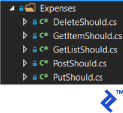
We organize integration test files by HTTP method within the project, with each method having its own fixture:
Here’s the integration test implementation for retrieving an expense list:
 1
 2
 3
 4
 5
 6
 7
 8
 9
10
11
12
13
14
15
16
17
18
19
20
21
22
23
24
25
26
27
28
| [Collection("ApiCollection")]
public class GetListShould
{
private readonly ApiServer _server;
private readonly HttpClient _client;
public GetListShould(ApiServer server)
{
_server = server;
_client = server.Client;
}
public static async Task<DataResult<ExpenseModel>> Get(HttpClient client)
{
var response = await client.GetAsync($"api/Expenses");
response.EnsureSuccessStatusCode();
var responseText = await response.Content.ReadAsStringAsync();
var items = JsonConvert.DeserializeObject<DataResult<ExpenseModel>>(responseText);
return items;
}
[Fact]
public async Task ReturnAnyList()
{
var items = await Get(_client);
items.Should().NotBeNull();
}
}
|
Retrieving expense details by ID:
 1
 2
 3
 4
 5
 6
 7
 8
 9
10
11
12
13
14
15
16
17
18
19
20
21
22
23
24
25
26
27
28
29
30
31
32
33
34
35
36
37
38
39
40
41
| [Collection("ApiCollection")]
public class GetItemShould
{
private readonly ApiServer _server;
private readonly HttpClient _client;
private Random _random;
public GetItemShould(ApiServer server)
{
_server = server;
_client = _server.Client;
_random = new Random();
}
[Fact]
public async Task ReturnItemById()
{
var item = await new PostShould(_server).CreateNew();
var result = await GetById(_client, item.Id);
result.Should().NotBeNull();
}
public static async Task<ExpenseModel> GetById(HttpClient client, int id)
{
var response = await client.GetAsync(new Uri($"api/Expenses/{id}", UriKind.Relative));
response.EnsureSuccessStatusCode();
var result = await response.Content.ReadAsStringAsync();
return JsonConvert.DeserializeObject<ExpenseModel>(result);
}
[Fact]
public async Task ShouldReturn404StatusIfNotFound()
{
var response = await _client.GetAsync(new Uri($"api/Expenses/-1", UriKind.Relative));
response.StatusCode.ShouldBeEquivalentTo(HttpStatusCode.NotFound);
}
}
|
Creating an expense:
 1
 2
 3
 4
 5
 6
 7
 8
 9
10
11
12
13
14
15
16
17
18
19
20
21
22
23
24
25
26
27
28
29
30
31
32
33
34
35
36
37
| [Collection("ApiCollection")]
public class PostShould
{
private readonly ApiServer _server;
private readonly HttpClientWrapper _client;
private Random _random;
public PostShould(ApiServer server)
{
_server = server;
_client = new HttpClientWrapper(_server.Client);
_random = new Random();
}
[Fact]
public async Task<ExpenseModel> CreateNew()
{
var requestItem = new CreateExpenseModel()
{
Amount = _random.Next(),
Comment = _random.Next().ToString(),
Date = DateTime.Now.AddMinutes(-15),
Description = _random.Next().ToString()
};
var createdItem = await _client.PostAsync<ExpenseModel>("api/Expenses", requestItem);
createdItem.Id.Should().BeGreaterThan(0);
createdItem.Amount.Should().Be(requestItem.Amount);
createdItem.Comment.Should().Be(requestItem.Comment);
createdItem.Date.Should().Be(requestItem.Date);
createdItem.Description.Should().Be(requestItem.Description);
createdItem.Username.Should().Be("admin admin");
return createdItem;
}
}
|
Updating an expense:
 1
 2
 3
 4
 5
 6
 7
 8
 9
10
11
12
13
14
15
16
17
18
19
20
21
22
23
24
25
26
27
28
29
30
31
32
33
34
35
36
37
38
| [Collection("ApiCollection")]
public class PutShould
{
private readonly ApiServer _server;
private readonly HttpClientWrapper _client;
private readonly Random _random;
public PutShould(ApiServer server)
{
_server = server;
_client = new HttpClientWrapper(_server.Client);
_random = new Random();
}
[Fact]
public async Task UpdateExistingItem()
{
var item = await new PostShould(_server).CreateNew();
var requestItem = new UpdateExpenseModel
{
Date = DateTime.Now,
Description = _random.Next().ToString(),
Amount = _random.Next(),
Comment = _random.Next().ToString()
};
await _client.PutAsync<ExpenseModel>($"api/Expenses/{item.Id}", requestItem);
var updatedItem = await GetItemShould.GetById(_client.Client, item.Id);
updatedItem.Date.Should().Be(requestItem.Date);
updatedItem.Description.Should().Be(requestItem.Description);
updatedItem.Amount.Should().Be(requestItem.Amount);
updatedItem.Comment.Should().Contain(requestItem.Comment);
}
}
|
Deleting an expense:
 1
 2
 3
 4
 5
 6
 7
 8
 9
10
11
12
13
14
15
16
17
18
19
20
21
| [Collection("ApiCollection")]
public class DeleteShould
{
private readonly ApiServer _server;
private readonly HttpClient _client;
public DeleteShould(ApiServer server)
{
_server = server;
_client = server.Client;
}
[Fact]
public async Task DeleteExistingItem()
{
var item = await new PostShould(_server).CreateNew();
var response = await _client.DeleteAsync(new Uri($"api/Expenses/{item.Id}", UriKind.Relative));
response.EnsureSuccessStatusCode();
}
}
|
With a clearly defined REST API contract, we can now implement it using ASP.NET Core.
Implementing the API
To prepare the Expenses project, install the following NuGet packages: AutoMapper, AutoQueryable.AspNetCore.Filter, Microsoft.ApplicationInsights.AspNetCore, Microsoft.EntityFrameworkCore.SqlServer, Microsoft.EntityFrameworkCore.SqlServer.Design, Microsoft.EntityFrameworkCore.Tools, and Swashbuckle.AspNetCore.
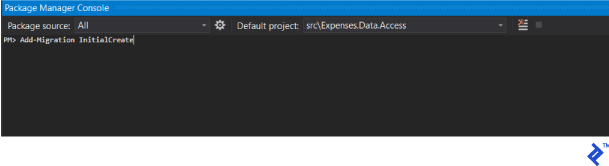
Next, create the initial database migration using the Package Manager Console within the Expenses.Data.Access project by running the command: Add-Migration InitialCreate
Before proceeding, configure the appsettings.json file and copy it to the Expenses.Api.IntegrationTests project for running the test API instance.
 1
 2
 3
 4
 5
 6
 7
 8
 9
10
11
12
13
14
15
16
| {
"Logging": {
"IncludeScopes": false,
"LogLevel": {
"Default": "Debug",
"System": "Information",
"Microsoft": "Information"
}
},
"Data": {
"main": "Data Source=.; Initial Catalog=expenses.main; Integrated Security=true; Max Pool Size=1000; Min Pool Size=12; Pooling=True;"
},
"ApplicationInsights": {
"InstrumentationKey": "Your ApplicationInsights key"
}
}
|
This configuration includes logging settings (created automatically), a Data section for the database connection string, and your ApplicationInsights key.
Application Configuration
Now, let’s configure the various services within our application.
Enable ApplicationInsights: services.AddApplicationInsightsTelemetry(Configuration);
Register your services: ContainerSetup.Setup(services, Configuration);
The ContainerSetup class, located in the IoC folder within the Expenses project, centralizes service registrations:
 1
 2
 3
 4
 5
 6
 7
 8
 9
10
11
12
13
14
15
16
17
18
19
20
21
22
23
24
25
26
27
28
29
30
31
32
33
34
35
36
37
38
39
40
41
42
43
44
45
46
47
48
49
50
51
52
53
54
55
56
| public static class ContainerSetup
{
public static void Setup(IServiceCollection services, IConfigurationRoot configuration)
{
AddUow(services, configuration);
AddQueries(services);
ConfigureAutoMapper(services);
ConfigureAuth(services);
}
private static void ConfigureAuth(IServiceCollection services)
{
services.AddSingleton<IHttpContextAccessor, HttpContextAccessor>();
services.AddScoped<ITokenBuilder, TokenBuilder>();
services.AddScoped<ISecurityContext, SecurityContext>();
}
private static void ConfigureAutoMapper(IServiceCollection services)
{
var mapperConfig = AutoMapperConfigurator.Configure();
var mapper = mapperConfig.CreateMapper();
services.AddSingleton(x => mapper);
services.AddTransient<IAutoMapper, AutoMapperAdapter>();
}
private static void AddUow(IServiceCollection services, IConfigurationRoot configuration)
{
var connectionString = configuration["Data:main"];
services.AddEntityFrameworkSqlServer();
services.AddDbContext<MainDbContext>(options =>
options.UseSqlServer(connectionString));
services.AddScoped<IUnitOfWork>(ctx => new EFUnitOfWork(ctx.GetRequiredService<MainDbContext>()));
services.AddScoped<IActionTransactionHelper, ActionTransactionHelper>();
services.AddScoped<UnitOfWorkFilterAttribute>();
}
private static void AddQueries(IServiceCollection services)
{
var exampleProcessorType = typeof(UsersQueryProcessor);
var types = (from t in exampleProcessorType.GetTypeInfo().Assembly.GetTypes()
where t.Namespace == exampleProcessorType.Namespace
&& t.GetTypeInfo().IsClass
&& t.GetTypeInfo().GetCustomAttribute<CompilerGeneratedAttribute>() == null
select t).ToArray();
foreach (var type in types)
{
var interfaceQ = type.GetTypeInfo().GetInterfaces().First();
services.AddScoped(interfaceQ, type);
}
}
}
|
While most of the code is self-explanatory, let’s delve into the ConfigureAutoMapper method:
1
2
3
4
5
6
7
| private static void ConfigureAutoMapper(IServiceCollection services)
{
var mapperConfig = AutoMapperConfigurator.Configure();
var mapper = mapperConfig.CreateMapper();
services.AddSingleton(x => mapper);
services.AddTransient<IAutoMapper, AutoMapperAdapter>();
}
|
This method uses a helper class to identify mappings between models and entities. It then obtains the IMapper interface to create an IAutoMapper wrapper for use in controllers, providing a convenient interface for AutoMapper methods.
 1
 2
 3
 4
 5
 6
 7
 8
 9
10
11
12
13
14
15
16
17
18
19
20
21
22
23
24
25
26
27
28
29
30
31
| public class AutoMapperAdapter : IAutoMapper
{
private readonly IMapper _mapper;
public AutoMapperAdapter(IMapper mapper)
{
_mapper = mapper;
}
public IConfigurationProvider Configuration => _mapper.ConfigurationProvider;
public T Map<T>(object objectToMap)
{
return _mapper.Map<T>(objectToMap);
}
public TResult[] Map<TSource, TResult>(IEnumerable<TSource> sourceQuery)
{
return sourceQuery.Select(x => _mapper.Map<TResult>(x)).ToArray();
}
public IQueryable<TResult> Map<TSource, TResult>(IQueryable<TSource> sourceQuery)
{
return sourceQuery.ProjectTo<TResult>(_mapper.ConfigurationProvider);
}
public void Map<TSource, TDestination>(TSource source, TDestination destination)
{
_mapper.Map(source, destination);
}
}
|
The AutoMapper configuration relies on a helper class that searches for mappings within specific namespaces. These mappings reside in the Expenses/Maps folder:
 1
 2
 3
 4
 5
 6
 7
 8
 9
10
11
12
13
14
15
16
17
18
19
20
21
22
23
24
25
26
27
28
29
30
31
32
33
34
35
| public static class AutoMapperConfigurator
{
private static readonly object Lock = new object();
private static MapperConfiguration _configuration;
public static MapperConfiguration Configure()
{
lock (Lock)
{
if (_configuration != null) return _configuration;
var thisType = typeof(AutoMapperConfigurator);
var configInterfaceType = typeof(IAutoMapperTypeConfigurator);
var configurators = thisType.GetTypeInfo().Assembly.GetTypes()
.Where(x => !string.IsNullOrWhiteSpace(x.Namespace))
// ReSharper disable once AssignNullToNotNullAttribute
.Where(x => x.Namespace.Contains(thisType.Namespace))
.Where(x => x.GetTypeInfo().GetInterface(configInterfaceType.Name) != null)
.Select(x => (IAutoMapperTypeConfigurator)Activator.CreateInstance(x))
.ToArray();
void AggregatedConfigurator(IMapperConfigurationExpression config)
{
foreach (var configurator in configurators)
{
configurator.Configure(config);
}
}
_configuration = new MapperConfiguration(AggregatedConfigurator);
return _configuration;
}
}
}
|
All mappings must implement the following interface:
1
2
3
4
| public interface IAutoMapperTypeConfigurator
{
void Configure(IMapperConfigurationExpression configuration);
}
|
Example mapping from entity to model:
1
2
3
4
5
6
7
8
| public class ExpenseMap : IAutoMapperTypeConfigurator
{
public void Configure(IMapperConfigurationExpression configuration)
{
var map = configuration.CreateMap<Expense, ExpenseModel>();
map.ForMember(x => x.Username, x => x.MapFrom(y => y.User.FirstName + " " + y.User.LastName));
}
}
|
Within Startup.ConfigureServices, we configure authentication using JWT Bearer tokens:
1
2
3
4
5
6
| services.AddAuthorization(auth =>
{
auth.AddPolicy("Bearer", new AuthorizationPolicyBuilder()
.AddAuthenticationSchemes(JwtBearerDefaults.AuthenticationScheme)
.RequireAuthenticatedUser().Build());
});
|
Register the ISecurityContext implementation to determine the current user:
 1
 2
 3
 4
 5
 6
 7
 8
 9
10
11
12
13
14
15
16
17
18
19
20
21
22
23
24
25
26
27
28
29
30
31
32
33
34
35
36
37
38
39
| public class SecurityContext : ISecurityContext
{
private readonly IHttpContextAccessor _contextAccessor;
private readonly IUnitOfWork _uow;
private User _user;
public SecurityContext(IHttpContextAccessor contextAccessor, IUnitOfWork uow)
{
_contextAccessor = contextAccessor;
_uow = uow;
}
public User User
{
get
{
if (_user != null) return _user;
var username = _contextAccessor.HttpContext.User.Identity.Name;
_user = _uow.Query<User>()
.Where(x => x.Username == username)
.Include(x => x.Roles)
.ThenInclude(x => x.Role)
.FirstOrDefault();
if (_user == null)
{
throw new UnauthorizedAccessException("User is not found");
}
return _user;
}
}
public bool IsAdministrator
{
get { return User.Roles.Any(x => x.Role.Name == Roles.Administrator); }
}
}
|
Modify the default MVC registration to incorporate a custom error filter for converting exceptions to appropriate error codes:
services.AddMvc(options => { options.Filters.Add(new ApiExceptionFilter()); });
Implement the ApiExceptionFilter:
 1
 2
 3
 4
 5
 6
 7
 8
 9
10
11
12
13
14
15
16
17
18
19
20
21
22
23
24
25
26
27
28
29
30
31
32
33
34
35
36
37
| public class ApiExceptionFilter : ExceptionFilterAttribute
{
public override void OnException(ExceptionContext context)
{
if (context.Exception is NotFoundException)
{
// handle explicit 'known' API errors
var ex = context.Exception as NotFoundException;
context.Exception = null;
context.Result = new JsonResult(ex.Message);
context.HttpContext.Response.StatusCode = (int)HttpStatusCode.NotFound;
}
else if (context.Exception is BadRequestException)
{
// handle explicit 'known' API errors
var ex = context.Exception as BadRequestException;
context.Exception = null;
context.Result = new JsonResult(ex.Message);
context.HttpContext.Response.StatusCode = (int)HttpStatusCode.BadRequest;
}
else if (context.Exception is UnauthorizedAccessException)
{
context.Result = new JsonResult(context.Exception.Message);
context.HttpContext.Response.StatusCode = (int)HttpStatusCode.Unauthorized;
}
else if (context.Exception is ForbiddenException)
{
context.Result = new JsonResult(context.Exception.Message);
context.HttpContext.Response.StatusCode = (int)HttpStatusCode.Forbidden;
}
base.OnException(context);
}
}
|
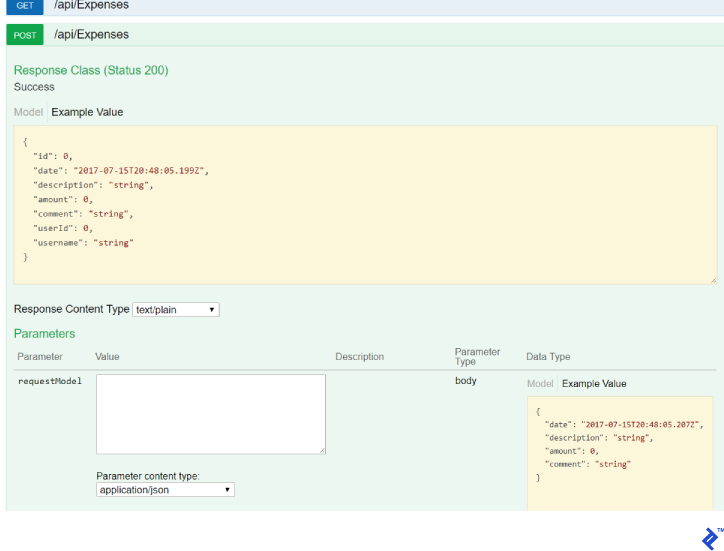
Enable Swagger for comprehensive API documentation:
1
2
3
4
5
| services.AddSwaggerGen(c =>
{
c.SwaggerDoc("v1", new Info {Title = "Expenses", Version = "v1"});
c.OperationFilter<AuthorizationHeaderParameterOperationFilter>();
});
|
In the Startup.Configure method, add a call to InitDatabase to automatically apply database migrations:
1
2
3
4
5
6
7
8
| private void InitDatabase(IApplicationBuilder app)
{
using (var serviceScope = app.ApplicationServices.GetRequiredService<IServiceScopeFactory>().CreateScope())
{
var context = serviceScope.ServiceProvider.GetService<MainDbContext>();
context.Database.Migrate();
}
}
|
Enable Swagger only in the development environment and disable authentication requirements for accessing it:
1
2
| app.UseSwagger();
app.UseSwaggerUI(c => { c.SwaggerEndpoint("/swagger/v1/swagger.json", "My API V1"); });
|
Connect authentication (refer to the repository for details):
ConfigureAuthentication(app);
You can now run integration tests to verify compilation, though functionality won’t be present yet.
Note: Controllers are organized within the Expenses/Server folder, divided into Controllers (for traditional MVC controllers returning markup) and RestApi (for REST controllers).
Create the Expenses/Server/RestApi/ExpensesController class, inheriting from the Controller class:
1
2
3
| public class ExpensesController : Controller
{
}
|
Configure routing for ~ / api / Expenses using the [Route("api/[controller]")] attribute.
Inject the following services for business logic and mapping:
1
2
3
4
5
6
7
8
| private readonly IExpensesQueryProcessor _query;
private readonly IAutoMapper _mapper;
public ExpensesController(IExpensesQueryProcessor query, IAutoMapper mapper)
{
_query = query;
_mapper = mapper;
}
|
Now, we implement the methods, starting with retrieving the expense list:
1
2
3
4
5
6
7
8
| [HttpGet]
[QueryableResult]
public IQueryable<ExpenseModel> Get()
{
var result = _query.Get();
var models = _mapper.Map<Expense, ExpenseModel>(result);
return models;
}
|
This method retrieves a database query from ExpensesQueryProcessor, which is then mapped to IQueryable<ExpenseModel> and returned as a result.
The QueryableResult attribute, utilizing the AutoQueryable library, handles server-side paging, filtering, and sorting. This attribute, located in the Expenses/Filters folder, ensures that data of type DataResult<ExpenseModel> is returned to the API client.
1
2
3
4
5
6
7
8
9
10
11
12
13
14
15
16
17
18
| public class QueryableResult : ActionFilterAttribute
{
public override void OnActionExecuted(ActionExecutedContext context)
{
if (context.Exception != null) return;
dynamic query = ((ObjectResult)context.Result).Value;
if (query == null) throw new Exception("Unable to retrieve value of IQueryable from context result.");
Type entityType = query.GetType().GenericTypeArguments[0];
var commands = context.HttpContext.Request.Query.ContainsKey("commands") ? context.HttpContext.Request.Query["commands"] : new StringValues();
var data = QueryableHelper.GetAutoQuery(commands, entityType, query,
new AutoQueryableProfile {UnselectableProperties = new string[0]});
var total = System.Linq.Queryable.Count(query);
context.Result = new OkObjectResult(new DataResult{Data = data, Total = total});
}
}
|
Let’s examine the POST method implementation for creating an expense:
1
2
3
4
5
6
7
8
| [HttpPost]
[ValidateModel]
public async Task<ExpenseModel> Post([FromBody]CreateExpenseModel requestModel)
{
var item = await _query.Create(requestModel);
var model = _mapper.Map<ExpenseModel>(item);
return model;
}
|
The ValidateModel attribute performs basic input data validation according to data annotation attributes using built-in MVC checks.
1
2
3
4
5
6
7
8
9
10
| public class ValidateModelAttribute : ActionFilterAttribute
{
public override void OnActionExecuting(ActionExecutingContext context)
{
if (!context.ModelState.IsValid)
{
context.Result = new BadRequestObjectResult(context.ModelState);
}
}
}
|
Complete ExpensesController code:
1
2
3
4
5
6
7
8
9
10
11
12
13
14
15
16
17
18
19
20
21
22
23
24
25
26
27
28
29
30
31
32
33
34
35
36
37
38
39
40
41
42
43
44
45
46
47
48
49
50
51
52
53
| [Route("api/[controller]")]
public class ExpensesController : Controller
{
private readonly IExpensesQueryProcessor _query;
private readonly IAutoMapper _mapper;

public ExpensesController(IExpensesQueryProcessor query, IAutoMapper mapper)
{
_query = query;
_mapper = mapper;
}
[HttpGet]
        [QueryableResult]
        public IQueryable<ExpenseModel> Get()
        {
            var result = _query.Get();
            var models = _mapper.Map<Expense, ExpenseModel>(result);
            return models;
        }
[HttpGet("{id}")]
public ExpenseModel Get(int id)
{
var item = _query.Get(id);
var model = _mapper.Map<ExpenseModel>(item);
return model;
}
[HttpPost]
        [ValidateModel]
        public async Task<ExpenseModel> Post([FromBody]CreateExpenseModel requestModel)
        {
            var item = await _query.Create(requestModel);
            var model = _mapper.Map<ExpenseModel>(item);
            return model;
        }
[HttpPut("{id}")]
[ValidateModel]
public async Task<ExpenseModel> Put(int id, [FromBody]UpdateExpenseModel requestModel)
{
var item = await _query.Update(id, requestModel);
var model = _mapper.Map<ExpenseModel>(item);
return model;
}
[HttpDelete("{id}")]
public async Task Delete(int id)
{
await _query.Delete(id);
}
}
|
Conclusion
While initially setting up the solution and understanding the application layers may seem complex, the system’s complexity remains relatively consistent as the application grows. This consistency is a significant advantage during maintenance.
The API benefits from comprehensive integration tests and unit tests for the business logic. This separation of business logic from the underlying server technology enables thorough testing and makes the solution ideal for systems with intricate APIs and complex business rules.
For those interested in building Angular applications that interact with this API, consider exploring resources like “Angular 5 and ASP.NET Core” by Toptaler Pablo Albella. Furthermore, Toptal now extends its support to mission-critical Blazor development projects.