When creating a website or web application, expanding its reach often means making it accessible in multiple languages and locales.
This is a significant challenge due to the fundamental differences between languages. Variations in grammar, nuances, date formats, and other factors make localization a complex task.
For example, English pluralization is relatively simple, with singular and plural forms. However, Slavic languages have two plural forms in addition to the singular, while others like Slovenian, Irish, and Arabic may have four, five, or even six.
Your code’s structure and component design significantly impact the ease of localization. Internationalization (i18n) ensures your codebase can be adapted to different languages and regions easily. It’s best done early in the project to avoid major code revisions later.

Once internationalized, localization (l10n) involves translating the application’s content into specific languages/locales. This process is required for each new language or region and whenever the interface’s textual content is updated.
This article explores internationalizing and localizing PHP software. We’ll cover various implementation options and tools available to simplify the process.
Internationalization Tools
Using array files is the simplest approach for internationalizing PHP software. Translated strings are stored in arrays and accessed from templates:
| |
However, this method is not ideal for large projects due to potential maintenance issues. Limitations such as lack of variable interpolation and noun pluralization support may arise.
One of the most established tools for i18n and l10n is a Unix tool called Gettext. Despite its origins in 1995, it remains a comprehensive and user-friendly solution for software translation, offering both simplicity and powerful supporting tools.
We’ll be utilizing Gettext in this article and showcasing a user-friendly GUI application that simplifies l10n source file updates, eliminating the need for command-line interaction.
Simplifying Libraries

Many major PHP web frameworks and libraries, with varying installation complexities and features, support Gettext and other i18n implementations. While this article focuses on PHP core tools, here are some noteworthy alternatives:
oscarotero/Gettext: Object-oriented Gettext support with improved helper functions, powerful extractors for various file formats (some not natively supported by the
gettextcommand), and export capabilities beyond .mo/.po files for integration with systems like JavaScript interfaces.symfony/translation: Supports numerous formats but recommends verbose XLIFFs. It lacks built-in extractors and helper functions but supports placeholders using
strtr().zend/i18n: Supports array, INI, and Gettext formats, implements a caching layer for reduced file system reads, and includes view helpers, locale-aware input filters, and validators, but lacks a message extractor.
Some frameworks have integrated i18n modules but are not available independently:
Laravel: Basic array file support; no automatic extractor but includes a
@langtemplate helper.Yii: Supports array, Gettext, and database-based translation, includes a message extractor, leverages the
Intlextension (available since PHP 5.3), and is based on the ICU project, enabling powerful replacements like number spelling, date, time, interval, currency, and ordinal formatting.
If you opt for libraries without extractors, consider using Gettext formats to leverage the original Gettext toolchain (including Poedit) as described later.
Gettext Installation
You may need to install Gettext and its PHP library using your package manager (e.g., apt-get or yum). Afterward, enable it by adding extension=gettext.so (Linux/Unix) or extension=php_gettext.dll (Windows) to your php.ini.
We’ll also be using Poedit to create translation files. It’s likely available in your package manager and can be downloaded for free on its website as well.
Gettext File Types
Three file types are commonly used with Gettext:
- PO (Portable Object): A readable list of translated objects.
- MO (Machine Object): The binary counterpart of PO files, interpreted by Gettext during localization.
- POT (PO Template): Contains all existing keys from source files, serving as a guide for generating and updating PO files.
Template files are optional; depending on your l10n tool, only PO/MO files might suffice. You’ll have one PO/MO pair per language/region but a single POT per domain.
Domain Separation
Large projects may require separating translations when words have different meanings in different contexts.
This involves dividing translations into “domains,” essentially named groups of POT/PO/MO files where the filename represents the translation domain. For simplicity, small to medium-sized projects typically use a single domain, arbitrarily named; we’ll use “main” in our examples.
For instance, in Symfony projects, domains differentiate translations for validation messages.
Locale Code
A locale is a code that identifies a language version, adhering to the ISO 639-1 and ISO 3166-1 alpha-2 specifications: two lowercase letters for the language, optionally followed by an underscore and two uppercase letters for the country/regional code. Rare languages use three letters.
While seemingly redundant for some, the country code distinguishes dialects, such as Austrian German (de_AT) or Brazilian Portuguese (pt_BR). Its absence implies a generic or hybrid language version.
Directory Structure
Gettext usage requires a specific folder structure.
Choose an arbitrary root directory for l10n files within your repository. Inside, create a folder for each locale and a fixed “LC_MESSAGES” folder to house all PO/MO pairs.

Plural Forms
As mentioned, pluralization rules vary across languages. Gettext simplifies this by requiring pluralization rule declaration when creating a .po file. Plural-sensitive translations have different forms for each rule.
When calling Gettext, you specify a number related to the sentence (e.g., “n messages” requires specifying ’n’), and it determines the correct form, even using string substitution if needed.
Plural rules consist of the number of rules and a boolean test for each (tests for at most one rule can be omitted). For example:
Japanese:
nplurals=1; plural=0;- one rule, no plural forms.English:
nplurals=2; plural=(n != 1);- two rules, plural form unless ’n’ is 1.Brazilian Portuguese:
nplurals=2; plural=(n > 1);- two rules, plural form only if ’n’ is greater than 1.
Refer to the online LingoHub tutorial for a detailed explanation.
Gettext uses the provided number to determine the correct localized string form. For pluralization-dependent strings, the .po file must include a different sentence for each defined plural rule.
Sample Implementation
Let’s delve into a practical example with an excerpt from a .po file (focus on the overall content, not the syntax):
| |
The first section acts as a header with empty msgid and msgstr, describing file encoding, plural forms, etc. The second translates a string from English to Brazilian Portuguese, while the third utilizes sprintf for string replacement, incorporating the username and visit date.
The last section demonstrates pluralization, displaying singular and plural English msgid with corresponding translations as msgstr 0 and 1 (based on the plural rule). String replacement using %d displays the number within the translated sentence. Plural forms always have two msgid (singular and plural), so using a simple source language is recommended.
Localization Keys
Notice that the actual English sentence serves as the source ID (msgid). This remains consistent across .po files, ensuring uniform formatting and msgid fields while allowing for translated msgstr lines.
Two main approaches exist for translation keys:
1. msgid as a real sentence
Advantages:
Untranslated parts retain some meaning (e.g., missing French translations on an English-to-Spanish website might default to English).
Easier translator comprehension and accurate translation based on
msgid.“Free” l10n for the source language.
Disadvantage:
- Changing the text requires modifying the same
msgidacross multiple language files.
2. msgid as a unique, structured key
This approach describes the sentence’s purpose in a structured manner, including its location in the template or part of the application instead of its content.
Advantages:
- Organized code, separating text content from template logic.
Disadvantages:
Lack of context for translators.
Requires a source language file as a reference for other translations (e.g., an “en.po” file for translators working on “fr.po”).
Missing translations display meaningless keys (e.g., “top_menu.welcome” instead of “Hello there, User!”). This enforces complete translation before publishing but results in poor user experience with translation issues. However, some libraries offer a fallback language option, mimicking the first approach.
The Gettext manual favors the first approach for its ease of use for both translators and users, especially in case of errors. We’ll adopt this approach here.
However, Symfony documentation leans towards keyword-based translation for independent modification of translations without affecting templates.
Everyday Usage
Typical applications involve using Gettext functions when writing static text on pages. These sentences are then extracted into .po files, translated, compiled into .mo files, and finally used by Gettext for interface rendering. Let’s illustrate this with a step-by-step example:
1. Sample template file with different Gettext calls
| |
gettext(): Translates amsgidinto its correspondingmsgstrfor the current language. The shorthand function_()achieves the same.ngettext(): Similar togettext(), but handles plural rules.dgettext()anddngettext(): Override the domain for a single call (more on domain configuration in the next example).
2. Sample setup file (i18n_setup.php), configuring Gettext and selecting the locale
Using Gettext involves some boilerplate code, primarily for configuring the locales directory and choosing appropriate parameters (locale and domain).
| |
3. Preparing translation for the first run
Gettext’s extensive and robust file format is a significant advantage over custom i18n packages.
While seemingly complex at first, applications like Poedit simplify the process. This free, cross-platform program offers a user-friendly interface and leverages all Gettext features. We’ll be using the latest version, Poedit 1.8.
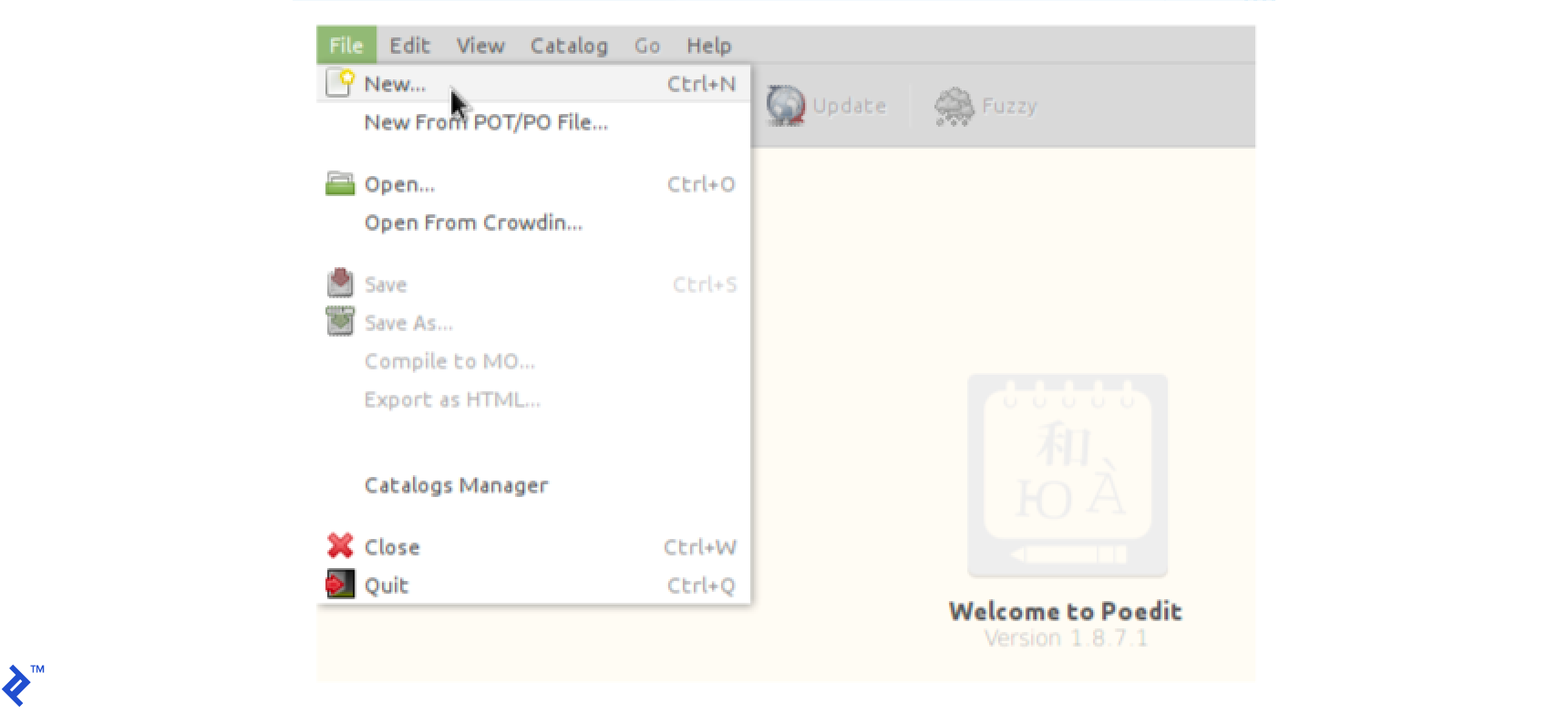
On the first run, go to “File > New…” and select the target language (e.g., en_US or pt_BR).
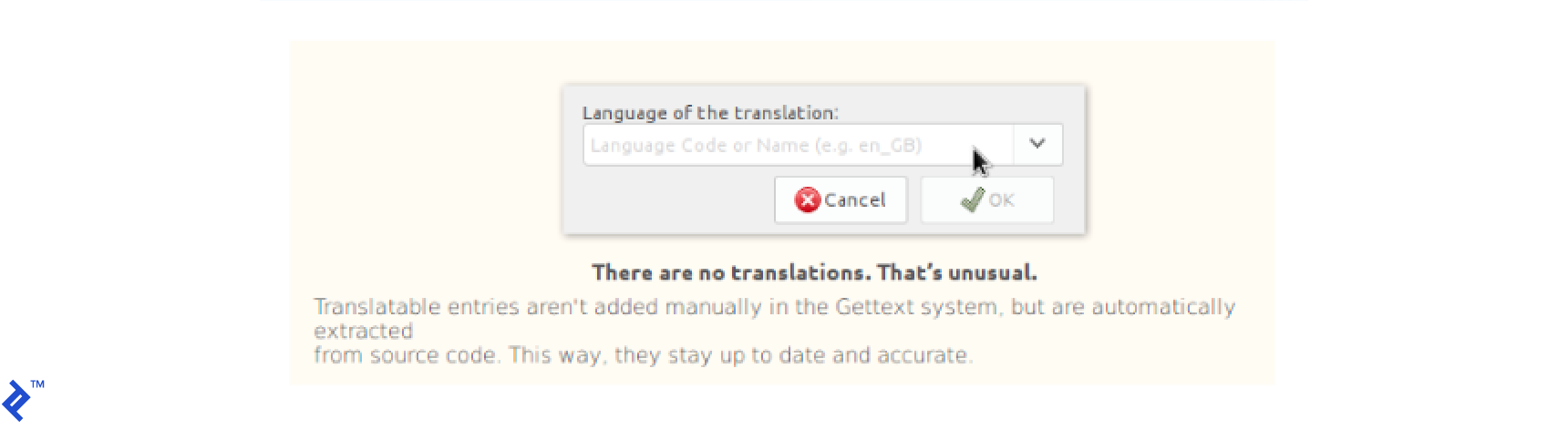
Save the file using the directory structure mentioned earlier. Then, click “Extract from sources” to configure settings for extraction and translation tasks, accessible later via “Catalog > Properties”:
Source paths: Include all folders containing
gettext()calls (and similar functions), typically your templates/views folder(s). This is mandatory.Translation properties:
- Project name and version, Team and Team’s email address: Useful information for the .po file header.
- Plural forms: Leave as default unless necessary, as Poedit includes a database of plural rules for numerous languages.
- Charsets: UTF-8, preferably.
- Source code charset: Likely UTF-8, matching your codebase.
Source keywords: Gettext automatically recognizes default functions for many languages. Add specifications for any custom translation functions (discussed in the “Tips” section) here. This will be covered later in the “Tips” section.
After configuring these properties, Poedit scans your source files for localization calls. A summary of found and removed entries is displayed. New entries appear empty in the translation table, ready for localization. Save the file, and a .mo file is (re)compiled in the same folder, effectively internationalizing your project!
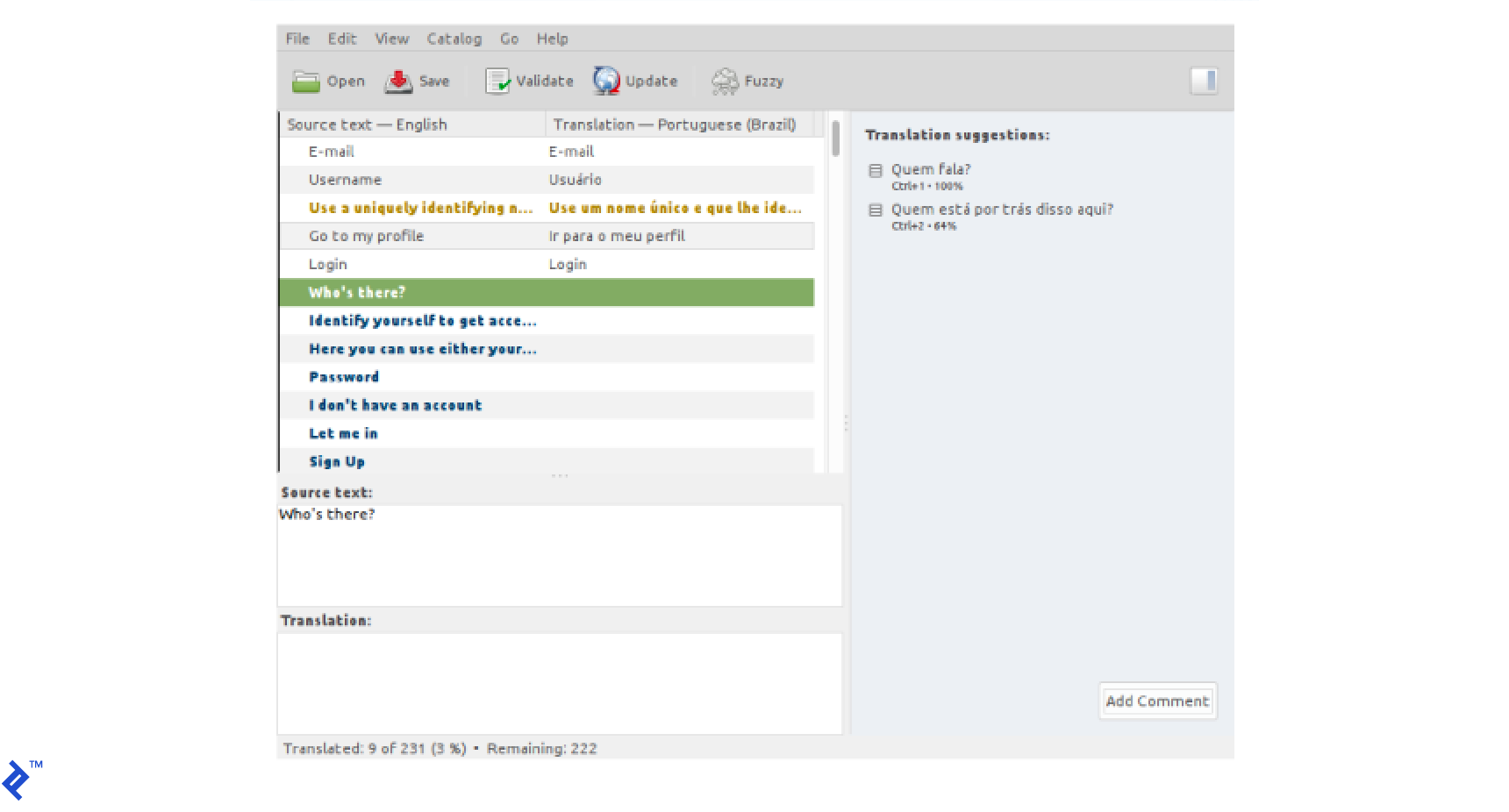
Poedit suggests translations from the web and previous files, allowing you to verify and accept them quickly. Mark uncertain translations as “Fuzzy” (displayed in yellow). Blue entries indicate missing translations.
4. Translating strings
Two main types of localized strings exist: simple and plural.
Simple strings have “source” and “localized string” boxes. You can’t modify the source string directly; changes require altering the source code and rescanning. (Tip: Right-clicking a translation line displays a hint with the source file and line number.)
Plural strings have two boxes for source strings and tabs to configure different forms.
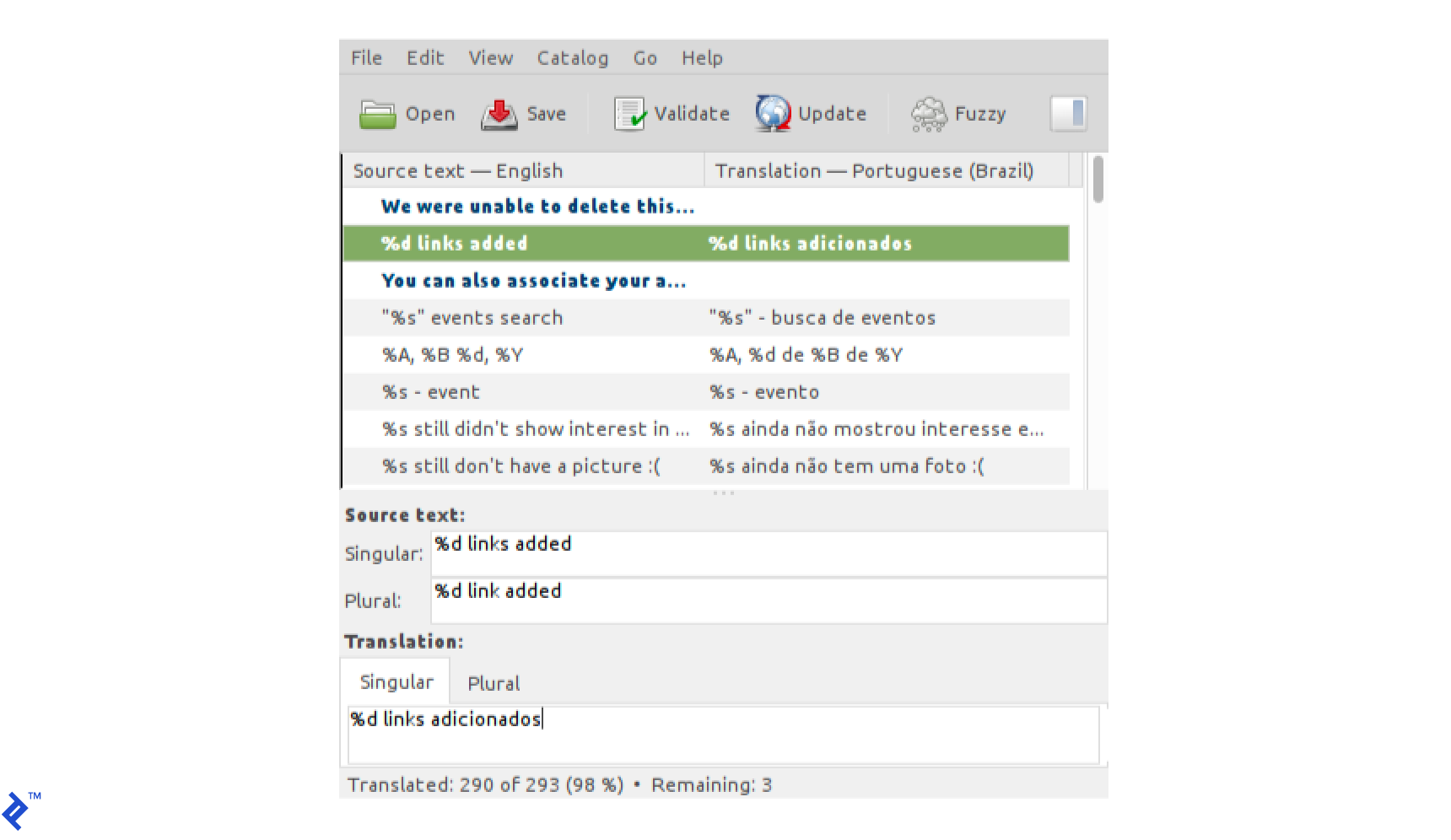
Example of a string with a plural form in Poedit, showing a translation tab for each form.
When updating translations after modifying source code, click “Refresh.” Poedit rescans the code, removing obsolete entries, merging changed ones, and adding new ones.
Poedit might suggest translations based on previous ones, marked as “Fuzzy” (yellow) and requiring review. This feature is also helpful for translation teams; mark uncertain translations as “Fuzzy” for review by others.
Keep “View > Untranslated entries first” enabled to avoid missing any entries. This menu also provides access to sections for leaving contextual information for translators.
Tips & Tricks
Web server caching of .mo files
Running PHP as an Apache module (mod_php) might lead to cached .mo files. After the initial read, updating the file may require restarting the server.
Nginx and PHP5 usually refresh the translation cache after a couple of page refreshes, while PHP7 rarely requires it.
Helper functions for concise localization code
Many prefer using _() instead of gettext(). Similarly, frameworks often employ custom i18n libraries with functions like t() for brevity. However, this shortcut only applies to this specific function.
Consider adding custom shortcuts to your project, such as __() or _n() for ngettext(), or even _r() to combine gettext() and sprintf() calls. Libraries like oscarotero’s Gettext also provide such helper functions.
In these cases, instruct Gettext on extracting strings from these new functions. This is easily achieved through the .po file or Poedit’s Settings screen (“Catalog > Properties > Sources keywords”).
Remember: Gettext recognizes default functions for many languages. Only specify new functions using the this specific format format:
For functions like
t()that return the translation of a string, specifyt. Gettext understands that the only argument is the string to translate.For multi-argument functions, specify the argument containing the first string and, if applicable, the plural form. For instance, if your function signature is
__('one user', '%d users', $number), the specification would be__:1,2, indicating the first and second arguments contain the first and second forms, respectively. If the number comes first (__('one user', $number, '%d users')), the spec would be__:2,3.
After including these rules in the .po file, a new scan will seamlessly incorporate your new strings.
Multilingual PHP Apps with Gettext
Gettext is a powerful tool for internationalizing PHP projects. Its flexibility supports numerous languages, and its support for more than 20 programming languages allows transferring knowledge to other languages like Python, Java, or C#.
Poedit streamlines the translation process, bridging the gap between code and translated strings. Its Crowdin integration feature facilitates collaborative translation efforts.
Always consider your user base’s language diversity, especially for non-English projects. Releasing in English alongside your native language can significantly expand your audience.
While not all projects require internationalization, implementing i18n early on is significantly easier than retrofitting it later. Tools like Gettext and Poedit make this process more manageable than ever.