Is your dad still finding use for that top-of-the-line fishing rod you gifted him last spring? Did your partner love the new watch, complete with that clever, personalized engraving? How about you, are you enjoying the crispness of your new 4K monitor, so sharp it could probably cut through a medium-rare steak?
These are the kinds of luxuries you could be enjoying if you had been more mindful of energy consumption in your home office. It’s no secret that Toptal’s mission is to identify and recruit the best 3% of freelance software engineers, but what many remote developers often neglect is the importance of energy efficiency. And let’s be clear: we don’t have a corporate HQ with impressive awards on display, designated parking spots, or executive suites for the higher-ups.
The majority of us operate from home or personal offices – most of us pay our own bills.
Of course, most freelancers weren’t always self-employed. Rewind about 15 years, and you’d find me on a green screen shoot in a cramped studio, simultaneously sweating and freezing. Kilowatts of energy were being consumed by lighting and equipment, the AC was struggling to cope, and the studio resembled a sauna above the waist and a refrigerator below. This went on for days, and my employers weren’t thrilled about the energy bill at the end of the month. Even our makeup artist nearly ran out of supplies.
But I wasn’t paying the electric bill, the company was.
Admittedly, this is an extreme case, and most remote workers aren’t using hundreds of kilowatts per week. However, conserving even a small amount of power every hour can add up to significant savings over a year. So, if you’re keen on saving a few hundred dollars (or more) and using it to treat yourself or your loved ones instead of burning fossil fuels, read on.
Straightforward Energy Saving Tips for Home Offices
Let’s begin with some basic tips. I won’t bore you with the obvious – a quick Google search for “home office power saving” will inundate you with guides. Here are some key takeaways:
- Opt for energy-efficient lighting
- Set your thermostat appropriately (if you have one)
- Utilize your AC for heating when possible
- Ensure your insulation is adequate
- Remember to switch off lights and electronics
- Choose the right hardware and configure it for efficiency
- Use high-quality power strips or smart sockets
Now, let’s dive deeper into these points, with a focus on the typical Toptaler’s needs.
Energy-Efficient Lighting for Your Home Office
A great starting point is lighting. Replacing old bulbs is simple, and high-quality LED lighting is widely available both locally and through online retailers with global shipping.
Traditional incandescent bulbs are a thing of the past, replaced by CCFL and LED lighting. Halogen bulbs are still around, but they can’t compete with LEDs in terms of efficiency. Your best bet is to go with LED bulbs or modern fluorescent tubes. Both come in various color temperatures, so whether you prefer cool or warm light, you’ll find something suitable – just remember to check the Kelvin temperature rating and select accordingly.
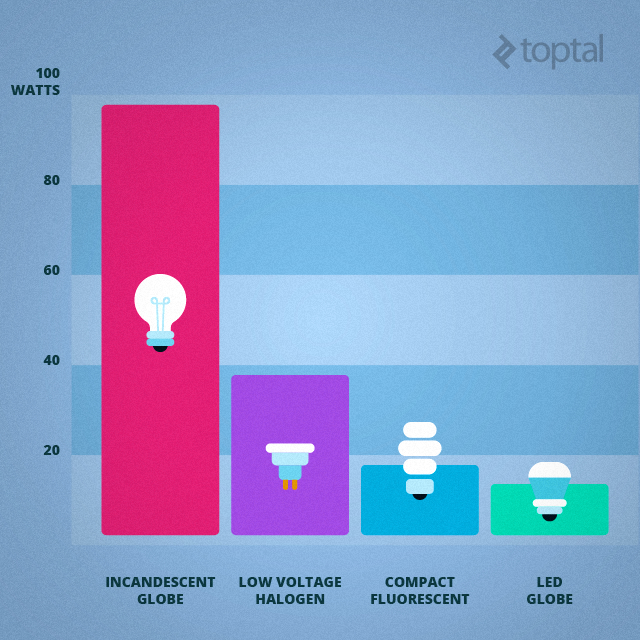
Since we’re addressing a tech-savvy crowd, it’s worth mentioning connected LED RGB bulbs. Philips was a pioneer in this area with its Hue LED lighting range a few years back, and more affordable options are now emerging. These solutions enable you to adjust the color temperature and brightness with a few taps on your phone, making them perfect for those whose living room doubles as their workspace. You can work under daylight or cool white light, then switch to a low-intensity warm light when it’s time to unwind and watch TV.
Managing Temperature in Your Home Office
If you have a large home, this aspect might be a significant factor in your energy consumption. When you were commuting to an office and back, you likely adjusted your heating and cooling accordingly. But now that you’re working remotely, what changes?
With central heating and cooling, it might seem logical to keep everything running constantly since you’re always home. However, this can be expensive in the long run. If you live in a studio apartment, you have limited options, but in a house, you have more control.
While you’re technically still at home, there’s no need to heat or cool every room simply because you’re working from your home office. Focus on your workspace and treat the rest of the house as if you were out. Of course, this might not be feasible if you have children or housemates.
Maximize heating efficiency by checking the insulation in your home office, even considering investing a bit more in this area compared to other rooms since you spend most of your time there. Using small space heaters and portable fans can also be cost-effective when you don’t need to heat or cool your entire home. Depending on your climate, air conditioning can be a significant expense during summer. Installing a separate AC unit in your home office allows you to cool just one room efficiently without wasting energy on the rest of the house. Modern inverter air conditioners are remarkably efficient and, besides cooling, offer the most efficient heating method when the temperature difference isn’t too significant (this is climate-dependent).
If you live in a warmer region and rely on AC for several months, consider the heat generated by your office equipment and yourself. Without getting into complex calculations, remember that the average person emits over 100W of heat per hour while seated. Depending on your work, your computer and monitor could consume 100W to 500W, inefficient lighting could add another 50W or more, and so on.
In warm climates, all this excess heat must be removed through ventilation or AC, and you’ll end up paying for every watt wasted.

This wouldn’t be a Toptal blog without mentioning some tech-savvy solutions, so let’s talk about smart technology designed to trim your energy bills. The Nest thermostat is arguably the most well-known example. Home automation is gaining momentum, and we can anticipate many more connected thermostats and clever smart home appliances that prioritize energy conservation.
Nest asserts that its thermostat can pay for itself in roughly two years in an average American home with a programmable thermostat. Regardless, Nest is a glimpse into the future. While smart technology can’t replace efficient heating systems and good insulation, it can potentially reduce your heating bill by a few percent (and we’re talking about substantial bills here).
Of course, the simplest way to minimize heating costs is to lower the thermostat, but I’m not suggesting you freeze for the sake of saving money. Setting sedentary reminders on a smart device is a good alternative and beneficial for your health. Instead of being glued to your desk for hours, take short breaks every 45-60 minutes. Use this time for quick chores – you don’t need to exercise, but taking out the trash, washing dishes, or similar activities can get your blood flowing and combat the cold. It’s also good for your eyes, spine, and heart.
Another tech-driven approach to energy efficiency comes from Elon Musk’s Tesla. The electric car company recently introduced Powerwall, a high-capacity lithium-ion battery pack for homes. It’s designed to store energy during peak solar hours, allowing homeowners to utilize it later when the sun sets.
The concept isn’t entirely new; power companies have used similar strategies for decades. Pumped-storage hydroelectric plants are one example, storing energy at night for daytime use. Powerwall enables individual homeowners to store energy similarly, and it’s not limited to solar energy. Many utility companies offer reduced rates during off-peak hours and charge more during peak hours.
The Tesla Powerwall is scheduled for release later this year, starting at $3000. The price might be a deterrent, especially considering potential battery replacements every few years. Another consideration is the peak rate factor – if everyone adopted this solution, peak rates might disappear altogether as home power storage would create consistent energy demand throughout the day.
Economy of scale is another factor. As we transition towards sustainable energy sources like solar and wind, more extensive power storage solutions will be necessary. Utility companies are better positioned to implement these solutions on a larger scale – an artificial lake can store significantly more energy than numerous expensive lithium-ion batteries requiring replacement every 5-10 years.
Selecting the Right Equipment
Different individuals utilize different hardware for their home offices, creating a challenge when addressing energy efficiency. Someone working primarily with standard office applications or within a browser doesn’t necessarily require a powerful computer. I know I don’t, but a friend of mine works with EMC Documentum on numerous local virtual machines, demanding more processing power, RAM, and storage. Designers need larger, higher-resolution displays, more potent GPUs, and so on.
Regardless of your work, there’s likely room for improvement.
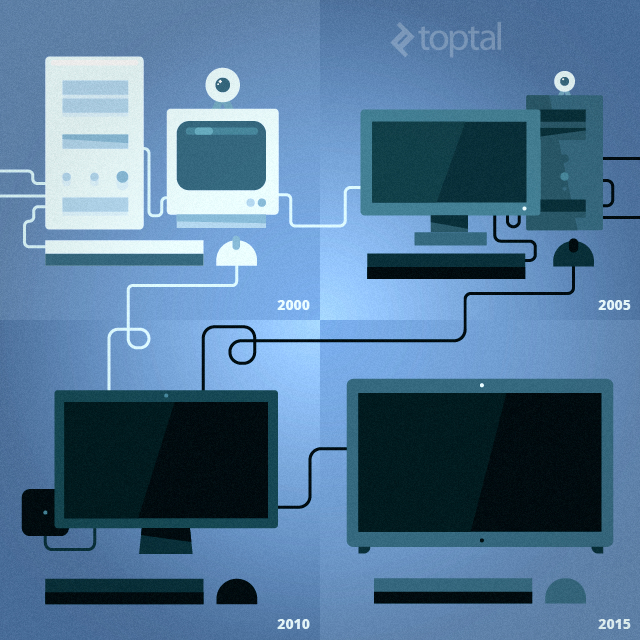
Fortunately, recent Intel and AMD processors prioritize energy efficiency, and their integrated graphics are often sufficient for many users, making dedicated graphics cards unnecessary. Unless you require exceptional processing power or graphics capable of running the latest games, a mid-range PC or Mac should suffice.
If you’re tempted to stick with your aging desktop because it’s “good enough,” consider whether it’s financially worthwhile. The PC upgrade cycle has slowed down, and Intel suggests that the average PC is around four years old. If your system falls into this category, you could likely achieve similar or even better performance with a quieter, smaller form factor (SFF) desktop that boasts significantly improved energy efficiency.
In fact, I’m writing this on such a machine because my old desktop recently decided to call it quits. It’s not a Mac mini, but the hardware is comparable – an Intel Core i5-4200U processor with integrated graphics, 8GB RAM, SSD, and HDD. I primarily use it as an HTPC and portable backup, but it outperforms my previous ATX desktop while consuming about one-fifth of the power. This is thanks to an ultra-low voltage mobile processor built on a more advanced node (22nm vs. 45nm) and modern components throughout.
Many developers rely on laptops as their primary machines, and these tend to offer similar efficiency to SFF systems using mobile chips. This also applies to all-in-one (AIO) systems like the iMac, often based on laptop hardware paired with a large display.
If you believe you’re in the clear because you use a laptop, remember that efficiency depends on the processor’s type, age, and efficiency. Additionally, an outdated external monitor, such as a five-year-old CCFL-backlit 1080p panel, likely consumes more power than a newer LED-backlit model.
Even if you need a high-performance desktop, opting for the latest, most efficient components is always recommended. They might cost more upfront, but if you’ll be using the system for years, even minor efficiency gains can justify the investment. In some instances, a well-considered upgrade can pay for itself.

Another option is to use a secondary, energy-efficient system for specific tasks. Why use your main computer to stream content to your TV when a mini-PC or stick PC costing $100-$200 can do the job? This approach saves energy and reduces wear and tear on your primary system’s components. With Intel planning to introduce more ultra-low voltage processors for stick PCs, these tiny devices could soon handle even more demanding tasks.
Optimizing Home Office Hardware Settings
Upgrading to a new, energy-efficient desktop or laptop and a modern monitor can yield immediate efficiency gains. However, proper configuration is essential to maximize these benefits.
Many power users avoid energy-saving features not out of disregard for efficiency but because earlier implementations were often underdeveloped and impractical. However, recent Windows and OS X versions, combined with modern x86 platforms, offer impressive boot and recovery times. This is partly due to software advancements, partly due to improved processors and motherboards, and largely due to the speed of solid-state drives.
While specific optimizations depend on your platform and hardware, explore available options for improvement. Fine-tune hibernation and sleep profiles to best suit your needs, keeping efficiency in mind.
Naturally, more powerful systems present greater opportunities for optimization. While there’s less to gain with a new laptop, desktops offer more flexibility. If you’re building your own desktop, prioritize high-quality power supply units with excellent efficiency ratings. Choose a PSU that meets your wattage requirements and boasts a Platinum or Gold efficiency rating – avoid oversized PSUs unless absolutely necessary.

High-quality power strips are beneficial not only for protecting your valuable hardware and data from power surges but also for saving energy. Switching off the power strip after finishing work is an obvious energy-saving measure, although this might not be practical for everyone. It’s a good practice if you won’t be using your office for several days or weeks.
Consider organizing your hardware across multiple power strips, allowing you to switch off devices not in constant use with a single button. All electronics consume a small amount of energy in standby mode, but the numbers aren’t significant.
Smart sockets offer an intriguing option, transforming “dumb” devices like heaters or lamps into smart devices. These connected sockets can be programmed or remotely controlled, saving both energy and time depending on your needs.
Smart sockets and connected LED bulbs can also enhance home security. If you travel frequently, use them to create the illusion of an occupied home, potentially deterring burglars.
Quantifying Potential Savings
Honestly, it’s impossible to provide an exact figure. Savings depend on your location, your work, and the hardware you use.
Electricity prices vary significantly by region, sometimes drastically. This is why I’ve avoided making definitive statements. For example, upgrading from an outdated desktop to an SFF machine like an iMac mini or Intel NUC could save a considerable amount for a user in Denmark. However, someone in Ukraine with the same hardware wouldn’t experience the same level of savings, making the upgrade less appealing from a purely financial perspective.
Our audience and network are global, so we can’t offer one-size-fits-all advice. Thankfully, our audience is tech-savvy and adept at calculations, so determining potential savings through increased efficiency shouldn’t be a problem.
For instance, conservatively reducing power consumption by 100W (8 hours per day, 25 days per month) translates to $24 saved annually at a kWh price of $0.10. In developed countries, however, kWh prices are typically higher. At 30 cents per kWh (common in Western Europe), that 100W reduction saves you $72 per year. Not bad for such a small change. Over a computer’s 4+ year lifespan, that’s over $300, which can be reinvested in even more efficient hardware.
Of course, 100W over eight hours daily might seem insignificant, but remember that we’re discussing individual home offices. You’re responsible for the bill, not your employer, and the savings can extend beyond your workspace. You’re investing in your home as well, so efficiency improvements can yield greater returns by benefiting both your home and office simultaneously.
In many cases, saving a few hundred dollars annually is achievable, if not straightforward, with a potential return on investment within a couple of years (excluding computer hardware, which requires periodic upgrades regardless).

Some might argue that these savings are negligible, especially for well-compensated software engineers. However, hundreds can transform into thousands over a decade. Besides, it’s not just about the money. By making your office and home more energy-efficient, you’re also contributing to a healthier planet.
Burning one kilogram of coal or oil generates between 2.5kWh and 3kWh of electricity. Therefore, even a single home office with improved efficiency can save a couple of kilos of fossil fuels each week. Generating 100kWh of power from coal releases approximately 120kg of CO2, equivalent to the emissions of a modern compact car driven for 1000km.
Ultimately, we don’t need to rely on environmental concerns to feel good about our choices. By working from home offices, we benefit from cheaper residential electricity rates and often pay less than businesses. We’re already saving money and reducing our carbon footprint by eliminating daily commutes.
Plus, we don’t have to deal with traffic.