As professionals working with pay-per-click advertising, we’ve recently seen a lot of new developments. It’s no secret that Google transitioned all accounts to Enhanced Campaigns last week, regardless of user preference. Despite the mixed reactions to Enhanced Campaigns, there are some features worth getting excited about.
One feature I found particularly interesting was the changes to Ad Extensions, specifically Sitelinks. This article will delve into some of the recent Sitelinks changes and how to better analyze their performance.
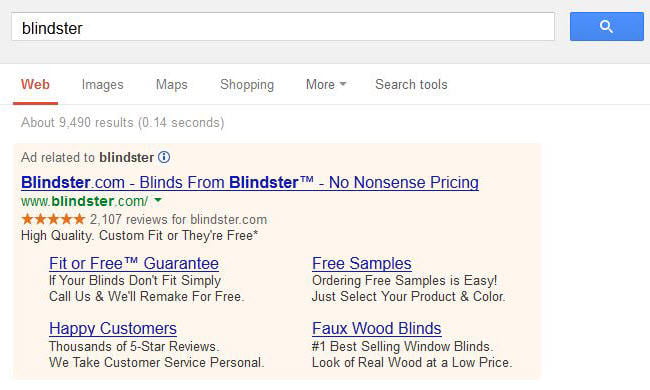
I conducted a few case studies to determine if the performance improvements were due to the sitelinks themselves, or simply because they occupied more space on the search engine results page (SERP). This article covers:
- Recap of changes to Sitelinks
- Understanding my Sitelinks’ performance
- Why aren’t my Sitelinks showing?
- 2 Case Studies on Upgraded Sitelinks
- Summary and My Humble Opinion
Recap of Changes to Sitelinks
Google first introduced a feature allowing sitelinks to be set at the Ad Group level. This means we can now set specific sitelinks for each ad group, instead of having generic campaign-level sitelinks applied to all ad groups within that campaign. Here are some observations about Ad Group Level Sitelinks:
- Each Ad Group can have up to 20 sitelinks
- The Link Text limit has been reduced from 35 to 25 characters
- Sitelinks can be scheduled to appear at specific hours or days of the week
- You can create mobile-specific sitelinks The second major change to sitelinks came with the introduction of Enhanced Sitelinks. This feature provides advertisers with greater control and flexibility over their sitelinks, essentially allowing the creation of 5 ads in 1! Here are some observations about Enhanced Sitelinks:
- Sitelinks can be displayed in groups of 2 or 4
- Description Lines 1 and 2 can each be 35 characters long
- Sitelinks cannot violate the duplicate sitelink URL policy
- Sitelink text cannot be identical to other sitelinks within the same ad group/campaign or the displayed main ad
- Sitelinks cannot utilize dynamic keyword insertion
Understanding Sitelink Performance
Given all the new sitelinks features, I was hopeful that Google would provide user-friendly data on individual sitelink performance. The data exists, but requires some effort to uncover. You might find, as I did, that the aggregated sitelink data Google provides under the ad extensions tab isn’t very helpful. The image below shows an example of what you might see (click to enlarge).
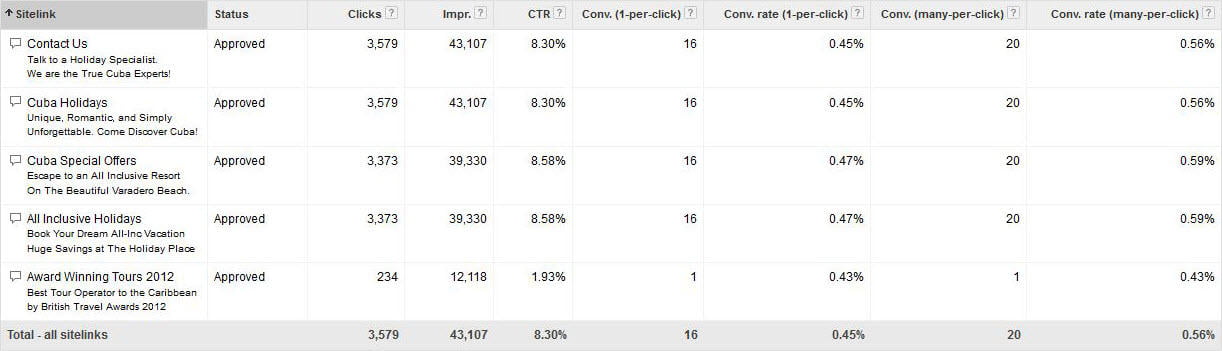
You’ll likely observe that your sitelinks have identical metrics. This is because the metrics reflect each instance an ad was displayed alongside 2 to 4 of these sitelinks. While this data helps understand your ad’s performance when those specific sitelinks are shown, it doesn’t reveal if the sitelinks themselves are making any real contribution.
First Method for Measuring Sitelink Performance
Select the desired campaign and navigate to the Ad Extension tab.
Click the “Segment” dropdown and select “Click Type.”
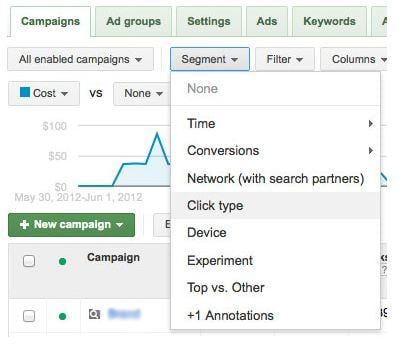
3. This breakdown shows where people actually clicked when your ad was shown with this specific sitelink across your campaign.
Understanding the Metrics
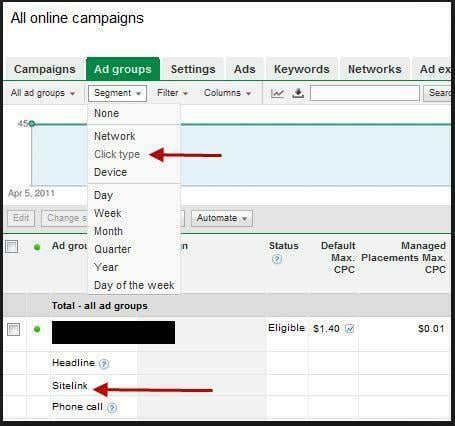
- The first line provides an overview of how all ads performed while these extensions were being displayed.
- The “Headline” row indicates the number of clicks received on your ad headline.
- The “Sitelink” row reveals the performance of this specific sitelink. Tip: When segmenting by “click type,” it’s clear the headline receives the most attention. Therefore, ensure the main ad directs to the most important destination URL.
Second Method for Measuring Sitelink Performance
- Select the Campaign, Ad Group, or even the specific Ad, then go to the Ad Extensions tab.
- In the “Segment” dropdown, choose “This Extension vs. Other.”
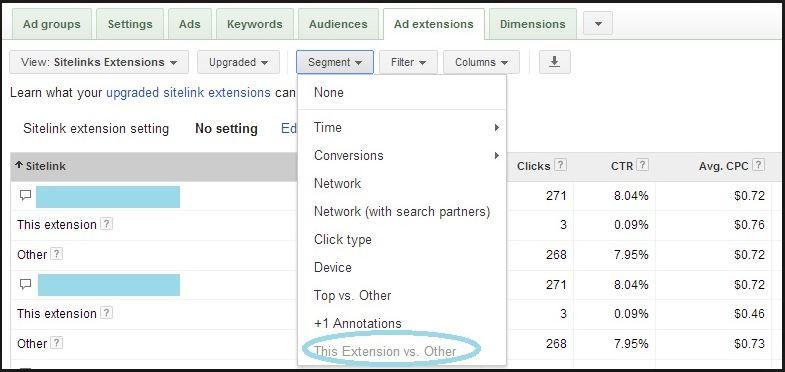
Understanding the Metrics
- This view compares the sitelink’s clicks to clicks on “other” parts of the ad.
- “Other” encompasses everything in the ad except that particular sitelink, including:
- The headline of the main ad
- Other displayed sitelinks
- Other extensions such as Location or Click to Call
Troubleshooting: Why Aren’t My Sitelinks Showing?
It’s frustrating to meticulously create new sitelinks only to discover they’re not appearing in searches. According to Google, sitelink display depends on these factors:
- Your Keyword’s Quality Score
- The ad’s position on the search result page
- The landing page quality of your ads and sitelinks
- Other enabled ad extensions within the campaign
- The potential customer’s search term
- The relevance of other ads on the page Google’s best practices to improve display chances:
- All sitelink URLs within a campaign or ad group must lead to unique landing pages with distinct content.
- Your ad should be positioned directly above or below Google search results.
- Your keyword should have a very high Quality Score.
- Sitelink URLs must direct to pages relevant to your product or service.
- Add the maximum number of sitelinks to your campaign. At least two approved sitelinks with different landing pages are required for sitelinks to appear alongside your ads.
- Keep sitelink text concise.
Case Study 1: Enhanced Sitelinks for Lead Generation
To analyze Enhanced Sitelinks in a lead generation account, I examined a travel agency based in the UK. I wanted to see how sitelinks affected overall campaign performance and if they directly contributed to it. The account’s sitelinks followed a consistent pattern, directing traffic to pages with destination-specific details on accommodations, hotels, special offers, and holiday packages. Each campaign had a similar set of sitelinks, simply substituting the relevant country and destination URLs. After running enhanced sitelinks for 3 weeks, I compared the performance to the previous 3 weeks. Here’s what I found:
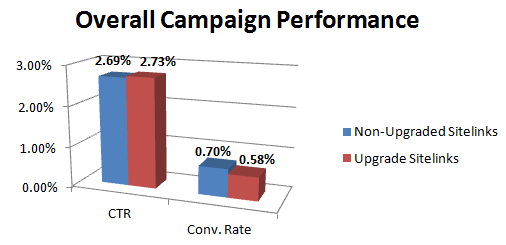
The CTR results aligned with my expectations, though not to the degree I’d hoped for. I anticipated higher CTRs due to the addition of description lines and the increased ad size/coverage on the SERP. The 0.04% CTR increase wasn’t as significant as I’d anticipated. The impact on conversion rate was more concerning. Surprisingly, the campaign’s conversion rate actually decreased.
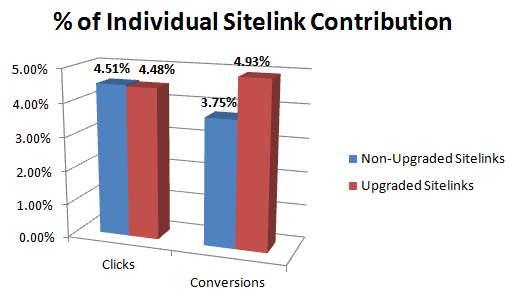
This second graph illustrates the percentage each sitelink contributed to overall performance. Although sitelink-attributed clicks remained relatively consistent, those clicks were now more likely to convert. While the results varied across campaigns, the Maldives campaign saw the most significant improvement. This campaign hadn’t generated any conversions prior to upgrading the sitelinks but produced 5 within a few weeks.
Case Study 2: Enhanced Sitelinks for E-Commerce
In this case study, I examined how upgraded sitelinks affected an e-commerce account, using an online shoe retailer in Canada. As before, I focused on overall CTR, Conversion Rate (1-per click), and Conversion Rate (many-per-click). I then assessed the individual sitelinks’ contributions to performance. Here’s what I discovered:
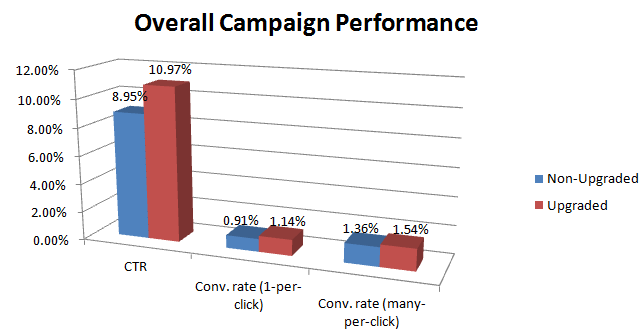
These results aligned more closely with my expectations. The upgraded sitelinks enhanced performance across the entire account. While the improvements might appear modest, it’s important to recognize the substantial impact of even slight conversion rate increases. If all else remains constant, a 0.5% conversion rate improvement can nearly double your business! The next graph shows the contributions of individual sitelinks to total clicks and conversions.
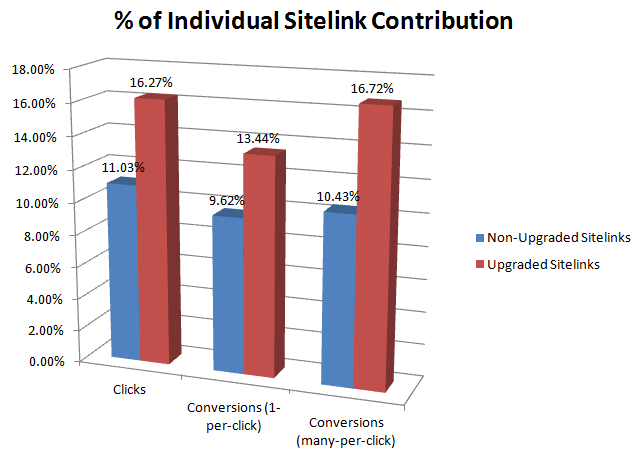
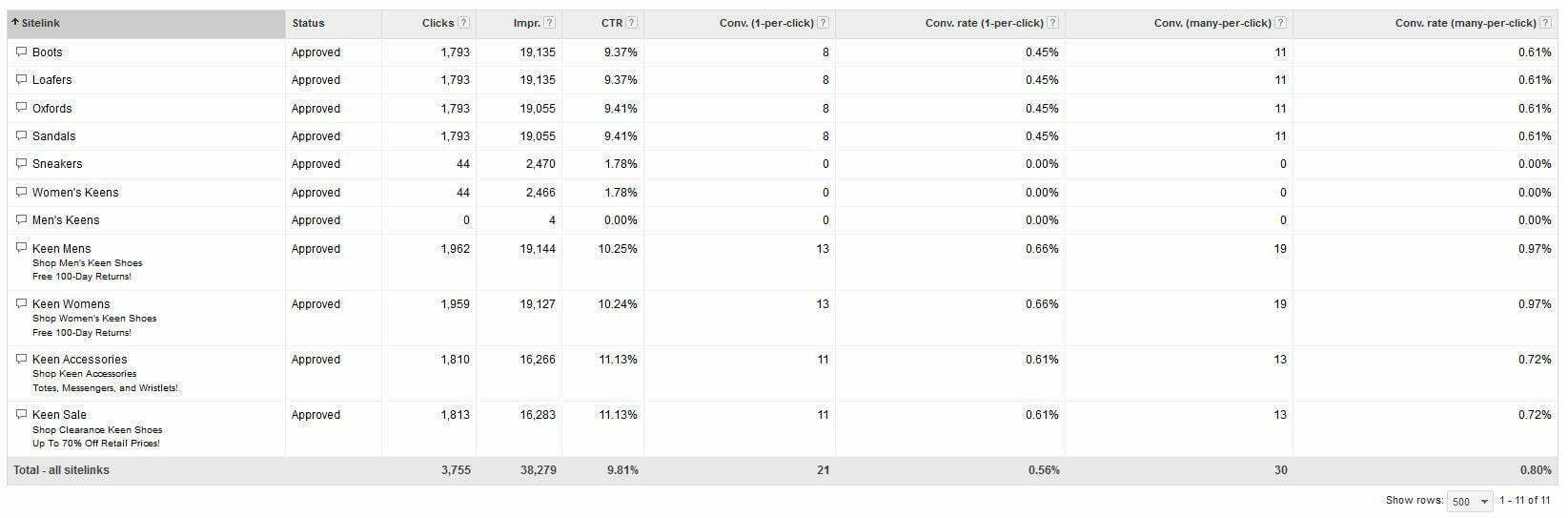
This graph highlights the significantly greater impact of upgraded sitelinks on clicks and conversions. If you aim to maximize sitelink benefits, upgrading them is crucial. Here’s an example of a successful campaign since upgrading the sitelinks (click to enlarge and view the stats):
Enhanced Sitelinks: Key Takeaways
I recommend upgrading your sitelinks. While adding them can be time-consuming without AdWords Editor support, here’s why it’s worthwhile:
- Sitelinks’ contribution to overall performance isn’t the only factor. Simply occupying more space than competitors can be advantageous.
- According to Google, ads with sitelinks typically achieve a 30% higher click-through rate than standalone ads.
- Replicate successful ads from one campaign or ad group as sitelinks in others, ensuring they link to different URLs.
- Individual sitelinks provide an opportunity to test different wording and calls to action in your ad copy.
- If your ad consistently ranks highly or you’re paying for top placement, upgrading sitelinks allows you to fully utilize that valuable “real estate.”
- Now that you can measure sitelink contribution, you can strategically choose which sitelinks to display for maximum return.