In recent years, JavaScript has undoubtedly risen to prominence in the realm of programming languages, largely fueled by the massive surge in demand for web applications. When it comes to front-end development across multiple browsers, JavaScript reigns supreme as the go-to choice. While some might point to alternatives like CoffeeScript, TypeScript, or Dart, the reality is that CoffeeScript is essentially syntactic sugar that ultimately translates back into JavaScript. TypeScript, on the other hand, serves as a superset of JavaScript, incorporating various object-oriented features such as optional static typing, classes, and interfaces, but it’s still in its nascent stages. Dart, an object-oriented language with C-like syntax, also ultimately compiles to JavaScript for compatibility with mainstream browsers.
The emergence and rapid expansion of Node.js have propelled JavaScript beyond the confines of front-end development. With the advent of Node.js backend frameworks, backend development has become more accessible to front-end developers. JavaScript is often perceived as a panacea for all development scenarios, encompassing front-end, web servers, desktop applications, embedded systems, databases, and the list goes on. Indeed, given JavaScript’s widespread adoption, the combination of Node.js, MongoDB, and AngularJS/React has given rise to a significant number of full-stack web developers. However, it’s crucial to acknowledge that Node.js prioritizes lightweight design and provides only fundamental web server functionalities to expedite web application development. In real-world scenarios, opting for a well-established framework available as an npm package often proves more practical.
This article delves into some renowned and battle-tested Node.js frameworks that have spared developers from repeatedly reinventing the wheel. Specifically, we’ll examine Express, Koa, Meteor, and Sails.js, focusing on their respective strengths and suitability for different project requirements.
Express: A Minimalist Web Framework for Node.js
Undeniably, Express has emerged as a cornerstone of the Node.js ecosystem. Its widespread recognition among Node.js developers is evident in its extensive usage, often even unknowingly. Currently in its fourth iteration, Express has served as the foundation or inspiration for numerous other Node.js frameworks.
Performance
Node.js is often lauded for its raw speed, and when it comes to framework selection, performance-conscious developers prioritize minimal overhead. Express provides a thin abstraction layer over Node.js, offering essential web application features like basic routing, middleware, template engine integration, and static file serving, all without compromising Node.js’s impressive I/O performance.
Express embraces minimalism and avoids imposing specific design patterns such as MVC, MVP, or MVVM out of the box. For proponents of simplicity, this is a major advantage, as it allows for building applications according to one’s preferences without the need to learn a rigid framework structure. This flexibility proves particularly beneficial for new personal projects with no legacy code to accommodate. However, as projects or development teams expand, the lack of standardization might lead to increased overhead for project and code management, potentially resulting in maintainability issues.
Generator
While Express refrains from dictating specific design patterns, it does offer a generator for establishing a consistent project folder structure. After installing the express-generator npm package and utilizing the generator command to create an application skeleton, a well-organized application folder emerges, facilitating the management of images, front-end JavaScript, stylesheets, and HTML templates.
| |
| |
Middleware
Middleware functions essentially act as intermediaries within an Express application, granting full access to both request and response objects.

True to their name, middleware functions apply filtering or modification logic before passing control to the subsequent middleware in the chain or the main application logic. Common tasks such as user authentication, authorization, or cross-site request forgery (CSRF) protection are often best implemented as middleware.
| |
At its core, an Express application is Node.js augmented with a series of middleware functions. Whether leveraging built-in middleware or crafting custom solutions, Express simplifies the process.
Template Engine
Template engines empower developers to embed backend variables directly into HTML files. Upon request, these template files are rendered into plain HTML, replacing the embedded variables with their actual values. By default, the express-generator employs the Pug template engine (formerly known as Jade), but other options like Mustache and EJS integrate seamlessly with Express.
Database Integration
Maintaining its minimalist approach, Express doesn’t enforce or favor any specific database system. Integrating a database, whether MySQL, MongoDB, PostgreSQL, Redis, Elasticsearch, or others, simply involves installing the corresponding npm package as a database driver. However, the lack of a unified syntax across these third-party database drivers for CRUD operations can make switching databases a cumbersome and error-prone endeavor.
Koa: Embracing Next-Generation JavaScript
Developed by the team behind Express, Koa aims to further distill the minimalist philosophy of Express by excluding any middleware from its core. Beyond its middleware-less nature, Koa bears a striking resemblance to Express in terms of its lightweight and un-opinionated design. What truly sets Koa apart, however, is its embrace of ES6 Generators to eliminate callbacks altogether.
Elegant Control Flow
Asynchronous programming is intrinsic to JavaScript. This inherent asynchronicity, combined with Node.js’s single-threaded, event-driven architecture, often leads to the infamous “callback hell.”
One approach to mitigating deeply nested callbacks involves using Async.js, which provides mechanisms for mapping, parallelizing, serializing, or iterating over multiple functions without directly nesting them. With Async.js, a single callback and error handling function suffice for a group of functions orchestrated by an Async.js method. However, Async.js doesn’t entirely eliminate callbacks. Code indentation in Node.js applications utilizing Async.js might still tend to drift rightward, albeit not as drastically.
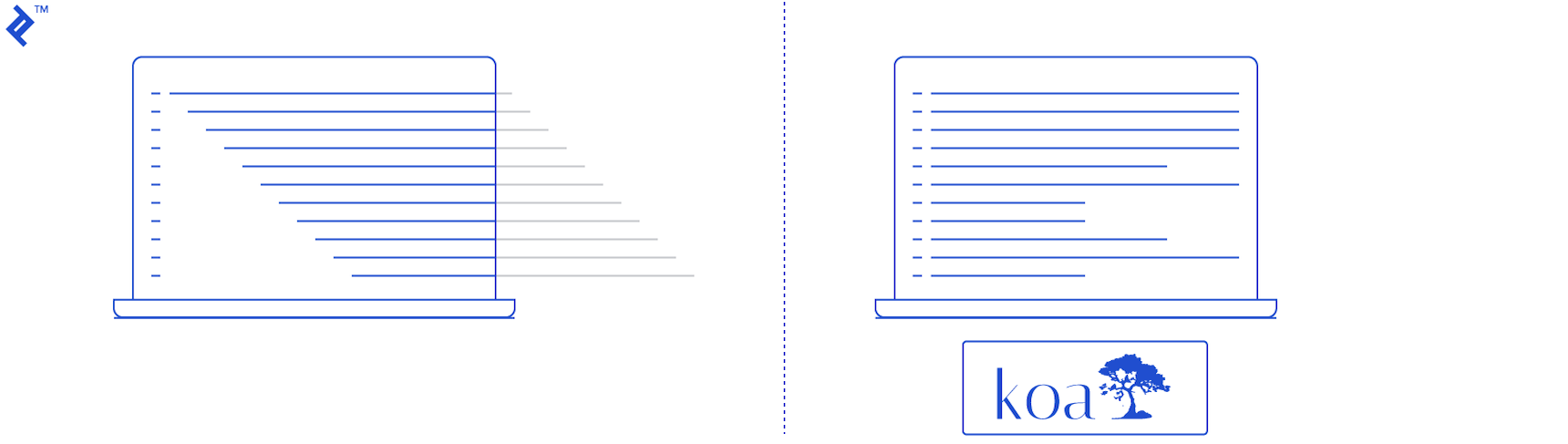
Promises offer a cleaner alternative for managing asynchronous operations. Libraries like bluebird and q have gained popularity for their Promise implementations. In ES6, Promises have been standardized as part of the language. In essence, Promises ensure that functions execute and return in a specific order by chaining them together using “then” methods. Within each function, you either “resolve” the Promise, signaling successful completion and triggering the next “then” function in the chain, or “reject” it, immediately jumping to the designated error handling logic. This approach centralizes error handling and effectively eliminates callbacks.
ES6 Generators introduce a paradigm shift in handling asynchronous code in JavaScript. While relatively new to JavaScript, the concept of generators is well-established in other programming languages. Similar to interrupts in C, ES6 Generators provide a mechanism to pause execution, perform other tasks, and seamlessly resume from where they left off.
Koa leverages ES6 Generators to offer an elegant solution for dealing with asynchronous programming in JavaScript, effectively eliminating the need for callbacks within pure Koa applications. A prime example of this is middleware cascading, where custom middleware functions execute sequentially without relying on callbacks.
| |
While it’s premature to declare this cutting-edge technique inherently superior to established solutions like Async.js, Promises, or event emitters, its unconventionality might introduce challenges in code debugging due to the non-linear control flow.
Meteor: A Unified Framework for Web, Mobile, and Desktop
Meteor distinguishes itself as a comprehensive, all-encompassing JavaScript framework. In contrast to Express and Koa’s minimalist approach, Meteor positions itself as a full-stack framework, a full package encompassing server-side logic, mobile applications, desktop software, and web applications.
One-for-all Package
Under the hood, Meteor comprises a combination of technologies, including Node.js, Blaze/AngularJS/React, Cordova, and MongoDB. Node.js handles server-side business logic, while MongoDB serves as the data store. Front-end UI development relies on either Blaze, AngularJS, or React. Cordova, renowned for its ability to package web applications as hybrid mobile apps, bridges the gap between web and mobile views.
Data Synchronization
Traditional web applications rely on a client-server model for data exchange:
- The client initiates a request for data or a specific HTML view.
- The server fetches the requested data from the database, combines it with the corresponding HTML view using a templating engine, and sends the rendered response back to the client.
- The client then renders and presents the data or view to the user.
Modern single-page applications (SPAs) introduce slight variations to this process. For instance, in AngularJS, HTML templates are treated as static files, bundled alongside other assets such as front-end JavaScript, CSS, and images. AngularJS dynamically populates these HTML templates with data retrieved from the backend through AJAX requests to RESTful APIs. Regardless of the approach, backend developers typically bear the responsibility of handling data modification requests from the frontend and persisting those changes to the database.
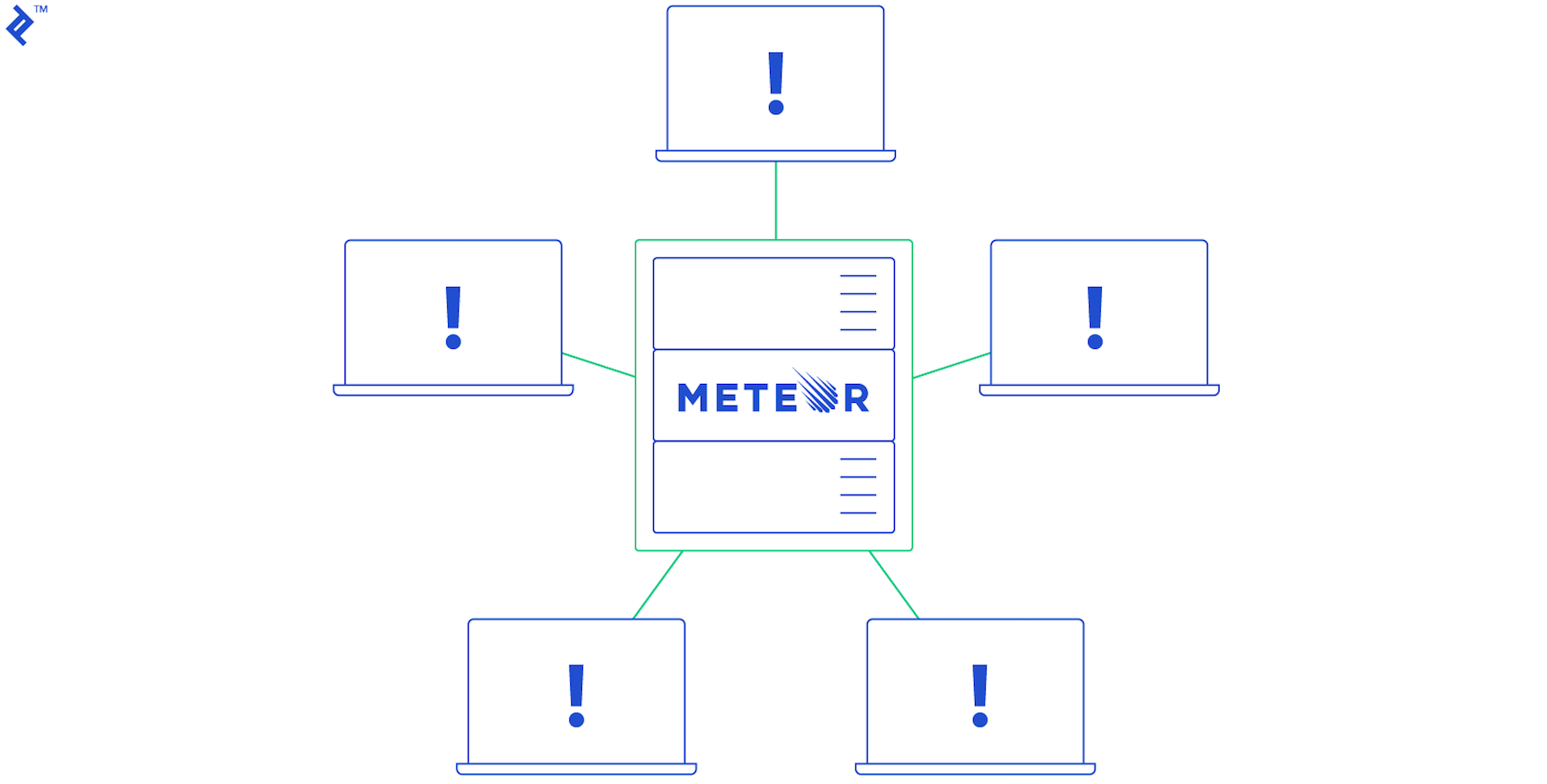
Meteor sets itself apart with its unique data synchronization mechanism between the server and client-side applications (web and mobile). Meteor maintains a mini-database on the client, representing a subset of data replicated from the server-side database. This subset comprises data previously requested by the client and authorized for access by the server. When the client needs to modify data, it utilizes the same database API as the server to execute CRUD operations. These changes are automatically transmitted to the server and persisted in the main database. Conversely, whenever the server detects data alterations, it pushes the updated data to the relevant clients subscribed to that data. This bidirectional data synchronization occurs seamlessly and automatically, without manual intervention. To achieve this, Meteor relies on WebSockets to maintain a persistent connection between the client and server, ensuring that data changes on one end are instantly reflected on the other.
Build Automation Tool
Meteor extends beyond server-side and web applications. Its build tool, Isobuild, in conjunction with Cordova (a library for combining web technologies with native mobile functionalities), simplifies the process of creating iOS and Android applications. The resulting mobile apps are hybrid in nature, running JavaScript code or displaying web pages within a WebView. While this approach might entail some trade-offs in user experience compared to fully native mobile apps, the ability to manage code for multiple platforms (web, iOS, and Android) from a single codebase and significantly reduce development costs is a compelling advantage for many developers.
In summary, Meteor prioritizes automation. This high degree of automation streamlines development workflows but comes at the cost of potential performance limitations and scalability constraints. As the user base expands, the automated data synchronization mechanism can become a bottleneck. Achieving comparable capacity and performance to meticulously optimized backend technologies often requires significantly more server hardware and bandwidth resources with Meteor. Consequently, while Meteor serves as an excellent starting point for prototyping projects across various platforms, a more robust and scalable architecture might be necessary as the project transitions to production and the user base grows.
Sails.js: A Powerful MVC Framework for Node.js
Sails.js shares several similarities with Express. It offers a project generator, middleware support, and template engine integration. In fact, it’s built upon Express, extending its capabilities with higher-level functionalities to accelerate development.
MVC
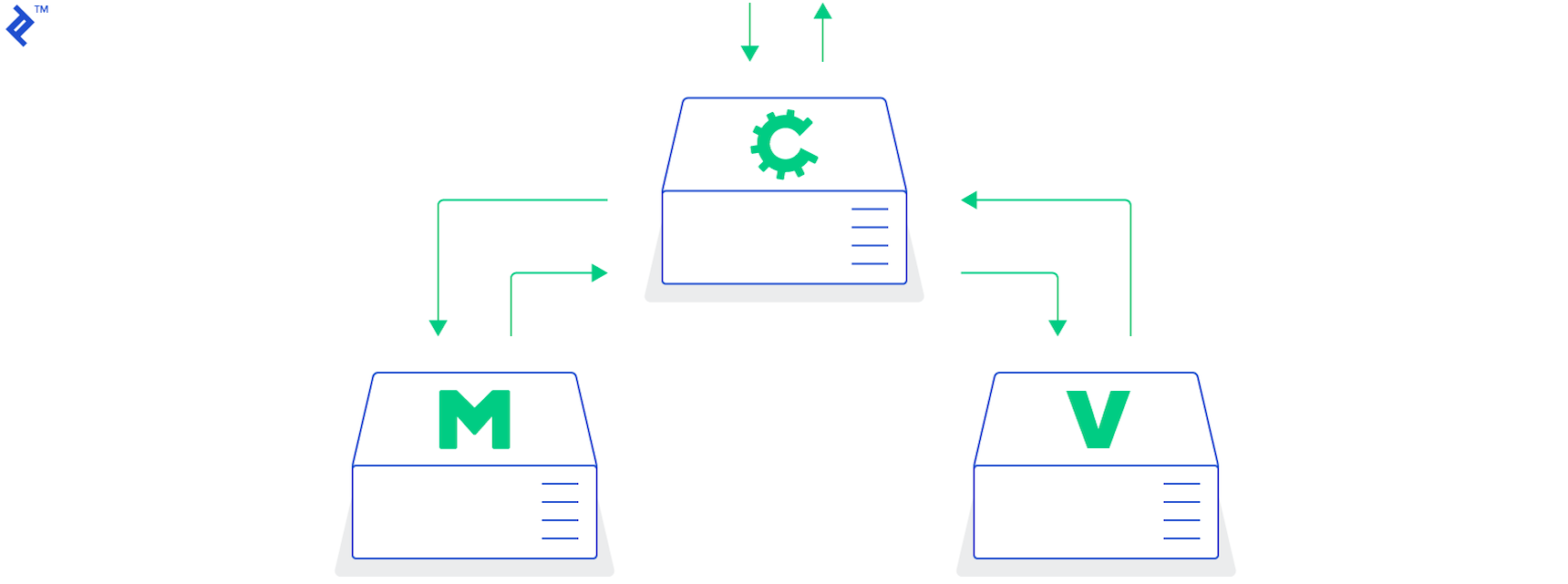
Sails.js embraces the Model-View-Controller (MVC) architectural pattern from the outset. Developers familiar with frameworks like Ruby on Rails or Laravel will find the structure of a Sails.js application quite familiar. Models represent data structures mirroring database tables or collections, views constitute the HTML templates populated with data, and controllers act as intermediaries between models and views, housing the server-side business logic.
Real-Time Communication
Unlike traditional HTTP requests, where the client must repeatedly poll the server for updates, or long-polling techniques, which can lead to server resource idleness, Socket.io enables bidirectional, event-driven communication between the client and server. Sails.js seamlessly integrates Socket.io and provides a higher-level API abstraction, making it well-suited for applications requiring real-time interactions, such as chat applications or multiplayer games.
Database ORM

Sails.js incorporates Waterline, an Object-Relational Mapping (ORM) tool, as an abstraction layer between the backend logic and database interactions. This ORM provides a consistent syntax for accessing and manipulating data across different database systems, shielding developers from the complexities of varying query languages (SQL vs. NoSQL), schema designs (schema-based vs. schema-less), and other database-specific nuances.
Sails.js strikes a balance between automation and flexibility. It prioritizes server-side logic, is designed for production environments, and enables faster development cycles compared to Express without compromising performance or scalability. Notably, for developers accustomed to the MVC paradigm, Sails.js offers a smooth learning curve.
Conclusion
This article has explored some of the leading Node.js backend frameworks, highlighting their strengths and areas where they excel. Rather than providing a strict performance comparison or ranking, it aims to empower Node.js developers to select the most appropriate framework for their specific project requirements.
What is your preferred Node.js backend framework? Do you favor any frameworks not discussed here? Feel free to share your thoughts and preferences in the comments section below!