To build high-quality software, tracking changes and being able to undo them is essential. Version control systems address this need by recording a project’s history and facilitating the integration of changes from multiple contributors. This speeds up development and simplifies bug detection.
Furthermore, these tools are instrumental in enabling distributed teams to collaborate effectively. They allow multiple developers to work on different aspects of a project simultaneously and later merge their contributions into a unified product. Let’s delve into the evolution of version control systems and explore the emergence of trunk-based development and Git flow.
Git Flow vs. Trunk: The Transformative Impact of Version Control Systems
Before version control systems, developers relied on manual backups of project versions. They would manually copy modified files to integrate the work of multiple developers on a single project.
This process was time-consuming, storage-intensive, and costly.
When we look at the history, we can broadly categorize version control software into three generations.
Let’s examine them:
| Generation | Operations | Concurrency | Networking | Examples |
|---|---|---|---|---|
| First | On a single file only | Locks | Centralized | RCS |
| Second | On multiple files | Merge before commit | Centralized | Subversion, CVS |
| Third | On multiple files | Commit before merge | Distributed | Git, Mercurial |
We observe a trend toward enhanced parallel development capabilities as version control systems evolve.
One significant advancement was the transition from file locking to change merging, boosting developer productivity.
Another major improvement was the introduction of distributed systems. Git was one of the first tools to embrace this concept. This innovation played a crucial role in the flourishing of the open-source movement. Git empowers developers to create complete copies of a repository (forking) and implement changes without the worry of merge conflicts.
Subsequently, they can initiate a pull request to integrate their modifications into the original project. If the original developer chooses not to incorporate these changes, they can become separate projects, thanks to the absence of a central storage concept.
Development Styles
Today, Git reigns supreme as the most prevalent version control system, commanding approximately 70 percent of the market share in 2016.
Git’s popularity surged alongside the rise of Linux and the open-source community. GitHub, the leading online platform for hosting public projects, has also significantly contributed to its widespread adoption. We can attribute the introduction of easily manageable pull requests to Git.
In essence, pull requests are mechanisms for developers to propose merging their changes into the main project. This process involves a review phase where reviewers can provide feedback on any aspect they deem improvable or unnecessary.
Developers can then address the feedback through discussions or by modifying their code accordingly.
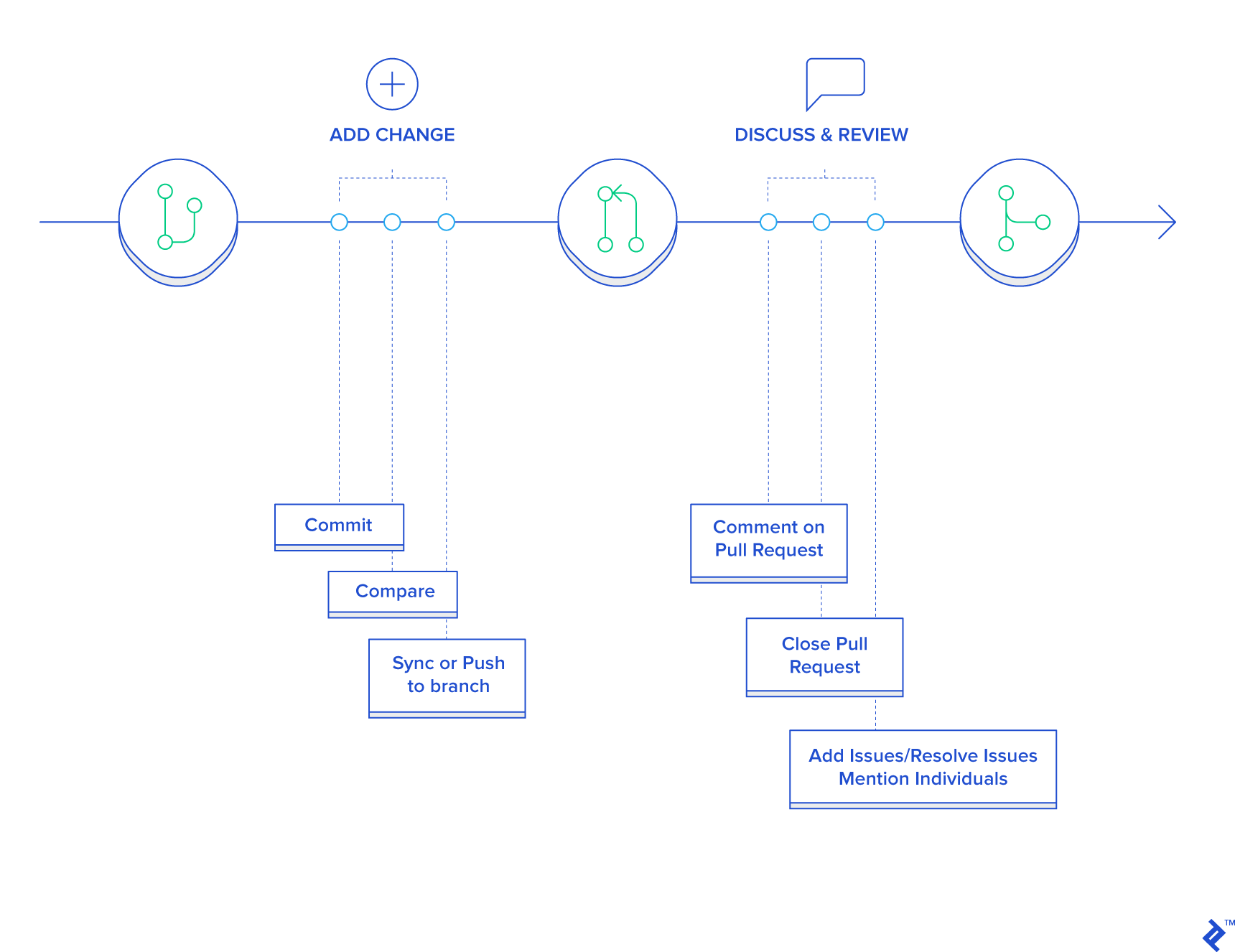
Git is inherently a tool, offering flexibility in its application. Currently, the two most common development styles are Git flow and trunk-based development. Often, developers may be familiar with only one of these styles.
Let’s compare and contrast both, trunk-based and Git flow, to understand their appropriate use cases.
Git Flow
In the Git flow model, there is a primary development branch, often named develop, with restricted access.
Developers branch off from this main branch to work on features. Upon completion, they initiate pull requests. These requests undergo review by other developers, often leading to extensive discussions and a negotiation process to finalize the changes.
Once approved, the pull request is merged into the main branch. When the main branch reaches a sufficient level of maturity for release, a separate branch is created for final preparation. The application undergoes testing and bug fixing in this branch until it’s ready for deployment. Finally, the finished product is merged into the master branch and tagged with the release version. Meanwhile, development of new features continues on the develop branch.
The diagram below illustrates the typical Git flow branching model:

One of Git flow’s strengths is its strict control mechanisms. Only authorized developers can approve changes after thorough scrutiny, ensuring code quality and early bug detection.
However, it’s important to acknowledge that this can also be a significant drawback, creating a bottleneck that hampers development speed. This can be problematic if speed is paramount. Features developed in isolation can lead to long-lived branches that are challenging to integrate with the main project.
Furthermore, pull requests tend to focus code review solely on new code, rather than considering the codebase as a whole for potential improvements. This can sometimes result in premature optimization, as there’s always a desire for increased performance.
Additionally, pull requests can foster excessive micromanagement, with lead developers overseeing every line of code. While this might be manageable with experienced developers, it can be a waste of their time and skills, potentially leading to demotivation.
In larger organizations, office politics can seep into the pull request process. Individuals responsible for approvals might leverage their position to obstruct certain developers, either due to a lack of trust or personal agendas.
Git Flow Pros and Cons
As we’ve seen, pull requests are not always the optimal choice and should be employed judiciously.
When is Git Flow Most Effective?
Open-Source Projects: Originating from the open-source world, this style thrives in such environments. Given the open contribution model, stringent control over changes is essential. Thorough code review becomes crucial because contributors’ trustworthiness cannot be assumed. Development speed is typically not a primary concern in these non-commercial projects.
Teams with Many Junior Developers: Closely monitoring the work of junior developers is crucial. Git flow facilitates this by providing ample opportunities for guidance and skill enhancement. Pull request approvers can maintain code quality by carefully scrutinizing recurring changes.
Established Products: This style also proves valuable for mature products where the emphasis is on performance optimization and load handling. These optimizations often necessitate precise changes, and time constraints are less of a factor. Large enterprises, with their need for meticulous change control to safeguard their substantial investments, also benefit from this style.
When Can Git Flow Pose Challenges?
Startups: Git flow is not suitable for startups aiming to rapidly develop a minimum viable product. The extensive pull request process creates a significant bottleneck, hindering the entire team’s progress.
Rapid Iteration: Once an initial product version is released, frequent iterations are often needed to align with customer needs. Again, multiple branches and pull requests impede development speed and are ill-advised in such scenarios.
Teams of Senior Developers: If your team comprises primarily senior developers with established trust and experience, the micromanagement inherent in pull requests becomes unnecessary. Trust your developers’ expertise and empower them to excel without the burden of Git flow’s bureaucracy.
Trunk-Based Development Workflow
In the trunk-based model, all developers collaborate on a single branch, typically the master branch, with open access. They commit code directly to this branch and run it, simplifying the process.
Short-lived feature branches might be created in some cases. Once the code on a feature branch compiles successfully and passes all tests, it’s merged directly into master. This ensures continuous development and minimizes the risk of complex merge conflicts.
Let’s visualize the trunk-based development workflow:

Code review in this approach typically involves comprehensive source code reviews, with minimal lengthy discussions. Since there’s no centralized control over code modifications, a robust and enforced coding style is paramount. This style demands experienced developers who can maintain code quality.
Trunk-based development excels when working with a team of seasoned software developers. It allows for rapid implementation of improvements without unnecessary overhead and demonstrates trust in the team’s abilities. Developers enjoy significant autonomy, delivering code directly and being evaluated on the final product’s functionality. This method minimizes micromanagement and the potential for office politics.
Conversely, if your team lacks experience or trust, Git flow is a more appropriate choice, providing greater control and peace of mind.
Advantages and Disadvantages of Trunk-Based Development
Let’s delve into the best and worst-case scenarios for this approach.
When is Trunk-Based Development Most Effective?
Startups: This style is ideal for startups building their minimum viable product, offering maximum development speed with minimal overhead. The absence of pull requests allows for rapid feature delivery, especially with a team of experienced programmers.
Rapid Iteration: When pivoting an existing product or exploring new directions based on customer feedback, trunk-based development enables agility and speed. The streamlined workflow facilitates swift adaptation.
Teams of Senior Developers: For teams composed primarily of senior developers, trust and autonomy are paramount. This workflow empowers them to leverage their expertise and witness the product’s growth, driven by a shared purpose and minimal bureaucracy.
When Can Trunk-Based Development Be Problematic?
Open-Source Projects: Git flow is a better fit for open-source projects due to the need for strict change control and the inability to fully trust all contributors.
Teams with Many Junior Developers: Closely supervising junior developers and providing structured feedback is crucial for their growth. Git flow’s strict pull request process aids in this endeavor and helps identify potential bugs early on.
Established Products or Large Teams: For successful products or large enterprises, Git flow provides the necessary control and oversight to protect valuable investments. Additionally, performance optimization in established products demands meticulous changes, making Git flow a suitable choice.
Selecting the Right Tool for the Task
As emphasized earlier, Git is simply a tool that should be used appropriately.
Git flow manages changes through pull requests, enforcing strict access control. This makes it well-suited for open-source projects, large enterprises, companies with mature products, or teams with inexperienced developers. It ensures thorough code review but can lead to excessive micromanagement, potential office politics, and slower development.
Trunk-based development, on the other hand, grants developers autonomy and trust, providing unrestricted access to the source code. This approach necessitates a high level of trust in the team’s capabilities. It prioritizes development speed and minimizes processes, making it ideal for new product development or rapid pivots. It thrives in environments with experienced developers.
However, if you work with junior developers or lack complete trust in your team, Git flow is a more prudent option.
Armed with this knowledge, you can confidently choose the workflow that aligns perfectly with your project’s needs.