When Google AdWords introduced their website call conversions program in August, I was thrilled. As the Chief Marketing Officer for an agency specializing in apartment marketing, our clients prioritize phone calls – their main goal is generating leads, not online sales or ad views. This new call conversion program was a game-changer. It not only allowed us to demonstrate the effectiveness of our AdWords campaigns to clients but also helped us fine-tune them by identifying what resonated and what didn’t.
However, as we implemented this for our clients, we stumbled upon a significant issue with the Google AdWords website call conversion feature. This issue could impact you as well, depending on how you’ve set things up. The problem is that the tracking number for one website in your account might appear on your other websites within the same account.
To be crystal clear, if you only manage campaigns for a single website within your AdWords account, you won’t encounter this problem. However, if you handle multiple websites under one account, then this Google AdWords glitch is something you need to be aware of.
RELATED: 10 Industries That MUST Use Call Tracking
A Closer Look at the Issue
Let’s use our own situation as a real-world example. Our marketing agency works with apartment companies, many of whom oversee multiple apartment complexes. We build websites for each of these complexes and manage their AdWords marketing from one central account for the entire management company. While we could create separate accounts for each complex, our strategy is to avoid any potential violation of the “double serving” ads rule, which prohibits “promoting the same or similar content from multiple accounts on the same or similar queries” – especially relevant for sister properties under the same management.
One day, a client alerted us that the dynamically generated tracking number for one community’s website was appearing on the website of another community within the same account. Here’s a side-by-side comparison of the two websites:
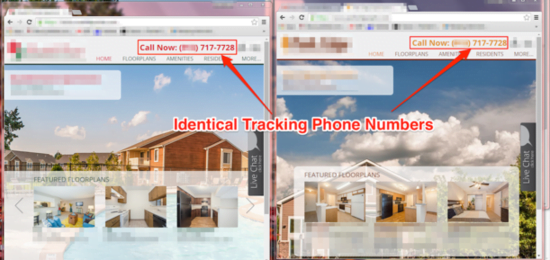
The point is, if you use Google website call conversions for multiple websites under a single account, your potential customers might end up dialing a number that connects them to a completely different business than the one they intended to reach.
This issue is particularly concerning in the apartment industry, where apartment seekers (like hotel shoppers) typically go through a “scouting” phase. They explore numerous apartment communities to understand their options. It’s easy to envision a scenario where someone visits multiple websites managed by the same company, and the phone number they see directs them to a different complex than the one they’re interested in.
A Temporary Fix
We reached out to Google about this issue, and they acknowledged that this configuration could indeed lead to inaccuracies in website call conversions destination phone numbers. However, they informed us that a solution isn’t likely to be implemented soon, as a relatively straightforward workaround exists.
The only way to resolve this problem at the moment is to create individual accounts for each website, preventing the dynamic phone number from one site from appearing on another. Alternatively, you can simply opt out of using website call conversion tracking until Google addresses the issue.
Why This Happens: A Technical Explanation
Curious about the underlying cause of this issue? Here’s a technical breakdown if you’re interested.
The technology Google uses for tracking website call conversions is conceptually quite simple. When someone clicks your AdWords ad, snippets of JavaScript code on your website seamlessly swap your regular phone number with a dynamically generated one, specific to the person who clicked the ad. If that person then calls that number, signifying their interest, AdWords can link that call back to the initial ad click.
The first snippet on your website is a tracking tag:
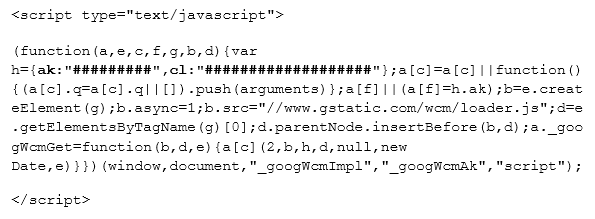
This tag contains two important custom variables:
- ak: This numerical variable identifies your account. It’s not your actual account ID, but it remains consistent across all your “Calls from website” conversions within the same account.
- cl: This case-sensitive alphanumeric string is the conversion label, identifying the specific website call conversion activated in your AdWords account. It’s unique to each website call conversion you set up.
The second JavaScript snippet is what replaces your business phone number with the AdWords dynamic tracking number. This enables a call to that number to be registered as a website call conversion.
One of the best things about this program is the conversion window Google provides. Even if someone clicks an ad and returns to your site up to 60 days later, the dynamic tracking number remains active. This ensures that a call is linked back to the ad, even weeks or months later.
The “ak” variable seems to be responsible for assigning each user a unique tracking number. While it identifies your account, it doesn’t differentiate between individual websites. The “cl” variable pinpoints the specific website call conversion, but there’s no place within the AdWords setup to link a phone number or website to that conversion – it’s all handled by the JavaScript snippet.
Because the “ak” account identifier is identical for all website call conversions, the same unique tracking number follows a user from one site to the next, as long as those sites share the same AdWords account.
In a Nutshell
If you’re managing campaigns for multiple websites with distinct phone numbers under a single Google AdWords account, the website call conversions feature might display the wrong phone number if a user visits more than one of your websites. For now, the only solution is to create separate AdWords accounts for each website.