Setting up peer-to-peer communication between devices has historically been a complex task for developers. Applications typically need to discover nearby devices, establish and maintain connections, and handle changes in network conditions. To address these challenges, Apple introduced its MultipeerConnectivity framework (referred to as MPC) in iOS 7 and macOS 10.10. This framework simplifies the process of implementing peer-to-peer connectivity in apps.
MPC provides several key features that streamline the process:
- Support for various network interfaces like Bluetooth, WiFi, and Ethernet
- Automatic device discovery
- Secure communication through encryption
- Mechanisms for sending small messages
- Facilitating file transfers
This article primarily focuses on implementing MPC in iOS, though most concepts apply to macOS and tvOS as well.
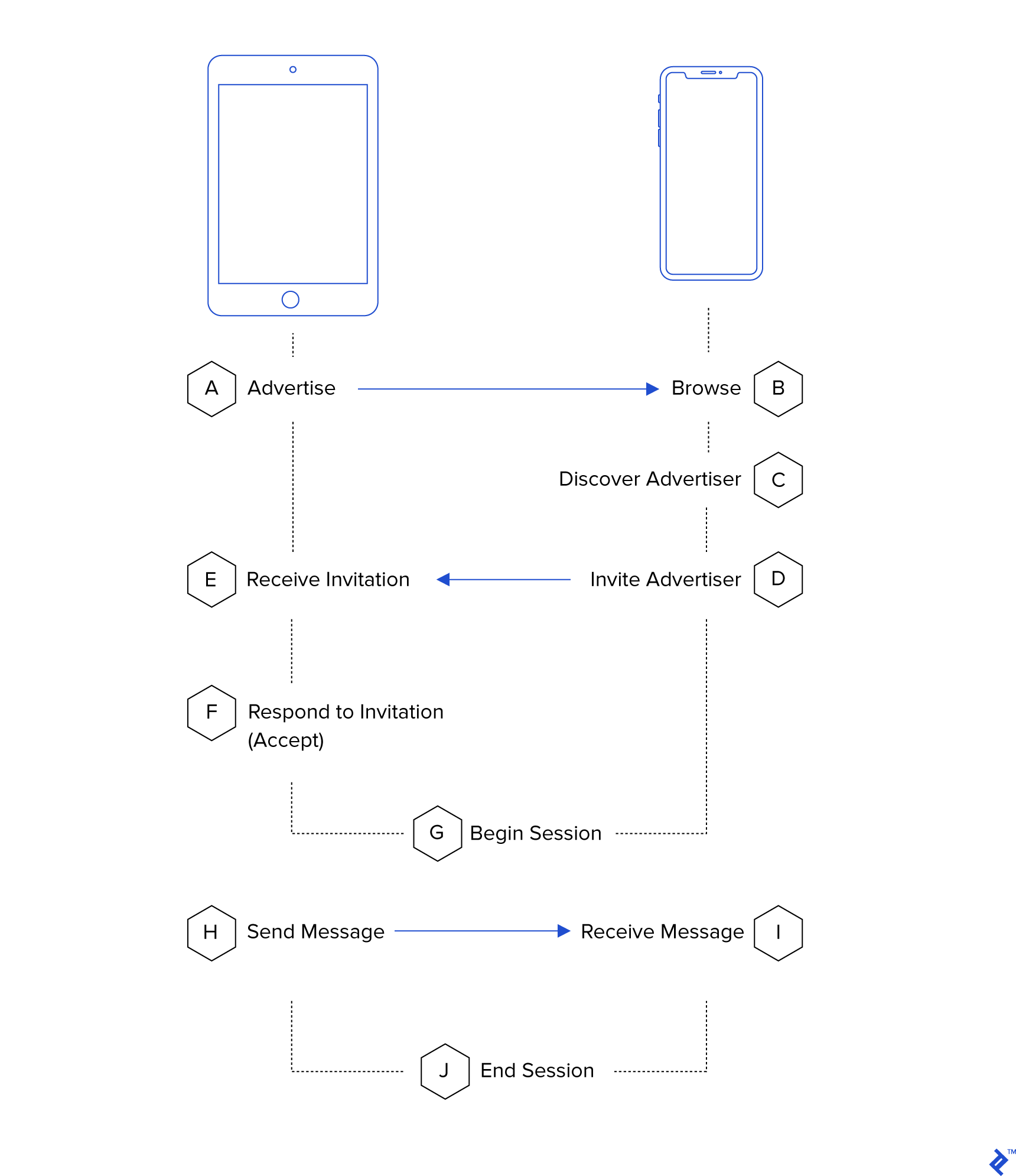
While numerous tutorials and examples aim to guide iOS developers in implementing MPC-based applications, they often overlook potential challenges and lack completeness. This article aims to provide a comprehensive walkthrough of a basic MPC app implementation, highlighting common pitfalls to help developers avoid them.
Key Concepts and Classes
MPC relies on several core classes:
MCSession: This class manages all communication between connected peers within a session. It enables sending messages, files, and streams, and its delegate handles incoming data from connected peers.MCPeerID: Each peer device in a session is identified by a uniqueMCPeerID. Although it has an associated name, it’s crucial to note that peer IDs with the same name are not considered identical (refer to “Ground Rules” below).MCNearbyServiceAdvertiser: This class allows a device to advertise its service to nearby devices, enabling them to initiate connections.MCNearbyServiceBrowser: This class enables searching for devices advertising a specific service usingMCNearbyServiceAdvertiser. Using these classes together allows for peer discovery and connection establishment.MCBrowserViewController: While this class provides a basic UI for browsing nearby services (advertised viaMCNearbyServiceAdvertiser), this article won’t utilize it to highlight MPC’s ability to facilitate seamless peer-to-peer experiences.
Ground Rules
When working with MPC, keep these essential considerations in mind:
MCPeerIDobjects uniquely identify devices. While they may appear as strings, twoMCPeerIDinstances created with the same string are not identical. Therefore, never copy or recreateMCPeerIDobjects. Instead, pass them within the application or useNSArchiverfor storage if needed.- Although documentation might suggest otherwise,
MCSessioncan support communication between multiple devices. However, for optimal stability, creating a separateMCSessionfor each connected peer is recommended. - MPC functionality is limited when an application runs in the background. Disconnect and tear down all
MCSessioninstances when your app enters the background. Minimize operations in background tasks to avoid issues.
Getting Started with MultipeerConnectivity
Before establishing a network, some initial setup is required. A singleton will store state variables like the local MCPeerID and connected devices. Then, MCNearbyServiceAdvertiser and MCNearbyServiceBrowser instances will be created. These require a unique service type string (less than 16 characters) to identify your application, such as “MyApp-MyCo”. An optional dictionary can be provided to the advertiser to offer additional information about the service to browsing devices, like game type or device role.
The singleton pattern is well-suited for managing MPC’s system-provided APIs and their interaction with real-world objects (devices and the network).
Below is the singleton definition:
| |
The code stores the MCPeerID in user defaults (using NSKeyedArchiver) for reuse. This is crucial to prevent obscure bugs that might arise from recreating the MCPeerID.
A “Device” class will keep track of discovered devices and their states:
| |
Now, let’s examine how browsers and advertisers work together. In MPC, a device can advertise a service and browse for the same service on other devices. This approach eliminates the need for a traditional client/server model, allowing for flexible device-to-device communication.
A new method in MPCManager will create and track discovered devices:
| |
When a browsing device discovers an advertiser, it can attempt to connect. The MCSession delegate methods will handle incoming requests:
| |
…a method on the Device class will create the MCSession:
| |
…and finally, a method to trigger the invitation when a browser discovers an advertiser:
| |
The withDiscoveryInfo argument, currently ignored, can be used to filter discovered devices based on the information they provide. This dictionary is the same one supplied to the discoveryInfo argument of MCNearbyServiceAdvertiser.
Connecting Devices
With the groundwork laid, it’s time to connect devices.
The MCSession’s init method sets up both the advertiser and its delegate. To start connecting, both need to be activated, ideally in the App delegate’s didFinishLaunching method or another suitable location. Here’s the start() method for the class:
| |
These calls enable the app to broadcast its presence over WiFi. Note that a WiFi connection isn’t necessary; only having WiFi enabled is sufficient.
When a device accepts an invitation and initiates its MCSession, it receives delegate callbacks. These will be handled by the Device object:
| |
The session(_:peer:didChangeState:) callback is particularly important. It indicates changes in a device’s connection state (notConnected, connecting, and connected). Tracking these states is essential for maintaining a list of connected devices:
| |
Sending Messages
With connected devices, it’s time to exchange messages. MPC offers three options:
- Sending raw data (a
Dataobject) - Sending a file
- Opening a stream to the other device
For simplicity, this example focuses on sending simple messages without delving into complex message types or formatting. A Codable structure will encapsulate the messages:
| |
An extension to the Device class will facilitate sending messages:
| |
static let messageReceivedNotification = Notification.Name(“DeviceDidReceiveMessage”) public func session(_ session: MCSession, didReceive data: Data, fromPeer peerID: MCPeerID) { if let message = try? JSONDecoder().decode(Message.self, from: data) { NotificationCenter.default.post(name: Device.messageReceivedNotification, object: message, userInfo: [“from”: self]) } }
| |
Conclusions
This article outlined the architecture and steps necessary to build the networking components of a MultipeerConnectivity-based iOS application. The full source code on Github provides a minimal user interface for viewing connected devices and exchanging messages.
MPC enables near-seamless connectivity between nearby devices, abstracting away complexities related to WiFi networks, Bluetooth, or traditional client/server setups. It exemplifies Apple’s design philosophy by enabling quick and straightforward connections between devices for activities like gaming sessions or file sharing.
The source code for this project can be found on Github at https://github.com/bengottlieb/MultipeerExample.
Interested in iOS development with AFNetworking? Explore the Model-View-Controller (MVC) pattern for maintaining a clean codebase. For scenarios requiring centralized networking, logging, or rate-limiting, a Singleton Class might be beneficial. Learn more about this approach in the article iOS Centralized and Decoupled Networking: AFNetworking Tutorial with a Singleton Class.