I enjoy incorporating video campaigns in Google Ads to introduce my brand to a new audience and guide those potential customers closer to making a purchase. The call-to-action extensions can be very effective in helping PPC advertisers increase traffic to their website and landing pages.
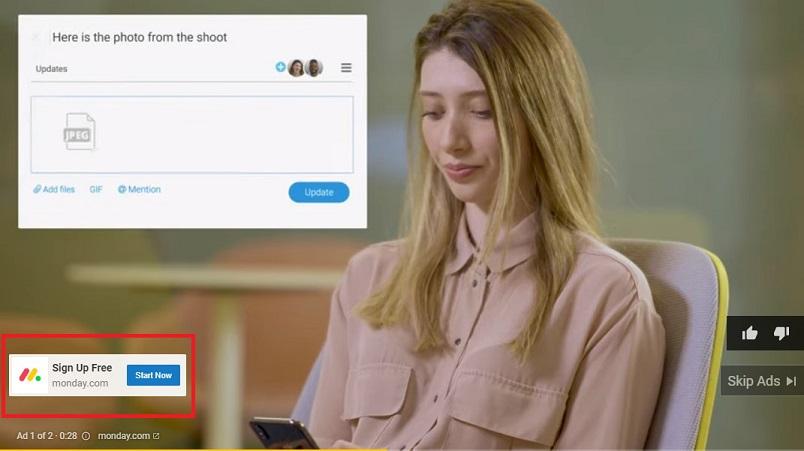
These recently added extensions are available for any video ad using the TrueView in-stream format. In this article, I’ll explain why call-to-action extensions are so valuable, how to implement them, and strategies to use for your video campaigns so you can begin attracting more visitors.
The Importance of YouTube CTA Extensions
Back in December of 2018, Google announced call-to-action extensions began appearing in advertisers’ video campaigns on Google Ads. The most significant effect this announcement had on marketers running YouTube ads is that this change also meant the discontinuation of the widely used call-to-action overlays. Call-to-action overlays were the initial interactive components that were displayed on our YouTube ads and helped attract visitors to our websites and landing pages.
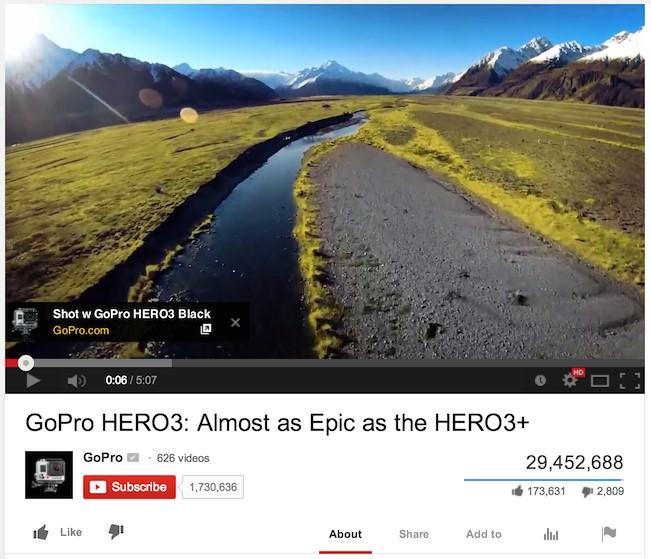
Call-to-action overlay example courtesy of Google Not long after the introduction of the call-to-action extensions, advertisers learned they could no longer modify their existing call-to-action overlays. Shortly after that, Google Ads eliminated the overlays from advertisers’ accounts. For every PPC marketer aiming to boost traffic from their video campaigns, the removal of the overlays meant they were obligated to utilize the new call-to-action extension.
Implementing Your Call-to-Action Extensions
Within an ad group from one of your video campaigns, you can either generate a new video ad or adjust an existing one. Just keep in mind that the new call-to-action extensions are only compatible with TrueView in-stream video ads. Once you’ve chosen the video from YouTube that you want to use for the ad, input your final and display URLs. Then, you’ll notice a small (and optional) “Call-to-Action” checkbox.
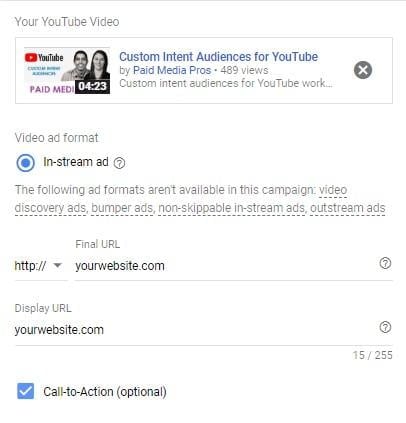
This is precisely where you can type in the call to action, along with the extension headline for your video ad. This section can be a little tricky simply because of the character limits. Like the original overlays, these call-to-action fields are limited to 10 characters (spaces included). The headline field allows for only 15 characters (also counting spaces).
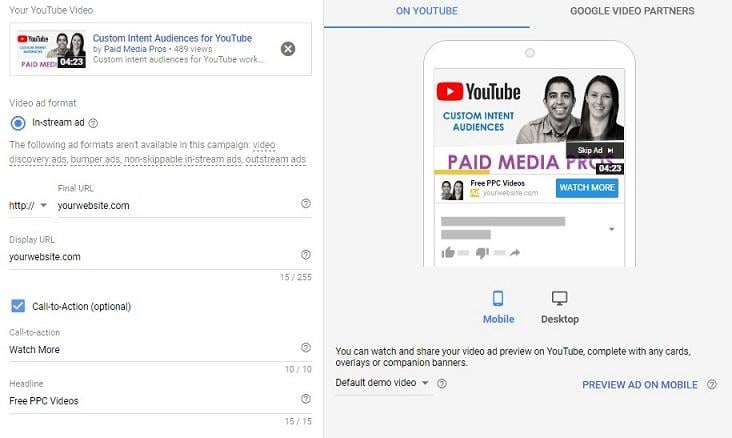
My suggestion? Keep your messages concise and direct. What is your core value proposition? What do you want the viewer to do next? You want to make these as straightforward as possible before they have the opportunity to bypass the ad. And, prior to launching your campaign, make sure to preview how the call-to-action extension will appear while the ad is playing.
Key to CTA Extension Success: Testing is Crucial!
I have reviewed numerous Google Ads video campaigns. A recurring problem I encounter in many of these accounts is that they only have a single video ad within each ad group. While I understand you may only have a single ad creative and that video campaigns differ significantly from campaigns on the Search or Display Network, it is still essential to test multiple ads for video ad groups. We learned earlier that the call-to-action extensions are configured at the ad level. So, even if you only have one or two videos to work with, you can try out various call-to-action messages and headlines to determine which blends generate the most traffic from your video ads. Let’s look at an example from a client test I conducted recently:
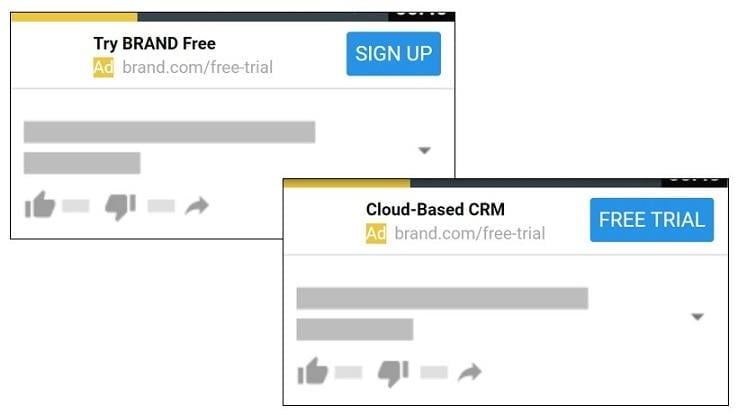
They had an ad running that promoted their latest product launch. The campaign aimed to engage new users. In one of the call-to-action extensions (lower-right), we went with a more product-centric headline message because we were trying to connect with a new audience who might not be familiar with the brand. We then presented the viewer with a free trial offer. In our second call-to-action extension (upper-left), we decided to experiment. We incorporated two call-to-action components and emphasized the brand name. We prompted users not only to try our product for free but also to sign up. The headline in the second ad mentioned the brand name and instructed the user to take action. The click-through rate for this second ad was double that of the first ad, and we would have missed out on this level of success if we had stuck with just our initial video ad. Building on this, we can continue experimenting with various extension elements to identify which ones will yield higher click-through rates and, ideally, more conversions from your video campaigns. When deciding on the call-to-action elements for your video ads, take into account the targeting parameters you are using in your video campaigns. Here are some helpful questions to consider when trying to craft the right message for your extensions:
- Do my call-to-action elements align with the message in the video?
- Am I targeting current customers or solely new viewers?
- Where in my marketing funnel do these viewers fall?
- Have these viewers seen any of my videos or special offers before?
- What are the most important value propositions for each targeting option? Once you establish who your target audiences are—which should ideally be done before creating your video ad—you will have a solid starting point for how to guide your viewers effectively with your call-to-action extensions.
Enhance Video Campaign Performance with YouTube CTA Extensions
When I manage video campaigns for my clients, I always strive to set realistic expectations. The primary advantage of advertising on YouTube is to increase brand awareness among new audiences or maintain engagement with potential customers. That said, if your video content resonates with your target audience, they will want to learn more about the products and services you provide. Although the character limits for the new call-to-action extensions are not as generous as we might prefer, it is crucial to approach ad extension testing with the same diligence as any other ad type. The more traffic you can direct to your website or landing pages, the better your chances of converting the user or developing larger remarketing audiences from your video campaign to utilize in your subsequent marketing initiatives.