The use of content delivery networks (CDNs) like Amazon CloudFront has significantly evolved. While they were once considered a static part of web infrastructure, primarily used for caching, advancements like Lambda@Edge have transformed them into dynamic components. Introduced in mid-2017, Lambda@Edge, a feature of AWS, allows for code execution in the form of Lambdas directly on CloudFront’s edge servers, thus presenting new opportunities.
This new technology paves the way for elegant solutions to challenges like server-side A/B testing. This method involves evaluating the effectiveness of different versions of a website by simultaneously presenting them to distinct user groups.
The Impact of Lambda@Edge on A/B Testing
The primary technical hurdle in A/B testing lies in effectively dividing incoming traffic without negatively impacting the experiment’s data integrity or the website’s functionality.
Two primary methods for implementation exist: client-side and server-side.
- Client-side execution involves running JavaScript code within the user’s browser to determine the displayed variant. This approach, however, has drawbacks, including potential slowdowns in rendering and issues like flickering, making it less desirable for websites aiming for optimal loading times and a high-quality user experience.
- Server-side A/B testing circumvents these problems as the decision of which variant to display is made on the server. This allows the browser to render each variant without any issues, as if it were the standard version of the website.
Given the advantages of server-side A/B testing, you might be curious why it’s not universally adopted. Unfortunately, its implementation is more complex than the client-side approach, often requiring modifications to server-side code or configuration.
Modern web applications, such as SPAs, present further complications. These are frequently served as static code bundles directly from services like an S3 bucket, bypassing a web server altogether. Even when a web server is utilized, altering server-side logic for A/B testing is often impractical. CDNs introduce an additional layer of complexity, as caching can influence segment sizes, and conversely, traffic segmentation can negatively impact CDN performance.
Lambda@Edge provides a solution by routing user requests to different experiment variants before they reach your servers. The AWS documentation offers a basic example for this use case. While this example serves as a good starting point, a production environment with numerous concurrent experiments would necessitate a more adaptable and robust solution.
Furthermore, practical experience with Lambda@Edge reveals certain nuances to consider during architecture design. For instance, deploying edge Lambdas takes time, and their logs are dispersed across AWS regions, requiring careful debugging to prevent 502 errors.
This tutorial aims to guide AWS developers in implementing reusable server-side A/B testing using Lambda@Edge across multiple experiments without requiring continuous modification and redeployment of edge Lambdas. It expands upon the example in the AWS documentation and similar tutorials by fetching traffic allocation rules from a dynamically adjustable S3 configuration file rather than hardcoding them within the Lambda function.
Our Lambda@Edge A/B Testing Approach: An Overview
The fundamental principle behind this approach is to leverage the CDN to assign users to specific segments and then direct them to the corresponding origin configuration. CloudFront enables distribution to either S3 or custom origins, both of which are supported in this approach.
The mapping of segments to experiment variants is stored within a JSON file on S3. While S3 is chosen for its simplicity, alternative storage options like databases are viable as long as the edge Lambda can access them.
Note: Certain limitations exist. For more detailed information, refer to the article Leveraging external data in Lambda@Edge on the AWS Blog.
Implementation
Lambda@Edge functions can be triggered by four distinct CloudFront events:
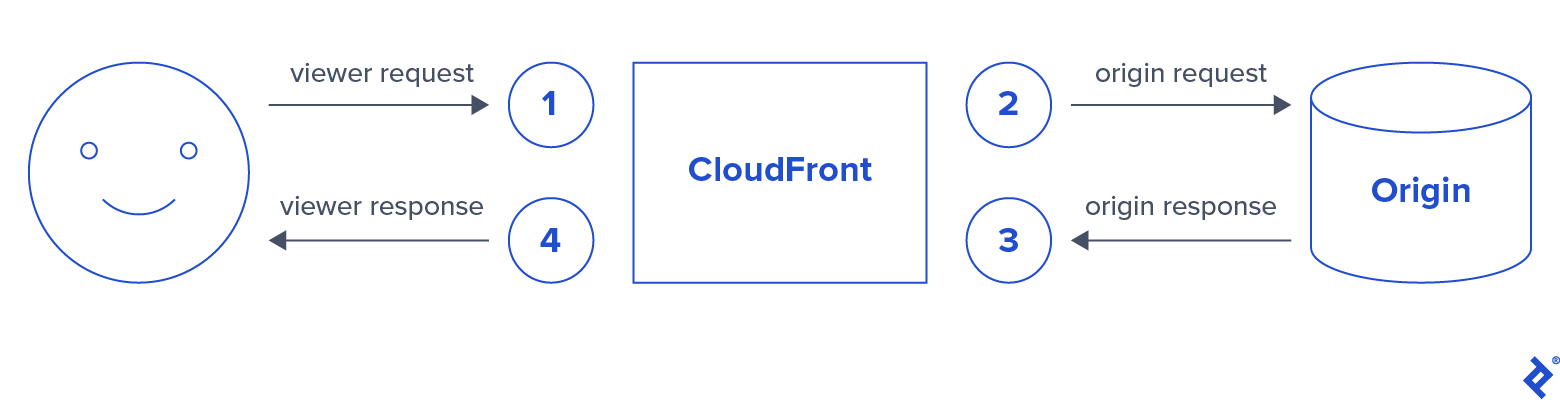
In this scenario, we will execute a Lambda function for the following three events:
- Viewer request
- Origin request
- Viewer response
Each event corresponds to a step in the following process:
- abtesting-lambda-vreq: This Lambda function handles most of the logic. It begins by either reading or generating a unique ID cookie for the incoming request, which is then hashed to a range of [0, 1]. The traffic allocation map is retrieved from S3 and cached across executions. Finally, this hashed value determines the appropriate origin configuration, which is then relayed to the subsequent Lambda function as a JSON-encoded header.
- abtesting-lambda-oreq: This function reads the origin configuration from the preceding Lambda function and routes the request accordingly.
- abtesting-lambda-vres: This function simply appends the Set-Cookie header to store the unique ID cookie within the user’s browser.
We will also configure three S3 buckets: two containing the content for each experiment variant and the third housing the JSON file with the traffic allocation map.
For this tutorial, the bucket structure will be as follows:
- abtesting-ttblog**-a** public
- index.html
- abtesting-ttblog-b public
- index.html
- abtesting-ttblog-map private
- map.json
Source Code
Let’s begin with the traffic allocation map:
map.json
| |
Each segment is assigned a traffic weight, determining the proportion of traffic it receives. Additionally, we include the origin configuration and host. The origin configuration format is detailed in the AWS documentation.
abtesting-lambda-vreq
| |
While this tutorial explicitly generates a unique ID, most websites typically have existing client IDs that could be utilized, potentially eliminating the need for the viewer response Lambda function altogether.
To optimize performance, traffic allocation rules are cached across Lambda invocations rather than retrieved from S3 upon each request. In this instance, we set a cache time-to-live (TTL) of one hour.
It’s important to note that the X-ABTesting-Segment-Origin header must be whitelisted in CloudFront to prevent it from being removed from the request before reaching the origin request Lambda function.
abtesting-lambda-oreq
| |
The origin request Lambda function’s operation is quite straightforward. It retrieves the origin configuration and host from the X-ABTesting-Origin header generated in the preceding step. This instructs CloudFront to direct the request to the appropriate origin in the case of a cache miss.
abtesting-lambda-vres
| |
Lastly, the viewer response Lambda function is responsible for returning the generated unique ID cookie within the Set-Cookie header. As previously mentioned, this Lambda function can be omitted if a unique client ID is already in use.
Even without an existing client ID, the cookie can be set using a redirect from the viewer request Lambda function. However, this could introduce latency. Therefore, we opt for a single request-response cycle in this scenario.
The complete code is available on GitHub.
Permissions for Lambda
As with any other edge Lambda function, you can utilize the CloudFront blueprint during Lambda creation. Alternatively, a custom role can be created with the “Basic Lambda@Edge Permissions” policy template attached.
The viewer request Lambda function requires additional permission to access the S3 bucket containing the traffic allocation file.
Deployment of Lambda Functions
Deploying edge Lambda functions differs slightly from the standard Lambda workflow. Within the Lambda function’s configuration page, navigate to “Add trigger” and choose CloudFront. This opens a dialog box to associate the Lambda function with a CloudFront distribution.
Select the appropriate event for each of the three Lambda functions and proceed with deployment. This initiates the process of deploying the function code to CloudFront’s edge servers.
Note: If modifications to an edge Lambda function necessitate redeployment, manual publishing of a new version is required.
CloudFront Configuration
To enable a CloudFront distribution to route traffic to an origin, each origin must be configured separately within the origins panel.
The only configuration setting requiring modification is whitelisting the X-ABTesting-Segment-Origin header. Access the CloudFront console, choose the desired distribution, and click “Edit” to modify its settings.
On the Edit Behavior page, select Whitelist from the dropdown menu corresponding to the Cache Based on Selected Request Headers option and add a custom X-ABTesting-Segment-Origin header to the list:
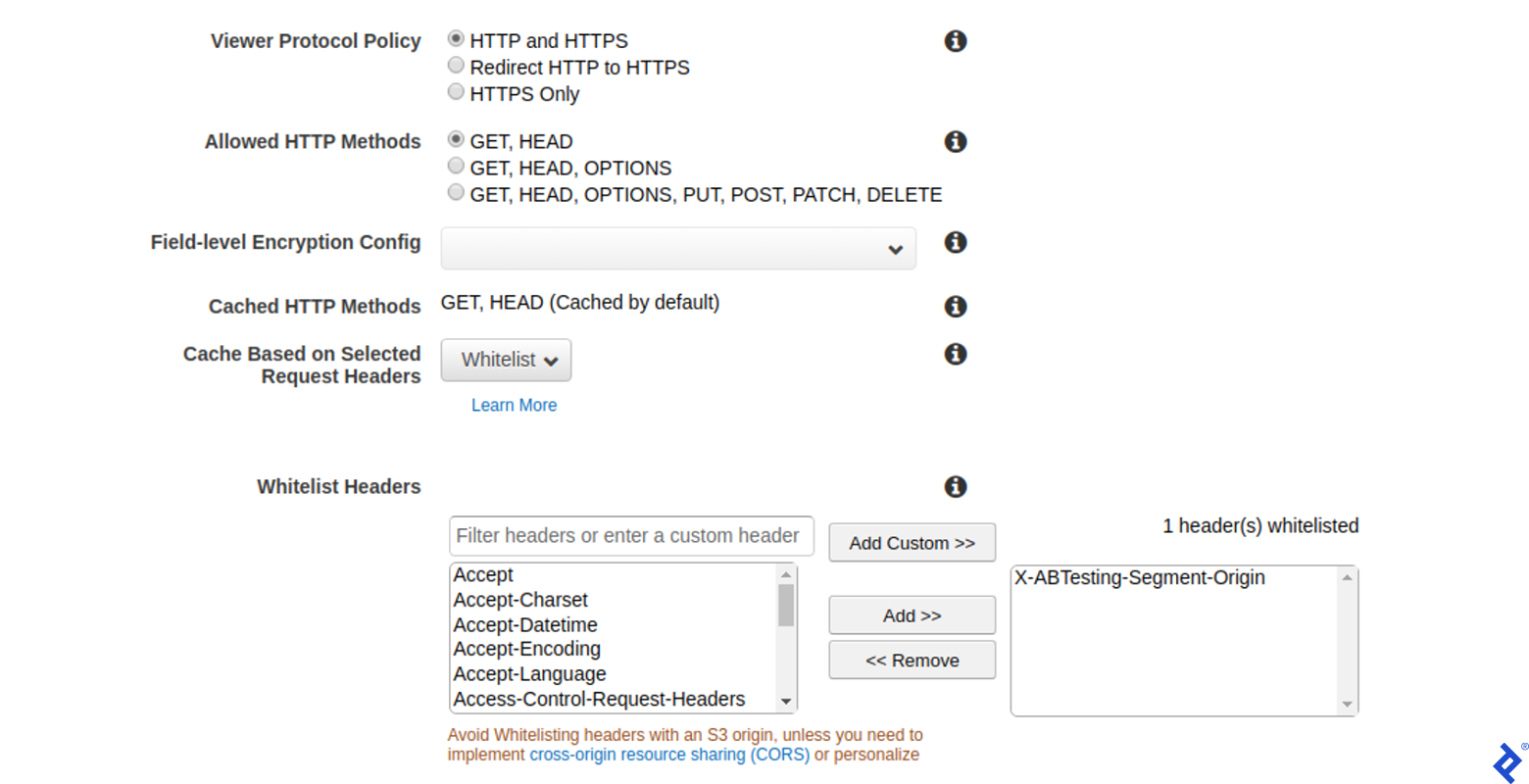
If the edge Lambda functions were deployed as outlined in the previous section, they should be associated with your distribution and visible in the final section of the Edit Behavior page.
A Robust Solution with Minor Considerations
Implementing server-side A/B testing effectively for high-traffic websites behind CDN services like CloudFront can be a complex endeavor. This article illustrated how Lambda@Edge offers a unique approach by abstracting the implementation details into the CDN itself, providing a clean and dependable solution for A/B testing.
However, it is crucial to acknowledge that Lambda@Edge has a few drawbacks. Notably, the additional Lambda invocations between CloudFront events can increase both latency and costs, requiring careful monitoring of their impact on a CloudFront distribution.
Furthermore, Lambda@Edge is a relatively new and evolving feature within AWS, so it may not yet feel completely polished. More cautious users might prefer to wait before integrating it into critical parts of their infrastructure.
Nevertheless, the distinctive solutions offered by Lambda@Edge make it an invaluable CDN feature, and its wider adoption in the future seems highly probable.
