In today’s financial markets, automated trading systems, powered by sophisticated algorithms, execute over 60% of trades involving various assets like stocks, index futures, and commodities. These programs are designed to generate profits over the long term by autonomously buying and selling assets across different markets.
This article aims to demonstrate how to predict, with reasonable accuracy, the optimal trade direction to maximize gains. We’ll use the S&P 500 index, a weighted average of 500 large-cap US companies, as our trading asset. A simple strategy involves buying the index at the 9:30 AM market open and selling at the 4:00 PM close (Eastern Time). Profit or loss depends on whether the closing price is higher or lower than the opening price. This is where Machine Learning comes in – we’ll utilize its predictive power to anticipate the closing price direction.
Machine Learning is revolutionizing various fields, including finance, where it’s widely employed. The beauty of Machine Learning lies in its ability to learn patterns and relationships from data, eliminating the need for explicit programming of every rule. This learned knowledge is then used to make predictions on new, unseen data.
Disclaimer: This article focuses on demonstrating Machine Learning techniques and code examples provided are for illustrative purposes only. Not all functions are explained in detail. Replicating the provided code and tests directly is not recommended as certain details are omitted for brevity. Basic Python knowledge is assumed. While the article showcases Machine Learning’s potential in financial trading, real-world trading involves additional skills like money management and risk management, which are not covered here.
Developing Your First Financial Data Automated Trading System
Let’s build your first program for financial data analysis and trade prediction using Python and historical data from Yahoo Finance service. As mentioned, this historical data is crucial for training our predictive model.
First, ensure you have the following installed:
- Python, specifically IPython notebook.
- Yahoo Finance Python package (package name:
yahoo-finance), installed via the terminal command:pip install yahoo-finance. - A free trial of the Machine Learning package GraphLab. Refer to the documentation of that library for more details.
Note that only the SFrame component of GraphLab is open source. A license is required for full library access, with options including a 30-day free trial and a non-commercial license for students and Kaggle competitors. GraphLab Create provides an intuitive and user-friendly platform for data analysis and Machine Learning model training.
Python Code Walkthrough
Let’s dive into the Python code for downloading financial data. IPython Notebook is recommended for its integrated environment that seamlessly combines source code, execution, data tables, and charts. For a quick IPython Notebook tutorial, refer to the Introduction to IPython Notebook article.
Create a new IPython Notebook and let’s download S&P 500 historical price data. You can adapt this to your preferred IDE and create a new Python project if desired.
| |
The variable hist_quotes contains a list of dictionaries, each representing a trading day with attributes like Open, High, Low, Close, Adj_close, Volume, Symbol, and Date. We’ll extract relevant data, reverse the order for most recent values first, and organize it into separate lists:
| |
Next, we’ll use GraphLab’s SFrame – a scalable, compressed, disk-backed columnar data frame that can handle datasets larger than RAM – to store these quotes. Learn more about SFrame in the documentation.
Let’s store and examine our historical data:
| |
| close | datetime | high | low | open | volume |
| 1283.27 | 2001-01-02 00:00:00 | 1320.28 | 1276.05 | 1320.28 | 1129400000 |
| 1347.56 | 2001-01-03 00:00:00 | 1347.76 | 1274.62 | 1283.27 | 1880700000 |
| 1333.34 | 2001-01-04 00:00:00 | 1350.24 | 1329.14 | 1347.56 | 2131000000 |
Now, save this data to disk using the save method of the SFrame:
| |
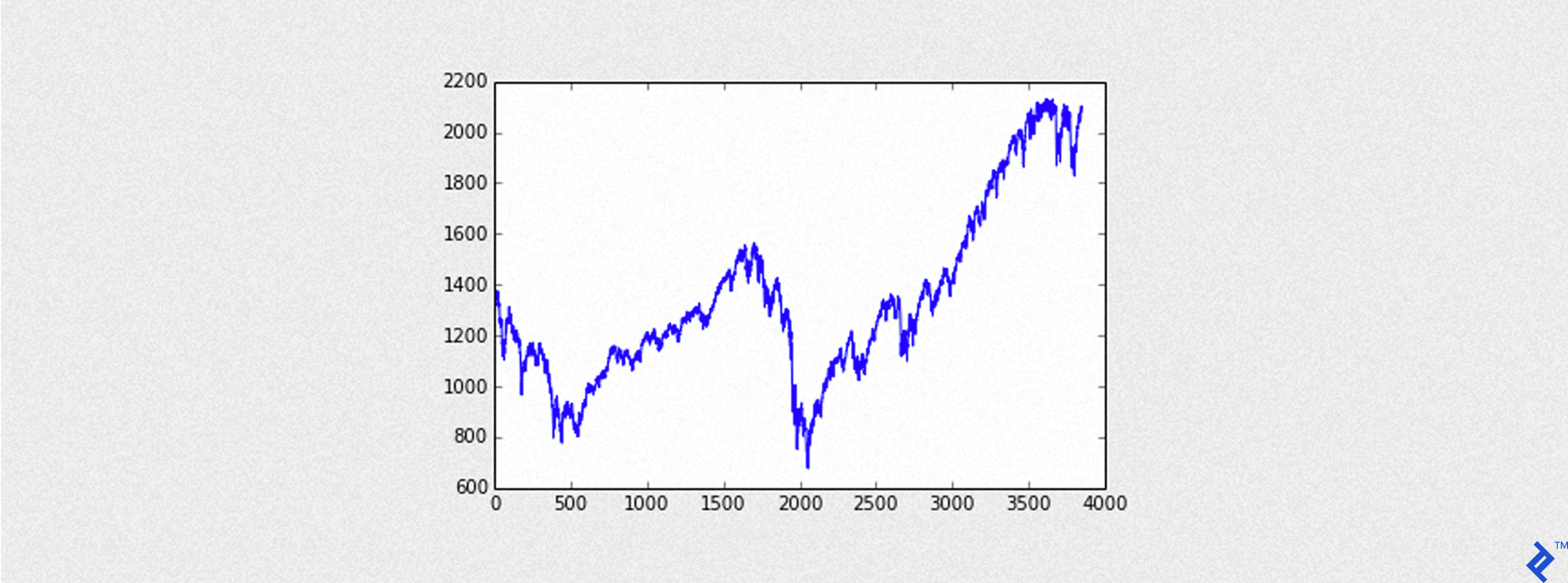
Visualizing the S&P 500
The following code visualizes the loaded S&P 500 data:
| |
The output is a graph that looks like this:
Training Machine Learning Models
Adding the Outcome Variable
Our models aim to predict whether the closing price will exceed the opening price, indicating a potential profit opportunity. Therefore, we need to add an outcome column – our target variable – to the data. Each row in this column will have:
+1for an Up day (closing price higher than opening price)-1for a Down day (closing price lower than opening price)
| |
To make predictions based on past data, we’ll lag the data by one or more days using GraphLab’s TimeSeries object and its shift method:
| |
Adding Predictors
Predictors are the features used to train our model and predict the outcome. Selecting relevant predictors is crucial for forecasting accuracy.
For example, we might consider if today’s closing price is higher than yesterday’s, and extend this to the past two days, etc. The code below illustrates this:
| |
Here, we’ve introduced two new feature columns, feat1 and feat2, to our dataset (ts), where 1 indicates a true comparison and 0 otherwise.
This article aims to provide a practical demonstration of Machine Learning in finance. In-depth predictor selection is a complex topic and beyond our current scope. Experimenting with different factor combinations is encouraged to understand their impact on model accuracy.
| |
Training a Decision Tree Model
GraphLab Create simplifies Machine Learning model implementation. Models are trained using the create method, which takes parameters such as:
training: The training dataset with features and the target column.target: Name of the target variable column.validation_set: Optional dataset for evaluating model generalization (not used in our case).features: List of feature column names for training.verbose: Prints training progress information if set totrue.
Additional model-specific parameters can be included, such as:
max_depth: Maximum depth of the decision tree.
Let’s build our decision tree:
| |
Evaluating Model Performance
Accuracy, the ratio of correct predictions to the total data points, is a key performance metric. Accuracy on the training set is typically higher than on a separate test set due to model fitting.
Precision measures the accuracy of positive predictions, and we aim for a precision closer to 1 for a high win-rate.
Recall assesses the classifier’s ability to identify positive examples, essentially the probability of correctly identifying a randomly chosen positive example. A recall closer to 1 is desirable.
GraphLab Create’s evaluate method provides these and other important model metrics.
Let’s check the model’s accuracy on both training and testing datasets:
| |
The test set accuracy is around 57%, slightly better than a random guess (50%).
Making Predictions
GraphLab Create uses the predict method for generating predictions from trained models. We’ll pass our testing set to predict the outcome variable.
| |
| datetime | outcome | predictions |
| 2013-04-05 00:00:00 | -1 | -1 |
| 2013-04-08 00:00:00 | 1 | 1 |
| 2013-04-09 00:00:00 | 1 | 1 |
| 2013-04-10 00:00:00 | 1 | -1 |
| 2013-04-11 00:00:00 | 1 | -1 |
| 2013-04-12 00:00:00 | -1 | -1 |
| 2013-04-15 00:00:00 | -1 | 1 |
| 2013-04-16 00:00:00 | 1 | 1 |
| 2013-04-17 00:00:00 | -1 | -1 |
| 2013-04-18 00:00:00 | -1 | 1 |
False positives occur when the model predicts an Up Day (+1) while the actual outcome is a Down Day. Conversely, false negatives happen when the model predicts a Down Day (-1) while the actual outcome is an Up Day.
Our strategy buys the S&P 500 at the opening price when an Up Day is predicted and sells at the closing price. Minimizing false positives is crucial to avoid losses, meaning we strive for the highest possible precision.
In the first ten predictions of our test set, we observe two false negatives and two false positives.
Calculating the metrics for this small sample:
- accuracy = 6/10 = 0.6 or 60%
- precision = 3/5 = 0.6 or 60%
- recall = 3/5 = 0.6 or 60%
Note that these metrics typically differ, but they happen to be the same in this particular example.
Backtesting the Model
Let’s simulate how the model would perform in a trading scenario. A predicted outcome of +1 (Up Day) triggers a buy at the opening price and a sell at the closing price. Conversely, a predicted outcome of -1 (Down Day) results in no trade.
Profit and Loss (pnl) for each daily trade (round turn) is calculated as:
pnl = Close - Open
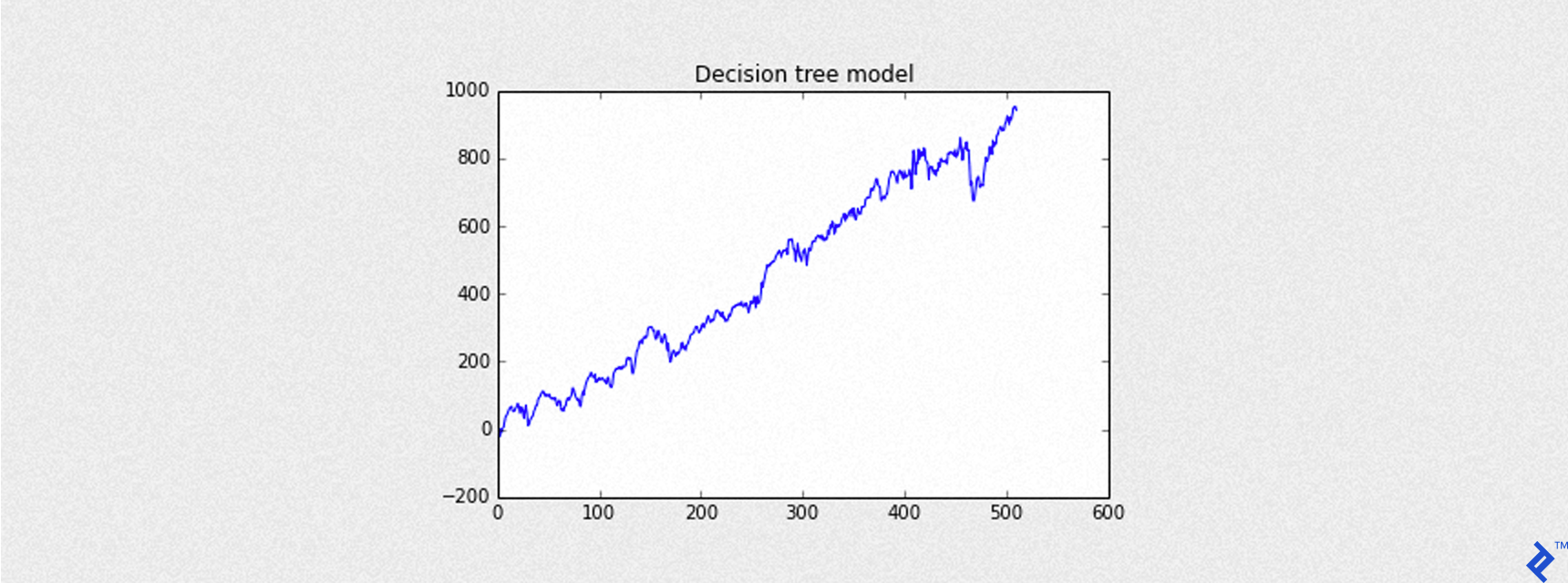
The plot_equity_chart helper function (code not shown for brevity) will be used to visualize the cumulative gains (equity curve) from a series of profit and loss values.
| |
| |
Here, Sharpe refers to the annualized Sharpe ratio – a crucial measure of trading strategy performance.
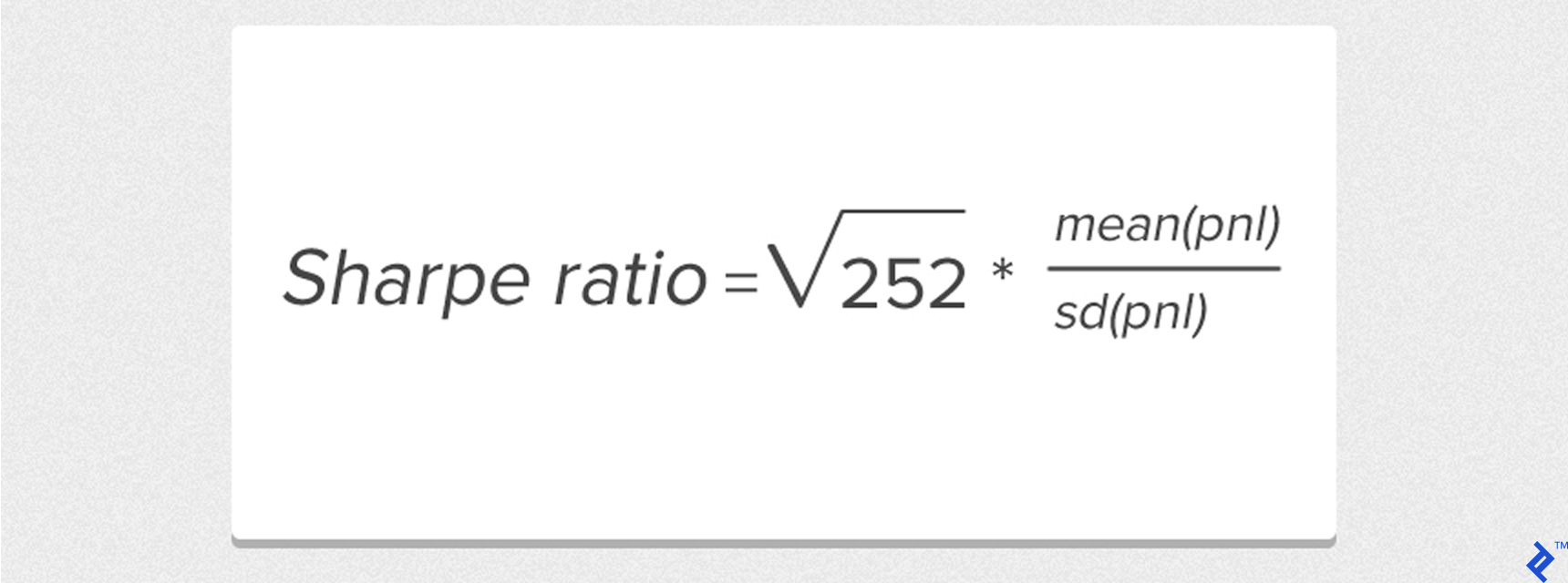
This simplified formula assumes a risk-free return of 0, with mean and sd representing the mean and standard deviation of daily profit and loss values, respectively.
Trading Fundamentals
Trading the S&P 500 requires an appropriate instrument. Many brokers offer CFDs (Contracts for Difference) – agreements to exchange the price difference between opening and closing – that track the index.
Example: Buy 1 S&P 500 CFD at the opening price of 2000 and sell at the closing price of 2020. The gain is 20 points. Assuming each point is worth $25:
- Gross Gain:
20 points x $25 = $500for 1 CFD contract.
Factoring in a hypothetical broker slippage of 0.6 points:
- Net Gain:
(20 - 0.6) points x $25 = $485.
Managing potential losses is crucial, especially with false positives where the actual closing price is lower than the opening price.
A stop-loss order limits potential losses by automatically closing the position if the asset price falls below a predetermined level.
Referring back to the Yahoo Finance data, each day has a Low price. Setting a stop-loss at -3 points from the opening price would trigger if the Low price is 5 points below the opening price (Low - Open = -5), limiting the loss to -3 points instead of -5.
Here’s a helper function to simulate trades with a stop-loss:
| |
Incorporating Trading Costs
Realistic backtesting requires accounting for transaction costs like broker commissions and spreads. For our simulations, we’ll use fixed costs:
- Slippage: 0.6 points
- Commission: $1 per trade ($2 per round turn)
For instance, a gross gain of 10 points (1 point = $25) would result in a net gain of (10 - 0.6) * $25 - $2 = $233 after costs.
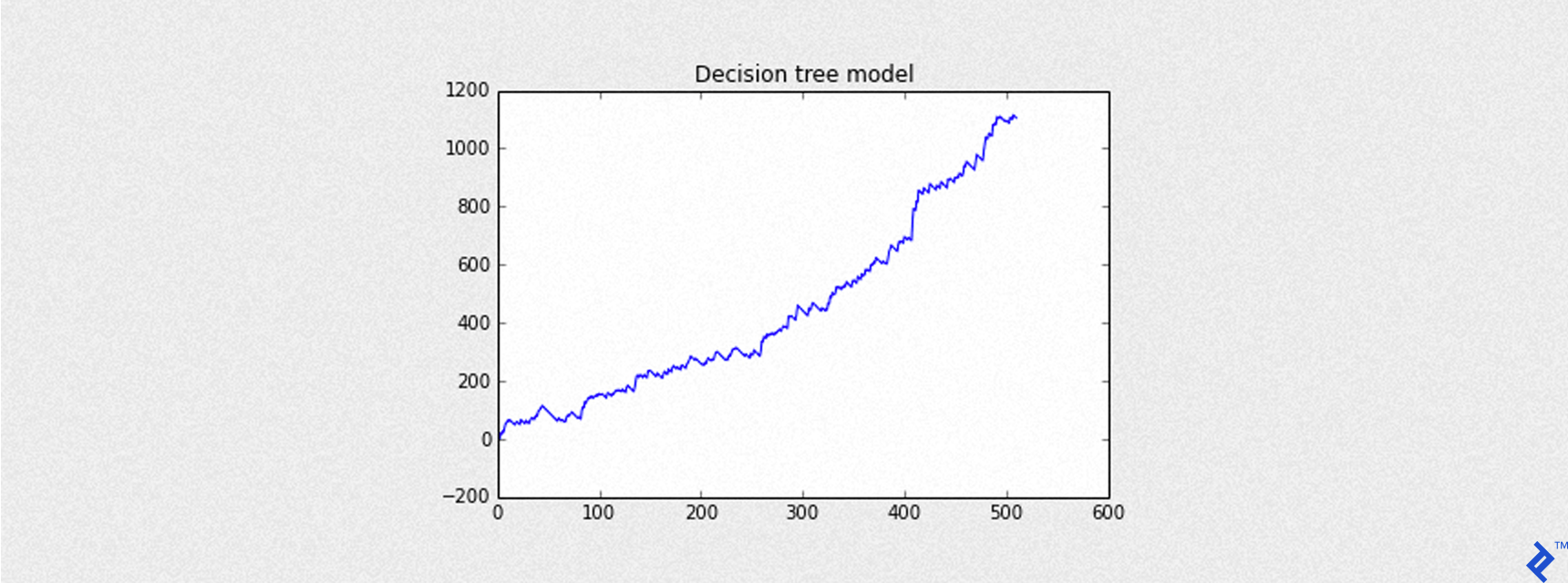
The code below simulates the trading strategy with a -3 point stop-loss. The blue line represents the equity curve (cumulative returns) considering slippage (0.6 points). Results are in basis points, consistent with the S&P 500 data.
| |
| |
Let’s modify our prediction approach slightly. Instead of directly predicting the outcome class (+1 or -1), we’ll use predict(output_type="probability") to get the probability of each outcome. A probability greater than or equal to 0.5 still suggests an Up Day. Higher probabilities indicate greater confidence in the prediction.
| |
Our updated backtesting function backtest_ml_model now considers a threshold for the predicted probability (defaulting to 0.5) to decide whether to open a trade. Trades are only opened if the predicted probability exceeds the threshold.
| |
As a reminder, Net Gain for each trading day is calculated as: Net gain = (Gross gain - SLIPPAGE) * MULT - 2 * COMMISSION.
Maximum Drawdown, another vital trading strategy metric, measures the largest peak-to-trough decline in portfolio value. In our single-asset scenario, it represents the most significant drop in the equity curve.
Given an SArray of profit and loss (pnl), drawdown is calculated as:
| |
Our backtest_summary helper function will calculate the following:
- Maximum drawdown (in dollars)
- Accuracy (using
Graphlab.evaluation) - Precision (using
Graphlab.evaluation) - Recall (using
Graphlab.evaluation)
The following code demonstrates the equity curve of cumulative returns for the model, expressed in dollars.
| |
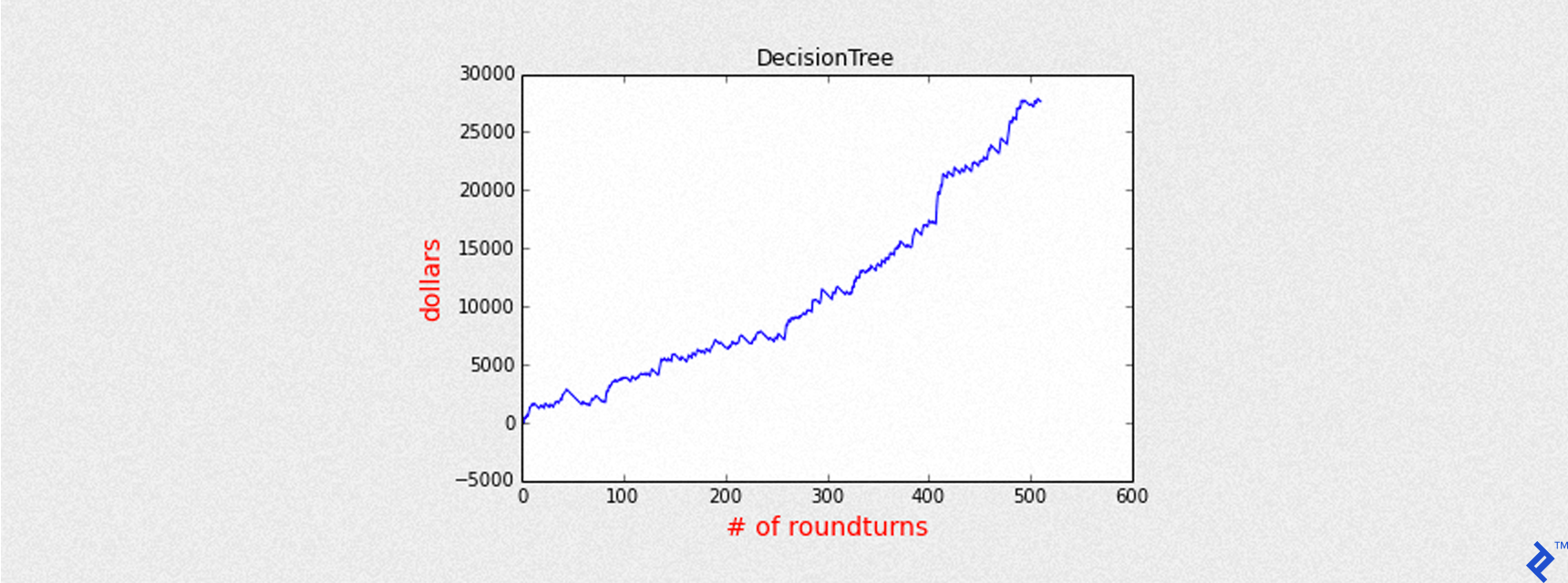
| |
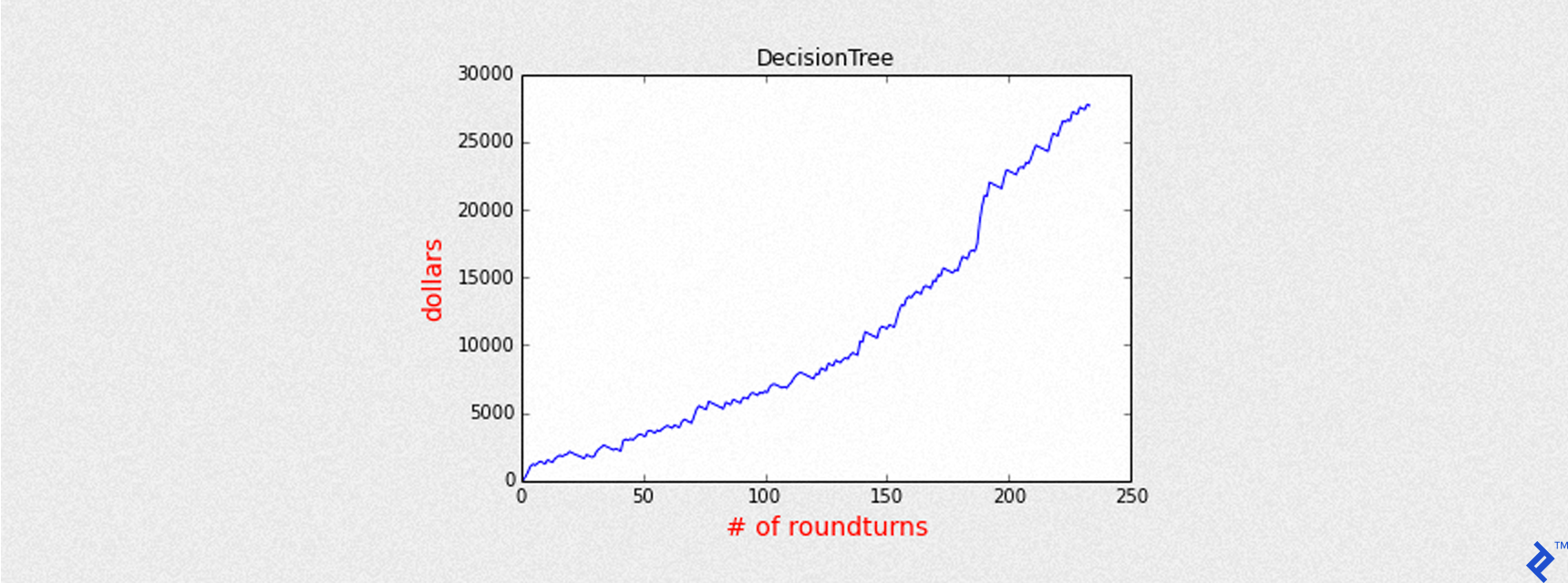
To enhance prediction precision, we can raise the threshold above 0.5, increasing our confidence in predicted Up Days.
| |
| |
With a higher threshold, the equity curve shows considerable improvement (Sharpe ratio of 6.5 compared to 3.5 previously) despite fewer trades.
From this point onward, we’ll employ thresholds higher than 0.5 for subsequent models.
Training a Logistic Regression Model
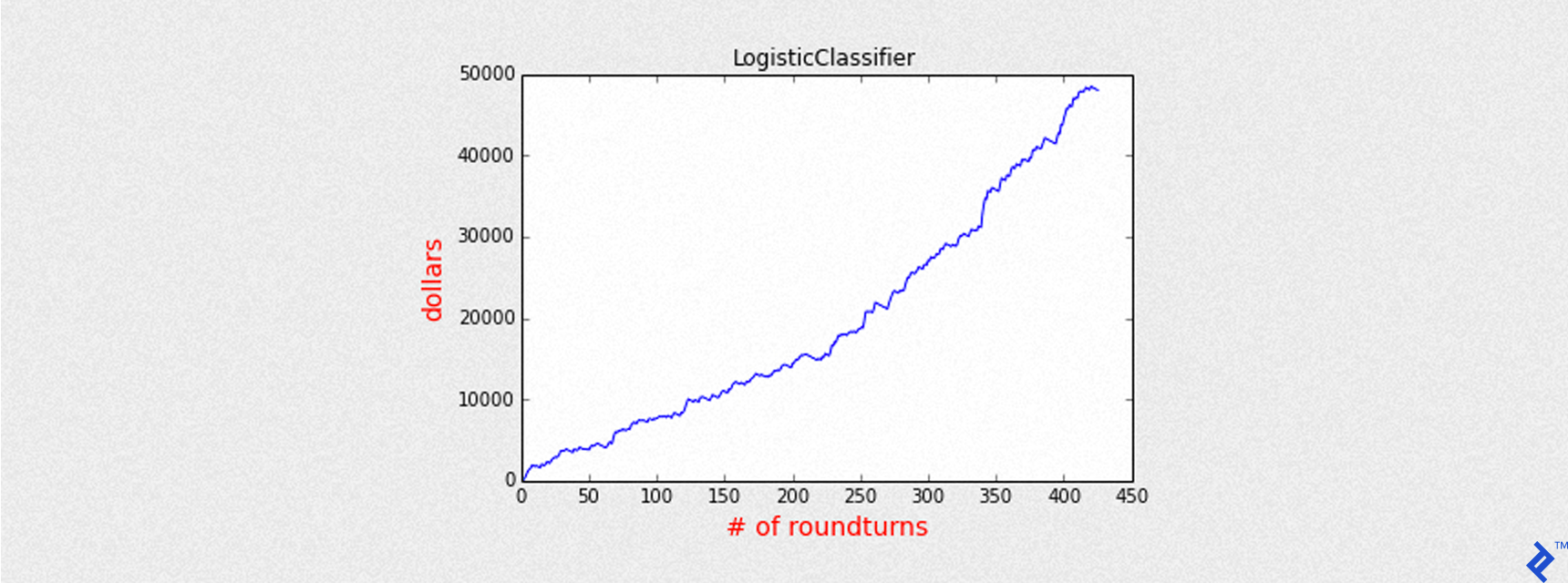
Let’s apply our approach to a Logistic Regression model using GraphLab Create. We’ll predict probabilities instead of class labels and use a threshold above 0.5 for improved precision.
| |
| |
The summary output is similar to the Decision Tree model, as both are classifiers predicting binary outcomes (+1 or -1).
Training a Linear Regression Model
Unlike our previous classifiers, Linear Regression deals with continuous values. Instead of using +1 and -1 as target variables, we’ll use the actual gain (closing price minus opening price). Our features will also be continuous variables like previous opening and closing prices.
We won’t delve into feature selection here, focusing on applying different Machine Learning models.
Key parameters for the create method are:
training: Training dataset with features and target variable.target: Name of the target variable column.validation_set: Optional validation dataset (not used here).features: List of feature columns.verbose: Prints training progress iftrue.max_iterations: Maximum number of passes through the data for training.
| |
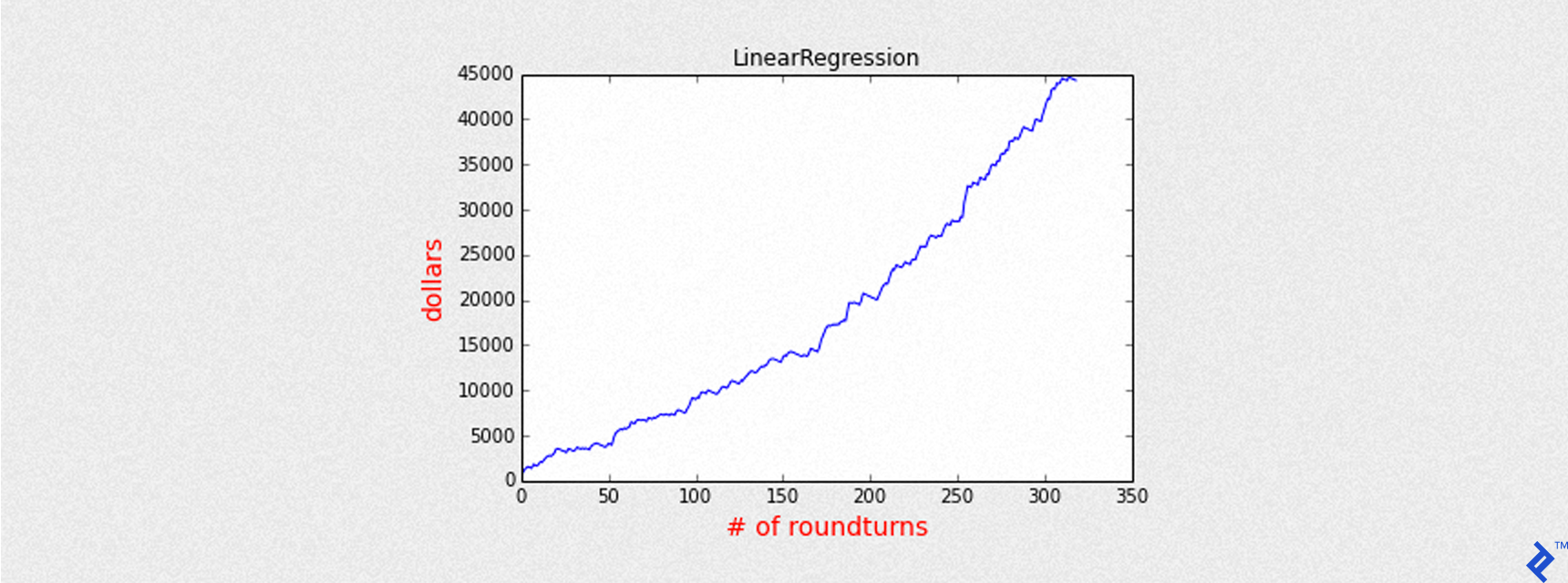
We now have predictions (predicted gains) and predictions_prob (normalized predicted gains). A threshold of 0.4 is chosen to balance accuracy and trade frequency. The backtest_linear_model helper function only opens trades when predictions_prob exceeds this threshold.
| |
| |
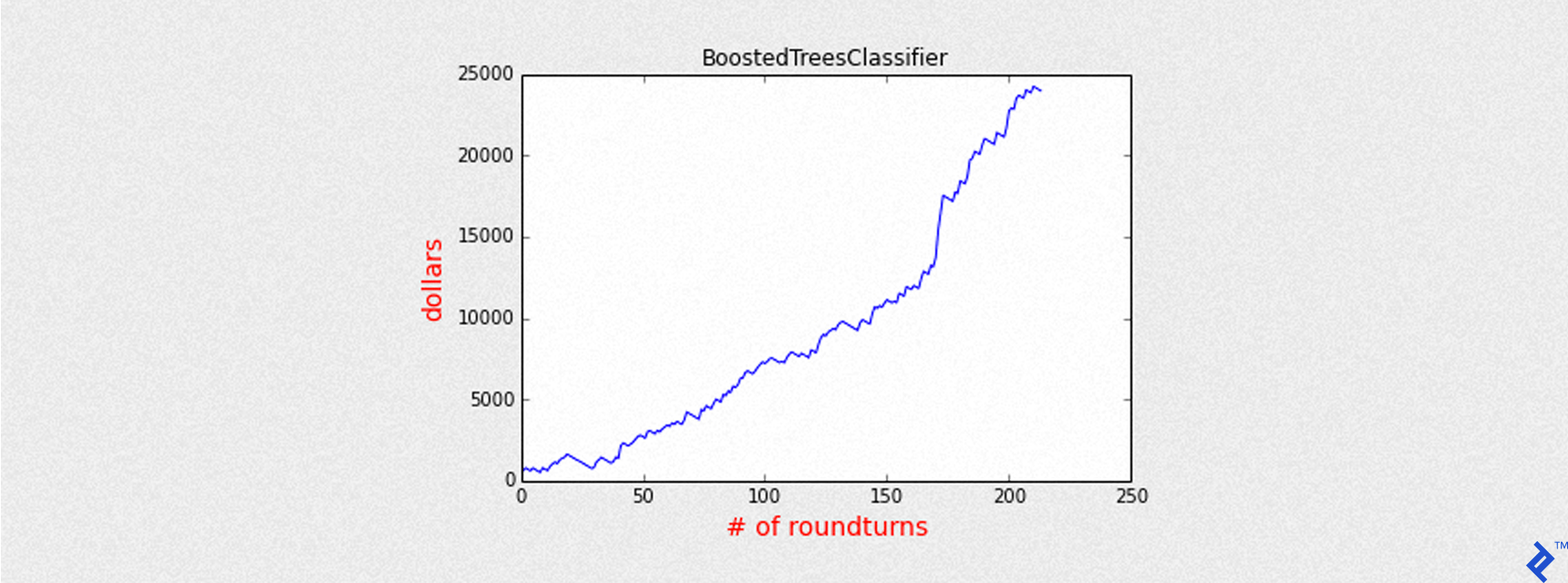
Training a Boosted Tree Model
Similar to the Decision Tree, we’ll now train a Boosted Tree Classifier. We’ll increase the max_iterations to 12 for more boosting iterations (each creating an additional tree) and use a threshold higher than 0.5 for better precision.
| |
| |
Training a Random Forest Model
Finally, let’s train a Random Forest Classifier – an ensemble of decision trees. We’ll limit the number of trees to num_trees = 10 to manage complexity and prevent overfitting.
| |

| |
Combining All Models
Now, let’s analyze the collective performance of all our models, sorted by precision.
| name | accuracy | precision | round turns | sharpe |
| LinearRegression | 0.63 | 0.71 | 319 | 7.65 |
| BoostedTreesClassifier | 0.56 | 0.68 | 214 | 6.34 |
| RandomForestClassifier | 0.60 | 0.67 | 311 | 6.38 |
| DecisionTree | 0.56 | 0.66 | 234 | 6.52 |
| LogisticClassifier | 0.64 | 0.66 | 426 | 6.45 |
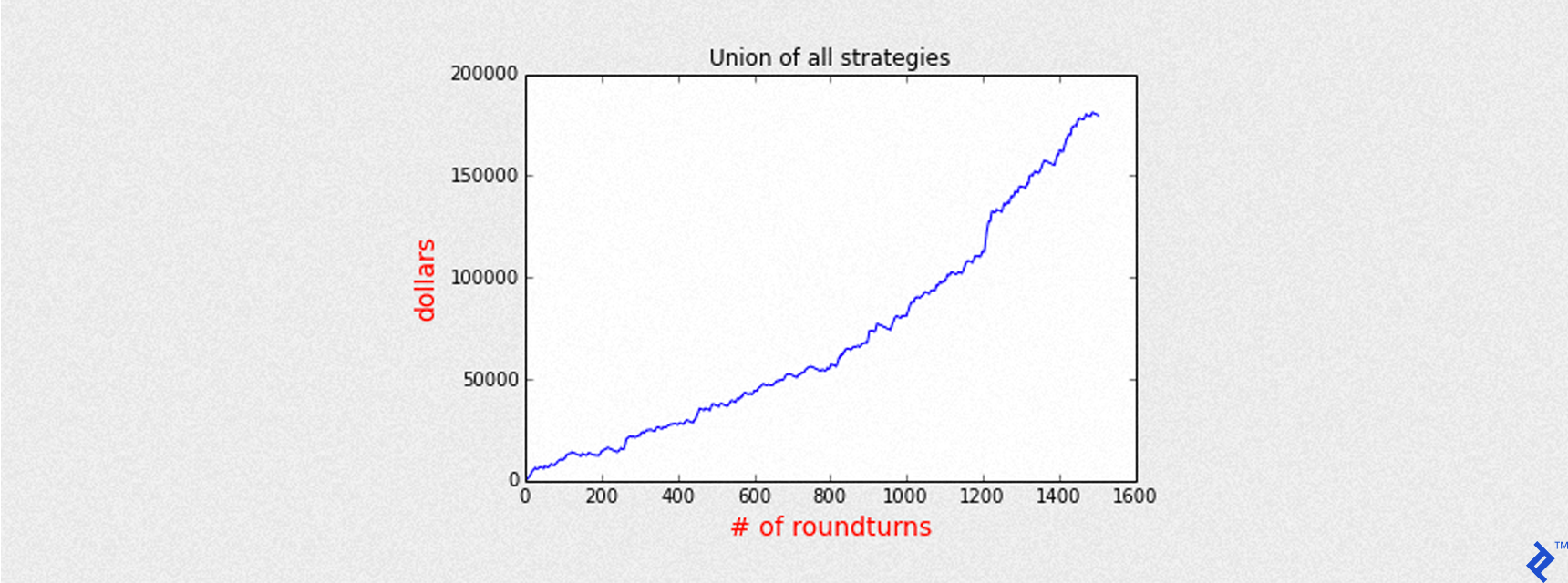
By aggregating the daily profit and loss from each model (pnl), we can visualize the combined equity curve.
| |
Over approximately 3 years of simulated trading, the combined models generate a total gain of roughly $180,000. The maximum exposure is 5 CFD contracts, closed at the end of each day to avoid overnight positions.
Analyzing the Aggregated Model Performance
Since we have 5 models running concurrently, the number of open trades on a given day can range from 1 to 5. We can group trades by the number of models agreeing on an Up Day and analyze precision accordingly.
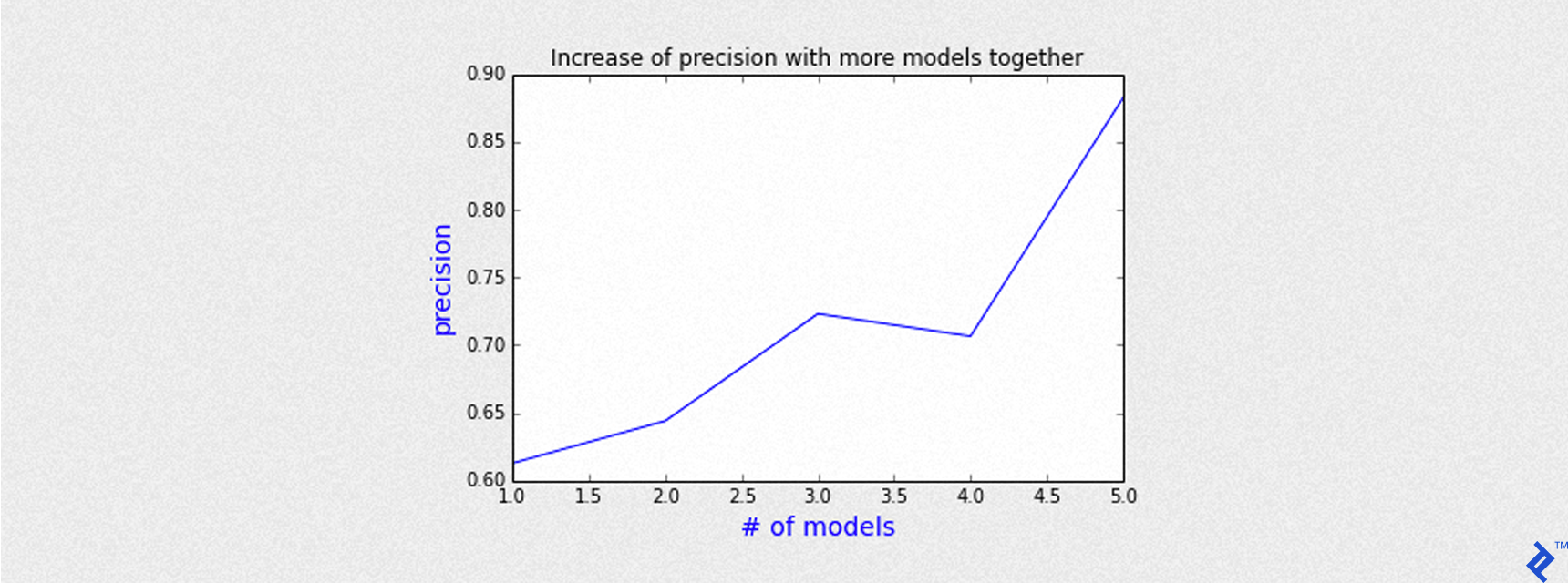
The chart above demonstrates that precision increases with the number of agreeing models. For example, when all 5 models predict an Up Day, the precision surpasses 85%.
Conclusion
Machine Learning offers powerful tools for learning from data and generating valuable predictions, even in the complex world of finance. While individual model performance varies, combining multiple models can lead to superior results. GraphLab Create provides an efficient and scalable platform for handling Big Data and implementing various scientific and forecasting models. Its free licensing options for students and Kaggle participants make it an accessible choice for exploration and learning.
Important Note: This article is intended for informational purposes only and should not be considered financial advice. Examples provided are for educational purposes only. Past performance is not indicative of future results. Always consult with a qualified financial advisor before making any investment decisions.