Streaming video is a core element of the modern internet. It’s prevalent on various devices, from smartphones and computers to TVs and even wearables. Seamless functionality across all devices and network types is essential, including slow mobile connections, WiFi, and firewalls. Apple’s HTTP Live Streaming (HLS) addresses these challenges.
Modern devices possess sufficient hardware for video playback, making network speed and reliability paramount. Traditionally, UDP-based protocols like RTP were used for video storage and delivery, but they posed several issues:
- Content streaming required a server (daemon) service.
- Firewalls often block non-standard ports and traffic, like those used by RTP.
- Global audiences necessitated streaming daemon services in multiple regions.
While storing video files (e.g., MP4s) on an HTTP server with a CDN seems like a solution, it has limitations.
Shortcomings of Legacy Video Streaming
Efficiency is a major concern. Hosting full-resolution videos burdens users with slow connections, leading to playback issues.
Ideally, the download rate should match the playback rate. For instance, downloading five seconds of video in five seconds is optimal. However, if it takes five seconds to download only three seconds, buffering occurs.
Reducing quality for all users compromises the experience for those with fast connections. A more sophisticated approach is needed.
Adaptive Bitrate Streaming
Instead of multiple video versions, what if players could dynamically adjust to network conditions? Imagine a seamless switch between streams of varying quality, ensuring smooth playback regardless of network changes.
This is precisely what Adaptive bitrate streaming achieves.
Note: This HLS tutorial will not discuss encryption, synchronized playbacks, or IMSC1.
Understanding HLS
Introduced by Apple in 2009, HTTP Live Streaming (HLS) is an adaptive bitrate streaming protocol. It utilizes m3u8 files to define media streams and employs HTTP for server-client communication. While the default protocol for iOS devices, HLS is compatible with Android and web browsers.
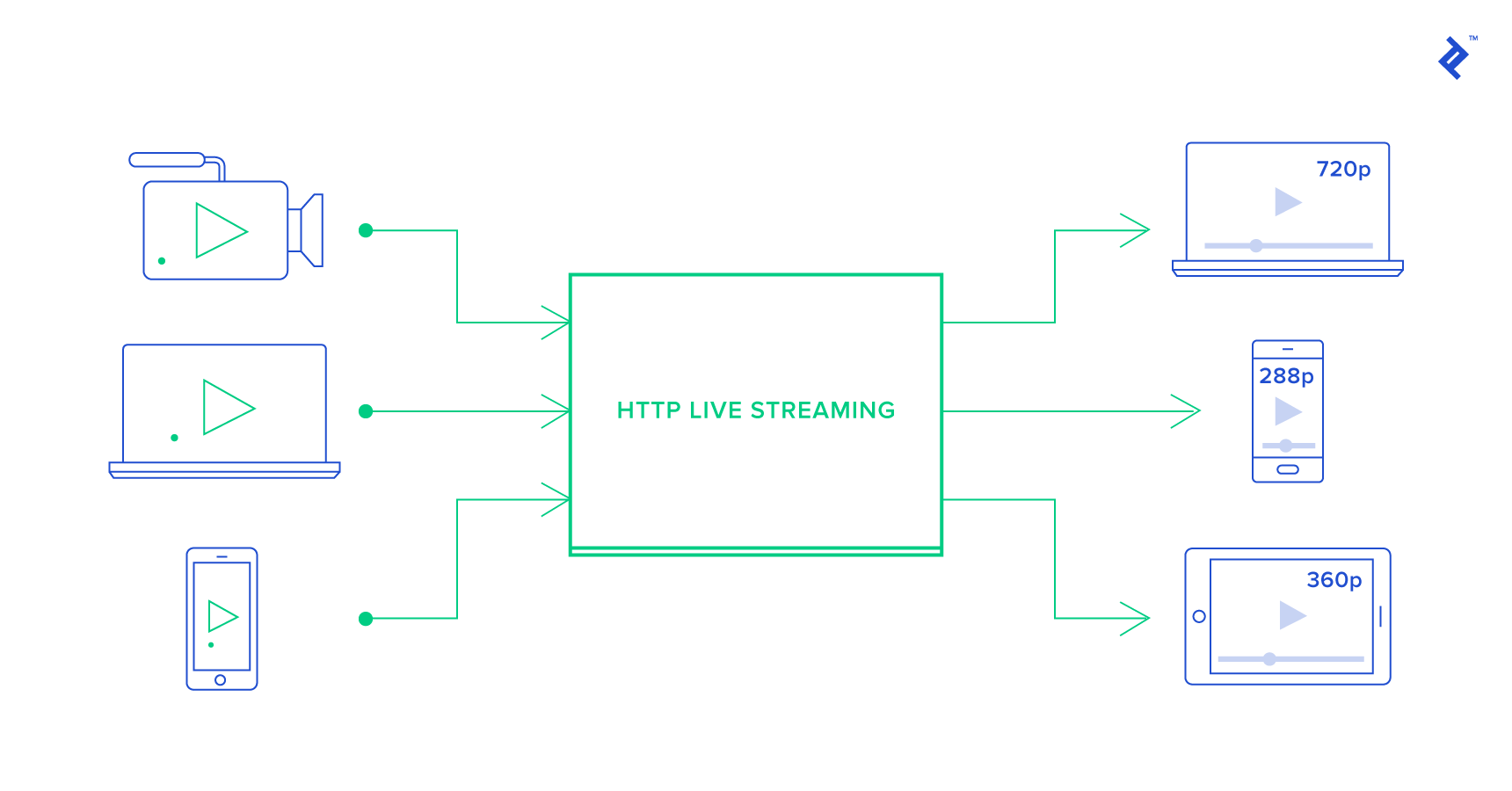
HLS streams consist of:
- M3U8 playlists
- Media files for different streams
M3U8 Playlists
Let’s address a fundamental question: What are M3U8 files?
M3U (or M3U8) is a text-based file format initially designed for MP3 file organization. HLS extends this format to define media streams using two types of m3u8 files:
- Media playlist: Contains URLs of the video segments (chunks).
- Master playlist: Contains URLs to media playlists, each representing a variant of the video at different bandwidths.
An M3U8 live stream URL simply points to an M3U8 file.
Sample M3U8 File for HLS Stream
An M3U8 file lists URLs or local file paths alongside metadata, which is denoted by lines starting with #.
Here’s an example of a simple HLS stream’s M3U8 file:
| |
- The first four lines contain global metadata for the playlist.
EXT-X-VERSIONspecifies the M3U8 format version (at least 3 forEXTINFentries).EXT-X-TARGETDURATIONdefines the maximum duration of each video segment, usually around 10 seconds.- The remaining lines represent video segments:
| |
This indicates the 00001.ts segment, with a duration of 10.344822 seconds. To start playback from a specific point, players calculate the required .ts file based on segment durations. The second line can be a filename or a URL.
This M3U8 file, along with its .ts files, constitutes a simple media playlist.
Note that native HLS playback support varies among browsers.
Master Playlist or Index M3U8 File
The previous example points to .ts segments derived from a resized and chunked video file.
The challenge of catering to varying network speeds and screen sizes remains. Streaming full resolution to a small screen on a slow connection is inefficient.
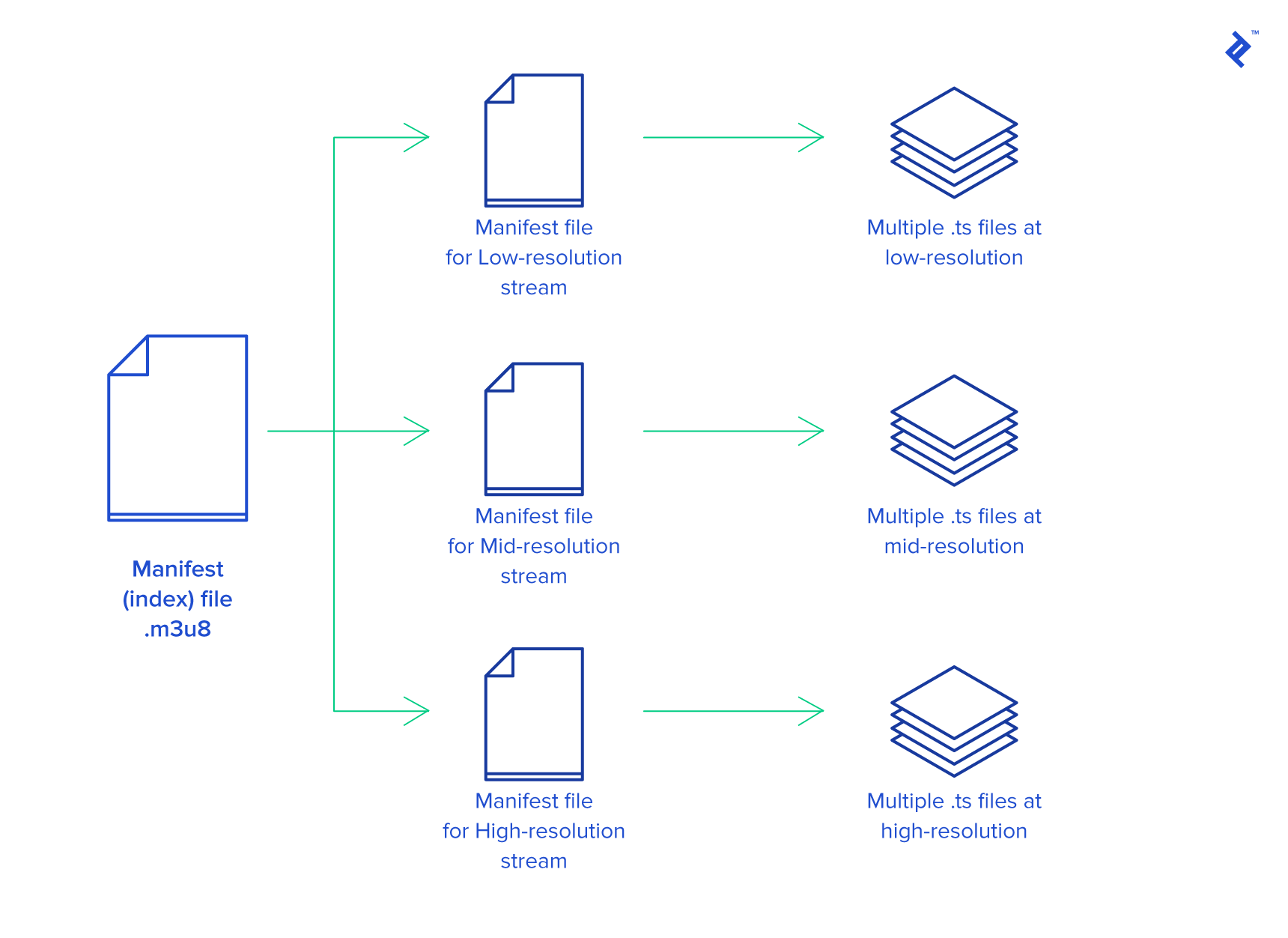
HLS addresses this with an additional M3U8 layer—the master playlist. This file points to other M3U8 files (media playlists), each containing segments tailored for specific bitrates and resolutions.
Here’s an example:
| |
Players select stream variants based on lines like:
| |
This variant (640x360_1200.m3u8) contains segments resized to 640x360 pixels and a bitrate of 1296 kbps, including both audio and video.
Playback typically starts with the first variant. If buffering occurs, the player switches to a lower bitrate variant. Conversely, it can switch to a higher quality variant if the connection and display allow.
The order of variants matters, as the player might require a few cycles to determine the optimal one if the first isn’t ideal.
This creates three HLS layers:
- Index M3U8 file (master playlist) with variant URLs.
- Variant M3U8 files (media playlists) containing segment URLs for various resolutions and bitrates.
.tsfiles (segments) containing portions of the video.
You can find an example index M3U8 file here (browser/OS compatibility applies).
For known network conditions, tailoring the initial variant selection can enhance the user experience. This can be achieved by:
- Preparing multiple index files for different network types (e.g.,
http://.../index_wifi.m3u8orhttp://.../index_mobile.m3u8). - Dynamically generating the index M3U8 file based on the client’s network type sent in the HTTP request.
Preparing Video Files for HLS
HLS relies on two key components: the storage of video files in a specific format for HTTP delivery and the M3U8 index file(s) guiding the player to the appropriate segments.
Let’s start with video files. HLS typically divides videos into equal-length chunks, usually 10 seconds each, stored as MPEG-2 TS files (.ts) encoded with H.264 video and MP3, HE-AAC, or AC-3 audio.
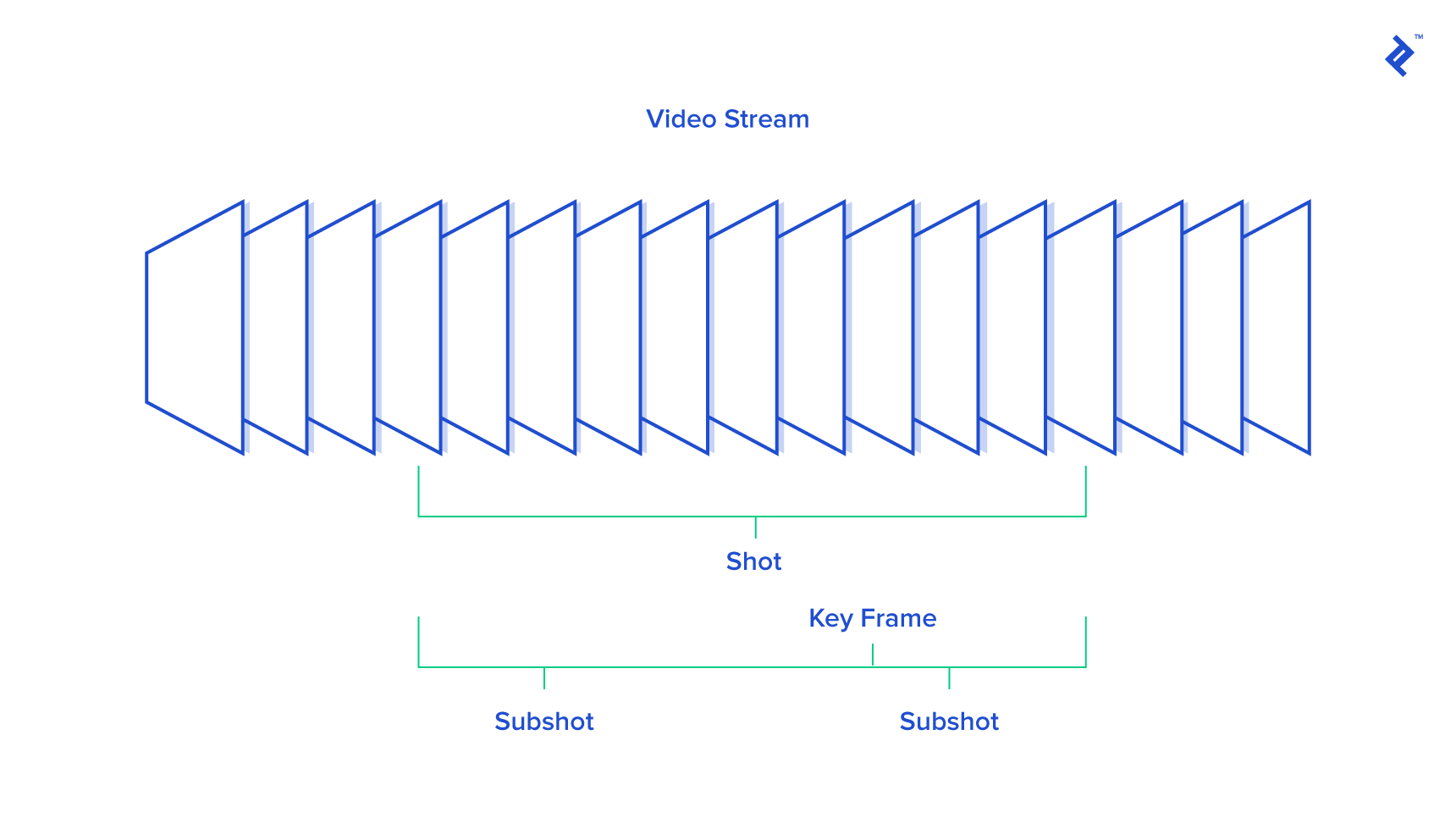
A 30-second video would be split into three 10-second .ts files.
While the latest HLS version supports fragmented .mp4 files, this article will focus on .ts files for broader compatibility.
Keyframes
Each segment must begin with a keyframe—a complete frame allowing for independent decoding. When seeking within a video, keyframes serve as reference points for efficient rendering.
Since players might need to start playback from the middle of a segment, placing keyframes every few seconds (around 3 seconds is ideal) further improves seeking performance.
HLS Break Points
Seamlessly playing consecutive video clips, potentially with interspersed ads, requires a mechanism for signaling transitions between different video configurations.
The #EXT-X-DISCONTINUITY tag in the m3u8 playlist serves this purpose. It alerts the player to potential changes in resolution or other parameters, prompting it to adjust accordingly.
Live Streaming With HLS
While often associated with Video On Demand (VOD), HLS supports live streaming as well.
Live HLS streams have specific characteristics:
- The variant M3U8 file includes the
#EXT-X-MEDIA-SEQUENCE:1tag. - The
#EXT-X-ENDLISTtag is omitted.
As new .ts segments become available, they are appended to the M3U8 playlist, incrementing the #EXT-X-MEDIA-SEQUENCE counter. Players use this counter to detect new content.
Serving the M3U8 file with no-cache headers ensures players fetch the latest version, reflecting the live stream’s progress.
VTT
HLS allows embedding Web Video Text Track (VTT) (VTT) files for functionalities like subtitles and image snapshots.
For example:
| |
The theprog_index.m3u8 file would look like this:
| |
An example VTT file (0000.webvtt):
| |
Besides VTT, HLS recently introduced support for IMSC1, a subtitle format optimized for streaming and styleable with CSS.
HTTP Live Streaming Tools and Potential Issues
Apple provides several HLS tools, detailed in the official HLS guide.
mediastreamsegmenterfacilitates on-the-fly segment creation for live streams.mediastreamvalidatoranalyzes M3U8 playlists and downloaded segments, identifying issues like bitrate discrepancies.- For video manipulation tasks (encoding, decoding, muxing, etc.), ffmpeg is a versatile tool. Custom compilations for specific use cases might be necessary.
Audio synchronization problems, often caused by variable framerates in the source video, are a common issue. Converting to a constant framerate or, ideally, recording at a constant framerate from the outset is recommended.
HTTP Live Streaming Example
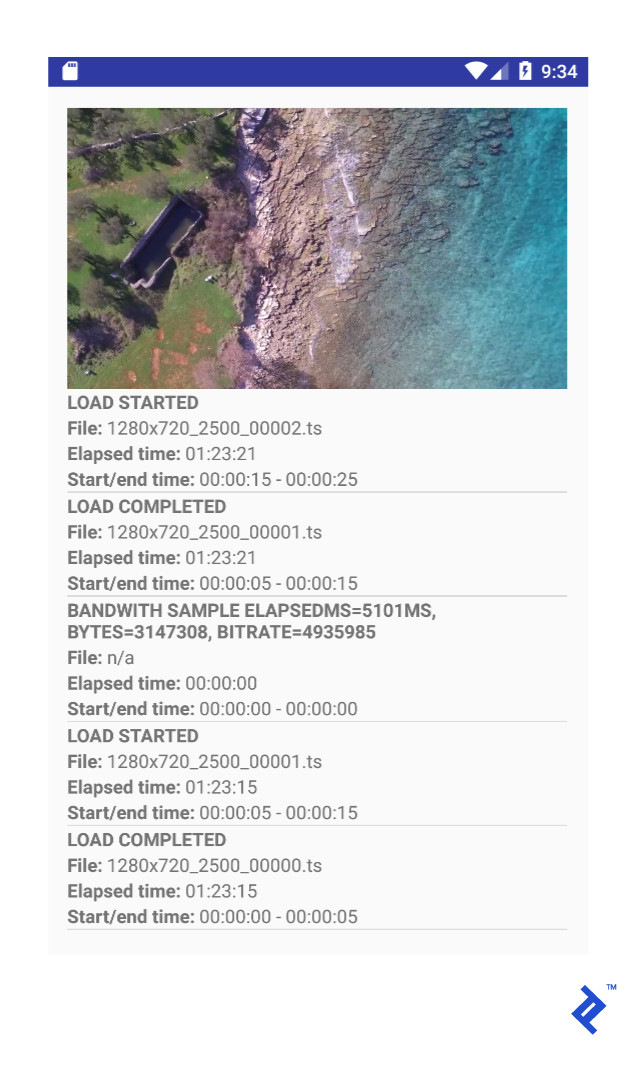
An HLS Android application demonstrating HLS streaming with Google’s ExoPlayer player is available. It displays a video alongside a log of HLS events, such as downloaded segments and bitrate switches.
Let’s examine the viewer initialization. The code determines the device’s connection type to request the appropriate m3u8 file:
| |
While the HLS player dynamically adjusts to the optimal variant, preselecting based on connection type can improve the initial viewing experience.
Next, the HLS player is initialized:
| |
The player is then configured with the appropriate m3u8 URL:
| |
The result:
HLS Browser Compatibility, Future Developments
Apple mandates HLS for iOS video streaming apps if videos exceed 10 minutes or 5 MB. This ensures HLS’s continued relevance.
While HLS initially faced competition from MPEG-DASH, the landscape is evolving. HLS’s lack of universal browser support (as seen in the previous m3u8 examples) and partial Android compatibility posed challenges.
However, Apple’s recent announced regarding fragmented MP4 (fMP4) support in HLS simplifies cross-platform delivery. This eliminates the need for separate encodes for HLS and MPEG-DASH, as the same video files can be used.
Furthermore, HLS now supports High Efficiency Video Codec (HEVC) when packaged in fMP4 containers. This suggests fMP4 will play a significant role in HLS’s future.
While native HLS playback in browsers is limited, open-source and commercial solutions bridge the gap. Many rely on Flash fallbacks, but JavaScript-based implementations are emerging.
Wrapping Up
This article delves into HTTP Live Streaming, offering insights into Adaptive Bitrate Streaming (ABS) principles. HLS effectively addresses crucial video streaming challenges:
- Streamlined video file storage
- Efficient content delivery via CDNs
- Dynamic adaptation to client bandwidth and seamless stream switching
- Support for subtitles, encryption, synchronized playbacks, and more
Whether you opt for HLS or MPEG-DASH, both protocols offer similar functionalities. With HLS embracing fragmented MP4, mastering these converging technologies becomes increasingly valuable for seamless video delivery.