One of the most compelling features of paid search is the immediate feedback provided by PPC campaigns. This makes A/B testing incredibly effective. You can channel the massive amount of data generated by pay-per-click campaigns into two variations and quickly see what works.
That’s why AdWords Campaign Experiments (ACE) is such a game-changer. This feature lets you isolate specific aspects of your Google AdWords campaigns and test them by splitting traffic as you see fit. In this guide, we’ll cover:
- What you can test with AdWords Campaign Experiments
- What you can’t test
- How to set up an experiment
- How to analyze your results
What Can I Test? What Can’t I Test?
Google states that you can test “keywords, bids, and placements.” But what does that mean in practice? Joe Kershbaum from Clix Marketing wrote a comprehensive five ideas you can try out piece with detailed information on testable elements, their potential uses, and limitations. Check out Joe’s post for a deep dive, but here’s a summary:
- Ad Group Structure – Joe emphasizes testing various keyword and ad text combinations and different segmentations to understand their impact on click-through rates and conversions.
- Keyword Match Types – This guide will explore how to test different match types within an ad group for performance insights.
- Keyword Expansion and Reduction – The tool enables adding or removing single or multiple keywords to gauge the effects of keyword expansion or elimination on your campaigns.
- Google Instant Experiments – Joe highlights a great article by Brad Geddes on leveraging ACE to test new keyword ideas from Google Instant results.
- Keyword Bids – Split-testing bid changes is another powerful function of AdWords Campaign Experiments.
- ACE Limitations – Joe also points out current limitations:
- Experiment Limit – Only one concurrent experiment is allowed.
- Campaign Settings – Testing elements like CPC vs. CPA, enhanced CPC, geo-targeting, etc., is not possible.
- No AdWords Editor or API Support – Experiments are limited to the AdWords Web interface.
Now that you understand what can be tested, let’s set up an experiment.
Setting Up a Google AdWords Campaign Experiment & Deciding What to Test
A common question about testing is “What should I test?” The true skill lies in identifying areas for improvement. With ACE, your testing approach can be data-driven:
- Prioritize High-Impact Areas – Focus on campaigns and ad groups with high spending, particularly those with high volume and CPAs that need improvement.
- Address Low Quality Scores – Experiment with different keyword segmentations and keyword/ad copy combinations for campaigns with low Quality Scores and likely low click-through rates.
- Tackle High Volume but Poor CPAs – This often indicates broad match inefficiency; test different match types to confirm. This guide demonstrates converting a campaign from all broad to all modified broad keywords.
- Improve Great CPAs but Low Volume – Test keyword variations related to what’s working to boost volume.
- Optimize Head Keywords Attracting Specific Queries – If a keyword attracts significant impressions and clicks, but search queries reveal matches for more specific queries, test setting the high-volume keyword to exact match. Observe if impressions shifting to more specific keywords improve CTRs and conversions.
These are just a few examples of insightful split tests.
This example focuses on a common experiment: converting broad match keywords to modified broad match keywords.
Setting Up the AdWords Campaign Experiment
This experiment assesses the impact of converting a broad match campaign to entirely modified broad match. While this example shows a simple transition, you could test other variations like broad vs. phrase or broad vs. all match types.
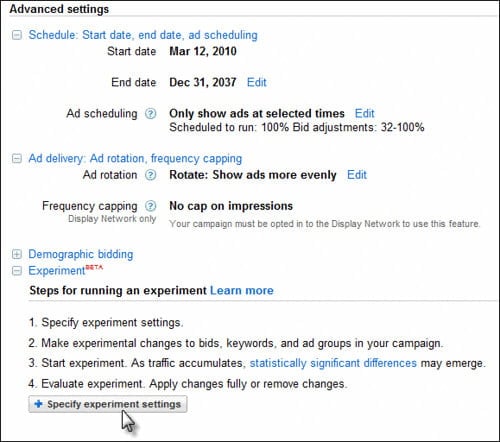
Navigate to the campaign > settings tab and scroll down to the advanced section:
Name your campaign and set the experiment’s impression share. For critical campaigns, limit the experiment to a smaller percentage (e.g., 10%) to minimize risk:
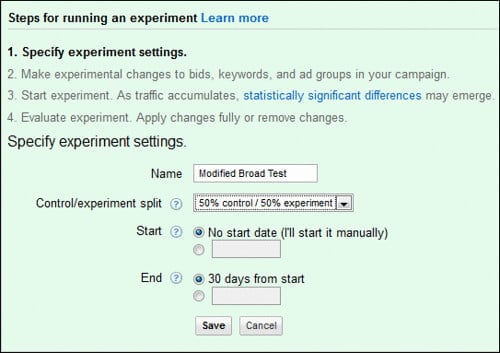
After saving these settings, Google allows you to “start your experiment.” However, this won’t work yet as no changes have been made. This guide will guide you through the next steps.
Go to the Ad Groups tab and select the Ad Group within the campaign where experiments are enabled. In the keywords tab, an experiment icon appears next to each keyword:
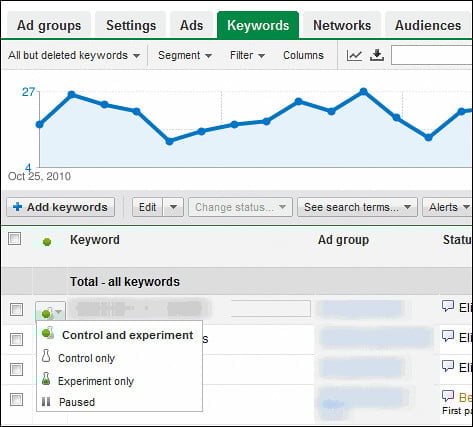
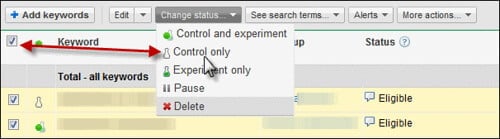
Determine each keyword’s role. In this case, keep existing keywords as the control and create a new list of modified broad match keywords for the experiment. Select all keywords using the checkbox in the keyword header and set their status to “control only”:
Now, generate the modified broad match keyword list. Two free tools can help:
- Export the keyword list from AdWords:
- Click the download report button
- Choose a CSV export of the keyword list
- Copy the keyword row from the Excel sheet (Brad Geddes wrote a useful an awesome video to navigate reporting in the new AdWords interface).
- Use a dedicated tool:
- Acquisio Modified Broad Match Keyword Tool generates modified broad matched keywords with various controls. A future post will delve deeper into using Modified Broad Match, but this tool helps create desired variations. Upload your list to get modifier-attached keywords.
- Chad Summerhill’s Modified Broad Match Keyword Tool, created by Chad, generates every modified broad match variation for a keyword, allowing you to test various combinations.
Input the generated keyword list into the Ad Group as “experiment only keywords”:
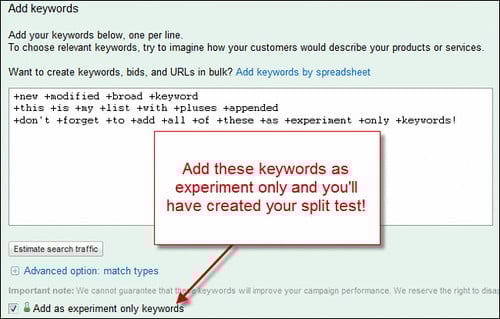
Save your changes; the experiment is now set up! Enable it and proceed to analyze the results.
Go back to campaign > settings and scroll down. Click “apply launch changes” to run the experiment.
Measuring Your Results with AdWords Campaign Experiments
Analyze your results using Excel for comprehensive insights.
In the Ad Group or Campaign view, use the segment tab to create a report segmented by your experiment data:
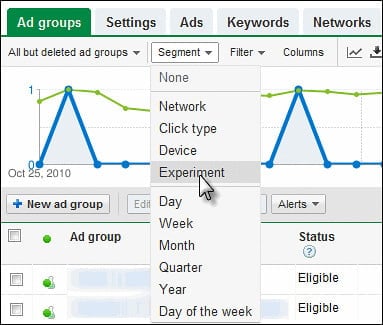
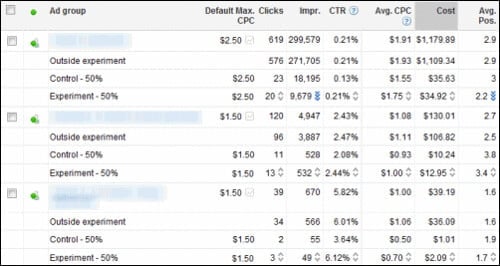
The output will resemble this (hopefully with better results):
[
](http://www.flickr.com/photos/36398274@N08/5199981703/ “reporting-output-campaign-experiments by TomDemers, on Flickr”)
Note: “Outside experiment” data represents clicks and impressions before or after the experiment period.
Download the report into Excel for analysis, focusing on:
- Changes in traffic and impression volume with modified broad.
- Impact on conversions.
- Fluctuations in costs and cost per conversion.
This analysis reveals which areas perform better with modified broad match, identify areas where volume or cost per acquisition is sacrificed, and allows for adjustments.
AdWords campaign experiments are powerful. Share your experiences, use cases, frustrations, or preferred tests in the comments!
Additional AdWords Campaign Experiments Resources
Tom Bates from Epiphany solutions blog also wrote a useful post on ACE.
For further exploration, here are some helpful resources from Google:
- Videos
- An overview of AdWords Campaign Experiments
- Step 1: Setting your experiment parameters
- Step 2: Defining your experimental changes
- Step 3: Monitoring your experiment
- Step 4: Applying or deleting your experimental changes
- Advanced video: Understanding your experiment results and statistical significance
- Advanced video: Ad Group Experiments
- Getting started
- What is AdWords Campaign Experiments?
- How does AdWords Editor work with AdWords Campaign Experiments?
- How do bid management tools work with ACE?
- Glossary
- How can I experiment with my ads?
- Which parts of my campaign can I experiment with?
- Can I run experiments for free?
- How do bid multipliers in advanced ad scheduling and demographic bidding work with Campaign Experiments?
- Setting up your experiment
- Campaign Experiments: Getting Started and Set-Up Guide
- How is traffic split between the control and experiment?
- What do the start and end dates mean?
- How long should I run an experiment?
- How many experiments can I run at once?
- How are budgets affected by experiments?
- Which features are incompatible with AdWords Campaign Experiments?
- How do I structure my experiment? What’s the difference between in-line edited experiments and ad group experiments?
- How does ad rotation interact with Campaign Experiments?
- What traffic split should I choose for my experiment?
- Why do I need to enter experimental bids as percentages?
- What happens to my campaign data while I’m running an experiment?
- How many experimental changes can I make at a time?
- What happens when I have a control-only ad group that contains an experiment-only keyword?
- Will my Quality Score be affected by experiments?
- How can I use Adwords Campaign Experiments with tracking URLs? What is the ValueTrack tag for ACE?
- How can I test destination URLs with Campaign Experiments?
- Monitoring your experiment
- What is statistical significance?
- How do I stop an experiment manually?
- What does Date Last Modified mean?
- Why don’t I see any experiment statistics?
- Why can’t I change my experiment while it’s running?
- Why do some elements have statistical significance, while others don’t?
- How likely is it that my experiment results will continue if I apply the changes?
- Why is the number of impressions in my control not identical to the number of impressions in my experiment?
- What is a holdback?
- What are some tips for evaluating an experiment?
- Applying or deleting an experiment