Git isn’t just for version control; it’s a powerful tool for collaboration and release management. This guide explores various Git workflow patterns, providing insights into how they can benefit or hinder your project. By understanding these patterns, you can effectively evaluate and adapt your project’s Git processes for optimal results.
This guide delves into common software development process patterns found within Git workflows. Whether you’re joining a team, starting a project, or expanding an existing one, this knowledge will provide valuable direction. We’ll examine the pros and cons of each workflow in relation to different project types and team structures, allowing you to choose the most suitable approach.
This guide is not a Git tutorial; for that, there are fabulous guides and documentation. This guide is best suited for those who have experience working within application development teams and have encountered workflow issues, integration problems, or other Git-related challenges. The patterns discussed here aim to provide insights into preventing such situations in the future.
Collaboration
In the context of Git, collaboration often revolves around branching workflows. Strategizing how commit trees will be integrated can minimize integration bugs and support your release management strategy.
Integration Branch
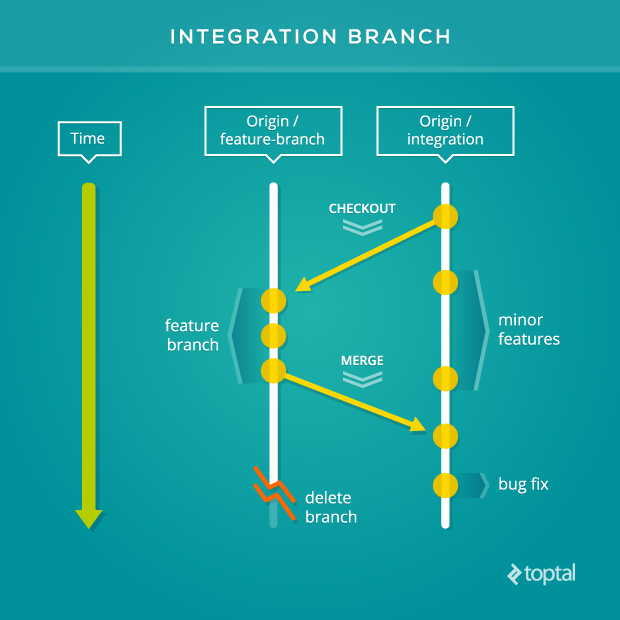
Use an integration branch when development teams work towards deploying a collection of contributions as a single unit, rather than deploying features individually. Although teams might prefer individual deployments, practical constraints sometimes necessitate grouping efforts. By analyzing your actual Git usage, you can determine if this collaboration pattern is beneficial for your team.
This workflow pattern is valuable for staging when integrating multiple branches carries a high risk, necessitating testing of combined contributions.
An integration branch typically comprises a major feature and several smaller contributions intended for deployment together. Subject this branch to your team’s development process (e.g., Q&A, acceptance testing). Push minor commits to refine it for production, then utilize an environment branch or release branch (discussed later) to prepare it for deployment.
Note that contributions on the integration branch must be merged to the next release stage before merging another major feature. Otherwise, you risk combining features at different completion stages, hindering your ability to release finished work.
Topic Branches
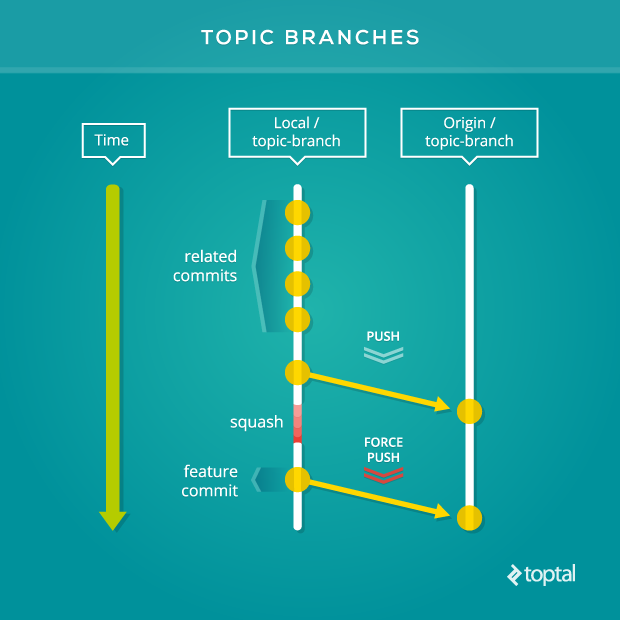
Utilize topic branches if maintaining clean and readable commit trees, or the ability to revert individual features, is crucial. Topic branches indicate that commits may be overwritten (using a force push) to enhance their structure and condense them into a feature commit.
Typically owned by individual contributors, topic branches can also serve as a dedicated space for a team to develop a feature. Other contributors should be aware that the commit tree of such branches could be rewritten at any time and should avoid synchronizing their local branches with them.
Without topic branches, you’re limited to the commits pushed to a remote branch. Force pushing a new commit tree to a remote branch could negatively impact collaborators relying on the maintained integrity of the branch they synchronize with.
You might already be using this workflow pattern unknowingly. However, establishing a common understanding of its definition and practices across teams is crucial. For instance, prefixing branch names with the creator’s initials can help identify topic branches. Ultimately, defining internal conventions is up to your team.
DO NOT use topic branches in public repositories. Rewriting the commit tree of a topic branch can create numerous conflicts for anyone who has synchronized their local branch with it.
Fork
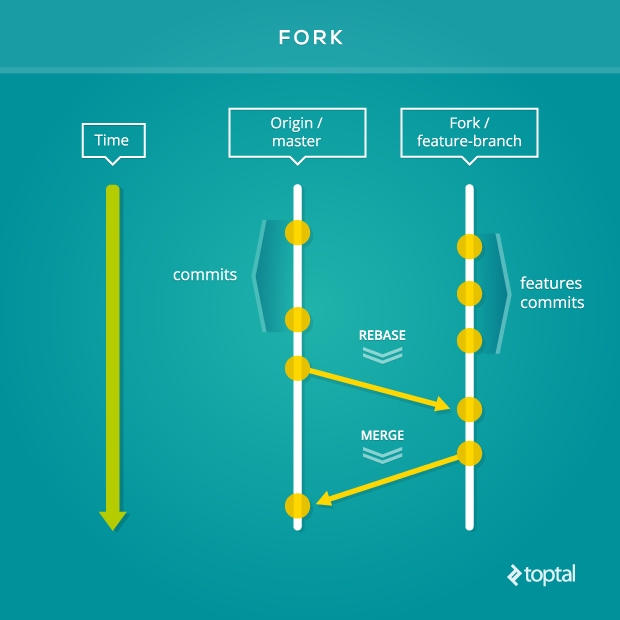
Open-source projects thrive using this Github-originated feature. The fork provides repository maintainers with a controlled gateway, preventing direct pushes to the origin repository’s branch. More importantly, it facilitates seamless collaboration.
Forking a private repository might also be beneficial. By setting the origin repository as read-only for contributors of the forked repository and utilizing pull requests, you can replicate the collaborative advantages enjoyed by the open-source community. Teams from different organizations can effectively work together using a fork as a platform for communication and project policy adherence.
The fork workflow grants teams autonomy in their preferred working style while maintaining a single integration point with the original repository—the pull request. Clear and comprehensive communication within the pull request description is vital. Highlighting previously made decisions helps expedite the review process, considering teams have separate communication streams before a pull request is issued.
A significant advantage of the fork workflow is the ability to direct comments to contributors of the origin repository, as permissions cascade downwards. From the origin repository’s perspective, maintainers can delete forks when they become obsolete.
Utilize tools that support forking and pull requests to leverage this pattern effectively. While Github is popular, other viable options include Bitbucket and GitlLab. Numerous other Git workflow hosting services offer these features or similar functionalities. Select the service that best suits your needs.
DO NOT create a separate fork of a private repository for each team member. This can hinder collaboration on the same feature branch, and synchronizing numerous forked repositories can become error-prone due to the sheer volume of moving parts. In contrast, open-source projects rely on core team members with push access to the origin repository to mitigate this overhead.
Clone
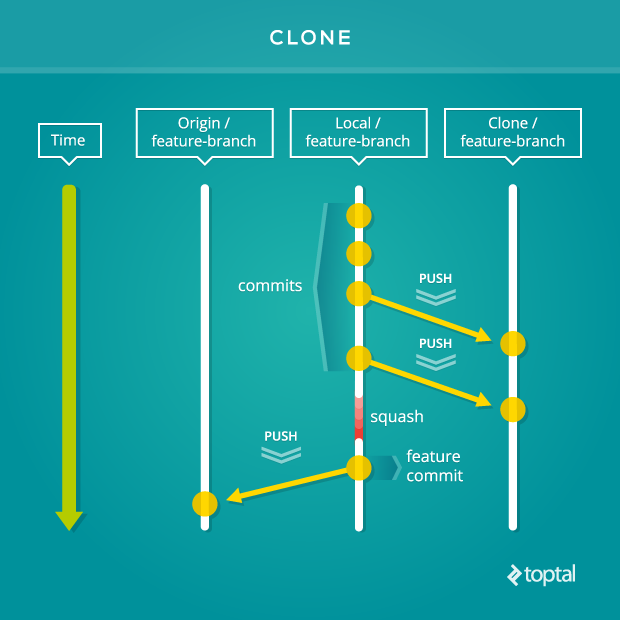
A common outsourcing strategy involves “contribution seats” on projects, which multiple developers can fill. While the outsourcing company manages resource allocation and delivery of contracted hours, challenges arise in onboarding, training, and maintaining a developer pool for each client project.
Using a clone of the project repository provides a dedicated training and communication environment for the outsourced team. They can manage contributions, enforce policies, and share knowledge without directly impacting the client’s development team. Once a contribution meets the required standards, it can be pushed to one of the origin repository’s remote branches and integrated seamlessly.
Some projects have stringent coding conventions and Git workflow standards. Working within such environments can be daunting initially. Collaborative efforts to optimize both parties’ time are crucial in such situations.
DO NOT create a hosted copy of the client’s repository without their consent, as this might violate contractual agreements. Discuss this practice with the client beforehand to ensure it benefits the project.
Release Management
The transition from collaboration to release varies across teams, beginning at different points in the development process. Generally, it’s advisable to stick to one release management Git pattern. Aim for the simplest workflow that enables your team to deliver effectively.
Environment Branches
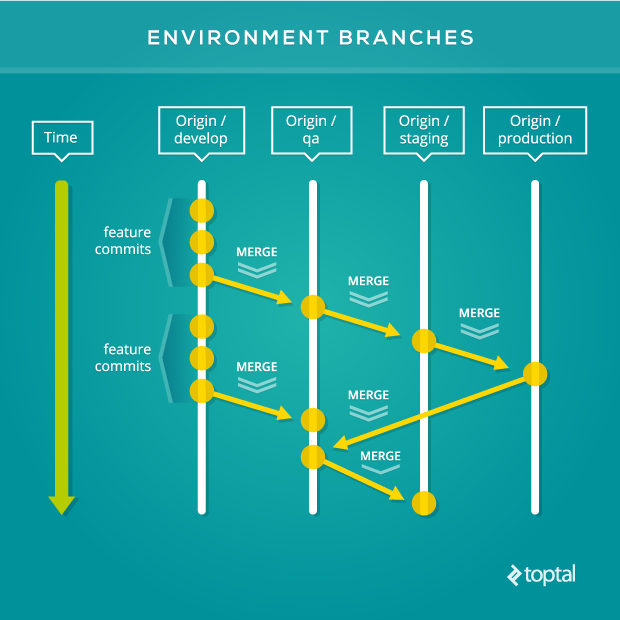
Your software development process might involve multiple environments for quality assurance before production deployment. Environment branches mirror these stages: each stage corresponds to a branch, and contributions flow through them in a pipeline.
Teams employing this process often have dedicated application environments for each stage, such as “QA,” “Staging,” and “Production.” Infrastructure supports personnel responsible for signing off features or contributions based on their specific criteria (e.g., exploratory testing, QA, acceptance testing) before passing them to the next stage. This provides them with dedicated spaces for deployment, testing, and evaluation against their requirements, all tracked within a defined Git workflow.
While having a branch for each stage works for small, cohesive teams, it can lead to bottlenecks, build-ups, and gaps in larger contexts. Coupling your Git process to your infrastructure can pose problems as feature demands increase and require scaling of both processes.
DO NOT adopt this pattern without carefully considering the long-term benefits of other patterns.
Release Branches
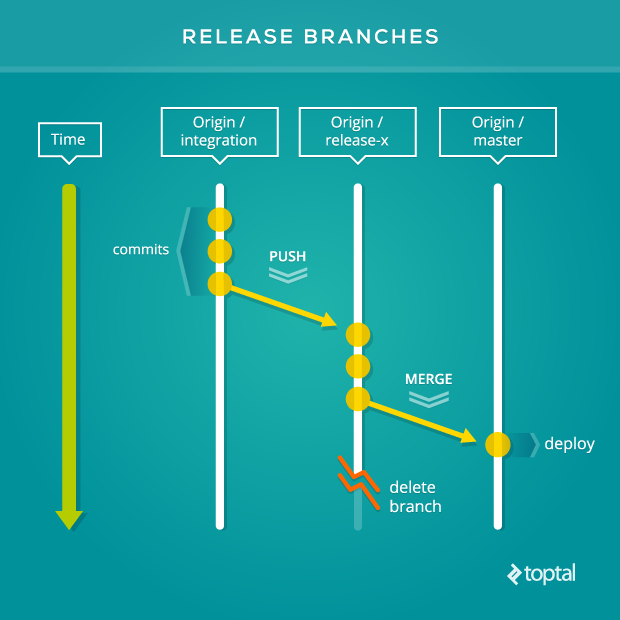
Release branches are a good fit for teams that deploy a collection of contributions to their production application as a single unit in successive sprints.
A collection of near “production-ready” commits undergoes minor bug fixes on a dedicated release branch. Utilize an integration branch for combining and testing features before transferring its commit tree to a release branch. Limit the scope of a release branch to final checks before deployment to the production application.
Unlike environment branches, release branches have short lifespans, created when needed and destroyed after deployment.
Avoid linking release branches to your software development roadmap. Adhering rigidly to a predetermined plan can delay releases until all planned features are production-ready. Mitigate this by avoiding version number assignments on the roadmap before creating a release branch. This allows deployment of production-ready features without waiting for the entire roadmap to be completed.
Utilize a version number naming convention for release branches to clearly indicate the deployed repository version.
Deploy the master branch, not the release branch. Encourage making minor fixes on release branches before merging with the master branch. Implement a Git hook on the master branch that triggers after a merge, automatically deploying the updated commit tree to production.
Allowing only one release branch at a time avoids the overhead of synchronizing multiple release branches.
DO NOT use release branches when multiple teams work on the same repository. Although short-lived, if the final check on a release branch takes too long, it can delay other teams’ releases. Piggybacking on another team’s release branch increases the risk of introducing bugs and causing delays for both teams. The timestamped release pattern, discussed below, is better suited for larger teams and groups of contributors.
Timestamped Releases
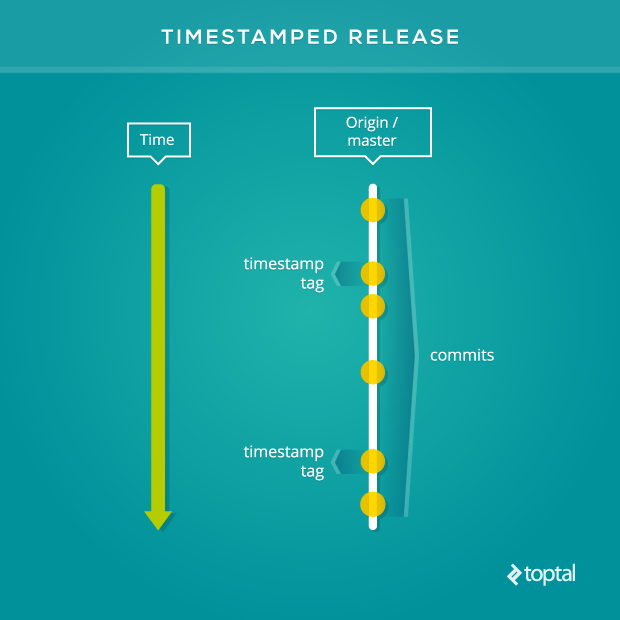
Applications with infrastructure constraints often schedule deployments during low-traffic periods. If your project frequently faces queues of deployment-ready features, timestamped releases might be beneficial.
In this approach, the deployment process automatically adds a timestamp tag to the last commit on the master branch deployed to production. Topic branches guide features through the development process before being merged into the master branch, where they await deployment.
The timestamp tag should include the actual timestamp and a deployment indicator label. For example: deployed-201402121345.
Including deployment metadata in the master branch’s commit tree through timestamp tags aids in debugging regressions in the production application. The person troubleshooting the issue might not be intimately familiar with every deployed line of code. Running git diff on the last two tags provides a quick snapshot of the last deployed commits and their authors, who can then assist in resolving the issue.
Timestamped releases offer more than meets the eye. While seemingly simple, recording deployments of queued features requires robust processes. However, it’s a scalable process that works well even with small teams.
For this pattern to be effective, the master branch must always be deployable. While the specific definition might vary, it essentially means that all commits should have undergone the complete development process before reaching the master branch.
New commits landing on the master branch multiple times a day can pose challenges for topic branches that haven’t been synchronized with the master branch recently. This can introduce regressions during merge conflict resolution.
Discuss the risk of introducing new bugs with your team before updating the remote master branch if merge conflicts arise between a topic branch and the master branch. If a regression is suspected, the topic branch should be retested with the resolved merge conflicts.
To minimize integration bugs, developers working on related parts of the repository can coordinate the timing of merges and synchronization of their topic branches with the master branch. Integration branches are helpful in resolving conflicts from related topic branches. However, these should be thoroughly tested before merging into the master branch’s deployment queue.
Software development projects with numerous contributors necessitate practical and efficient collaboration and release management processes. Using timestamped releases provides valuable metadata in the commit tree, demonstrating the team’s foresight in preparing for and addressing production issues.
Version Branch
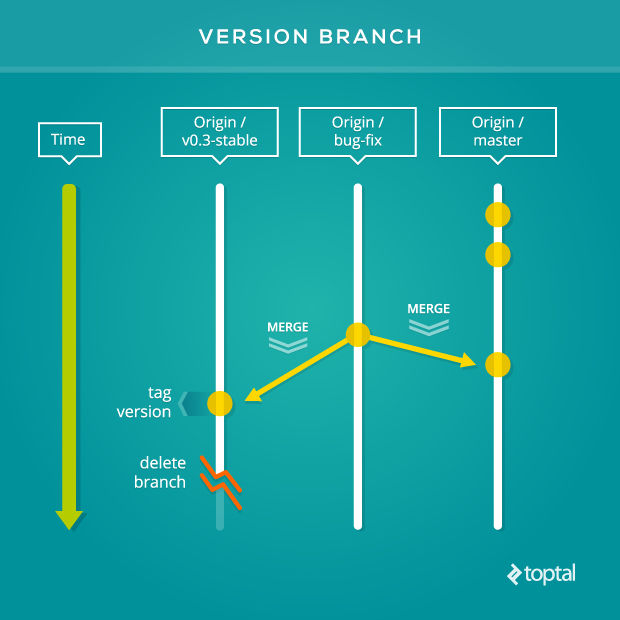
If your repository powers both your production environment and applications hosted by others, version branches offer a platform to support users who are unable or unwilling to stay on the bleeding edge of your application’s development.
In this approach, each minor version of the application gets a dedicated branch. The Semantic Versioning documentation explains major, minor, and patch versions in detail. Version branches typically follow a naming convention that includes the word “stable” and excludes the patch number from the application version (e.g., 2-3-stable) to emphasize their purpose and reliability to end-users.
While Git tags can be applied down to the patch version, version branches are not as granular. A version branch consistently points to the most stable commit for a supported minor version.
When security patches or backported functionality are required, prepare the necessary commits for the supported older versions and push them to their respective version branches.
DO NOT use version branches unless you need to support multiple versions of your repository.
Summary
As your team expands or your project’s processes evolve through continuous evaluation, remember to include your Git process in this review. Use the patterns in this guide as a starting point to navigate the path towards an effective Git workflow.
These patterns can equip you with the foresight to adapt your distributed version control system to work for you, not against you. For further exploration of Git workflows, refer to Gitflow, Github Flow, and the exceptional resource, git-scm documentation!