Ad extensions are essential companions to ad copy, offering a way to enhance user experience and boost campaign effectiveness. They can guide users to specific pages, provide pricing insights before clicks lead to costs, and even facilitate conversions without requiring a landing page visit. Google recognizes the value extensions bring to advertisers and will often add in extensions on your behalf.

Just like Han Solo and Chewy in Star Wars, ad extensions prove that sidekicks can be heroes too! Some extensions, like seller ratings, are obvious choices for Google to implement automatically. Others, such as those requiring specific copy or location matching, necessitate more advertiser control. It’s crucial to remember that extensions are meant to augment your ad copy, not replace it. Google is already venturing into ad copywriting with its automated solutions, like responsive search ads, which have yielded mixed results. For brands with flexible messaging and limited time for copywriting, this automation can be beneficial. However, brands with strict guidelines and specific messaging requirements might find this approach challenging. Most advertisers likely fall somewhere in between, able to delegate certain tasks to Google while maintaining control over crucial strategic messaging. Understanding when to delegate and when to take charge requires knowledge of the available extension options and their effective utilization. This guide will explore each available extension and assess whether automating them with Google is advisable.
Sitelinks

What are they?
Sitelinks are concise, 25-character links directing users to specific pages on your website. You can deploy up to eight sitelinks, depending on the search results page (SERP) and the user’s device. These links can point users to specific products or services, provide insights about your team, showcase client testimonials, or guide them toward any desired action.
Will Google automate them?
If you haven’t set up your own sitelinks, Google will automatically add them to your ads.
Should you let Google automate?
Definitely not! Sitelinks empower you to guide users to specific landing pages, potentially increasing conversion rates. Relinquishing control means missing out on this opportunity to enhance conversions and ensure brand-consistent messaging. Maximize their impact by utilizing both description lines to occupy more space on the SERP.
Callouts

What are they?
Callouts are 25-character non-clickable statements providing supplementary information and context to your offering. They highlight reasons to choose your business, proximity details, special promotions, and other relevant information.
Will Google automate them?
Similar to sitelinks, Google will automatically generate callouts if you don’t create them.
Should you let Google Automate?
It’s best to handle this yourself. Just like sitelinks, callouts enable you to provide additional context to your ad using your brand’s voice. Automated callouts often default to generic “action” phrases like “Book online”:
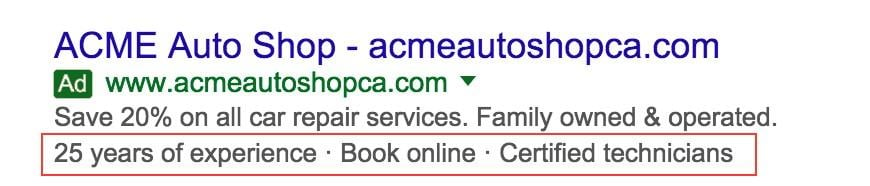
Image via Google
Structured Snippets
What are they?
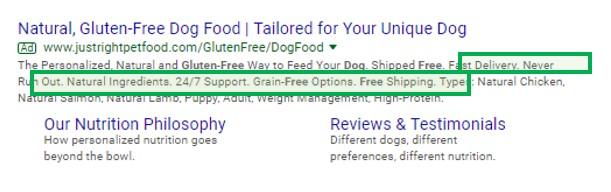
Structured snippets are collections of concise, 25-character information units highlighting product offerings, locations, types, and more. These are useful for showcasing offerings with low search volume or presenting a complete business overview when budget constraints limit campaign scope.
Will Google automate them?
Google will automatically generate structured snippets for your ads.
Should you let Google automate them?
In this case, automation can be beneficial. Google offers exclusive structured snippets (highlights) when you opt for dynamic structured snippets. Additionally, manually created snippets can sometimes encounter time-consuming disapproval issues (e.g., incorrect header usage). However, if you require specific copy, creating your own is recommended.
Call Extensions
What are they?
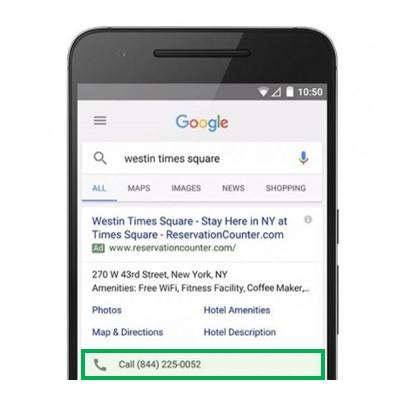
Call extensions display a clickable phone number on mobile devices and a non-clickable number on desktops and tablets. These extensions can be tracked as conversions using Google call forwarding numbers.
Will Google automate them?
If your website seems geared towards phone calls, Google will automatically create a call extension.
Should you let Google automate them?
It depends. For businesses with a single location and phone number on their site, Google’s automation can be helpful. However, multiple numbers and objectives require a more hands-on approach. Setting up call extensions yourself and routing them to the correct campaigns is the safest bet.
Message Extensions
What are they?
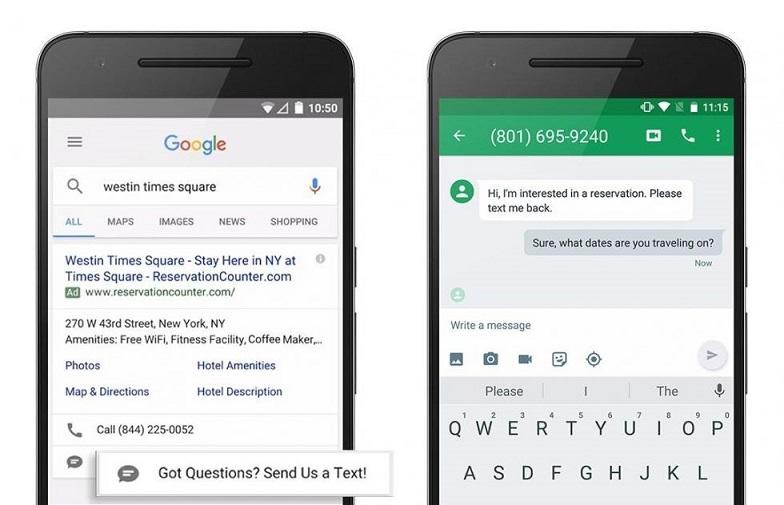
Message extensions, appearing on mobile ads, empower prospects to contact you via text or email. Businesses with lengthy sales cycles benefit from this communication channel, nurturing leads without overwhelming sales teams with premature inquiries. This also caters to the growing preference for texting over calling.
Will Google automate them?
If you have a call extension or a phone number on your website, and driving calls seems to be the goal, Google might automatically create a message extension.
Should you let Google automate them?
It’s not recommended to let Google automate this. Unaware of a running extension, you might receive inquiries you’re unprepared for, or the contact information might be incorrect. Additionally, email forwarding requires manual configuration.
Location extensions
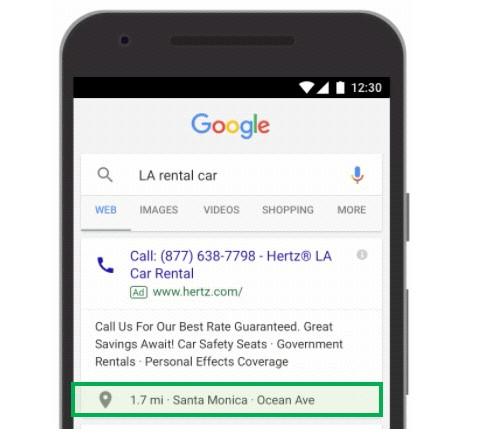
What are they?
Location extensions utilize data from your Google My Business profile to create clickable links providing directions to your business. They also unlock opportunities for additional ad placements.
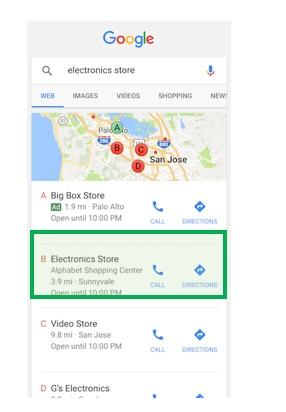
Will Google automate them?
When a search query implies local intent, Google will automatically create location extensions. This means your extension might not always be displayed.
Should you let Google automate them?
Automating location extensions is a safe bet. They provide valuable context and unlock additional ad formats, offering benefits without drawbacks. However, be aware that connecting your Google My Business profile syncs all linked locations. Ensure you audit campaigns to avoid multiple locations appearing within a single campaign.
Promotion Extensions

What are they?
Promotion extensions let you spotlight specific discounts and offers, whether tied to an event or ongoing. This facilitates flash sales and urgency creation without altering successful ad copy, while also increasing your visibility on the SERP.
Will Google Automate them?
Google won’t create promotional extensions for you.
Is it worth it your time to make them?
Absolutely! Promotion extensions protect your ad copy data, allowing simultaneous promotions without requiring edits. The scheduling feature simplifies promotional calendar management, eliminating last-minute copy adjustments.
Price Extensions
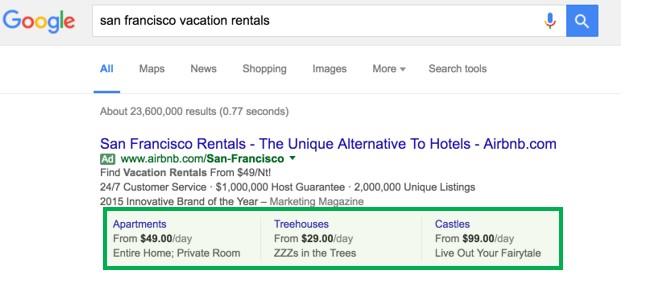
What are they?
Price extensions are clickable links to product or service landing pages, offering users a pricing preview before engagement. This ensures clicks primarily come from users aligned with your pricing while guiding transaction-ready users directly towards purchase points. Service providers can also leverage this, utilizing qualifiers like “from,” “up to,” “hourly,” “nightly,” and more.
Will Google automate them?
While Google might suggest creating price extensions, it won’t make assumptions about which aspects of your business you want to emphasize.
Is it worth the time to set-up?
Yes, it is! Google Ads price extensions can significantly improve your performance by pre-qualifying users and delivering targeted messaging. Even businesses with customized quotes for every client benefit from showcasing a base price. Hiding pricing only pushes potential customers towards competitors.
Some Final Takeaways
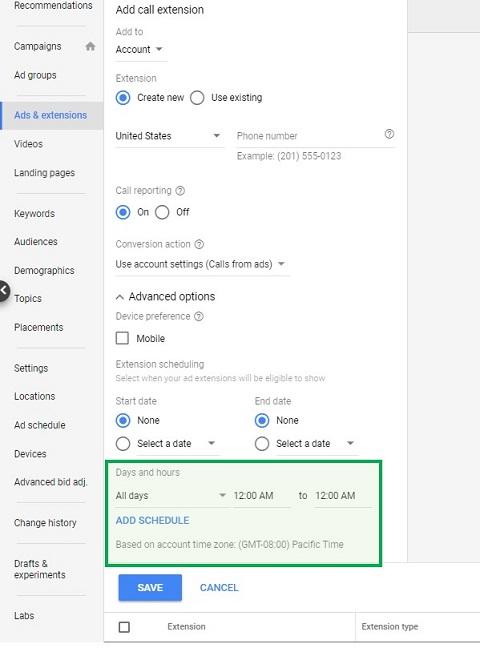
Extensions effectively cover areas within your business that require attention, even if they don’t warrant dedicated budgets. While extensions won’t trigger appearances for specific searches, they highlight additional offerings on campaigns with lower auction prices, such as branded campaigns. Remember that extensions can have their own schedules – crucial for avoiding unwanted contact during off-hours. Unless you’re a 24/7 locksmith, a DUI lawyer with a dedicated night team, or a pizza place near bustling nightlife, those late-night calls are likely wasted spend. Implement schedules for extensions involving communication with prospects.
While automated extensions aren’t inherently detrimental, remain vigilant about their implementation and regularly analyze their performance. Monthly audits of click types help uncover surprises and hidden conversions, like phone calls or direction requests.

Finally, avoid redundant messaging between extensions and ad copy. Utilize extensions to provide compelling additional context that makes your offering irresistible to potential customers.