In today’s digital landscape, the ability to build mobile applications that efficiently handle real-time data is crucial. While this article focuses on iOS and Swift, the concepts discussed here are applicable to other platforms like Android and web.
Over the past few years, mobile app functionality has evolved significantly. Constant internet connectivity, push notifications, and technologies like WebSockets have changed how users interact with apps. Real-time data updates are now a common expectation, meaning user actions are no longer the sole trigger for events.
This article will examine two prominent Swift design patterns—Model-View-Controller (MVC) and a streamlined immutable Model-View-ViewModel (MVVM) approach—within the context of a modern chat application. Chat apps, with their diverse data sources and dynamic UI updates, serve as an excellent case study for this comparison.
Our Chat Application
Our example application will mirror popular chat apps like WhatsApp, encompassing these key features:
- Loading and syncing chat history from local storage and the server.
- Real-time message reception via push notifications and WebSockets.
- Sending and receiving messages, including read receipts.
- Displaying in-app notifications for unread messages in inactive chats.
- Updating the app icon badge for unread message counts.
For simplicity, the demo will use a simulated backend. However, API interactions, WebSocket connections, and data persistence are structured realistically.
This demo includes the following screens:

Classic MVC
The MVC pattern is deeply ingrained in iOS development, endorsed by Apple and reflected in their documentation and APIs.
However, MVC is often criticized for leading to bulky UIViewControllers. This can be mitigated by adhering to a strict separation of concerns between layers.
The flowchart below illustrates the MVC implementation of the app (excluding the CreateViewController for clarity):

Let’s break down the individual layers:
Model
The model layer usually presents the fewest challenges in MVC. Here, ChatWebSocket, ChatModel, and PushNotificationController act as intermediaries between the Chat and Message objects, external data sources, and the application itself. ChatModel represents the single source of truth and operates in memory, although in a production setting, it would likely be backed by Core Data. Finally, ChatEndpoint manages all HTTP requests.
View
The views are relatively complex due to a conscious effort to isolate all view-related code from the UIViewControllers. Key aspects include:
- Using the (very recommendable) state
enumpattern to represent the current view state. - Connecting functions to buttons and other interactive UI elements.
- Setting up constraints and utilizing delegates for communication.
The introduction of a UITableView further increases the view’s complexity, resulting in over 300 lines of code and a blend of responsibilities within the ChatView.
Controller
With model handling delegated to ChatModel and view code residing in dedicated view classes, the UIViewControllers are remarkably concise. They are agnostic to the structure and retrieval of model data, acting solely as coordinators. Notably, no UIViewController in the example project exceeds 150 lines of code.
Despite this, the ViewController still handles these tasks:
- Acting as a delegate for the view and other view controllers.
- Managing the presentation and dismissal of view controllers.
- Communicating with the
ChatModel. - Controlling the WebSocket connection based on the view controller lifecycle.
- Enforcing basic logic, like preventing empty messages from being sent.
- Updating the view.
While these responsibilities are numerous, they primarily involve coordination, callback processing, and data forwarding.
Benefits
- Widely understood pattern promoted by Apple.
- Seamless integration with existing documentation.
- No external frameworks required.
Downsides
- View controllers often become burdened with tasks like shuttling data between the view and model layers.
- Challenges arise when dealing with multiple event sources.
- Classes tend to have excessive knowledge about each other.
Problem Definition
MVC excels when applications primarily respond to user actions. However, modern apps are interconnected, often communicating via REST APIs, push notifications, and even WebSockets.
This influx of data sources complicates the view controller’s role. External events, like receiving a message through a WebSocket, necessitate complex mechanisms to route information back to the appropriate view controllers. The resulting codebase becomes bloated with glue code.
External Data Sources
Let’s illustrate this with the scenario of receiving a push message:
| |
We manually traverse the view controller stack to determine if an update is necessary. In this case, we also need to refresh screens implementing the UpdatedChatDelegate, such as the ChatsViewController. Additionally, we need to suppress notifications if the user is already viewing the relevant Chat. This tight coupling between PushNotificationController and the application’s structure is far from ideal.
Introducing a ChatWebSocket that broadcasts messages to multiple parts of the application would exacerbate this problem.
Each new external source introduces invasive and fragile code, heavily reliant on the application’s structure and delegate callbacks.
Delegates
MVC’s reliance on delegates introduces complexity when multiple view controllers come into play. View controllers become interconnected through delegates, initializers, and storyboard segues for data passing and reference sharing. Each view controller manages its own connections to the model or mediating controllers, leading to a web of data flow.
Furthermore, views communicate back to view controllers using delegates. While functional, this approach requires numerous steps to propagate data, often resulting in refactoring and meticulous delegate management.
Changes in one view controller can inadvertently impact others. For instance, stale data in the ChatsListViewController might occur if the ChatViewController fails to call updated(chat: Chat). Maintaining synchronization becomes increasingly difficult as complexity grows.
Separation between View and Model
Extracting view-related code to customViews and model logic to specialized controllers results in leaner and more separated view controllers. However, a disconnect remains between the view’s display requirements and the model’s data representation.
Consider the ChatListView. We aim to display a list of cells showing the chat recipient, last message, timestamp, and unread message count:

However, the provided model, a simple Chat object containing messages and contact information, lacks this presentation-specific data:
| |
While we could add code to extract the last message and message count, formatting dates into strings is inherently a view layer concern:
| |
Consequently, date formatting is deferred to the ChatItemTableViewCell during display:
| |
This simple example highlights the tension between the view’s needs and the model’s structure.
Static Event-driven MVVM, a.k.a. a Static Event-driven Take on “the ViewModel Pattern”
Static MVVM utilizes view models, but unlike traditional MVVM’s bidirectional data flow, it employs immutable view models to update the UI in response to events.
Events can originate from various parts of the codebase, as long as they provide the data associated with the event enum. For instance, the received(new: Message) event can be triggered by push notifications, WebSocket messages, or standard network responses.
The following diagram illustrates this concept:
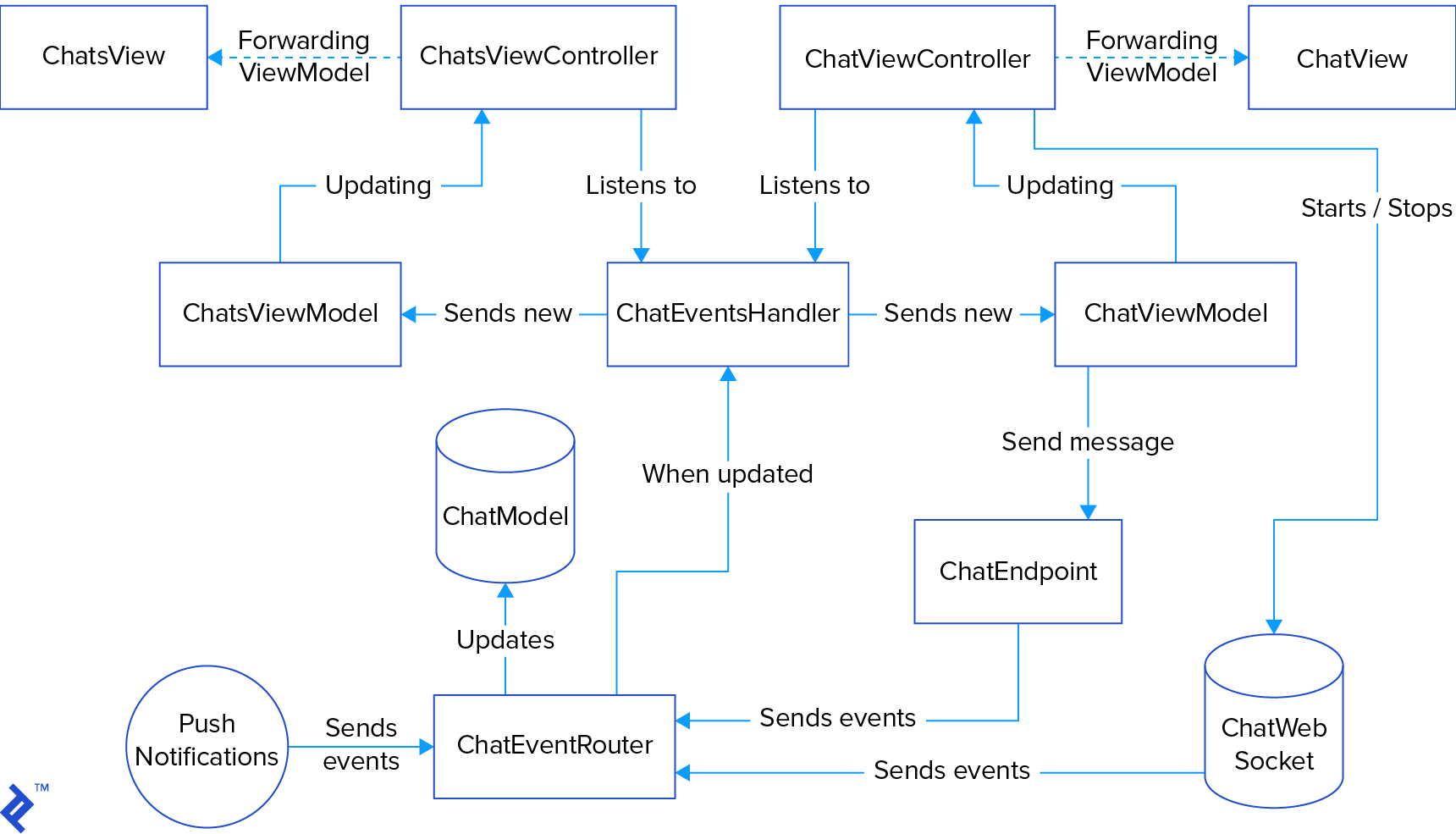
While seemingly more complex than MVC due to the increased number of classes, a closer look reveals that all relationships are unidirectional.
Furthermore, every UI update is event-driven, providing a clear and centralized path for all application logic. This makes it straightforward to understand event flow, add new events, or extend existing event behavior.
Refactoring to this pattern did introduce new classes. You can explore the implementation on GitHub. However, code analysis reveals a surprisingly modest increase in code size:
| Pattern | Files | Blank | Comment | Code |
|---|---|---|---|---|
| MVC | 30 | 386 | 217 | 1807 |
| MVVM | 51 | 442 | 359 | 1981 |
The total line count increased by only 9%. More importantly, the average file size decreased from 60 lines to 39.
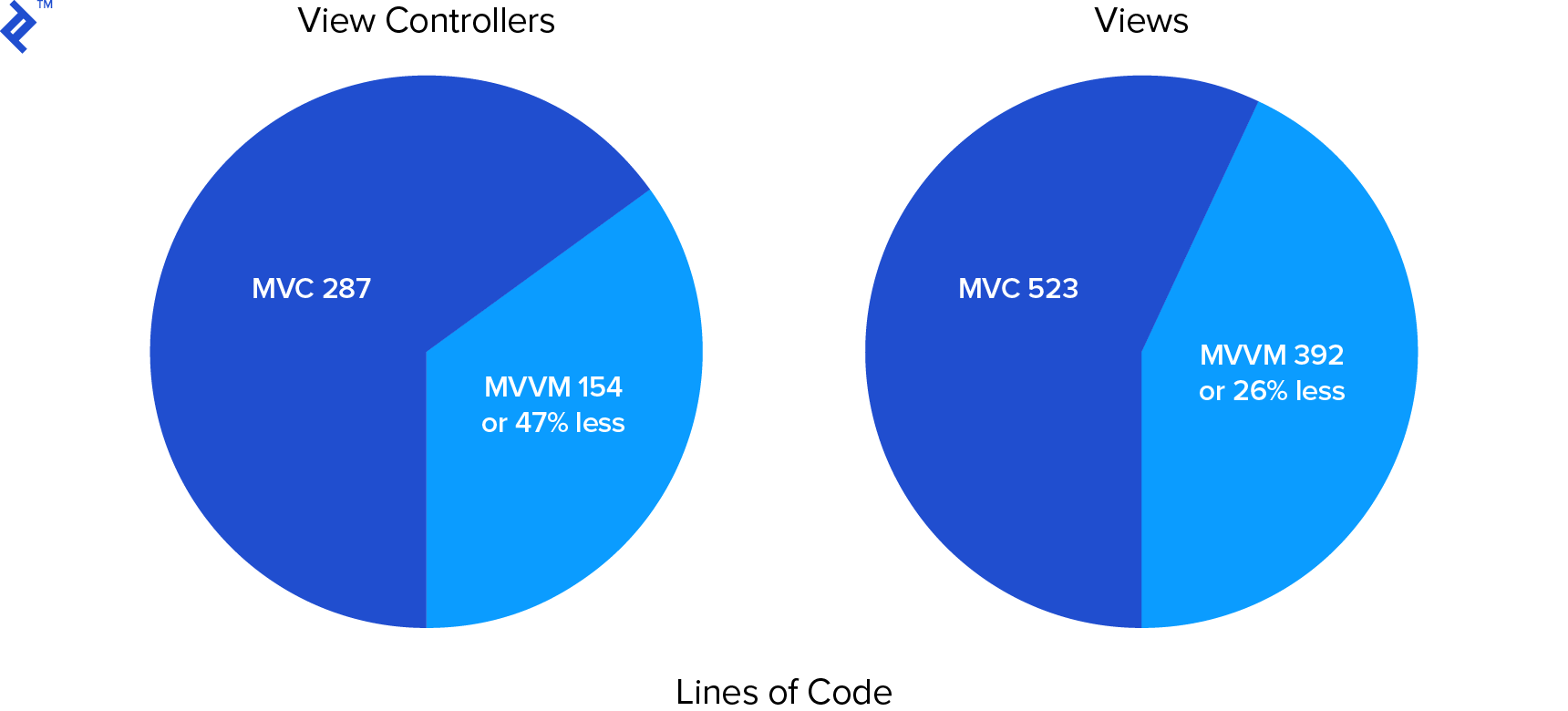
Significant reductions are evident in the files that tend to be most bloated in MVC—views and view controllers. View size shrank to 74% of the original, while view controllers are now only 53% of their initial size.
It’s worth noting that a significant portion of the added code belongs to a library that simplifies UI event handling using blocks.
Let’s delve into each layer of this design.
Event
Events are represented as enums, often with associated values. They frequently align with model entities but are not restricted to them. This application uses two primary event enums: ChatEvent and MessageEvent. ChatEvent encompasses updates related to chat objects:
| |
MessageEvent handles message-specific events:
| |
Keeping your *Event enums concise is crucial. If you exceed 10 cases, it might indicate that you’re attempting to represent too many concepts within a single enum.
Note: Swift’s enums with associated values offer remarkable flexibility and expressiveness, effectively addressing ambiguities associated with optional values.
Swift MVVM Tutorial: Event Router
The event router serves as the central hub for all application events. Any class capable of providing the necessary associated value can create and dispatch an event. This means events can be triggered by a wide range of sources, including:
- User navigation within the app.
- User interactions with UI elements.
- Application lifecycle events (e.g., startup).
- External events:
- Network request outcomes.
- Push notifications.
- WebSocket messages.
Ideally, the event router should remain agnostic to the event’s origin. In this example, events carry no source information, enabling seamless integration of various message sources. For instance, both WebSocket messages and push notifications trigger the same received(message: Message, contact: String) event.
The event router’s primary responsibility is to direct events to the appropriate handlers. Typically, this involves the model layer (for data manipulation) and the event handler (for UI updates). We’ll explore these components further.
Here’s the ChatEventRouter implementation:
| |
The code is remarkably simple. It updates the model and forwards the event to the ChatEventHandler to trigger UI updates.
Swift MVVM Tutorial: Model Controller
This class remains unchanged from the MVC implementation. It represents the application’s state and, in a production environment, would likely interact with Core Data or another persistence mechanism.
Well-designed model layers in MVC rarely require substantial refactoring for different patterns. The primary change here is the reduced number of classes that can modify the model, enhancing clarity.
An alternative approach involves observing model changes and reacting accordingly. However, in this case, only the *EventRouter and *Endpoint classes are allowed to modify the model, clearly defining where and when updates occur. Observing changes would necessitate additional code to propagate non-model-altering events, potentially obscuring event flow.
Swift MVVM Tutorial: Event Handler
The event handler acts as a registry for views and view controllers to subscribe (and unsubscribe) to view model updates. These updates are generated whenever the ChatEventRouter invokes a function on the ChatEventHandler.
Observe how the event handler mirrors the view states from the MVC implementation. Additional UI updates, such as sounds or haptic feedback, can also be initiated here.
| |
This class ensures that the correct listeners receive the appropriate view models in response to events. It also provides newly registered listeners with an immediate view model if needed for initialization. Weak references prevent retain cycles.
Swift MVVM Tutorial: View Model
This is where static MVVM diverges significantly from other MVVM implementations. Instead of a persistent, two-way bound intermediary, we use immutable view models.
Maintaining application state consistency is paramount for robustness. Mismatches between the UI and the model or outdated data can lead to data corruption, crashes, or unexpected behavior.
This pattern aims to minimize application state. State refers to any stored representation of data. UI state is unavoidable, but data-related state can be mitigated. For instance, a local copy of a Chat array backing a UITableView introduces duplicate state. Traditional two-way bound view models also contribute to this duplication.
Immutable view models, refreshed with every model change, eliminate this redundancy. After updating the UI, they are discarded, leaving only the essential UI and model states, which remain synchronized.
Therefore, the view model here acts as a transient, read-only data source for flags, values, blocks, and other view-specific information. The View cannot modify it.
This immutability allows us to represent it using a simple struct. To streamline its creation, we use a view model builder. Notably, the view model incorporates behavioral flags like shouldShowBusy and shouldShowError, replacing the state enum mechanism previously used in the view. Here’s the data for the ChatItemTableViewCell:
| |
With the view model builder handling formatting and actions, all data is ready for immediate display. Additionally, a block is provided for handling item taps.
View Model Builder
The view model builder generates instances of view models, transforming raw data like Chats or Messages into view-ready representations.
Crucially, it defines the behavior of blocks embedded within the view model. These blocks should be concise, delegating logic to other parts of the architecture.
| |
Now, all formatting and behavior logic resides in one central location. This class plays a pivotal role in the hierarchy. Examining the various builders in the demo application reveals how they handle more complex scenarios.
Swift MVVM Tutorial: View Controller
View controllers in this architecture have minimal responsibilities. They primarily handle the setup and teardown of their associated views, leveraging their lifecycle callbacks to manage event listener registration and deregistration.
In some cases, they might update UI elements not managed by the root view, like the navigation bar title or buttons. That’s why the view controller is typically registered as an event listener even when a dedicated view model manages the entire view. However, directly registering a UIView as the listener is also viable if certain screen elements require independent update rates.
The ChatsViewController code is now remarkably concise:
| |
The ChatsViewController is reduced to its bare essentials.
Swift MVVM Tutorial: View
While still handling various tasks, the view in immutable MVVM sheds these responsibilities compared to MVC:
- Determining state-based UI updates.
- Implementing delegates and action functions.
- Managing view-to-view interactions like gestures and animations.
- Transforming data for display (e.g.,
Dates toStrings).
The last point offers a significant advantage. In MVC, when the view or view controller handles data transformation, it often occurs on the main thread, potentially impacting responsiveness.
With this MVVM pattern, data processing, from the tap event to view model generation, can happen on a background thread, leaving only UI updates for the main thread. This offloading improves application smoothness.
Once the view model applies the new state, it’s discarded, preventing state accumulation. Event triggers are directly attached to view elements, eliminating the need for communication back to the view model.
Importantly, view model to view mapping doesn’t have to be mediated by a view controller. As mentioned earlier, different view models can manage distinct view sections, particularly when update frequencies differ.
For example, consider a live-updating search box in a type-to-find implementation. In this scenario, the CreateAutocompleteView would have the entire screen managed by the CreateViewModel, while the search box would listen to the AutocompleteContactViewModel.
Form validation provides another example. It can be implemented as a “local loop” within the view or by triggering events.
Static Immutable View Models Provide Better Separation
Static event-driven MVVM achieves complete layer separation by introducing the view model as a bridge between the model and the view. It simplifies the handling of non-user-initiated events and reduces dependencies between application components. View controllers primarily manage event listener registration and deregistration.
Benefits:
- Reduced view and view controller complexity.
- Enhanced class specialization and separation of concerns.
- Simplified event triggering from any location.
- Predictable event flow.
- Centralized state management.
- Improved performance through easier off-main-thread processing.
- Tailor-made, decoupled view models for views.
Downsides:
- View model creation and propagation for every UI update, potentially leading to redundant operations.
- Requires helper extensions for seamless integration of UI events with view model blocks.
- Event
enums can become unwieldy in complex scenarios.
The beauty of this pattern lies in its pure Swift implementation, requiring no external frameworks. It also allows for gradual adoption alongside classic MVC.
Other architectural patterns address large view controller issues and promote separation of concerns. While we won’t delve into them here, let’s briefly acknowledge some alternatives:
- Traditional MVVM, which typically uses a class-based view model and often employs Observables (e.g., RxSwift).
- Model-View-Presenter (MVP), where the view layer encompasses both the view and view controller, and a presenter handles model transformation.
- View-Interactor-Presenter-Entity-Router (VIPER), a more granular and decoupled version of MVP.
- Reactive programming, often using frameworks like RxSwift, which aligns with static MVVM’s event-driven nature.
MVP introduces a presenter layer for model transformation, while VIPER further refines this by adding an interactor for business logic and a router for navigation. Reactive programming fundamentally alters data and event flow.
This article has provided an in-depth exploration of static event-driven MVVM. Feel free to share your thoughts and questions in the comments section below!