Achieving success in local SEO has always been tough. From link building to on-page and technical SEO, nailing the basics is crucial.
Google My Business (GMB) is an area needing particular focus. Without a well-optimized GMB listing, your chances of appearing in features like the Local Pack and Maps are slim. With 97% of consumers looking online for local businesses, maximizing visibility for this audience is key.
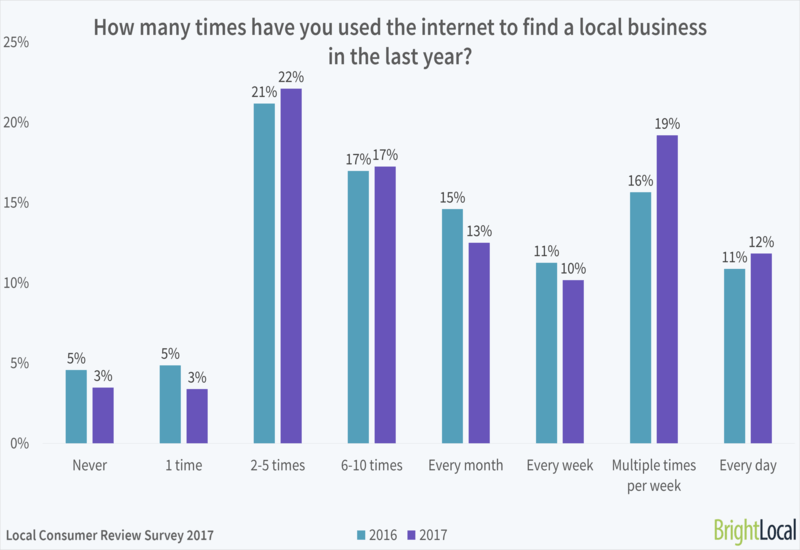
This makes a well-optimized Business Profile more critical than ever. Leading search experts recently provide their forecasts for local SEO, with many concluding that as users find answers directly on Google - through instant answers and Business Profiles - website traffic decreases while Google interaction rises.
Add to this the rise of paid Local Service Ads, and it’s clear that local businesses must prioritize organic conversions, whether through their website or directly from their Business Profile.
With numerous new features at your disposal, there’s a lot you can do to fully optimize this local SEO cornerstone. This not only improves your listing, but also encourages users to connect and convert directly from it.
Let’s explore some of these useful features and how they can boost your local SEO.
Setting Up Google My Business
Every business, especially local ones, needs a fully optimized and current Google Business Profile, managed through your Google My Business account dashboard. Why? Because their Business Profile impacts their local ranking. A fully optimized Business Profile increases the likelihood of appearing in the “Local Pack,” at the top of organic results for local queries, like in this search for “Nottingham locksmiths”:
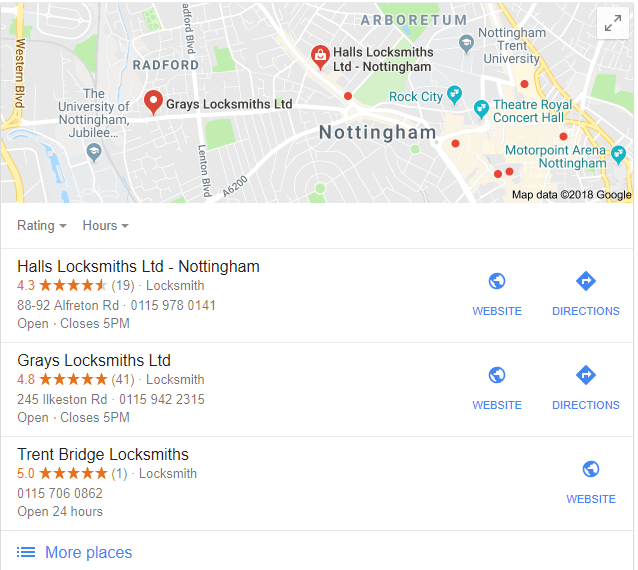
Google Maps also displays these Business Profiles. Setting up a Business Profile and a Google My Business Account is free and easy - simply visit Google My Business, click “Start Now,” and input your basic business information.

When completing your Google My Business account, ensure accuracy for crucial details like business category, contact information, and opening hours.
Before we delve into the interesting features, remember to keep your business name, address, and phone number (NAP) consistent with your website and all directory listings.
Though seemingly simple, errors like an inaccurate category or inconsistent contact information can negatively impact your local rankings. However, consistency and regular photo and post uploads to your Google My Business account can boost your Google Maps ranking.
Key Google My Business Features
Many business owners mistakenly believe that creating a Google My Business set up their Google My Business account alone will optimize their Business Profile. This isn’t true. To stand out from competitors and engage more customers, you need to actively use its features.
Let’s examine how some of these GMB features can benefit your local SEO.
Insights
Just like your website utilizes Google Analytics, the Insights tab within your Google My Business account offers valuable data about your Business Profile through user-friendly graphs and tables.
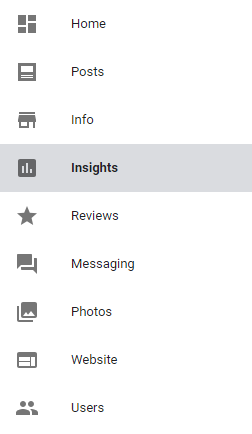
Access this by logging into your GMB and selecting “Insights” on the left-hand side:
You’ll gain valuable insights into how customers find your local business and their actions on your listing:
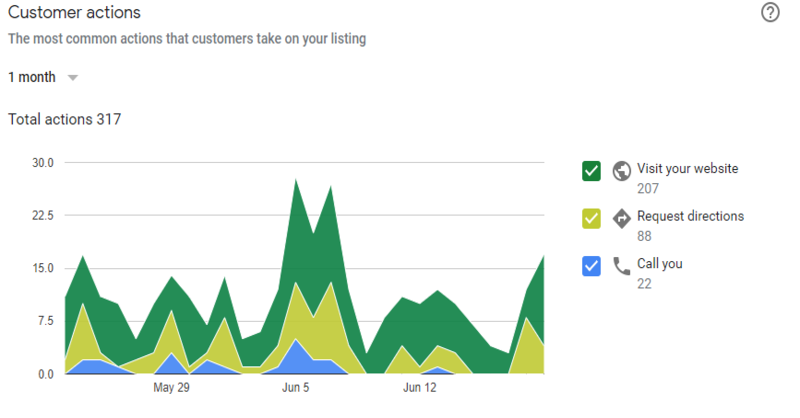
Furthermore, it delves deeper, showcasing the regions from which users viewed your Business Profile and offering comparative metrics, contrasting aspects of your profile with competitors:
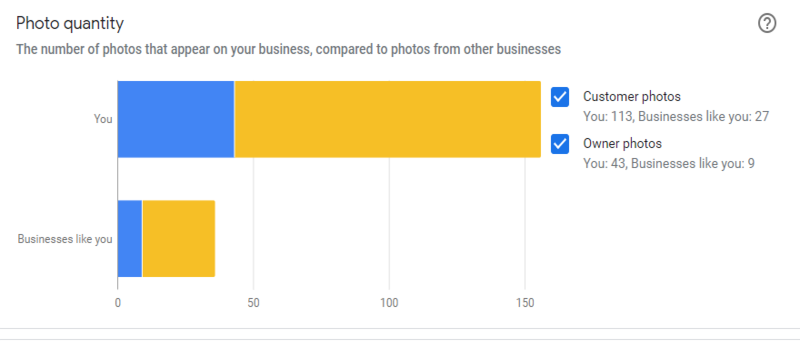
This analytical data can guide your profile optimization. For example, if similar businesses have more photos, it’s an area for improvement.
Description
Back by popular demand, business owners can now write a short description of their business. Located in the “From the business” section of your Business Profile, it should cover, as Google’s guidelines suggests, “what you offer, what sets you apart, your history, or anything else helpful for your customers to know.”
Add a description by navigating from “Info” on the sidebar to the dedicated description field. You have a 750-character limit, with around 250 displayed before truncation.
If you’re short on inspiration, consider condensing your “About Us” page or similar content.
Note: For larger businesses, using duplicate descriptions across locations is acceptable.
Services
Another excellent Google My Business feature, related to the description, is the option to add products and services.
Many businesses find that the “Category” options don’t perfectly represent their offerings, leading them to insert keywords into the business name field, which is against Google’s guidelines and could result in penalties.
Access and modify your Services section through Info > Services in your Google My Business dashboard.
Posts
For businesses with special events, offers, or a desire to highlight specific products or services, the Posts feature is invaluable. Accessed through “Posts” in the left-hand menu of your Google My Business Dashboard, it allows you to engage your audience directly.
Google Posts effectively promote events and special offers or spotlight specific products or services. They are quick to create and, due to their limited use by businesses, offer a great way to stand out on Google.
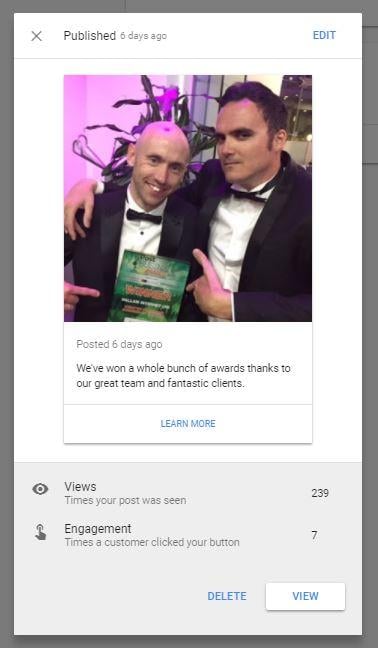
This guide on GMB Posts goes into a lot more detail provides a comprehensive guide to their functionality and utilization.
Messaging
Another underutilized feature within the Google My Business dashboard is Business Profile messaging, which allows users to text the business directly from its Business Profile. Given the high volume of mobile local searches, providing an additional contact point is invaluable.
You’ll find the messaging option on your Google My Business dashboard. No need to worry about displaying your personal number, as you’ll utilize a separate number via Google’s Allo app.
Once set up, mobile search users can message you directly from the local panel, exemplifying how Google’s updates can lead to fewer website clicks. (If you can’t beat them, join them.)
Bookings
Currently available in the US with plans for wider rollout, Google’s booking feature is one to watch.
Google has partnered with various several scheduling providers to allow customers to book directly through a business’s Google Business Profile in under a minute. US businesses already partnered with one of these scheduling providers will have the booking button automatically added to their listing, as shown below:
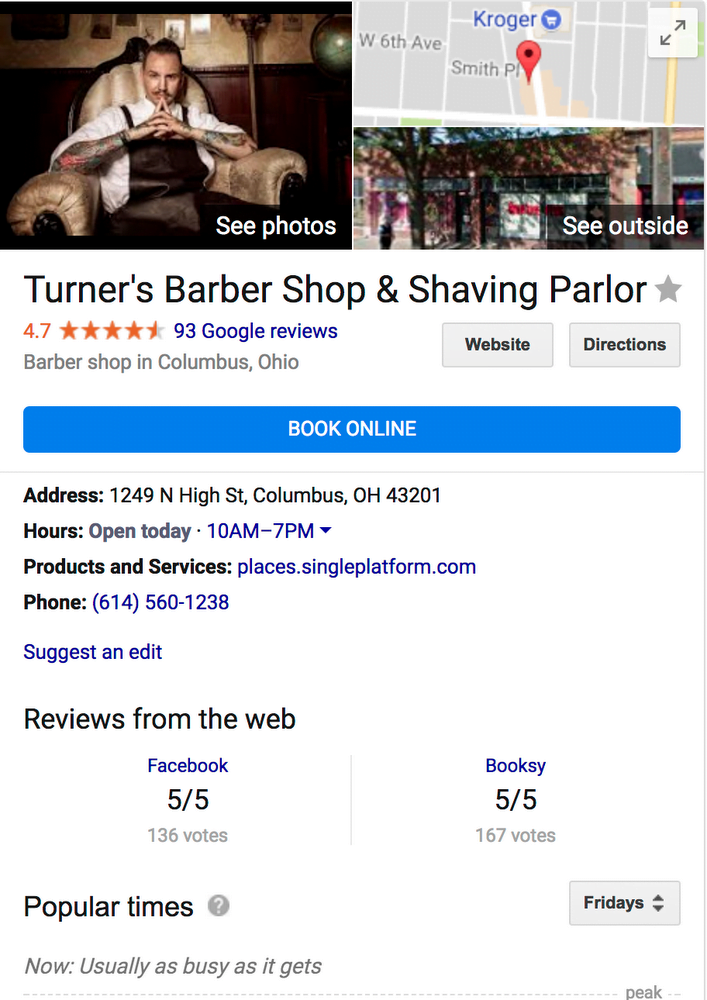
Image via Blog.google
Offering the option to convert directly from the SERP, unlike your competitors, can give you a competitive edge. Note: Bookings don’t occur on your website, keeping users within Google’s “walled garden” - which is becoming increasingly contentious in the search community.
Those outside the US should keep an eye out for its arrival.
Reviews
While not new, reviews on Google My Business still present an opportunity to stand out on the crowded local SERP.
Firstly, actively encourage reviews and feedback from customers. Once received, respond to them! Whether positive or negative, acknowledging all reviews is crucial. 30% of people said this was key when judging local businesses shows that many businesses fall short in this area. Remember, you can only manage reviews through a Google My Business account linked to your Business Profile.
Video
The power of video marketing is undeniable. Case in point: viewers retain 95% of a message through video compared to 10% when reading.
Therefore, capitalize on Google My Business’s video upload feature, located in the “Overview” tab of the dashboard. It’s a fantastic way to add a personal, creative touch to your listing.
Upload your video through the “Photos” section of your dashboard:
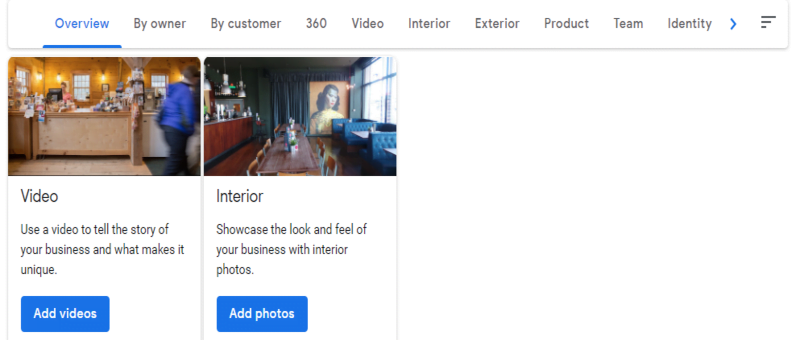
Imagine the impact a video tour could have for an event space or entertainment complex.
Agency Dashboard
Launched in June 2018, the Google My Business Agency Dashboard aims to streamline Google Business Profile management for marketing agencies.
This dashboard simplifies location management and user access, particularly for agencies handling thousands of profiles, as the previous 100-location limit per account has been lifted.
While those new to local SEO are unlikely to manage thousands of Business Profiles, it’s good to be aware of this feature.
However, there’s been some initial criticism of it, suggesting it might be wise to wait for initial bug fixes.
Common Google My Business Mistakes To Avoid
As mentioned, incorrect business information is a common and easily rectified mistake.
Also, be wary of duplicate listings (Business Profiles). Ensure your business has only one listing to reflect optimizations made within your Google My Business dashboard accurately.
Another common error is creating a new Business Profile when updating information like location or business name. move to a new location Instead, update the existing profile to avoid duplicates.
Adding promotional messages or business locations to the business name field is also common. However, this field should only contain the actual business name. Adhering to Google’s guidelines is crucial!
Once your Google My Business account is set up, utilize these features to maximize your Business Profile. Achieving local SEO success necessitates work on technical aspects, content, and off-page SEO like any other SEO endeavor, but Google My Business provides a solid foundation.
As search evolves toward increased SERP interactivity and potentially fewer website clicks, evolving alongside it and enabling conversions directly from your GMB listing is crucial.