Software release management encompasses the planning, scheduling, management, and control of a software build as it moves through various stages and environments, including testing and deployment (Humble & Farley, 2011).
This comprehensive topic can be refined over time through collaboration with development teams, iterating on different approaches, and aligning with business needs and feature release cycles. This text will delve into industry practices such as metadata management, CI building, and sandbox management for effectively managing an organization’s release train.
But what exactly constitutes a release train?
Essentially, a release train is a structured approach to feature delivery that prioritizes incrementalism and predictability. It necessitates developers to establish a formal process for deploying changes made in the development environment to production.
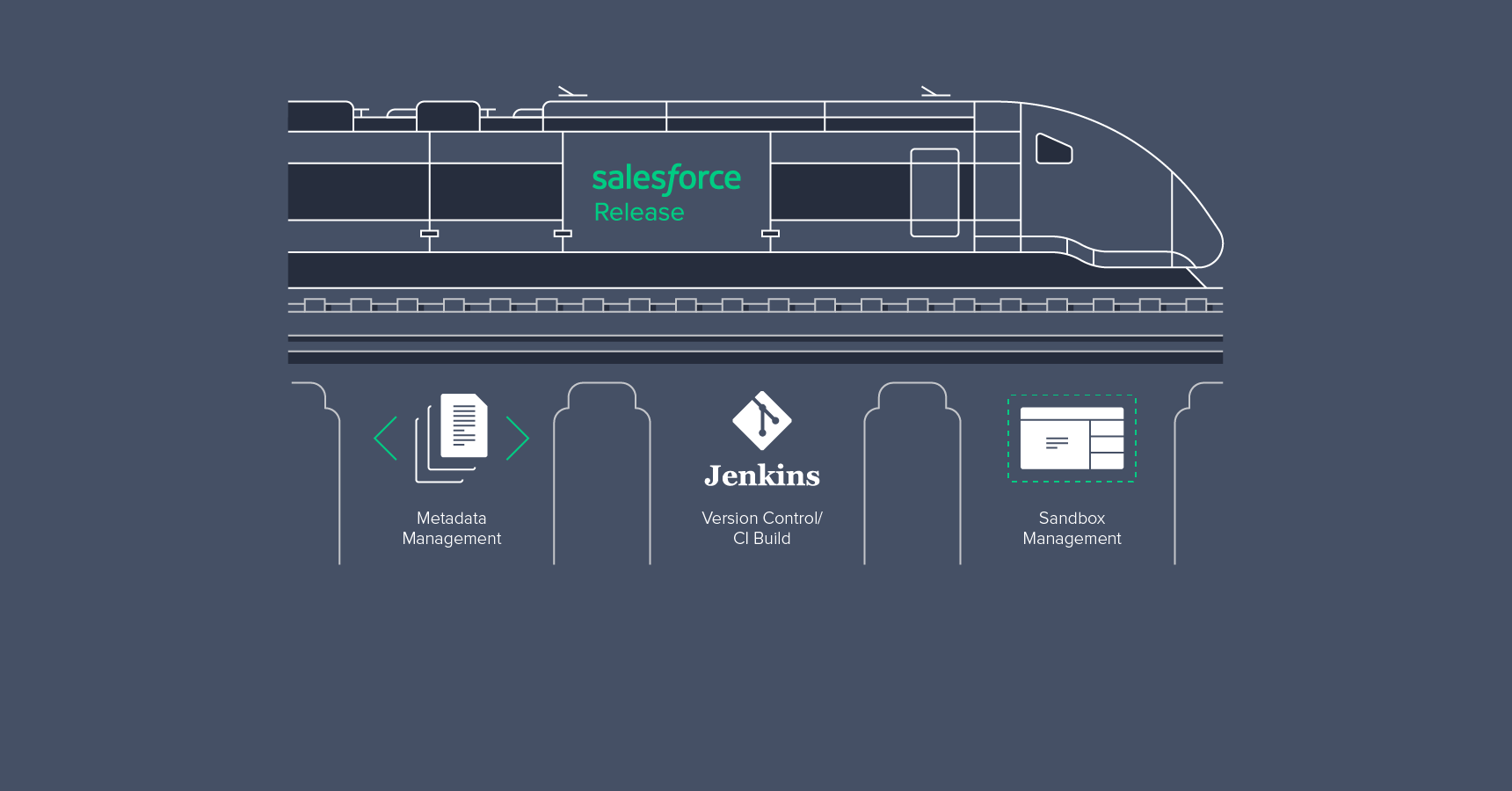
A release train typically consists of three main segments:
- Metadata management
- Continuous integration build
- Sandbox management
Metadata Management
Metadata, in essence, is data that provides context and information about other data. Salesforce, through its Metadata API, offers a robust and feature-rich metadata model. This application metadata comprehensively describes and encapsulates methods that provide programmatic access to your organization’s source code and configurations.
The Metadata API is the optimal method for managing customizations within Salesforce. It provides comprehensive support for create, read, update, and delete operations. Tools like Change Sets, the Force.com IDE, and the Ant Migration Tool can be used for migrating metadata between orgs, as they all leverage the API for migrations.
Each tool offers unique advantages, and several factors should be considered when making a selection:
Table 1: Tool Comparison for Metadata Migration
| Change Sets | Force.com IDE | Ant Migration Tool |
|---|---|---|
| Change Sets are the way to deploy components via the standard Salesforce UI. | Force.com IDE (Eclipse) is primarily intended for Apex development, but can be used for deployment purposes. | Ant Migration is a powerful command line tool, dedicated for migrating changes/metadata between environments. |
| Usually used for a small number of component migration. | Developers usually use the IDE for migrating changes to the testing or staging environment. | Ant Migration is used for Large payload migration and needs advanced knowledge of the Salesforce Metadata API. |
| Connection between the orgs has to be manually established, so it isn’t suitable for automated deployments. | It can be used to deploy to any org, but needs some manual steps, which are error prone. | Automatic deployments can be scheduled very easily. |
| Intended for use by administrators. | Geared towards salesforce developers, since developing the code is its primary use. | Geared towards DevOps engineers. |
| Adding dependencies is very easy and user friendly. | Adding dependencies is somewhat easy, as it provides a point and click UI. | Deployment usually fails due to missing dependencies. |
| Doesn’t allow destructive changes. | Does allow destructive change sets but the process is quite tedious. | Allows destructive change sets. |
While the Metadata API excels in development and migration of changes within the Force.com platform, it’s worth noting that it doesn’t support all Salesforce metadata. The official documentation provides a comprehensive list outlining unsupported components.
If your organization implements changes involving components not supported by the Metadata API, manual replication in the destination org becomes necessary. Employing a spreadsheet for tracking these changes is recommended. In such scenarios, it’s advisable to designate a single person to manage and track these modifications.
A general spreadsheet structure for tracking these changes could include:
- Component Name
- Component Type
- Change Owner
- Functionality Description
- Capability Mapping
- Dependencies on Other Components
- Review Status/Reviewer Name
- URL
- Org Name/ID
- Additional Comments
Version Control and Continuous Integration
The migration of changes to production should be a seamless process, ideally mirroring the steps taken in the testing and staging environments. However, unforeseen issues can arise, necessitating a fallback plan. Maintaining backups of your org’s metadata is crucial, which is where version control and the CI build come into play.
Version control is non-negotiable for any organization, fostering collaboration, efficiency, and safety among developers. Managing code development and migration across multiple developers and sandboxes within the Salesforce ecosystem can be challenging. Salesforce’s own release and maintenance schedule, while introducing new features, can bring about changes in the Metadata API, potentially disrupting your CI build. Beyond addressing situations where developers might overwrite each other’s changes, version control provides a safety net by enabling a rollback strategy, which is essential when your application resides on Force.com.
The following flow diagram illustrates a practical structure for Version Control and CI:
- A developer commits their changes to the version control system.
- The CI Server/Jenkins deploys the latest build to the CI sandbox and executes test classes.
- If the deployment in step 2 is successful, the changes are merged into the QA branch.
- CI then deploys the latest commit from the QA branch to the QA sandbox.
- If QA identifies issues during testing, steps 1 through 3 are repeated until the changes are approved.
- Once the changes pass QA testing, they are merged into the Master branch.
- The latest changes from the Master branch are deployed to the Master sandbox.
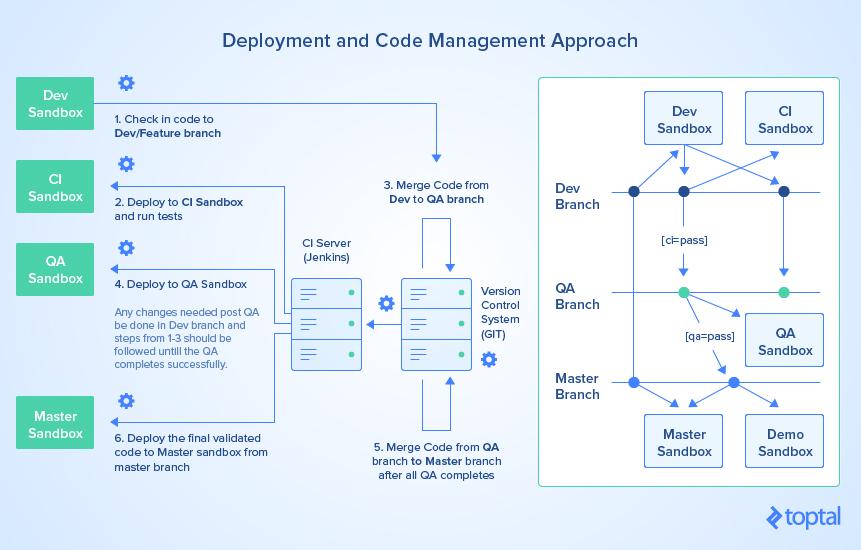
Organizations can adapt this structure by incorporating additional branches based on their specific needs. Nevertheless, the outlined structure generally proves effective for medium to enterprise-level development workflows.
Sandbox Management
A well-defined sandbox structure is paramount to maximizing the benefits of DevOps within your organization. Before delving deeper, let’s explore the different types of sandboxes Salesforce offers.
A sandbox can be thought of as a near-identical copy of your production metadata, primarily used for development, testing, staging, and training purposes. With four distinct types of sandboxes available, careful consideration should be given to the selection process. It’s worth noting that Full Copy sandboxes can be quite expensive.
The table below highlights the limits imposed by Salesforce for each sandbox type:
Table 2: Limit Comparison
| Developer | Developer Pro | Partial Copy | Full Copy | |
|---|---|---|---|---|
| Production Data | No | No | Yes | Yes |
| Data Storage | 200 MB | 1 GB | 5GB (10K records per object) | Complete Data |
| Refresh Period | 1 Day | 1 Day | 5 Day | 29 Day |
As evident from the table, cost isn’t the sole differentiator between these sandbox types.
Developer sandboxes, with their one-day refresh period, are well-suited for development but have limitations in terms of data storage (200 MB) and lack production data. In contrast, Full Copy sandboxes provide an exact replica of production data, even replicating record IDs. While advantageous for testing and staging, their 29-day refresh period can pose challenges in obtaining the latest production metadata and data.
Consider the following as a general guideline for selecting the appropriate sandbox:
Table 3: Use Cases for Sandbox Selection
| Developer | Developer Pro | Partial Copy | Full Copy | |
|---|---|---|---|---|
| Development | Yes | Yes | No | No |
| QA | Yes | Yes | Yes | No |
| Integration Test | No | No | Yes | Yes |
| Batch Data Test | No | No | Yes | Yes |
| Training | No | No | Yes | Yes |
| UAT | No | No | Yes | Yes |
| Load Test | No | No | No | Yes |
| Staging | No | No | No | Yes |
| User Training | No | No | No | Yes |
The diagram below depicts a typical org structure employed for medium-sized projects. While enterprise-level org structures tend to be more intricate, they generally adhere to this model.
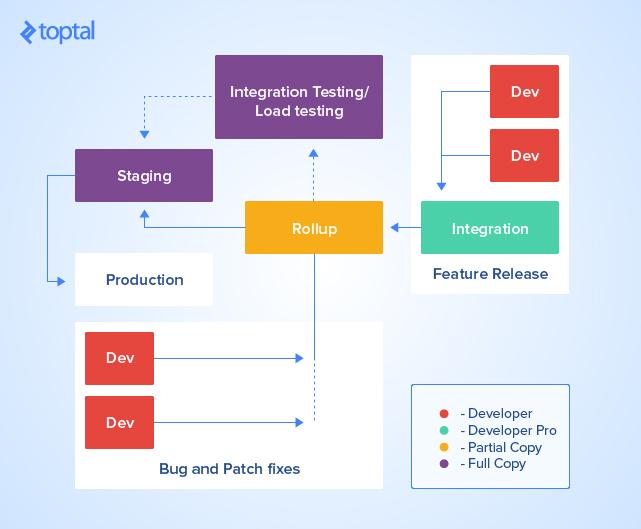
Salesforce development typically occurs within the developer sandbox (red), and changes are subsequently migrated to the integration sandbox (green), which is usually a Developer Pro or Partial Copy sandbox. These changes from multiple integration sandboxes are then promoted to the rollup sandbox (yellow), ideally a Partial Copy sandbox.
If your organization utilizes integrations with third-party systems requiring integration and load testing, a stable dataset that remains consistent across releases is essential. A Full Copy or Partial Copy sandbox is recommended in such scenarios.
Changes are then promoted to the integration testing sandbox for thorough testing before being moved to the staging sandbox, which should be a Full Copy sandbox. Prior to deployment, all test classes are executed, and a deployment validation is performed to ensure a smooth transition.
While this multi-stage process ensures rigorous testing and multiple layers of review, it can significantly extend the time required for development, testing, and deployment.
To expedite bug fixes or patches, a dedicated developer sandbox can be used to directly push small changes to the rollup sandbox.
It’s crucial to remember that while sandboxes closely mirror production metadata, they are not perfect replicas. Certain official list are disabled within a sandbox environment.
Another important aspect to bear in mind is that sandbox refreshes only copy production metadata and data. It’s currently not possible to directly copy metadata between sandboxes or create an empty sandbox devoid of metadata configurations (unlike free developer orgs). This limitation can sometimes create difficulties in real-world scenarios. Salesforce is actively working on solutions, and a feature might soon become generally available to address this.
Furthermore, if your production environment contains sensitive data that should be restricted from development or testing teams, you have the option to establish sandbox templates for Full Copy and Partial Copy sandboxes.
Considerations for Deployment
This text has provided an overview of industry practices for application lifecycle management within the Salesforce ecosystem, emphasizing the crucial roles metadata and sandbox management play in creating deployment packages and payloads. For large and complex Salesforce applications, version control is indispensable, ensuring meticulous tracking of metadata changes and enabling rollback strategies.
Sandbox management is particularly critical for projects of significant scale or complexity. However, sandboxes in the Salesforce ecosystem come at a cost, both financially and in terms of time. A well-defined sandbox management strategy is therefore crucial to the release management process.
In closing, consider these additional points during your next deployment:
- Deployments are limited to 10,000 files or a 39 MB ZIP file. Larger payloads necessitate dividing the package into smaller parts and deploying them sequentially.
- If deployments encounter
request timeouterrors, try excluding objects, custom fields, and profiles from the package, as these components can prolong deployment times. - Modifying field types or making changes to the role hierarchy can lead to extended delays due to data recalculations.
- Salesforce locks components actively being used by users, so attempting to deploy changes to such components will result in deployment failures.
Hopefully, this comprehensive overview will prove valuable for your future Salesforce releases.