In September 2021, Google Ads introduced numerous changes, some met with sadness (farewell, expanded text ads), some with uncertainty (“improved” key matching behavior ), and some with confusion (especially display campaigns).
However, there were also positive changes, such as the new travel ad type, holiday-themed Google Shopping attributes, and the focus of this article: the Google Ads budget report.
While it might not sound thrilling, understanding this report and using the strategies discussed can lead to significant savings. We’ll explore:
- A detailed explanation of the Google Ads budget report.
- Five steps to establish a practical Google Ads budget.
- Five expert-recommended techniques to optimize your ad expenditure.
Understanding the Google Ads Budget Report
To grasp the report’s significance, let’s clarify the concept of the daily average budget. When you set this budget, you’re not dictating Google’s exact daily spending on your campaign but providing an estimated average daily expenditure for the month. This means Google’s daily spending may fluctuate above or below your set amount.
Initially, Google could spend up to 20% more than your daily average budget. However, since October 2017, Google can spend up to double your budget if it translates to increased clicks or conversions.
While this approach maximizes your budget’s potential, advertisers had limited visibility into these fluctuations. This is where the new budget report comes in, announced on September 30, addressing this lack of transparency.
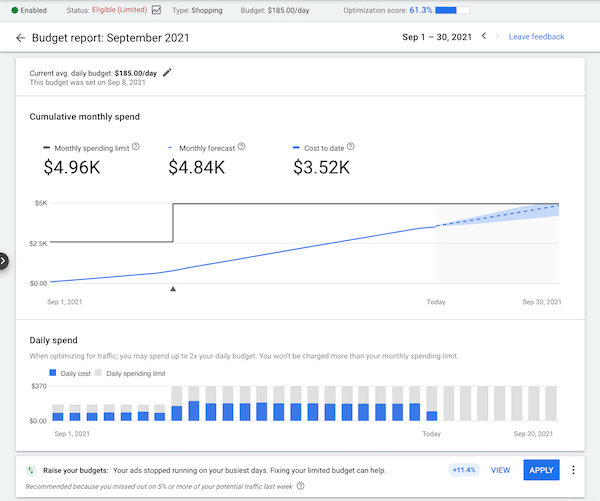 Now, let’s delve into how to access and interpret this report, focusing on your Google Ads budget pacing.
Accessing the Google Ads Budget Report
The budget report is unique for each campaign within Google Ads (applicable only to campaigns utilizing the daily average budget). There are multiple ways to access it. You might need to switch from the summary view to the detailed view under Tools & settings for each method.
- From the campaigns tab: Choose a campaign with a date range encompassing the current month. Hover your cursor over the budget in the campaign’s budget column or click the pencil icon. Besides modifying your average daily budget, you’ll also find a link to the budget report.
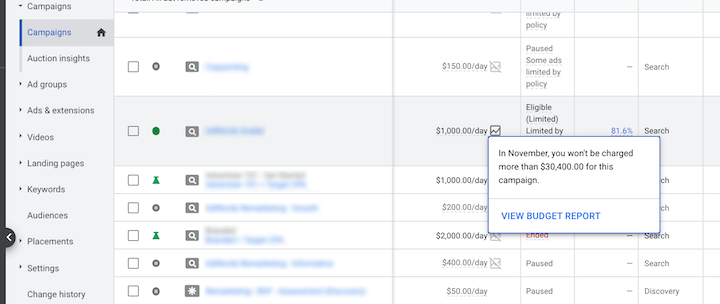
- From the shared library: Go to Tools > Shared Library > Shared budgets. Repeat the previous step—hover over the budget or click the pencil icon to adjust the budget or access the budget report link.
- From the ad groups page: In the left-hand tabs, select Ad groups, then choose an ad group, and follow the same process.
As a reminder, you can also analyze your competitors’ advertising strategies using the Google Ads library.
Utilizing the Google Ads Budget Report
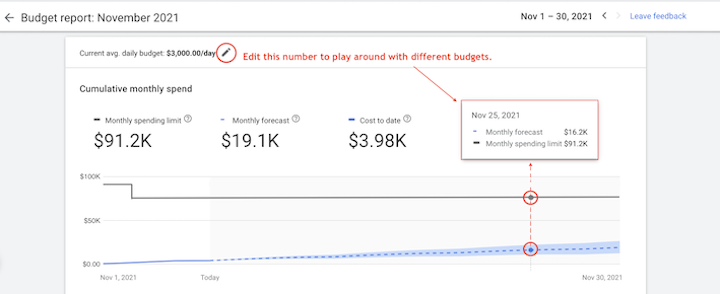
This report illustrates how modifications to your average daily budget have influenced (or are projected to influence) your performance and spend limits. It also projects your anticipated end-of-month expenditure. The report comprises two sections: cumulative monthly spend and daily spend.
Analyzing the Cumulative Monthly Spend Section
This section presents:
- Monthly spending limit: This figure represents the maximum amount you’ll be charged for a campaign within a month. It’s calculated by multiplying the campaign’s average daily budget by 30.4 (average days in a month). Monthly spend limits were introduced in June 2021. More information can be found here.
- Monthly forecast: This is the projected spending based on your average daily budget.
- Cost to date: This reflects the total expenditure incurred in the current month.
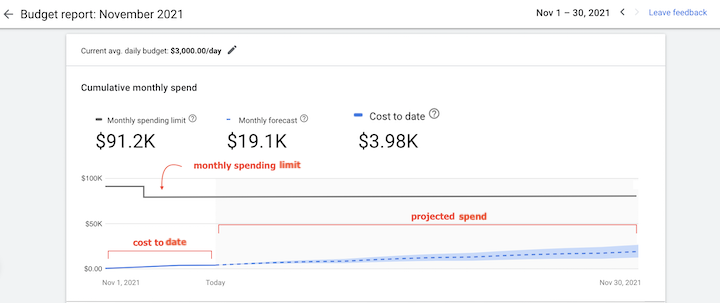 Hovering over the graph lines reveals specific details for each day.
Spend for a past day:
Hovering over the graph lines reveals specific details for each day.
Spend for a past day:
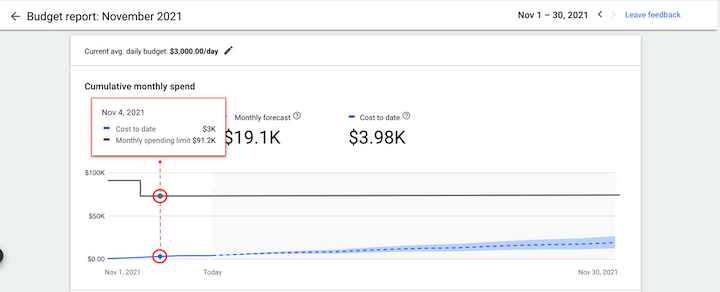 Spend for a future day:
Observe how you can modify the budget amount to understand how budget adjustments might affect your campaign’s spending limits.
Spend for a future day:
Observe how you can modify the budget amount to understand how budget adjustments might affect your campaign’s spending limits.
The Daily Spend Section
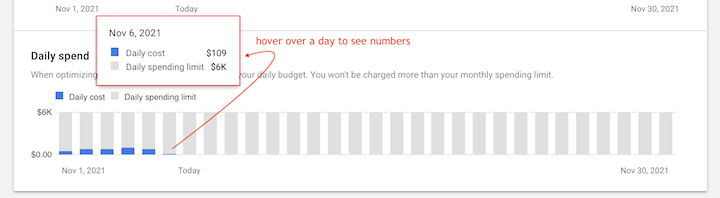
This section visually represents your daily average budget utilization. You can observe:
- Daily budget expenditure patterns.
- How adjusting your average daily budget has impacted (or is projected to impact) your campaign performance.
Understanding Served Costs, Billed Costs, and Monthly Spending Limits
While Google’s help page on spending limits offers a comprehensive explanation, here’s a concise overview of the differences between served and billed costs and their connection to monthly spend limits.
- Served cost: Reflects the cost of all clicks and impressions associated with a campaign.
- Billed cost: Represents the actual amount you’re responsible for paying. This figure accounts for adjustments related to factors like invalid activity.
- Served costs may surpass monthly or daily spending limits. However, you’ll never be charged more than your set limits. Google covers any costs exceeding your monthly spending limit (which might occasionally happen due to delayed detection).
 Want more Google Ads budgeting tips?
 Establishing Your Initial Google Ads Budget
If this article caught your attention, you’re likely budget-conscious and aiming to maximize your Google Ads returns. Let’s explore tips and strategies to achieve your desired Google Ads budget report outcome.
When starting with Google Ads or revamping your existing strategy, establishing a sensible budget is crucial. But how do you determine a suitable monthly, weekly, or even per-click budget?
Our Google Ads budget guide offers a comprehensive breakdown, but here are four fundamental questions to guide you toward a workable budget:
- How does Google Ads align with your current marketing plan? Will your Google Ads complement existing efforts or function as an entirely new strategy? Do you already have a strong online presence?
- What are your competitors’ spending habits? Conduct a PPC competitor analysis to identify their targeted keywords. This will give you insights into potential keywords and untapped opportunities.
- What are the average cost-per-click (CPC) figures for those keywords? Utilize keyword research tools to determine the average CPC for your targeted keywords. While not providing an exact budget, this offers a general cost estimate.
- What are the industry benchmarks? Beyond keyword tools, leverage our Google Ads benchmarks reports to obtain average CPCs (and other relevant data) for your industry. This helps set realistic expectations.
- Which key performance indicators (KPIs) are most important to you? While cost per conversion is universally crucial, considering your unique goals and metrics is vital. For instance, what are your target sales or lead generation figures? Examining goals from other marketing channels might provide clarity.
For a deeper dive, explore our Google Ads budgeting strategies, which cover various pros, cons, and expert tips.
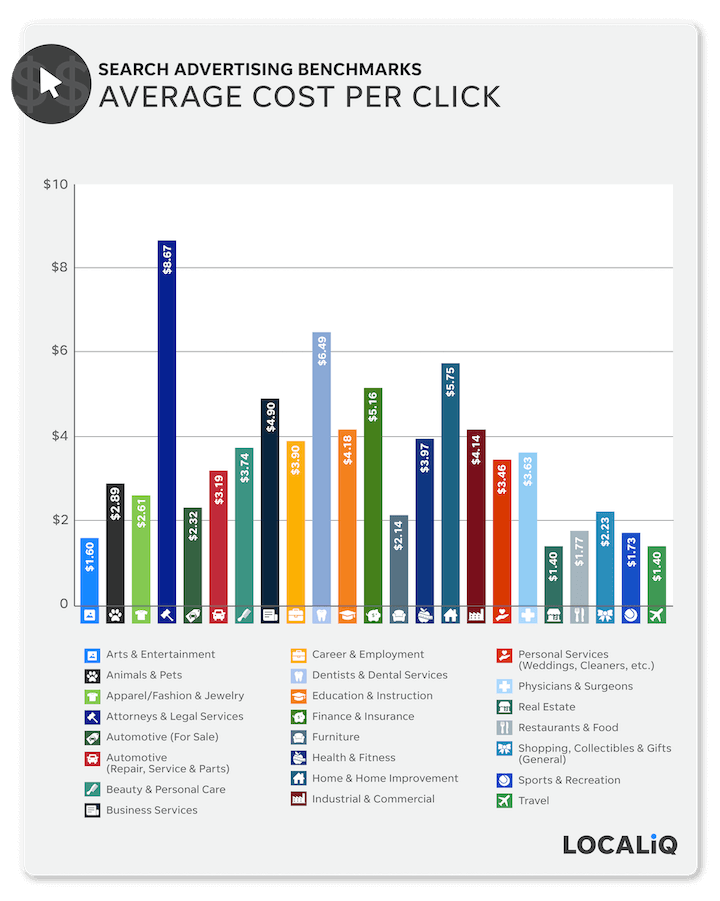
Benchmark reports like this can offer insights into expected costs.
Optimizing Your Budget for Maximum Returns
Once you’ve established your budget, the next step is ensuring you’re extracting maximum value from every dollar spent. Here are some effective strategies.
1. Implementing Effective Bidding Strategies
Google Ads offers numerous automated bidding strategies to optimize your budget. The challenge often lies in setting and adjusting those bids, especially if math isn’t your forte. Follow these steps to set initial Google Ads bids and determine your optimal cost-per-acquisition (CPA).
- Utilize Google’s bid recommendations provided in the Keyword Planner.
- Target a position slightly below the highest ranking.
- Employ third-party tools to analyze your competitors’ bidding strategies.
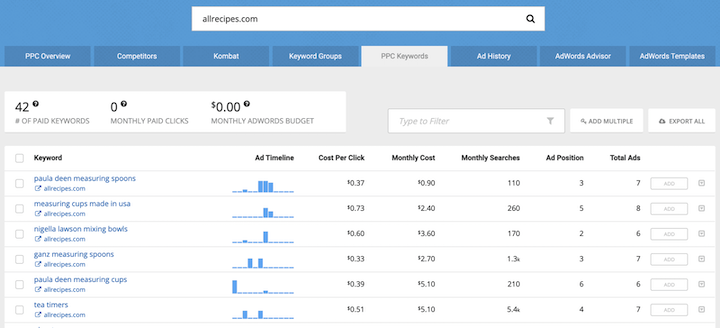
- Let your keyword-level CPAs guide your bid adjustments.
- Leverage bid management scripts.
For a comprehensive understanding of these strategies, refer to our resource: “Easy Google Ads Bidding Strategies for Beginners & Those Who Dislike Math.”
2. Distributing Your Budget Across Keyword Types
Keywords in your Google Ads campaigns can be categorized into five types: research, branded, competitor, high-intent, and top performers. Consider these fundamentals when allocating your budget:
- Allocate the majority of your budget towards high-intent keywords, including branded terms.
- Top-of-funnel keywords can deplete your budget rapidly. Explore more cost-effective methods for broad audience reach, such as Display ads.
- Adjust budget allocation weekly to ensure optimal return on investment (ROI).
Our aforementioned Google Ads budget guide elaborates on each of these tips.
3. Identifying and Plugging Spending Leaks
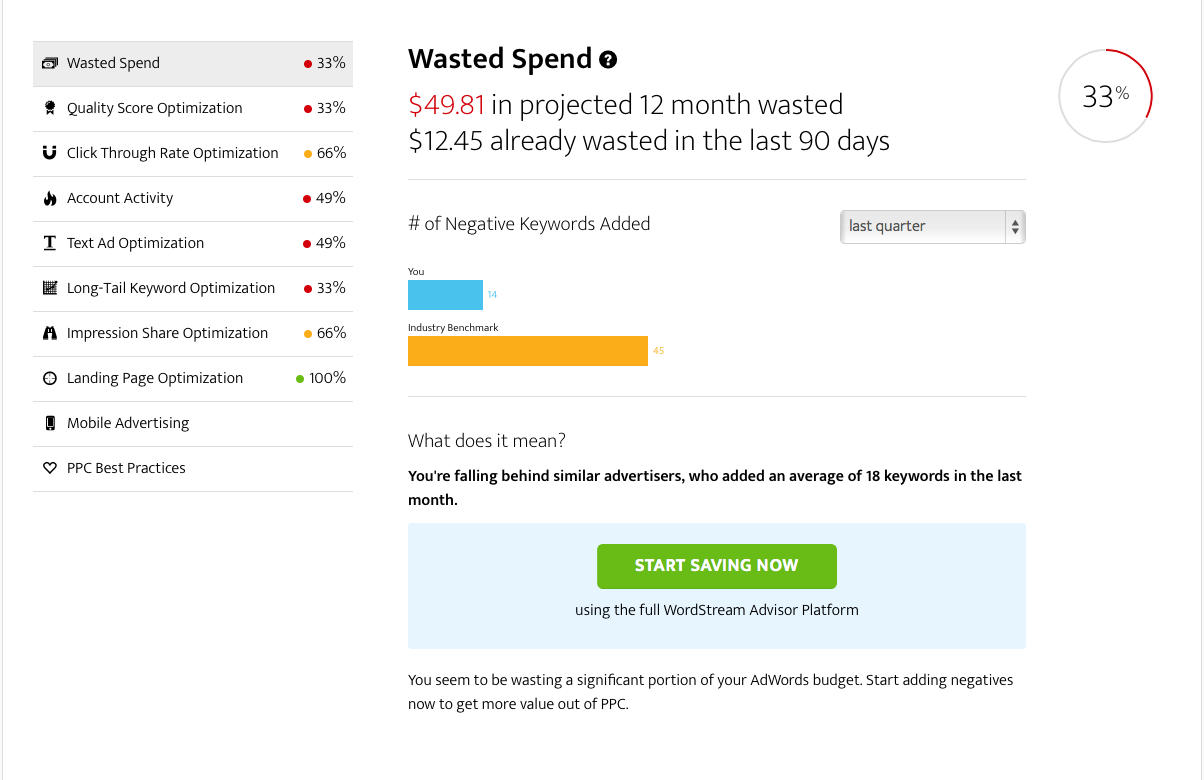
Our frequent calls to action highlighting the Google Ads Grader, a tool designed to pinpoint wasted spending and other inefficiencies, underscore our commitment to helping businesses optimize their Google Ads budgets. While most of our Google Ads articles touch upon this goal, here’s a direct resource: “7 Ways to Prevent Wasting Your Google Ads Budget.” This article guides you on how to:
- Minimize click fraud.
- Prioritize buyer intent.
- Strategically bid on branded keywords.
- Exercise caution with broad match keywords.
- Leverage negative keywords.
- Set realistic expectations and aim for sustainable growth.
- Continuously measure and analyze results.
Utilize our Google Ads Performance Grader to identify and address areas of wasted spending.
4. Adopting the Habits of Successful Advertisers
Generally, larger budgets tend to yield better results compared to smaller budgets. However, this isn’t solely because of the larger budget itself. Having more at stake compels larger advertisers to be more proactive and strategic in managing their accounts. Our article “How to Compete with Big Spenders in Google Ads (Without Spending More)” outlines how to achieve better results without increasing your budget by focusing on:
- Implementing conversion tracking.
- Creating dedicated landing pages.
- Writing compelling ad copy with captivating headlines.
- Utilizing ad extensions.
- Leveraging negative keywords.
- Improving your Quality Score.
- Maintaining and optimizing your campaigns regularly.
5. Exploring Lesser-Known Optimization Techniques
Don’t limit your budget optimization efforts to common best practices alone. Continuously seek out and experiment with new tips and tricks, such as those outlined in “4 Google Ads Optimizations to Stretch Your Budget Further”:
- Discard vanity metrics and concentrate on truly impactful data.
- Utilize the custom “Impression to Conversion” (ITC) column to swiftly identify high-performing ads.
- Incorporate more long-tail exact match keywords to boost conversion rates.
- Leverage In-Market Segments within Google Analytics to pinpoint audiences with higher conversion potential.
Mastering Your Google Ads Budget
Overcoming budget challenges in Google Ads is achievable. Armed with the Google Ads budget report and these strategies for determining, setting, and maximizing your budget, you can make every dollar count.