Not many developers had attempted it before (check this out](https://en.wikipedia.org/wiki/Nokia_9000_Communicator)), but Apple, with the launch of the original iPhone, established the blueprint for both Smartphone design and mobile operating systems. Apple achieved a remarkable feat in both hardware and user experience. It’s easy to overlook, however, that they also set the gold standard for mobile OS functionality and Smartphone application development.
Creating strict boundaries between applications, ensuring they were fully isolated and unaware of each other, was deemed the most effective way to maintain security and data protection. iOS maintained tight control over all activities, and apps had very limited capabilities outside their designated sandbox.
“The safest approach is complete separation!” - but where’s the excitement in that?
It took some time - too long, in my opinion - but with iOS 8, Apple decided to inject some fun. This release introduced a novel concept: App Extensions. This new feature didn’t completely demolish the walls between applications, but it did open a few doors, allowing for controlled yet tangible interaction between them. The latest update has empowered iOS developers with the ability to tailor the iOS ecosystem, and we are excited to witness how this evolves.
Understanding iOS 8 App Extensions and Their Functionality
In essence, iOS 8 App Extensions provide a new way to interact with your application without needing to launch it or display it on the screen.
As anticipated, Apple maintains strict control, offering only a limited number of entry points for your application:
- Today (also known as a widget) - This extension, appearing in the Notification Center’s Today view, presents concise information and facilitates quick actions.
- Share - This extension empowers your app to share content with users on various social networks and sharing platforms.
- Action - This extension enables the creation of custom action buttons within the Action sheet, allowing users to view or modify content originating from a host app.
- Photo Editing - This extension allows users to directly edit photos or videos within the Photos app.
- Document Provider - This extension grants other apps access to documents managed by your application.
- Custom Keyboard - This extension offers the ability to replace the default system keyboard.
App extensions are not independent applications. They provide supplementary functionality to an app (accessible from other apps, referred to as host apps) and are designed for efficiency and a singular focus. They possess their own binary, code signature, and set of elements but are distributed through the App Store as an integral part of the containing app’s binary. A single (containing) app can have multiple extensions. Upon installation of an app with extensions, those extensions become available throughout iOS.
Let’s illustrate with an example: A user browsing a picture in Safari taps the share button and selects your application’s sharing extension. Safari communicates with the iOS Social framework, which proceeds to load and present the extension. The extension’s code executes, transferring data via the system’s communication channels. Once the task is complete, Safari closes the extension view. Shortly after, the system terminates the process. Notably, your application never appeared on the screen yet successfully executed the picture-sharing function.
iOS, leveraging inter-process communication, takes responsibility for seamless interaction between the host app and the app extension. Developers work with high-level APIs provided by the extension point and the system, eliminating the need to delve into the complexities of underlying communication mechanisms.
Life Cycle
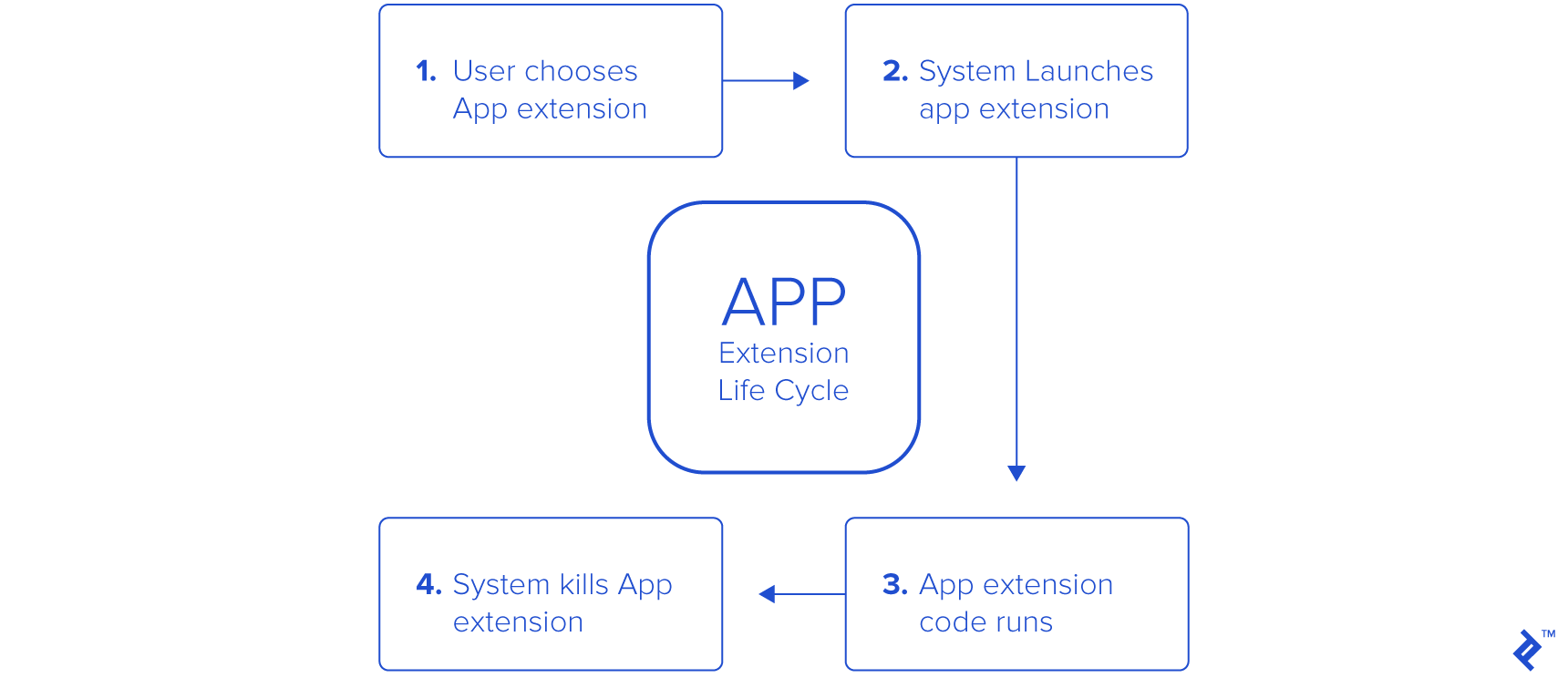
App Extensions follow a different life cycle compared to standard iOS apps. A user action within a host app triggers the extension’s life cycle. The system then instantiates the app extension and establishes a communication channel between them. The extension’s view is rendered within the host app’s context, utilizing items included in the host app’s request. Once visible, the user can interact with the extension’s view. Based on user interaction, the extension fulfills the host app’s request by either instantly performing/canceling the task or, if needed, initiating a background process. The host app then removes the extension’s view, returning the user to their previous location within the host app. Results from this process may be relayed back to the host app upon completion. Typically, the extension is terminated shortly after fulfilling the host app’s request (or initiating a background process).
In summary, a user action from within the host app triggers the extension, the extension presents its UI, carries out its function, and potentially returns data to the host app (depending on the extension type). Significantly, the containing app remains inactive while its extension operates.
Building an App Extension - A Practical Example Using the Today Extension
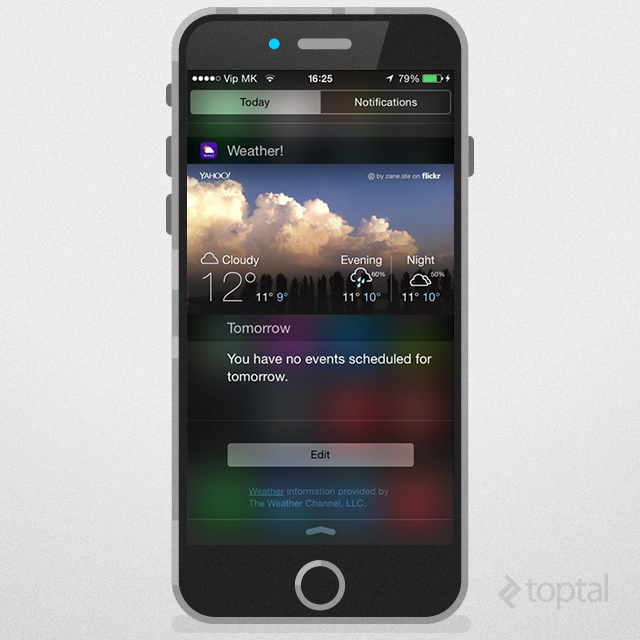
Today extensions, also known as widgets, reside in the Notification Center’s Today view. They excel at presenting up-to-date information (like weather conditions) or enabling quick actions (such as marking items as done in a to-do list app’s widget). It’s crucial to note that keyboard input is not supported.
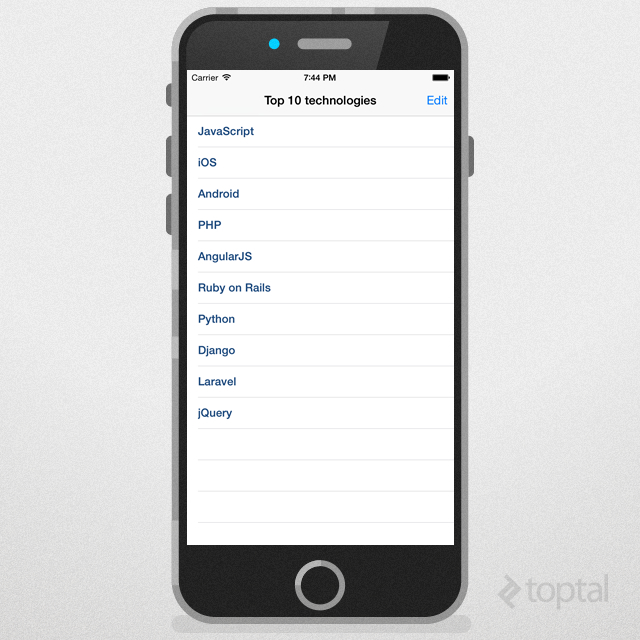
Let’s craft a Today extension that displays the latest information from our app (code on GitHub). Before running this code, ensure that you’ve (re)configured the App Group for the project (select your Development Team and remember that App Group names must be unique, adhering to Xcode’s guidelines).
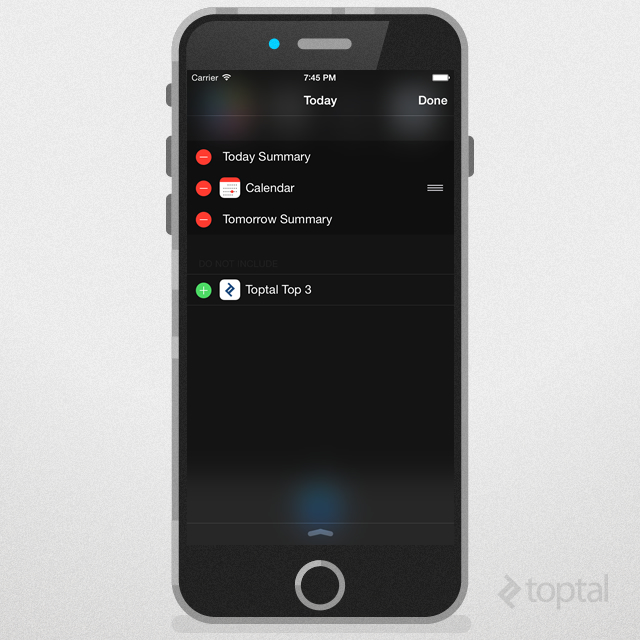
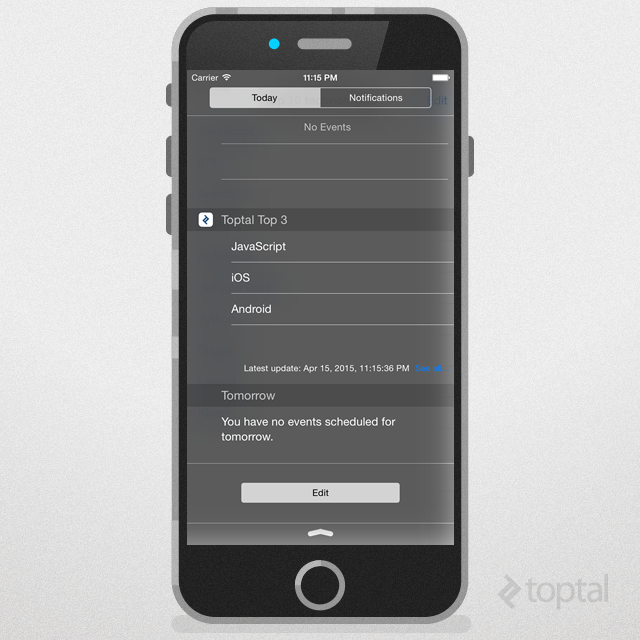
Creating a New Widget
As previously mentioned, app extensions are not standalone applications. We need a containing app upon which to build our extension. Once we have our containing app, we add a new target by going to File -> New -> Target in Xcode. We then select the Today Extension template for our new target.
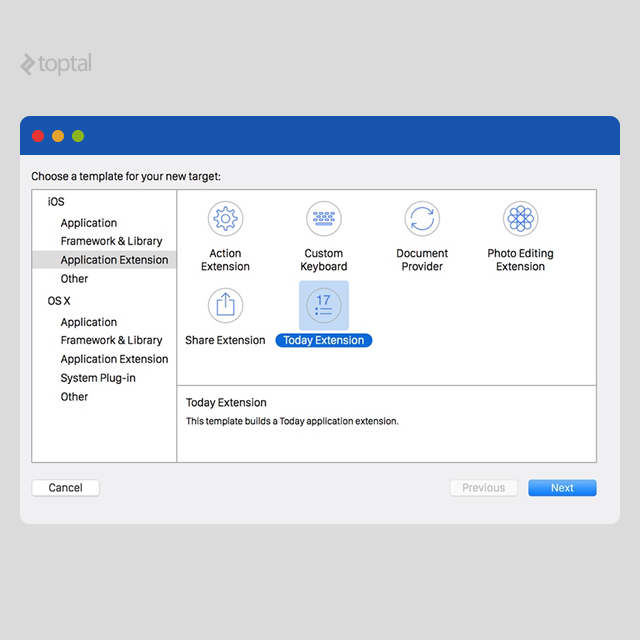
Next, we specify our Product Name, which is the name that will be displayed in the Notification Center’s Today view. We can also choose between Swift and Objective-C as the programming language. Xcode then generates a Today template, providing default header and implementation files for the main class (TodayViewController), along with an Info.plist file and an interface file (either a storyboard or .xib file). The default Info.plist file looks like this:
| |
If you prefer not to use the provided storyboard, remove the NSExtensionMainStoryboard key and add the NSExtensionPrincipalClass key, using the name of your view controller as its value.
An effective Today widget should:
- Ensure its content remains current.
- Respond appropriately to user interactions.
- Be performant (iOS widgets must be memory-efficient to avoid system termination).
Data Sharing and Shared Containers
Both the app extension and its containing app can access shared data within their privately defined shared container - an indirect communication method between them.
Apple’s knack for “simplicity” is truly remarkable, isn’t it? :)
Sharing data through NSUserDefaults is straightforward and frequently used. By default, extensions and their containing apps have separate NSUserDefaults datasets and can’t access each other’s containers. To overcome this, iOS introduced App Groups. After enabling app groups on both the containing app and the extension, use [[NSUserDefaults alloc] initWithSuiteName:@"group.yourAppGroupName"] instead of [NSUserDefaults standardUserDefaults] to utilize the same shared container.
Updating the Widget
To maintain content freshness, the Today extension provides an API for managing a widget’s state and handling content updates. The system periodically takes snapshots of the widget’s view. When the widget reappears, the latest snapshot is displayed until replaced with a live view. Conforming to the NCWidgetProviding protocol is crucial for updating a widget’s state before snapshot capture. Upon receiving the widgetPerformUpdateWithCompletionHandler: call, the widget should update its view with the latest content and call the completion handler with one of the following constants to indicate the update status:
NCUpdateResultNewData- New content requires a view redraw.NCUpdateResultNoData- The widget doesn’t need updating.NCUpdateResultFailed- An error occurred during the update.
| |
Controlling Widget Visibility
To control when a widget is displayed, use the setHasContent:forWidgetWithBundleIdentifier: method from the NCWidgetController class. This method lets you define the widget content’s readiness state. You can pass a NO or YES flag to indicate whether the content is ready. If not ready, iOS will hide the widget when the Today view is accessed.
| |
Launching the Containing App from the Widget
The Today widget is unique in that it can request the launch of its containing app by using the openURL:completionHandler: method. To ensure a contextually relevant launch, both the widget and the containing app should defined a custom URL scheme.
| |
UI Considerations
When designing your widget, utilize the UIVisualEffectView class. Remember that views requiring blurring or vibrancy effects should be added directly to the contentView, not the UIVisualEffectView. Widgets (conforming to NCWidgetProviding) should load cached states in viewWillAppear: to match the state from the last viewWillDisappear:, then seamlessly transition to new data, unlike typical view controllers (where UI setup happens in viewDidLoad and animations/data loading occur in viewWillAppear). Design widgets for single-tap task completion or launching the containing app. Keyboard input isn’t available within widgets, so avoid UI elements requiring text entry.
Implementing scrolling within a widget, both vertically and horizontally, is not feasible. While you can add a scroll view, scrolling functionality won’t work as intended. Horizontal scrolling gestures within a Today extension’s scroll view will be captured by the notification center, causing a shift from the Today view to the Notification Center. Vertical scrolling attempts will be overridden by the Today view’s scrolling behavior.
Technical Considerations
Let’s highlight key points to bear in mind when developing App Extensions:
Features Common to All Extensions
These points apply universally to all extensions:
No Access to sharedApplication Object: App extensions cannot utilize the sharedApplication object or any related methods.
Restricted Access to Camera and Microphone: App extensions lack access to the device’s camera and microphone (though this doesn’t apply to all hardware). This limitation stems from certain APIs being unavailable. Before attempting to utilize hardware within an extension, check if its corresponding API is accessible (using API availability checks, as described earlier).
Limited Background Task Capabilities: App extensions cannot execute long-running background tasks except for initiating uploads or downloads, which we’ll discuss shortly.
No AirDrop Reception: App extensions can send but not receive data via AirDrop.
Background Uploading/Downloading
The sole background task permitted is uploading/downloading using the NSURLSession object.
Once an upload/download is initiated, the extension can fulfill the host app’s request and terminate without impacting the task’s progress. If the extension isn’t running when the background task completes, the system launches the containing app in the background, and the app’s delegate method application:handleEventsForBackgroundURLSession:completionHandler: is invoked.
Apps whose extensions initiate background NSURLSession tasks must have a shared container accessible by both the containing app and the extension.
Ensure distinct background sessions are created for the containing app and each of its app extensions (using unique identifiers). This is crucial because background sessions can only be used by one process at a time.
Action vs. Share Extensions
The distinctions between Action and Share extensions might not be immediately apparent from a developer’s perspective, as they share a lot of similarities in practice. Xcode’s template for share extension targets utilizes SLComposeServiceViewController, which offers a standard compose view UI ideal for social sharing but not mandatory. Share extensions, like Action extensions, can inherit directly from UIViewController for a fully customized design, and Action extensions can also inherit from SLComposeServiceViewController.
The key difference lies in their intended use. Action extensions can be built without a UI (e.g., an extension that translates selected text and returns the translation to the host app). Share extensions, on the other hand, are specifically designed for sharing content like comments, photos, videos, audio, links, and more directly from the host app. Both are driven by UIActivityViewController, with Share extensions presented as colored icons in the top row and Action extensions as monochrome icons in the bottom row (Image 2.1).
Forbidden APIs
APIs marked with NS_EXTENSION_UNAVAILABLE or similar unavailability macros in the header files are off-limits (for instance, HealthKit and EventKit UI frameworks in iOS 8 are unusable within app extensions).
When sharing code between an app and an extension, referencing an API prohibited for the extension will lead to App Store rejection, even if the containing app can use it. You can address this by restructuring shared classes into hierarchies, with a common parent and specialized subclasses for different targets. Another approach is to utilize the preprocessor with #ifdef checks. Since built-in target conditionals are absent, you’ll need to define your own.
Creating your own embedded framework is another viable solution. Ensure it doesn’t include any APIs inaccessible to extensions. To configure an app extension to use an embedded framework, navigate to the target’s build settings and enable the “Require Only App-Extension-Safe API” setting. When setting up the Xcode project, choose “Frameworks” as the destination for the embedded framework in the Copy Files build phase. Selecting “SharedFrameworks” will result in App Store rejection.
A Note on Backward Compatibility
While app extensions were introduced in iOS 8, you can still make your containing app available for earlier iOS versions.
Apple Human Interface Compliance
Adhere to Apple’s iOS Human Interface Guidelines when designing your app extension. Guarantee that your app extension is universal regardless of the devices your containing app supports. For universal app extension compatibility, utilize the targeted device family build setting in Xcode, specifically the “iPhone/iPad” value (also known as universal).
Conclusion
App extensions undoubtedly represent one of the most significant additions to iOS 8. With 79% of devices already running iOS 8 (based on App Store data as of April 13, 2015), they offer invaluable capabilities that apps should leverage. By striking a balance between API restrictions and data sharing mechanisms between extensions and their containing apps, Apple seems to have addressed a major platform criticism without compromising its security model. Direct data sharing between third-party apps remains restricted. While still in its early stages, this concept holds immense promise.