The landscape of software development has undergone a significant transformation over the past two decades. Software complexity has surged, development teams are now frequently dispersed globally, and specialization within the development process has become the norm. Additionally, the importance of UI/UX has grown as competition for user acquisition and retention intensifies.
In my recent experience working on numerous projects, the use of a project management tool (PMT) has become almost universal. Rather than promoting a specific tool, this article aims to provide a developer’s perspective on how these tools function in real-world scenarios, along with an examination of two popular options. My hope is that this information will assist both decision-makers and developers in determining the most suitable tool for their team, project, and individual needs.
Why Use a Project Management Tool?
When I began my career, project management tools were not as prevalent. This might lead you to question their necessity. Can’t developers simply create software without them? The answer is multifaceted and depends on various factors, which we’ll delve into below.
The Rise of Global Teams
In today’s interconnected world, it’s common to work with individuals scattered across the globe. While enriching, this presents unique challenges compared to traditional office-based teams. Time zones, for instance, can become major obstacles when seeking assistance or collaboration on specific system components.
Furthermore, there are instances where direct communication with fellow developers might be limited to once or twice a week. Project management tools help streamline these collaborative processes by serving as a central and often primary communication hub for team members to convey their needs and updates.
Beyond communication between individual team members, PMTs enhance transparency and information sharing. All team members gain visibility into project progress, enabling better coordination and activity planning.
Streamlining Collaboration
You might believe that similar results can be achieved through email or other communication channels. However, based on my personal experience with a client who relied solely on email, this approach can quickly devolve into chaos. Multiple email threads, fragmented communication about single issues, and conversations spanning various topics make it incredibly challenging to track progress and outstanding tasks.
Project management tools address this by dedicating a single conversation thread to each issue. This centralized approach simplifies information retrieval, as designs, APIs, feedback, and all relevant details become accessible with a single click. From a collaborative standpoint, this is transformative. PMTs empower everyone with access to all project segments and stages, minimizing the need for constant updates and communication.
Managing Project Requirements
One significant challenge faced by teams that forego project management tools stems from the dynamic nature of software development. Startups, in particular, often pivot multiple times, and project goals and requirements tend to evolve throughout the development lifecycle.
Software, in this sense, is akin to a living organism. Regardless of the initial plan’s robustness, change is inevitable. The problem arises when these changes aren’t effectively communicated to all team members. Executives might decide on a new feature to outmaneuver competitors, but without proper dissemination through a manager to the development team, it’s likely to be overlooked.
Without a centralized system of record, these verbal agreements can even slip the minds of managers and CEOs. Lacking a single source of truth for the latest and official requirements inevitably results in wasted time and resources. PMTs provide this central repository, ensuring that all requirements and information are documented and accessible throughout the project’s duration. This isn’t limited to just new features; I’ve personally invested effort in developing entire features only to discover later that they were no longer a project priority.
Memory and Time Efficiency
“The palest ink is more reliable than the most powerful memory.” – Proverb
Our cognitive capacity is finite. When bombarded with information during meetings, such as a manager outlining a dozen issues, details are bound to be missed. Even with diligent note-taking, some crucial points might slip through the cracks.
Documenting requirements rather than relying solely on verbal communication during calls helps identify potential gaps in logic or roadblocks early on. Software development is rarely linear. You might start working on a feature, only to be pulled into a more urgent task and return weeks or months later, struggling to recall the specific requirements.
Having written requirements saves time by serving as a reminder and eliminating the need to revisit discussions. This time efficiency is invaluable, especially as software complexity increases. With documented requirements, meeting times can be significantly reduced by focusing solely on clarification and resolving ambiguities.
Enhanced Focus
This point builds upon the previous one regarding tracking issue-related communication and staying informed about future requirements without constant verbal exchanges.
This benefits developers by allowing them to concentrate on current tasks while staying aware of upcoming priorities. It’s not merely about convenience and easy access to information; this enhanced visibility empowers each team member to grasp the broader project context and plan their work effectively.
Key PMT Features
In essence, an ideal PMT streamlines communication by organizing discussions around specific issues. It facilitates collaboration across time zones and teams while serving as a central repository for the official software vision. This focus on organization, communication, and documentation minimizes friction in the development process, benefiting developers, project managers, and all stakeholders involved in modern software development.
Jira
Jira is a powerful PMT specifically designed for software development. However, its extensive features can be overwhelming for those unfamiliar with the platform, such as a business owner embarking on their first project. If you’re considering Jira but lack prior experience, I recommend starting with some tutorials to unlock its full potential.
Sprints
Much of my experience with Jira revolves around the concept of sprints. A sprint is a defined timebox during which the team concentrates on completing a set of related or independent goals. Jira sprints are highly flexible and typically span one week, which I find to be the optimal duration.
From a developer’s perspective, this structure allows for flexibility in task management. Developers can choose to tackle tasks in an order that suits them, such as alternating between challenging and easier tasks or grouping related ones together. This empowers developers with a degree of autonomy while ensuring timely delivery.
Jira Epics and Issues
While sprints organize tasks chronologically, epics group them thematically. For instance, you can structure sprints weekly while simultaneously categorizing tasks into front-end and back-end epics. Assigning developers based on subject matter within epics promotes efficiency.
For example, an epic dedicated to migrating data from a legacy database, aptly named “DB Migration,” allows a single developer to take ownership throughout the project. This focused approach avoids redundant efforts and knowledge duplication, as multiple developers won’t need to invest time understanding the old database.
Issues, on the other hand, represent individual work items that need to be addressed. Issues belong to both an epic and a sprint. Jira offers various issue types, including stories, tasks, and bugs. Stories are unique in that they can be broken down into subtasks, providing a hierarchical structure for managing complex work items.
Tasks, in contrast to stories, are highly specific and self-contained. They represent straightforward work items that don’t require further decomposition. Bugs, as the name suggests, are defects that need fixing. Maintaining a separate category for bugs provides visibility into the amount of effort dedicated to bug fixing versus new feature development.
Prioritization
Effective communication is paramount when working with geographically dispersed teams spanning multiple time zones. Conveying task priority effectively can be particularly challenging. Consider a scenario using a simple to-do list:
A developer is presented with seven tasks for the week, some complex, others straightforward. However, one critical task, from the manager’s perspective, is highly intricate. Without a clear indication of priority, the developer might prioritize easier tasks, leaving the critical one for last. Should unexpected delays occur, this crucial task might get pushed back or rushed, potentially compromising quality.
Jira addresses this through its priority system. This feature allows managers to explicitly communicate task urgency to developers, ensuring that critical items receive appropriate attention.
Content, Content, Content
One of Jira’s standout features is its ability to accommodate a wealth of information within each issue. Users can embed images, links, attachments, and tag relevant team members. While Trello offers similar functionality, Jira’s interface encourages comprehensive documentation, resulting in more data-rich tasks.
The Pros and Cons of Jira
Jira is a mature and widely adopted PMT with a rich feature set tailored for software development. It offers extensive integration options with other systems and excels at keeping projects organized. It’s particularly well-suited for large teams and projects.
However, Jira’s comprehensive nature can be intimidating for newcomers. The abundance of features, including sprints, epics, and various issue types, can feel overwhelming, especially if the project manager is a client with limited software development experience.
I highly recommend Jira for large, long-term projects (spanning several months or more) with experienced managers and developers.
Pros
- Specifically designed for software development
- Rich issue details with support for links, images, and attachments
- Mobile app with notifications for constant task awareness
- Native integration of sprints into the workflow
- Intuitive task filtering for focused task management
Cons
- Steep learning curve due to the wide array of features
- Potential for underutilization if not fully leveraged
- Familiarity with Agile development methodologies recommended
- May be overkill for small teams and projects
Trello
Trello can be succinctly described as “boards with cards,” also known as Kanban. At first glance, it might appear deceptively simple, but its strength lies in its elegance.
Simplicity is a powerful concept. It’s one of the reasons behind the widespread popularity of iPhones and Macs—their operating systems are intuitive and enjoyable to use. While Jira offers a seemingly endless array of features, Trello provides just enough to get the job done. No epics, stories, or sprints; just cards moving across columns representing different stages.
While these concepts are present in Jira, they are presented in a more streamlined manner within Trello. Let’s explore some of Trello’s standout features.
Stages
Defining stages in Trello is incredibly straightforward. Simply create a column and assign it a purpose. Common stages include “To Do,” “Doing,” “Review,” and “Done.” Trello’s flexibility allows for customization with additional columns like “On Hold” (a feature Jira also offers, but it’s less prominent) or stage-specific columns like “Todo Front-end” and “Todo Back-end.”
This simplicity makes Trello ideal for small teams and projects such as websites, widgets, or extensions, where the number of tasks and team members is manageable.
Members
Assigning tasks to developers in Trello is as simple as assigning a card to a team member. You can also tag members in comments, ensuring that everyone involved in an issue stays informed.
Trello’s filtering capabilities are also noteworthy. With a single click, users can view cards assigned to them or other team members, which is especially useful in the Calendar view.
Visual Clarity
Trello’s inherent simplicity keeps the Kanban board front and center. This visual approach ensures that the project’s progress is always visible. Additionally, cards can display images directly on the board.
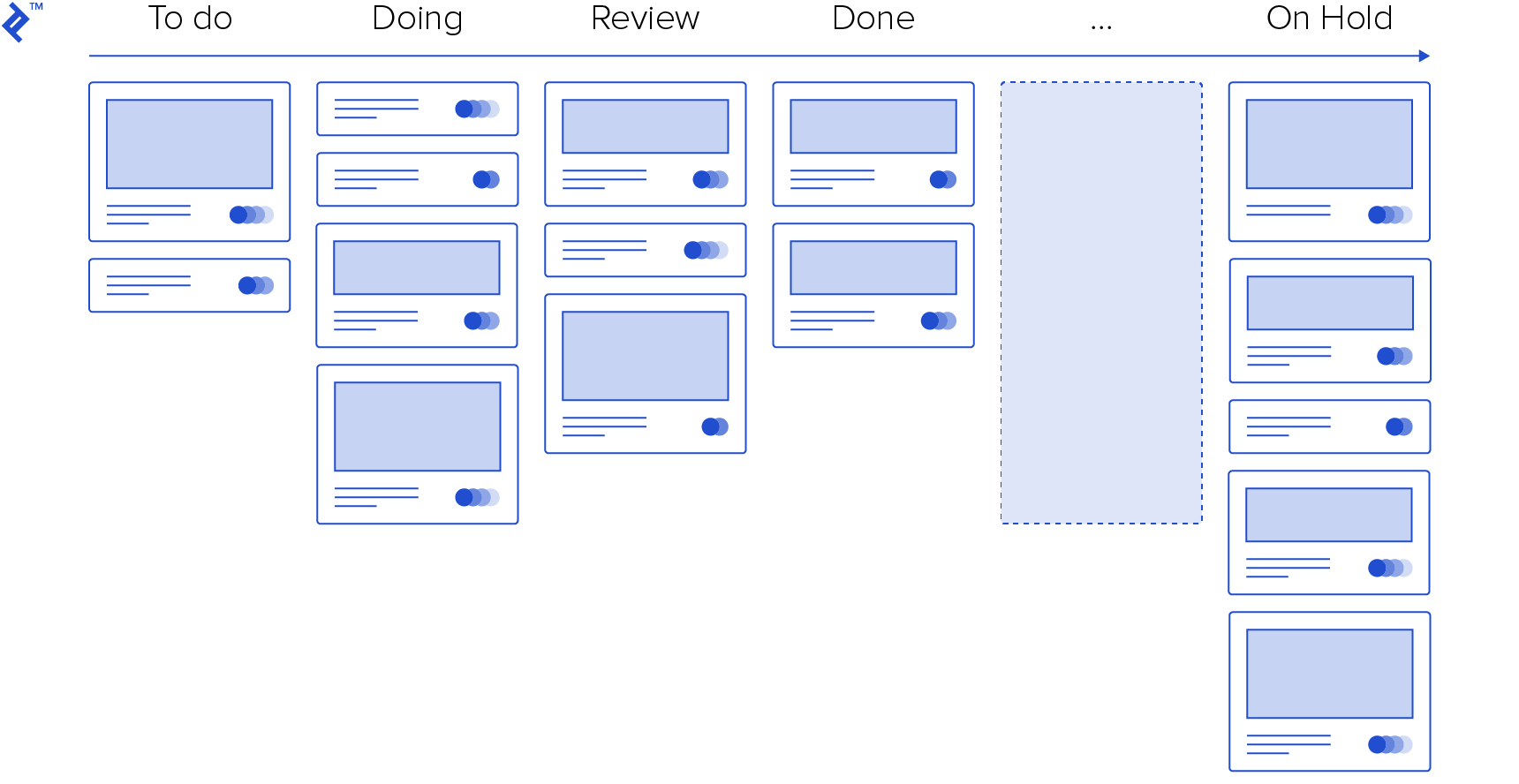
This visual emphasis, a feature not as prominent in Jira, leverages the power of images to convey information quickly. With a well-organized board, users can grasp the project status at a glance without having to delve into individual cards.
Trello’s colorful tags provide another layer of visual organization, conveying additional information without requiring users to expand cards. These digital equivalents of Post-It notes, when used effectively, can streamline workflow and reduce unnecessary clicks.
Combating Information Overload
Trello’s minimalist design encourages conciseness and clarity, mitigating the feeling of information overload. In contrast to platforms that inundate users with notifications for every project activity, Trello maintains a sense of focus.
My experience suggests that Trello’s streamlined approach leads to smaller, more manageable tasks compared to Jira. With proper planning, these granular tasks contribute to a less overwhelming workflow.
Gamification
Gamification involves incorporating game-like elements into non-game contexts to increase engagement. The underlying principle is that “difficulty doesn’t put you off if it’s supplemented with rewards,” as highlighted in this article on the Trello Blog.
Trello’s drag-and-drop interface for moving cards between stages subtly taps into this concept. This physical action of dragging a card to a new stage triggers a sense of accomplishment, akin to completing a level in a game. This can motivate users to tackle more tasks or strive to clear their “To Do” column as quickly as possible. This action-reward mechanism is similar to the “likes” and “views” that drive engagement on social media platforms.
The Good and the Bad
Trello’s intuitive design and inherent simplicity make it a joy to use. Completing tasks, even if they’re small, feels rewarding. Moving three cards to “For Review” in Trello feels more satisfying than marking a single Jira story as “Done,” even though the workload might be comparable. (In my estimation, one Jira story often translates to roughly three Trello cards.)
This low barrier to entry makes Trello an excellent choice for novice developers or business owners. However, its lightweight nature might not be suitable for large, complex projects or teams. While Trello allows for multiple boards, managing a large development team within a single board can become unwieldy. It lacks the robust shared workspace capabilities of Jira.
Pros
- Easy to learn and use, even without prior experience
- Clean and intuitive user interface
- Highly visual, providing a clear overview of project progress
- Ideal for small teams and projects
Cons
- Limited space for detailed issue descriptions
- Mobile experience hindered by the need to display the Kanban board effectively
- Lacks intuitive task prioritization features
Should I Use a Project Management Tool?
Given the prevalence of remote work and the need for asynchronous communication, I firmly believe that project management tools are essential for most software development projects. They provide a centralized platform for documenting requirements, tracking progress, and ensuring that everyone stays informed. This is crucial for preventing miscommunication and missed deadlines that can arise from relying solely on verbal agreements or scattered email threads. For smaller, personal projects, a dedicated PMT might be overkill.
Which One Should I Use?
The best tool is the one that aligns most closely with your specific requirements. For teams larger than four people embarking on a project spanning more than a year, Jira is the recommended choice. However, it’s essential to invest time in understanding Jira’s features and software development methodologies to maximize its effectiveness.
If you have a smaller team and a simpler project, such as a website or adding features to an existing application, Trello’s simplicity shines. Ultimately, both tools can get the job done, but the optimal choice depends on the context of your project and team dynamics.