Many companies struggle to understand paid marketing on Twitter. It’s not a simple process, and without a clear understanding, businesses risk wasting significant funds.
It may seem obvious, but when creating your Twitter ad strategy, keep your goals in focus. While it’s tempting to mimic the approach of attention-seeking teenagers by pleading for retweets, follows, and engagement, this strategy often lacks a clear return on investment. You might find yourself asking, “Where’s the ROI?” This article will demonstrate how to achieve a tangible return on your Twitter ad investment.
Leads vs. Engagement
Effective lead generation through Twitter ads hinges on strategy. Those “desperate for attention” ads prioritize engagement metrics, seeking interaction as a measure of success. These ads can drive significant user interaction and bolster brand awareness. However, they lack a direct connection with potential customers interested in your offerings. These tweets won’t instantly expand your database or provide a “direct” return on investment. If your aim is to bypass traffic and brand engagement strategies and directly target leads, this article will guide you on using Twitter for direct response purposes. (It’s worth noting that even lead generation campaigns indirectly contribute to engagement and brand awareness.)

Understanding Twitter Ads
To illustrate the recommended strategies, let’s briefly delve into how Twitter’s ad platform functions. For beginners, start by selecting “Create a new campaign.” Twitter presents a range of campaign types:
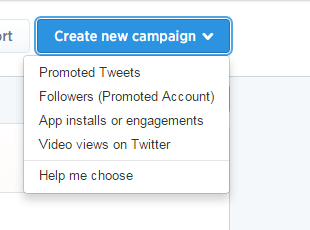
For the purpose of this strategic guide, we’ll focus solely on campaign types suitable for lead generation. The recommended choices are Promoted Tweets and Video views (unless you have an app, in which case select that option). Promoted Tweets are the staple of Twitter ads; you promote tweets that are evaluated and priced based on user engagement, encompassing:
- Follows
- Favorites
- Clicks
- Retweets
- Replies Video ads differ by promoting a video and incurring charges solely based on video “plays.” This advantage will be explored further later.
Targeted Twitter Ads for Lead Generation: Targeting and Pricing
A successful lead generation campaign on Twitter relies heavily on precise targeting and subsequent pricing strategies. Twitter ads excel in targeting capabilities, allowing you to pinpoint your ideal user segment. After confirming location and language settings, you can refine your audience through keywords, handles, and interests. For industries with active social media discussions where your target audience engages with topics related to your products or services, keyword targeting proves beneficial. For instance, if there’s an upcoming industry event or convention generating buzz among potential customers on Twitter, keyword targeting is highly effective. In other scenarios, targeting handles is recommended. Handles are the “@username” identifiers on Twitter. This targeting option enables you to display your promoted tweets to followers of specific Twitter handles.
The Correlation Between Engagement and Cost
You might be tempted to select as many relevant handles as possible for your target audience. However, this approach can quickly deplete your budget without yielding significant conversions. Twitter’s promoted tweets ad format analyzes your selected target audience, assessing its size and composition, and then generates data based on estimated bids from other advertisers targeting the same individuals. This is where things get a bit intricate. The level of engagement your ads receive directly influences the cost per engagement. High engagement rates can significantly reduce your bid and result in lower costs compared to your competitors. Therefore, focus on targeting individuals highly likely to engage with your offer. Remember that engagement rate (engagements/impressions) is crucial to your tweet’s performance. This explains the prevalence of those “attention-grabbing” ads. A low engagement rate (below 0.60%) can lead to Twitter halting your ad’s impressions. The platform perceives low engagement as irrelevant content and pulls the plug. Think of engagement rate as the Quality Score for Twitter ads. Additionally, refresh your tweets every 2-3 days when managing your ads. This ensures continued ad visibility on Twitter, as ads with prolonged inactivity may stop showing regardless of engagement.
Twitter Ads for Lead Generation: Choosing the Right Format
Twitter offers several creative options for generating leads:
- Website Cards
- Lead Gen Cards
- Promoted Video ads
- Promoted Tweets with a link and image Two common questions about Twitter cards are: “What’s the difference between website cards and lead gen cards?” and “What exactly are they?” Called “Cards” due to their visual element that enhances visibility in a targeted user’s Twitter feed, these ads combine aspects of text and banner ads. There are key distinctions between Twitter Lead Generation Cards and Website Cards. The first lies in image dimension requirements. Lead Gen Cards feature an 800 X 200 pixel image, while Website Card images measure 800 X 320:
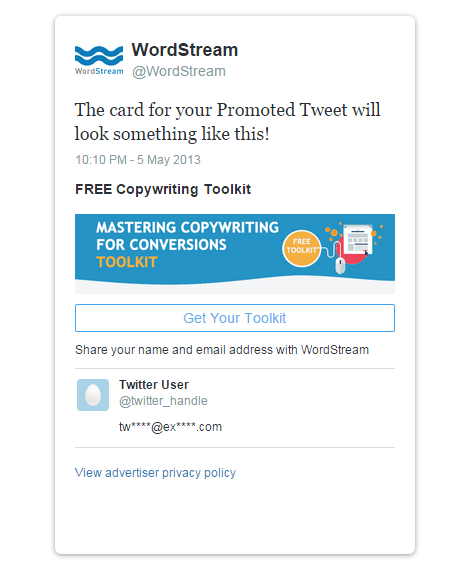
Example of a Twitter Lead Generation Card
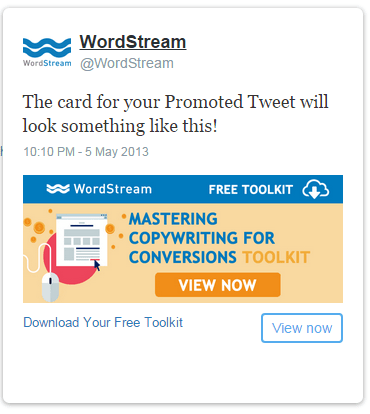
Example of a Twitter Website Card Another difference is the call to action. Lead Gen Cards allow for customizable calls to action, enabling you to attract potential leads with personalized messages. Website Cards lack this creative freedom, offering only a predefined selection of CTAs:
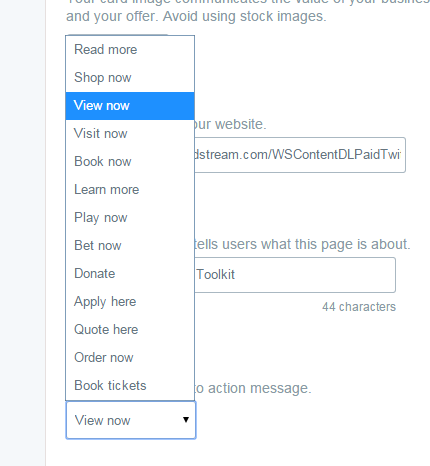
Beyond appearance, the primary difference lies in functionality and user interaction. Lead Gen Cards describe your offer, and upon clicking the CTA, Twitter requests user permission to share their handle, name, and email address. With consent, the data is stored, and the user is redirected to a landing page of your choice. Website Cards simply require a CTA click to direct users to a landing page. While Website Cards don’t capture user information, they remain a viable option. Lead Gen Cards are suitable for collecting names and email addresses, such as for opt-in newsletters. Conversely, Website Cards are recommended when seeking more comprehensive prospect information.
Comparing Effectiveness: Twitter Lead Generation Cards vs. Website Cards
While both Website Cards and Twitter Lead Generation Cards can yield moderate success, other options have proven more efficient and cost-effective. By utilizing a simple 440 x 227 image for creative and a concise, actionable message followed by a landing page link, ads consistently achieved high engagement and increased conversions. Here are examples of the new (and significantly more successful) ads:

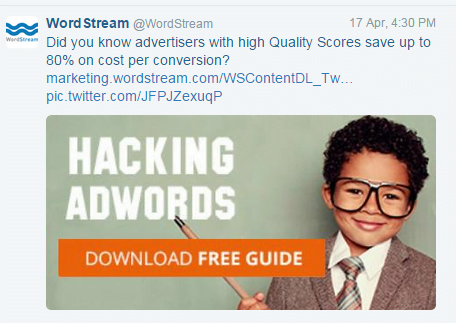
This type of Promoted Tweet has been highly effective in recent times. Engagement rates consistently remain above 1.00% while maintaining lower costs. While the captivating imagery of children dressed as adults undoubtedly contributes, it emphasizes the importance of creative elements. This isn’t an endorsement to use puppies in your ads…. Instead, it suggests incorporating puppies dressed as people in your ads.

(Click-worthy, right?) The only drawback to using images and links is their impact on the 140-character tweet limit, requiring even more concise messaging.
Leveraging Promoted Video Campaigns for Twitter Advertising
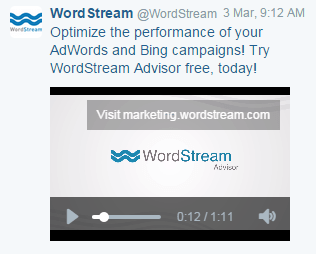
Another highly recommended tactic is the use of Promoted Video campaigns. This relatively new feature allows you to promote virtually anything through video. From a lead generation perspective, it’s an excellent way to engage customers and encourage desired actions. Twitter allows you to embed a CTA with a URL of your choice. However, similar to Website Cards, the CTA lacks customization, limiting you to two options:
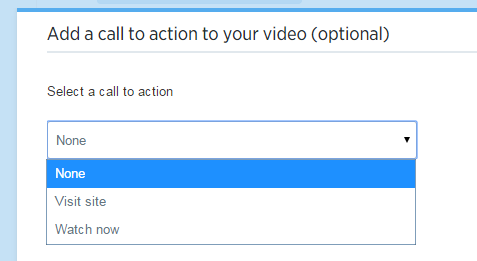
While these options might seem restrictive, they are still valuable tools. Consider including an additional link in the tweet copy or description to capitalize on free clicks! As discussed earlier, Twitter ad pricing varies. Promoted tweets, Lead Gen Cards, and Website Cards are charged per engagement, meaning you pay for any interaction (follow, click, retweet, favorite, or reply). However, Video campaigns are billed solely for video “plays,” offering a significant amount of free engagement. For instance, a Promoted Video for nexus-security consistently generated high engagement rates. The campaign yielded favorites, follows, clicks, replies, and retweets without impacting the daily ad budget. Users who watched the video (incurring a cost-per-view) engaged further by retweeting, favoriting, or following—all at no extra cost. This free engagement extends to the CTA and additional URLs you choose to include. Maximize these opportunities for free engagement! The recommended video duration is between 35-45 seconds. However, longer, engaging, and informative videos can still be successful. With compelling video content, you gain free engagement, increased brand awareness, and the potential to capture leads, leading to significant positive outcomes for your business.
Tracking Twitter Ads for Lead Generation
Before launching into a flurry of tweets and campaigns, ensure you have proper conversion tracking in place. Conversion tracking is less critical for Lead Gen cards since Twitter stores data on all card interactions and provides notifications within the active campaign. To access leads collected from your Lead Gen card, navigate to the “Creatives” section of your Twitter Ads dashboard and select “Cards”:
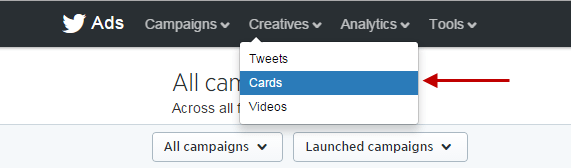
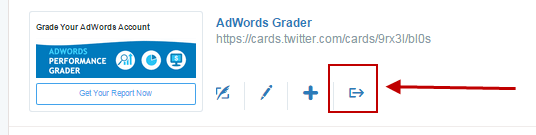
This section displays the number of leads captured by your cards and allows you to download the list:
For other options, insert a Twitter tracking pixel on your destination landing page—not the initial landing page but the one users reach after taking the desired action. To obtain the tracking pixel, go to the top of Twitter ads and select “Conversion tracking” under “Tools”:
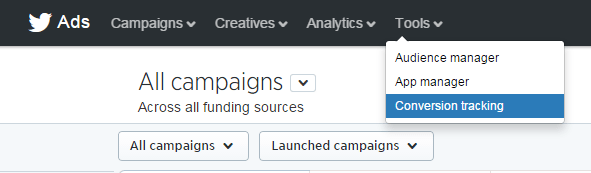
Then, choose “Create new website tag”:

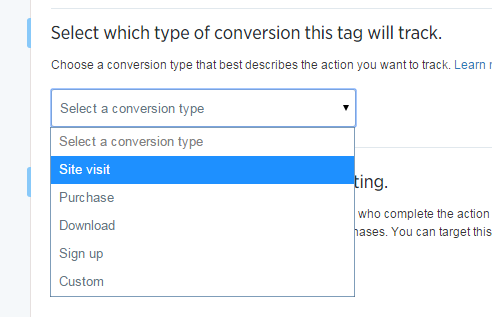
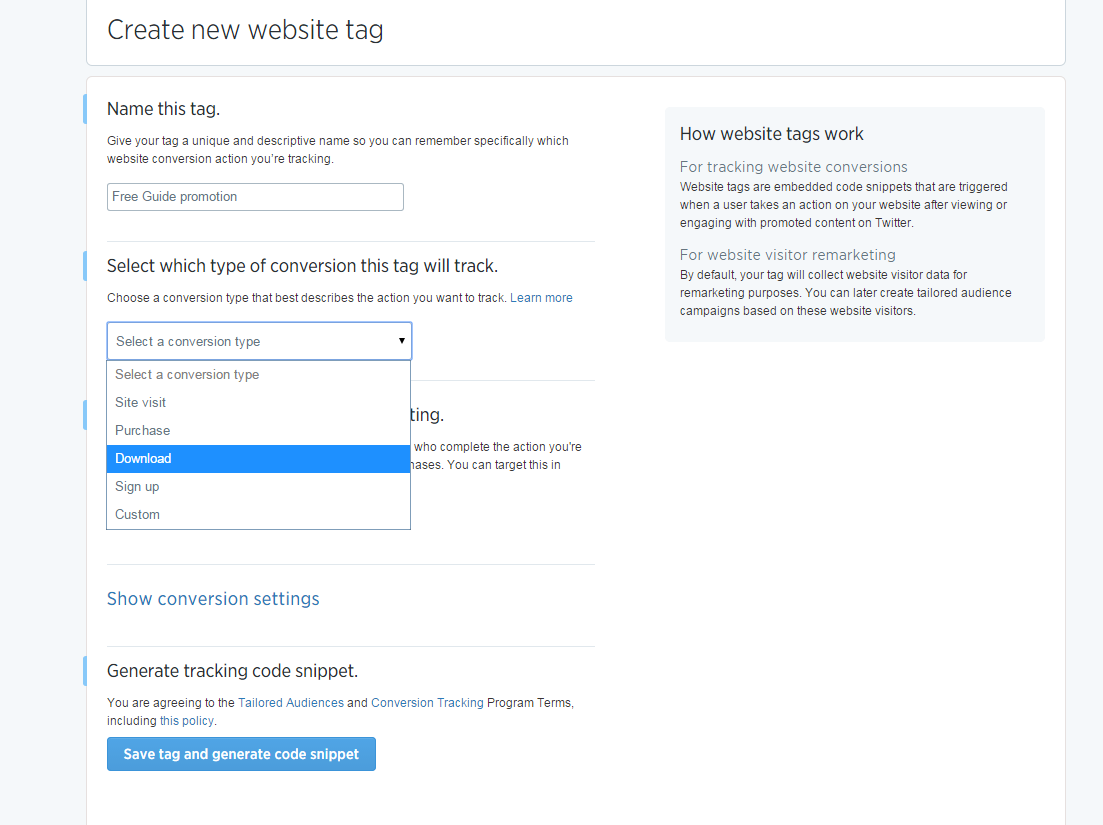
Name your website tag based on the promotion or offer, and select the conversion type that accurately reflects the action:
Ensure that “Create a tailored audience” is checked:
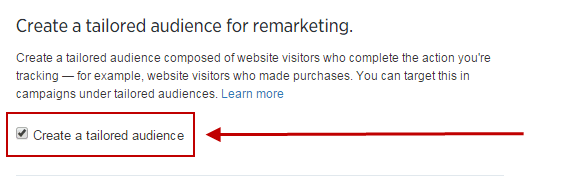
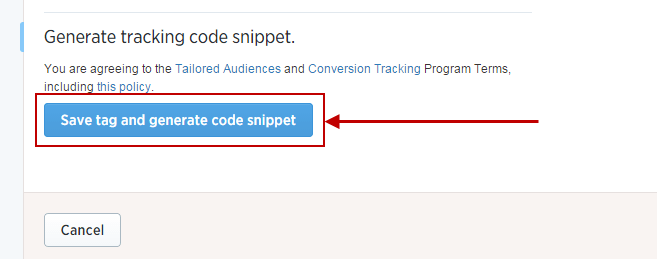
This creates a custom audience that, once large enough, allows you to exclude converted individuals from future targeting. Save and generate the code:
Copy and paste the generated code:
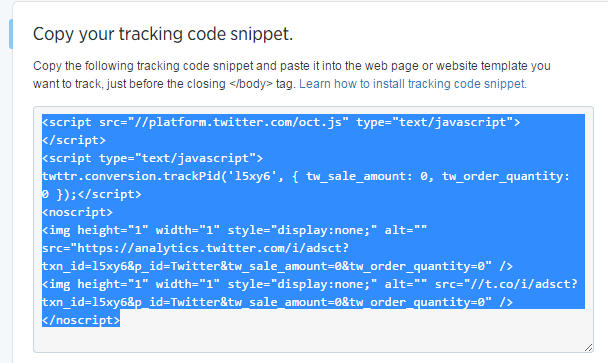
Insert this code into the HTML of your destination landing page, right before the closing