Thinking about going beyond search with your Google Ads strategy? Image-based campaigns like Google Discovery or Display are popular choices for expanding your reach. Many business owners and marketers are unclear about the differences between Display and Discovery ads and when to utilize each. Let’s clear up the confusion - these two are not interchangeable!
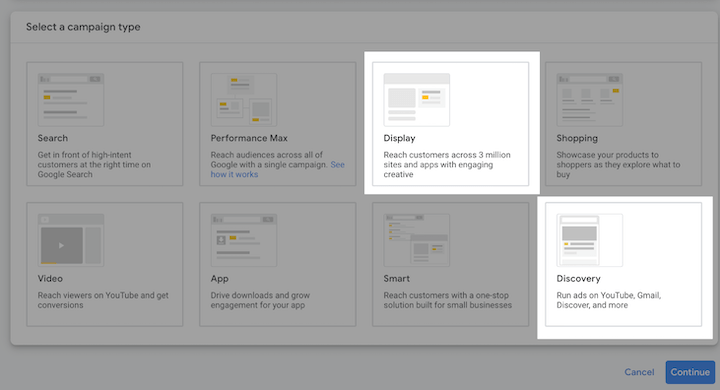 This comprehensive guide compares and contrasts Google Discovery and Display ad campaigns, covering:
- Appearance
- Placements
- Targeting
- Performance
- When to use each We’ll equip you with the knowledge you need to confidently incorporate these ad formats into your paid media strategy. Note: Google announced Discovery Ads will be upgraded to Demand Gen campaigns in early 2024. We cover what you need to know here.
Google Discovery ads vs. Display: Appearance
Both Google Ads Display and Discovery campaigns use image-based formats. Creating ads for either platform involves providing headlines, descriptions, and images that Google then adapts to fit various placements – similar to Responsive Search Ads. Despite these similarities, here are five subtle ways that Discovery ads visually differ from Display ads:
Text specs: Discovery ad headlines allow up to 40 characters, while Display ad headlines, like search ads, are limited to 30 characters. While the reasoning behind this difference remains unclear, Google’s Discovery ad best practices suggest that “medium length headlines” work best. So, utilizing all those extra characters in Discovery ads may not always be necessary.
Image specs: Display and Discovery ads accept both square (1:1) and landscape (1.91:1) images. However, Discovery campaigns also accommodate portrait (4:5) images, aligning with Meta Ads assets. This compatibility makes it easy for Google Ads advertisers to repurpose their existing, high-performing Facebook and Instagram ad creatives for Discovery campaigns.
Video specs: While Display ads offer the option to include video assets, Discovery ads currently do not. Google announced at Google Marketing Live 2022 that video asset compatibility for Discovery ads is in development but, as of now, the feature is not yet live.
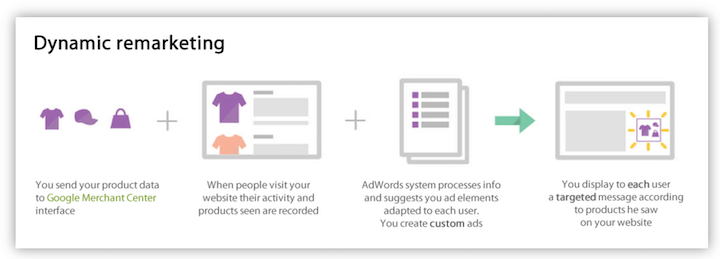
Shopping feed: One of the most frequent uses of Display campaigns is dynamic remarketing. This involves linking your Google Merchant Center feed to your Display campaign, enabling the system to personalize ad creative based on past user activity on your website. Recently, Discovery campaigns introduced a beta program allowing advertisers to connect a feed. However, unlike Display campaigns, this program leverages the feed data for both prospecting and remarketing, not exclusively for dynamic remarketing.
Ad format: Taking another cue from Meta, Discovery campaigns allow the creation of Discovery carousel ads. This format showcases multiple images, headlines, and links within a single ad unit, a feature not available in Display campaigns.
 Are you taking advantage of all that Google Ads has to offer?
Find opportunities to optimize your account with the Free Google Ads Performance Grader.
Are you taking advantage of all that Google Ads has to offer?
Find opportunities to optimize your account with the Free Google Ads Performance Grader.Display vs. Discovery ads: Placements
A significant distinction between Google Ads Display and Discovery campaigns lies in where your ads appear. Display campaigns appear across the Google Display Network, while Discovery campaigns are limited to Google-owned properties. The Google Display Network encompasses millions of websites and apps that generate revenue through Google AdSense. This network functions similarly to the Microsoft Audience Network, LinkedIn Audience Network, or Facebook Audience Network. You might encounter Display ads on various platforms, including websites like ebay.com, forbes.com, or tmz.com, apps such as MyFitnessPal, TextNow, or Wordle, and even YouTube. That’s right, YouTube is a part of the Google Display Network!
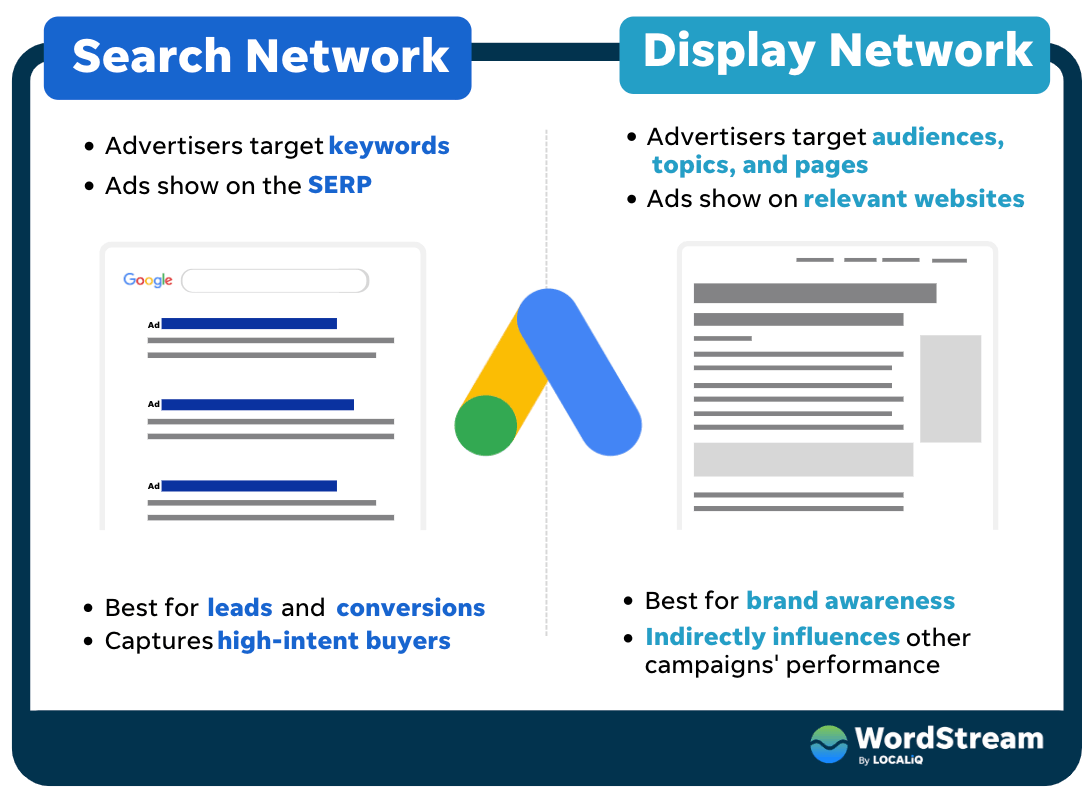 Conversely, Discovery campaigns are exclusively displayed on three Google-owned platforms: YouTube, Gmail, and the Discover feed. Since these platforms primarily cater to signed-in users, audience targeting in Discovery campaigns tends to be more precise than in Display campaigns, and the traffic quality is generally higher.
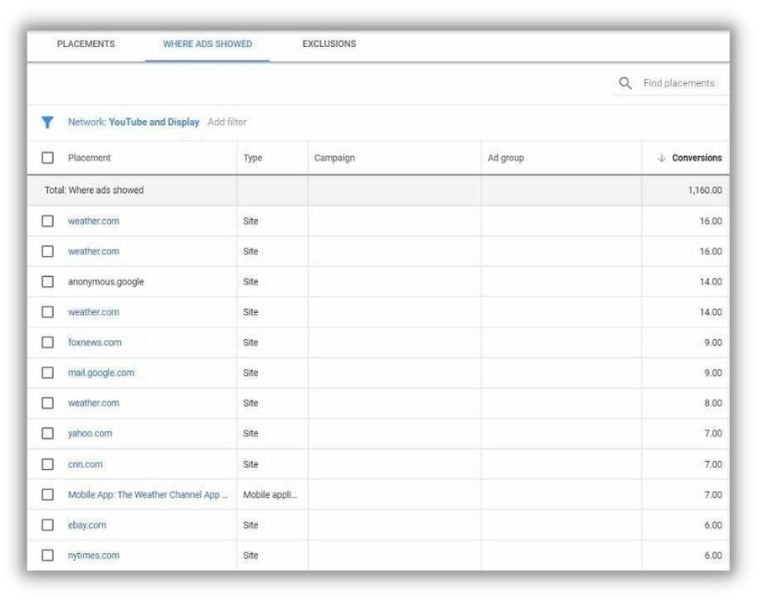
While Display campaigns provide a detailed “Where ads showed” report, there is no placement report for Discovery campaigns. This means you won’t know the exact location where your Discovery ads were displayed.
Conversely, Discovery campaigns are exclusively displayed on three Google-owned platforms: YouTube, Gmail, and the Discover feed. Since these platforms primarily cater to signed-in users, audience targeting in Discovery campaigns tends to be more precise than in Display campaigns, and the traffic quality is generally higher.
While Display campaigns provide a detailed “Where ads showed” report, there is no placement report for Discovery campaigns. This means you won’t know the exact location where your Discovery ads were displayed.
Google Discovery ads vs. Display: Targeting
Google Display campaigns provide access to the complete suite of Google’s audience and content targeting tools, offering flexibility to be as general or specific as desired. However, it’s important to note a recent update to content targeting. When including Placements, Topics, and/or Keywords in your Display campaign content targeting, Google Ads now treats these as “OR” options rather than “AND.” For instance, incorporating five Topics and five Keywords into your ad group allows your Display ad to appear on pages related to any of those five topics OR any of those five keywords. Keep in mind that audience targeting has consistently employed an “OR” relationship. Including multiple audiences in your ad group targeting means Google Ads will showcase your ads to users who belong to any of the specified audiences. To establish an “AND” relationship between audiences, creating a Combined segment is necessary.
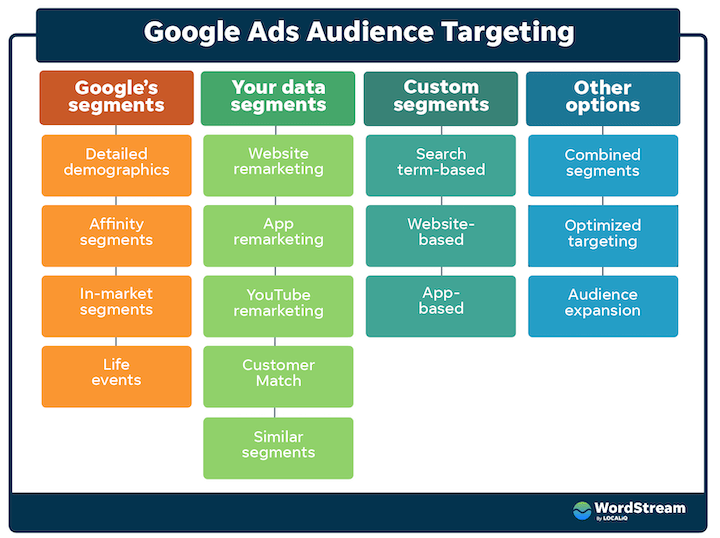 Unlike Display campaigns, Google Discovery campaigns solely support audience targeting and do not accommodate content targeting. Nevertheless, the available options remain extensive, encompassing Demographics, affinity, in-market, life events, your data segments, custom segments, and combined segments.
Both campaign types automatically opt you into optimized targeting by default. You can disable this feature in your audience settings if preferred.
Unlike Display campaigns, Google Discovery campaigns solely support audience targeting and do not accommodate content targeting. Nevertheless, the available options remain extensive, encompassing Demographics, affinity, in-market, life events, your data segments, custom segments, and combined segments.
Both campaign types automatically opt you into optimized targeting by default. You can disable this feature in your audience settings if preferred.
Display vs. Discovery ads: Performance
Understanding the performance metrics for image-based ad formats can be challenging for advertisers accustomed to PPC metrics for search and Shopping campaigns. While click-through rate (CTR) and cost per click (CPC) might be familiar metrics, interaction rate and cost per engagement are particularly relevant to image-based campaigns.
Interactions
In Google Ads, a “click” specifically refers to a paid click that leads users to your website. When someone clicks on a search ad or a Display ad and lands on your site, you incur a charge for that click. In contrast, an “interaction” encompasses any paid click within Google Ads, even if it doesn’t direct the user to your website. For example, clicking on a Gmail ad “opens” the email but doesn’t redirect the user to your site. To reach your website, the user would need to read the email and then click on a call-to-action button if they choose to do so. Consequently, a Gmail open qualifies as an “interaction” but not a “click.” Since Gmail is one of the three Discovery placements, it’s crucial to monitor your interactions, interaction rate, and cost per interaction in addition to clicks, click-through rate, and cost-per-click.
Engagements
Further expanding on interactions, “engagements” occur when a user takes a valuable action that isn’t categorized as a click or an interaction. For instance, watching 10 seconds of your video counts as an engagement, although billing typically starts after 30 seconds of viewing or at the end of the video, whichever happens first. Similarly, forwarding your Gmail ad to a friend or “liking” your Discovery ad constitutes an engagement. While the engagement, engagement rate, and cost per engagement columns might not be your primary focus, they can offer helpful insights for troubleshooting purposes.
How can I improve the performance of my Display and Discovery campaign?
Both Display and Discovery campaigns offer the standard performance optimization tools: bid strategy, budget, targeting, campaign settings, etc. However, the most critical factor determining success is the quality of your ad creative. This emphasis on ad creative resonates with those experienced in running Meta or TikTok ads. However, it can pose a challenge for Google Ads practitioners accustomed to text-based formats. Google’s own research provides insights into the types of text and image assets that yield the best results in a Discovery campaign. Since Discovery is an integral part of Performance Max, these best practices also apply to Performance Max campaigns. Here are five key takeaways from this research:
- Images should feature a single, centrally framed object.
- Showcase real people using your products or services in everyday settings.
- Minimize or avoid using overlaid text on images.
- Keep headlines and descriptions “medium length,” specific, and include a clear call to action.
- Ad copy emphasizing special offers tends to perform well, while creating a sense of urgency or FOMO does not.
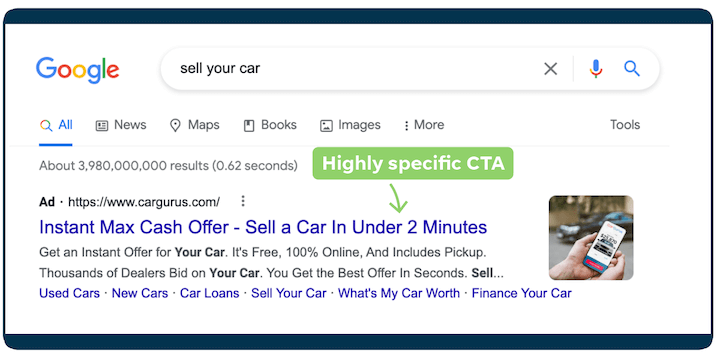 You can view more great ad copy in these Google Ads examples.
Remember, the key is to continuously test and iterate! Both Display and Discovery campaigns provide asset-level performance ratings to guide your optimization efforts.
You can view more great ad copy in these Google Ads examples.
Remember, the key is to continuously test and iterate! Both Display and Discovery campaigns provide asset-level performance ratings to guide your optimization efforts.
 Want even more ad copywriting tips? Download our free guide!
10 Tricks to Get the Click: How to Write Exceptional PPC Ad Copy (with Examples!)
For those looking to enhance their Display campaigns specifically, these resources can provide valuable insights:
- The 17 Best Display Ad Examples
- 5 Google Ads Display Best Practices That Always Work
- I’ve Designed 100+ Display Ads: Here’s What I’ve Learned
Display vs. Discovery ads: When to use which
Still unsure about when to use Discovery ads versus Display ads? Let’s break it down.
When should I use Discovery campaigns?
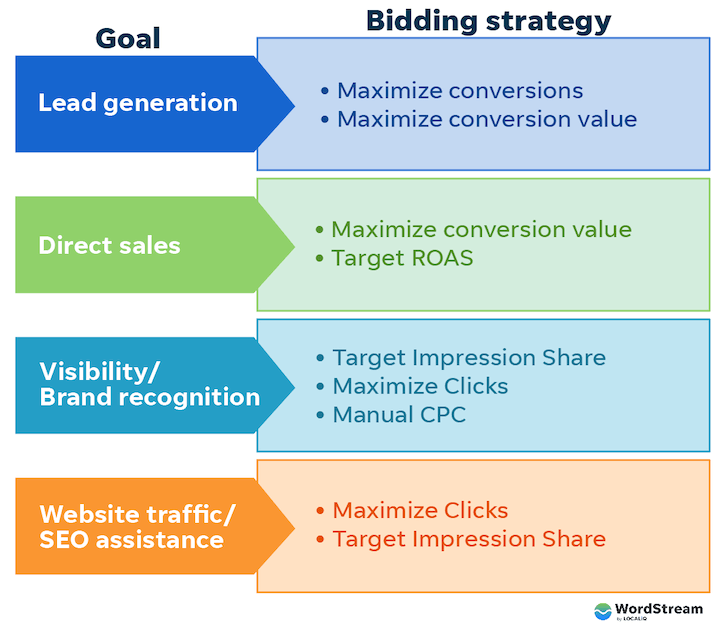
Google Ads Discovery campaigns are designed for conversion-focused strategies and can only be used with conversion-based Smart Bidding strategies: Maximize Conversions (with an optional target CPA) or Maximize Conversion Value (with an optional target ROAS). Given their “bottom of funnel” optimization capabilities, high-quality traffic, and accurate audience matching, testing Discovery campaigns before Display campaigns is often recommended. While anecdotal evidence suggests that cost per click tends to be higher in Discovery compared to Display, the potential for higher conversion rates and lead quality makes it a worthwhile investment. If your goal is to leverage Discovery campaigns for awareness objectives, a workaround exists. By setting up a conversion action based on page views, you can effectively transform your Maximize Conversions bid strategy into a Maximize Clicks strategy.
When should I use Display ads?
Google Ads Display campaigns offer broader applications compared to Discovery campaigns and can be used with impression-, click-, or conversion-based bid strategies. This versatility makes Display campaigns suitable for any campaign objective:
- Top of funnel: Viewable CPM
- Middle of funnel: Manual CPC (with optional enhanced CPC), Maximize Clicks
- Bottom of funnel: Maximize Conversions (with optional target CPA) or Maximize Conversion Value (with optional target ROAS) One of the unique advantages of Display campaigns is the availability of pay-per-conversion bidding. While there are plenty of limitations and rules surrounding the use of pay-per-conversion bidding, it presents an intriguing option for performance advertisers who want to test the effectiveness of Display campaigns for conversion-focused goals.
Google Discovery ads vs. Display ads: Which will you start with?
There you have it – a comprehensive exploration of the similarities, differences, and possibilities of Discovery and Display campaigns. Armed with this knowledge, you can confidently determine which campaign type best suits your needs and when to utilize each.