Should we utilize TypeScript or JavaScript? This question often arises for developers embarking on new web or Node.js projects, but it holds relevance for existing projects as well. TypeScript, being a superset of JavaScript, encompasses all the features of its predecessor while offering additional advantages. By design, TypeScript promotes clean coding practices, resulting in more scalable code. However, it’s important to note that projects can incorporate as much plain JavaScript as needed, making TypeScript adoption a matter of choice rather than an all-or-nothing decision.
Understanding the Link Between TypeScript and JavaScript
TypeScript introduces an explicit type system to JavaScript, enabling strict type enforcement for variables. Before execution, TypeScript employs a process called transpiling, a form of compiling that converts TypeScript code into JavaScript code, making it understandable for web browsers and Node.js.
Contrasting TypeScript and JavaScript Through Examples
Let’s examine a valid JavaScript snippet:
| |
Initially, var1 is assigned a string value, which is then replaced by a number.
JavaScript’s loosely typed nature allows us to redefine var1 with any type—be it a string or a function—at any given time.
Executing this code produces an output of 10.
Now, let’s transform this code into TypeScript:
| |
Here, var1 is declared as a string. Attempting to assign a number to it violates TypeScript’s strict type system. Consequently, transpilation generates an error:
| |
If we instruct the transpiler to process the original JavaScript snippet as TypeScript, it would infer that var1 should have a type of string | number. This is known as a TypeScript union type, allowing var1 to hold either a string or a number at any point. With the type conflict resolved, our TypeScript code would transpile without errors, and its execution would yield the same result as the JavaScript example.
TypeScript vs. JavaScript: A High-Level View of Scalability Hurdles
JavaScript, being ubiquitous, powers projects of all sizes, used in ways unimaginable during its inception in the 1990s. While JavaScript has evolved, it faces limitations in scalability support. Consequently, developers grapple with JavaScript applications that have grown in both size and complexity.
Fortunately, TypeScript offers solutions to many challenges associated with scaling JavaScript projects. Let’s delve into the top three: validation, refactoring, and documentation.
Validation
IDEs (Integrated Development Environments) assist in tasks such as adding, modifying, and testing code, but they lack the ability to validate pure JavaScript references. To overcome this, developers must remain vigilant while coding to avoid typos in variable and function names.
This issue escalates when dealing with third-party code, where broken references in rarely executed code branches can easily slip through the cracks.
TypeScript, in contrast, allows developers to concentrate on coding, ensuring that any errors are caught during transpilation. To illustrate this, let’s consider a legacy JavaScript code snippet:
| |
Here, .toISO() is a typo for the moment.js toISOString() method. The code might function correctly as long as the format argument is not ISO. However, passing ISO to the function would result in a runtime error: TypeError: moment(...).toISO is not a function.
Finding such misspelled code can be tedious. The current codebase might not have a direct path to the erroneous line, meaning our broken .toISO() reference could escape detection during testing.
Porting this code to TypeScript would cause the IDE to flag the incorrect reference, prompting correction. If left unaddressed, attempting to transpile would halt the process, and the transpiler would generate the following error:
| |
Refactoring
While typos in external code references are common, typos in internal references present a different set of problems, as shown below:
| |
A single developer could easily locate and fix all instances of phoneNumbr to include the correct spelling.
However, as the team size increases, this seemingly trivial error becomes disproportionately costly. Team members would need to be aware of and propagate such typos in their work, or the codebase would become unnecessarily bloated by accommodating both spellings.
With TypeScript, fixing a typo prevents dependent code from transpiling, signaling colleagues to update their code accordingly.
Documentation
Accurate and up-to-date documentation is crucial for communication within and across development teams. JavaScript developers often rely on JSDoc for documenting expected method and property types.
TypeScript’s language features, including abstract classes, interfaces, and type definitions, facilitate design-by-contract programming, naturally leading to better documentation. Having a formal definition of methods and properties that an object must adhere to helps identify breaking changes, create tests, perform code introspection, and implement architectural patterns.
For TypeScript, the popular tool TypeDoc (based on the TSDoc proposal) automatically extracts type information, such as class, interface, method, and property details, from our code. This results in effortlessly generated documentation that is significantly more comprehensive than JSDoc.
Advantages of TypeScript over JavaScript
Let’s explore how TypeScript addresses the scalability challenges mentioned previously.
Enhanced Code/Refactoring Suggestions
Many IDEs leverage information from the TypeScript type system to provide real-time reference validation during coding. Furthermore, while typing, the IDE can offer relevant documentation (e.g., function arguments) and suggest contextually appropriate variable names.
In this TypeScript example, the IDE suggests autocompleting the keys within the function’s return value:
| |
My IDE, Visual Studio Code, displayed this suggestion (in the callout) when I started calling the function (line 31):
![At the point of typing parsePeopleData(), the IDE shows a tooltip from the TypeScript transpiler that reads "parsePeopleData(data: string): { people: { name: string; surname: string; age: number; }[]; errors: string[]; }" followed by the text contained in the multiline comment before the function definition, "A string containing a CSV with 3 fields: name, surname, age. Simple function to parse a CSV containing people info.".](https://assets.toptal.io/images?url=https%3A%2F%2Fbs-uploads.toptal.io%2Fblackfish-uploads%2Fpublic-files%2Fimage_0-b4f827a139f837435799a5eb35106839.png)
Moreover, the IDE’s autocomplete suggestions (in the callout) are context-aware, displaying only valid names within a nested key structure (line 34):
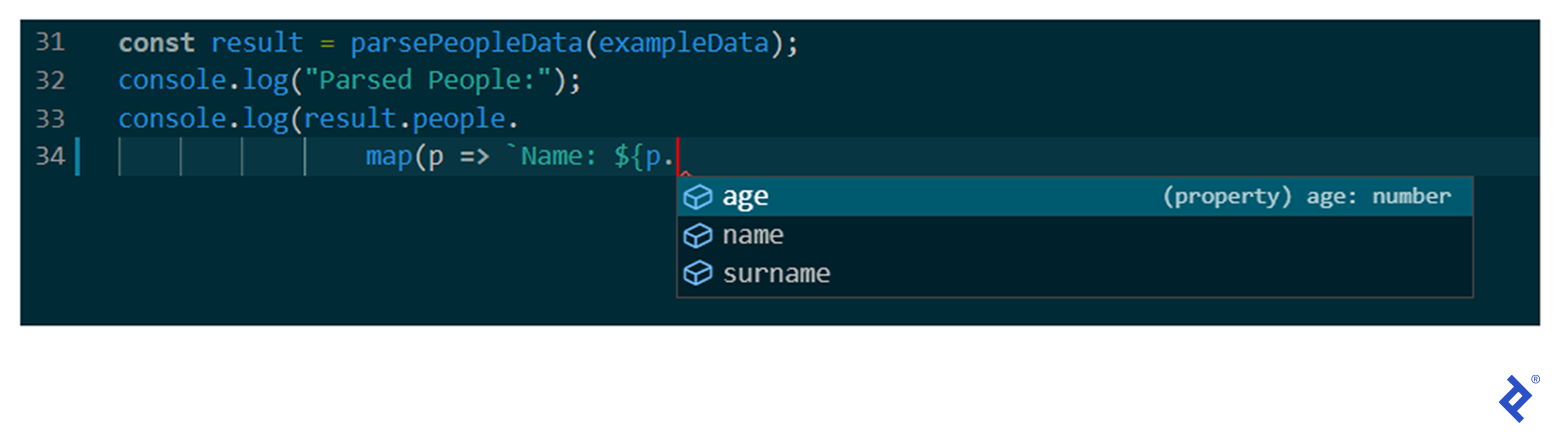
Such real-time assistance speeds up coding. IDEs can also rely on TypeScript’s robust type information for refactoring code at any scale. Operations like renaming properties, relocating files, or even extracting superclasses become straightforward with the confidence of accurate references.
Interface Support
Unlike JavaScript, TypeScript allows type definitions using interfaces. An interface defines the methods and properties an object must have without providing implementations. This construct proves particularly useful for collaboration among developers.
The following example demonstrates how TypeScript’s features enable the clean implementation of common OOP patterns—in this case, strategy and chain of responsibility—improving upon the previous example:
| |
ES6 Modules—Universal Compatibility
At present, not all front-end and back-end JavaScript runtimes support ES6 modules. However, TypeScript allows us to use ES6 module syntax:
| |
The transpiled output will be compatible with the chosen environment. For instance, using the --module CommonJS compiler option results in:
| |
Alternatively, using --module UMD generates the more verbose UMD pattern:
| |
ES6 Classes—Universal Compatibility
Legacy environments often lack support for ES6 classes. TypeScript transpilation ensures compatibility by using target-specific constructs. Here’s a TypeScript code snippet:
| |
The resulting JavaScript output depends on both the module and the target, which we can specify in TypeScript.
Using --module CommonJS --target es3 produces:
| |
However, using --module CommonJS --target es6 instead generates the following transpiled output. The class keyword is used to target ES6 environments:
| |
Async/Await Functionality—Universal Compatibility
Async/await simplifies the development and maintenance of asynchronous JavaScript code. TypeScript brings this functionality to all runtimes, including those without native async/await support.
It’s worth noting that running async/await on older runtimes like ES3 and ES5 necessitates external support for Promise-based output (e.g., using Bluebird or an ES2015 polyfill). TypeScript’s built-in Promise polyfill seamlessly integrates into the transpiled output; we just need to configure the lib compiler option accordingly.
Support for Private Class Fields—Universal Compatibility
TypeScript supports private fields for all target environments, including legacy ones, similar to strongly typed languages like Java or C#. In contrast, many JavaScript runtimes achieve private field support through the hash prefix syntax, a finalized proposal of ES2022.
Disadvantages of TypeScript Compared to JavaScript
While TypeScript offers numerous advantages, there are situations where it might not be the ideal choice.
Transpilation: Potential Workflow Conflicts
Specific workflows or project constraints may clash with TypeScript’s transpilation step. For example, if post-deployment code modification requires an external tool or if the generated output needs to be easily understandable by developers, TypeScript might not be suitable.
In a recent project, I developed an AWS Lambda function for a Node.js environment where TypeScript wasn’t a good fit. Requiring transpilation would hinder me and my team from editing the function directly using the AWS online editor, a deal breaker for the project manager.
Type System Effective Only Until Transpilation
TypeScript’s JavaScript output lacks type information, so type checks are not performed at runtime, potentially leading to runtime type errors. For instance, if a function defined to return an object returns null when called from a .js file, a runtime error would occur.
Features reliant on type information, like private fields, interfaces, or generics, add value during development but are removed during transpilation. For example, private class members would no longer be private after transpilation. It’s important to remember that such runtime issues are not specific to TypeScript and can also arise in JavaScript.
Merging TypeScript and JavaScript
While TypeScript offers compelling benefits, completely converting a JavaScript project at once might not always be feasible. Fortunately, we can instruct the TypeScript transpiler to treat specific files as plain JavaScript. This hybrid approach allows us to address individual challenges as they emerge throughout a project’s lifecycle.
We might choose to retain JavaScript code if it:
- Was written by a previous developer and would demand substantial effort to reverse-engineer for TypeScript conversion.
- Employs techniques not permitted in TypeScript (e.g., adding a property after object instantiation) and requires refactoring to comply with TypeScript’s rules.
- Belongs to another team continuing to use JavaScript.
In such scenarios, a declaration file (.d.ts file, often referred to as a definition file or typings file) provides TypeScript with enough type information for IDE suggestions without modifying the JavaScript code.
Many popular JavaScript libraries like Lodash, Jest, and React offer TypeScript typings files as separate type packages, while others like Moment.js, Axios, and Luxon include them in their main packages.
TypeScript vs. JavaScript: A Matter of Efficiency and Scalability
TypeScript’s unparalleled support, flexibility, and enhancements significantly enhance the developer experience, allowing projects and teams to grow effectively. The primary cost of integrating TypeScript is the added transpilation build step. However, for most applications, transpiling to JavaScript is a small price to pay for the numerous advantages TypeScript brings to the table.