If you’ve noticed your organic Facebook business page posts aren’t reaching as many people as they used to, you’re not the only one. Organic reach has been steadily declining for years as Facebook’s algorithm evolves and more brands join the platform. Today, you’re lucky if even 1% of your followers see your posts.
Let’s face it, brands are competing with a constant stream of personal updates, from cute cat videos to adorable baby photos. The organic reach we once enjoyed is a distant memory, and if you want more visibility, you’ll have to pay for it. A quick, easy, and budget-friendly way to do this is by boosting your organic posts with a sponsored post, also known as a boosted post.
This guide will cover:
- What Facebook sponsored posts are.
- How to run sponsored posts.
- How to integrate them into your Facebook marketing strategy.
- How to make your sponsored posts successful.
Let’s dive in!
What is a Facebook sponsored post?
Simply put, it’s an ad created from a post on your Facebook business page. Boosting, or promoting, your post increases its visibility and helps you reach new and larger audiences. This leads to greater brand awareness, more user engagement, and can even indirectly boost website traffic and conversions if your post includes a link.
How do I run a Facebook sponsored post?
Currently, you can boost a post in two ways: directly from your organic post or through Facebook Ads Manager. Let’s explore both options.
Set up directly through your organic post
Facebook makes sponsoring a post straightforward for individuals and small businesses. The quickest and easiest way is directly from the organic post on your Facebook business Page. Look for the blue “Boost Post” button on each of your posts.
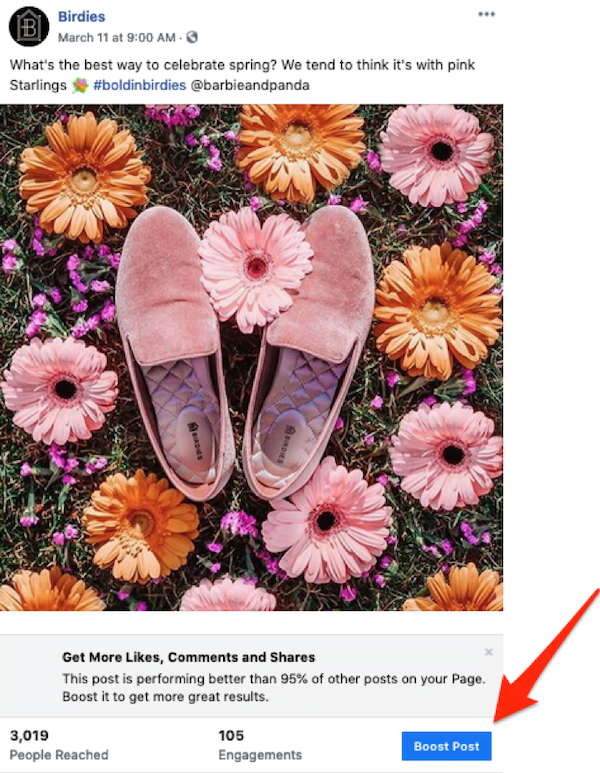
Click the button on your post. A pop-up window will appear with options for targeting, duration, budget, and conversion tracking.
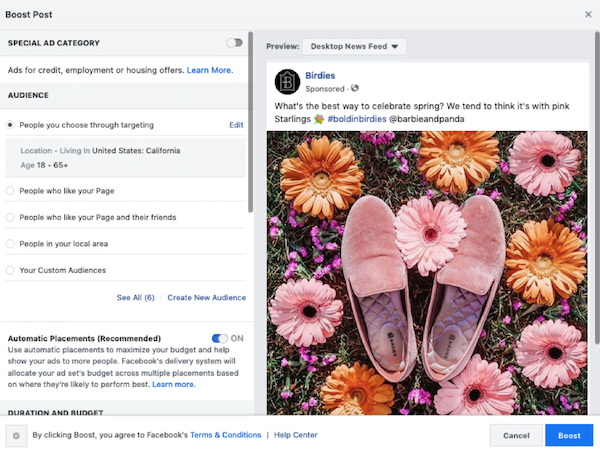
Images via Birdies
Here, you’ll select your target audience or create a new one. If you want more of your existing followers to see it, target “people who like your page." For broader reach and new potential customers, explore wider audiences. You can target people within your service or delivery area, or focus on specific age groups interested in your offerings. Importing existing customer or lead email lists into Ads Manager Audiences and creating lookalike audiences is another effective method. You can also build lookalike audiences based on your website visitors or those who abandoned their carts. Additionally, consider targeting based on interests and behaviors related to your products or services.
Next, it’s generally recommended to run your ad across all placements using the “Automated Placements” option. This allows you to analyze performance across different audiences and placements. If you run your boosted post with sufficient budget for at least seven days, you can later access Facebook Ads Manager to generate an ad placement report. This report highlights any underperforming placements, which you can then deselect at the ad set level within your sponsored post campaign. This optimization can significantly improve your sponsored post’s performance. You can also apply these insights to other campaigns, saving you time and money on testing creatives and copy with new audiences.
The next step is setting the duration and budget. Under “Tracking Conversions,” ensure the Facebook Pixel is selected and blue, indicating it’s set up and active. This enables you to track various actions, including website clicks (if your post has a link) and conversions. For first-time Facebook advertisers, you’ll need to add payment information, like a debit or credit card, before activating your boosted post. If you’ve run ads before, your payment information should be saved. Finally, click the “Boost” button and let it run!
Set up through Facebook Ads Manager
For those with some Facebook advertising experience, Facebook Ads Manager offers a more comprehensive approach. Create a campaign with an objective that aligns with your boosted post goal.
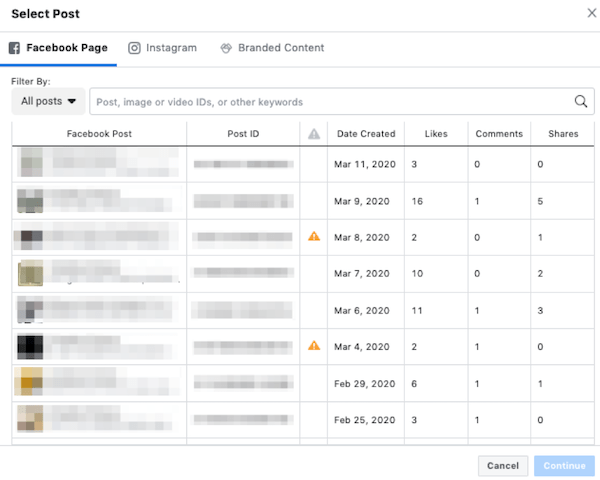
Navigate to the ad level where you select your creative and choose “Use Existing Post.” A window will pop up, allowing you to select a post from Facebook, Instagram (coming soon!), or branded content where another brand has tagged you. Note that currently, only Facebook branded content is available.
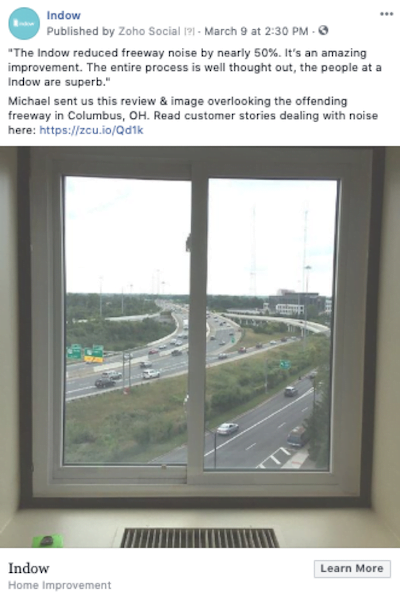
There are countless strategic approaches, but one way we leverage sponsored posts through Ads Manager is within retargeting campaigns. These campaigns specifically target warm audiences who haven’t converted yet. Take our custom window insert client, Indow, as an example. We often boost their engaging and informative organic posts within existing awareness campaigns. This helps us maintain brand visibility and keep their products top-of-mind with warmer audiences who have shown previous interest but haven’t made a purchase. These ads, often featuring customer stories, perform exceptionally well and at a lower cost because they leverage social proof without being overly sales-y.
Facebook sponsored posts vs. traditional Facebook ads
Facebook sponsored posts are incredibly user-friendly, especially for small business owners or individuals with limited Facebook advertising experience. They’re ideal for short-term campaigns lasting one to seven days, while traditional ads are better suited for long-term strategies. One significant benefit of boosting a post with existing engagement (likes, comments, shares) is that this engagement is amplified to your target audience, increasing social proof. You can boost and re-boost the same post across different audiences, and the engagement remains, further enhancing your credibility.
Another advantage is affordability. With a minimum daily ad spend of just $1, sponsored posts offer an accessible entry point. Of course, a larger budget translates to wider reach and faster learning, allowing you to optimize your posts and ads more effectively.
However, compared to the advanced features available in Ads Manager, sponsored posts have limitations.
Traditional Facebook ad campaigns, set up in Ads Manager, provide access to a broader range of features, reporting, and optimization options. Unlike sponsored posts, traditional ads allow you to select a specific campaign objective, such as awareness, engagement, website traffic, event attendance, app installs, leads, or conversions. While sponsored posts are effective for driving brand awareness and engagement, they can indirectly drive traffic if a website link is included.
Traditional ads also offer advanced targeting options like inclusion and exclusion audiences, bidding strategies, and optimization strategies based on landing page views, link clicks, conversions, and more. While this increased flexibility adds complexity and requires more setup time, the potential rewards are significantly higher.
Exploring the depth of Facebook Ads Manager is worthwhile. However, if you need a quick and easy way to boost your organic posts’ traction, sponsored posts are an excellent starting point.
How to add Facebook sponsored posts to your strategy
Sponsored posts are most effective when used strategically and sparingly alongside your traditional Facebook ad campaigns. Due to their short-term nature and limitations, they can’t single-handedly achieve your lower-funnel goals like sales.
Consider boosting a post that generates excitement for an upcoming product launch or showcasing a sneak peek. Already have a successful organic post? Extend its reach and lifespan by boosting it to new audiences. For products with a higher price point or a longer conversion funnel, use boosted posts to target your warm retargeting audiences and keep your brand top-of-mind.
While running occasional sponsored posts, continue to leverage campaigns within Facebook Ads Manager to build awareness, introduce your brand to new audiences, and guide them through your funnel toward conversion. Think of traditional Facebook Ads as your foundation of your marketing and sponsored posts as periodic bonuses that amplify awareness and engagement.
How to create wow-worthy Facebook sponsored posts
While setting up Facebook sponsored posts is quick and easy, success requires careful thought and planning. Here are four tips to ensure your Facebook sponsored posts stand out.
Determine your goal
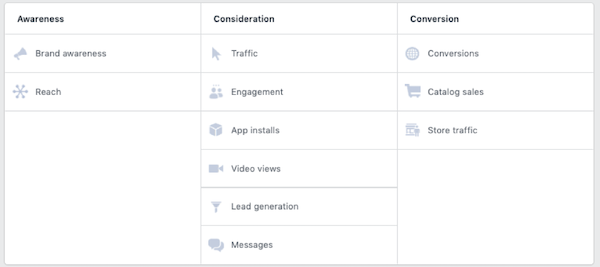
Before hitting that boost button, define your objectives. If your aim is to increase awareness and engagement, a boosted post is a good fit. However, if you’re looking to drive website traffic, app installs, leads, or conversions, traditional ads are the way to go. The full list of available campaign objectives can be found here:
Harness high-quality posts
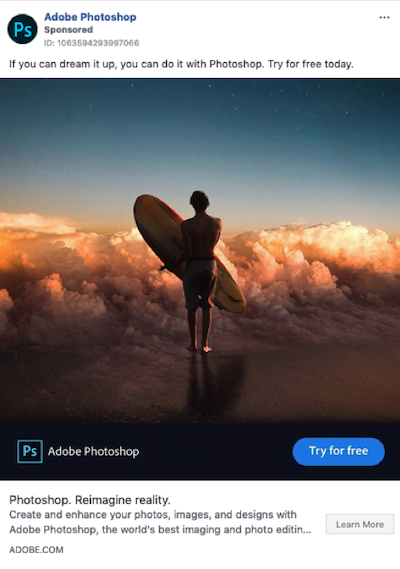
While you can promote almost any post from your business page (except for posts you’re featured in, photo albums, or mobile app install posts), prioritize your best-performing posts for promotion. High-quality posts use strong, relevant messaging, include eye-catching creatives that complement the text, and always incorporate a clear call to action. Examples of calls to action include “Learn More,” “Shop Now,” “Donate Now,” and “View More.”
Captivate with your creative
Have a stunning image or a video you’re particularly proud of? Boost it! Visual content is key to maximizing your sponsored post’s impact. As users scroll through their feeds, a compelling image or video gives them a reason to pause and engage with your content. Consider using images of smiling people who reflect your target audience. This can make your post more relatable and clickable.
Select great social proof
If you have a post with high organic engagement, amplify its reach and extend its lifespan by boosting it to a new audience. People are more likely to engage with content that already has a lot of interaction. Posts that are entertaining, inspiring, helpful, relatable, or thought-provoking tend to perform well. Consider asking a question in your post to encourage engagement, as shown in the example below.

Boost your bottom line with Facebook sponsored posts
Now that you understand the benefits, limitations, and best practices of Facebook sponsored posts, it’s time to strategically integrate them into your marketing strategy. Set them up quickly and easily, expand your reach, increase visibility, and drive more engagement. Sponsored posts offer an affordable and effective way to dip your toes into the world of Facebook advertising and attract new customers.