You’ve got your mobile app, your Facebook and/or Instagram Business Pages, and your Facebook Ads Manager account all set up? Great!
Now, you’re ready to take it up a notch and get more people to not only install your app but actually use it and keep coming back for more. That’s exactly what we’re here for! This comprehensive guide to Facebook ads for mobile apps will walk you through everything you need to know:
- Registering your mobile app on Facebook
- Choosing the right campaign objectives
- Targeting the right audiences
- Creating amazing Facebook ads that highlight your mobile app
Let’s dive right in!
Getting Your Mobile App on Facebook for Developers
Before we jump into the world of Facebook Ads Manager and setting up your first campaign for mobile app installs, you’ll need to register as a developer on Facebook. Not a developer yourself? No worries, simply share this instructional link with your developer so they can get everything set up correctly in the App Dashboard. Here, you’ll discover how to register your app, install your iOS or Android Software Development Kit (SDK), integrate important app events aligned with your goals and business, and much more. While installing the SDK is optional, we strongly recommend it to our clients. Why? Because it unlocks a higher level of tracking and ad targeting precision, providing invaluable insights. As advertisers, the more information we have, the better decisions we can make, allowing us to create custom audiences and optimize your app campaigns for maximum impact. Adding app events is also optional, but we suggest setting them up to reflect important actions within your app, such as app installs, launches, adding items to the cart, making in-app purchases, etc. This allows you to tailor your ads to reach the people most likely to take those desired actions, all while enabling you to build custom audiences based on this valuable data. Not sure if you’ve already taken these steps or want to double-check if everything is set up correctly? You can easily verify if your app is registered and ready to run in campaigns by simply entering your Facebook App ID into Facebook’s App Ads Helper.
Setting Your Sights on the Right Campaign Objectives
With the initial setup out of the way, let’s shift our focus to campaign creation. There are two primary Facebook campaign objectives you’ll want to familiarize yourself with: App Installs and Conversions.
The Power of App Install Campaigns
If your main goal is to boost the number of mobile app installs, then selecting the “App Installs” campaign objective when creating a new campaign is your go-to move.
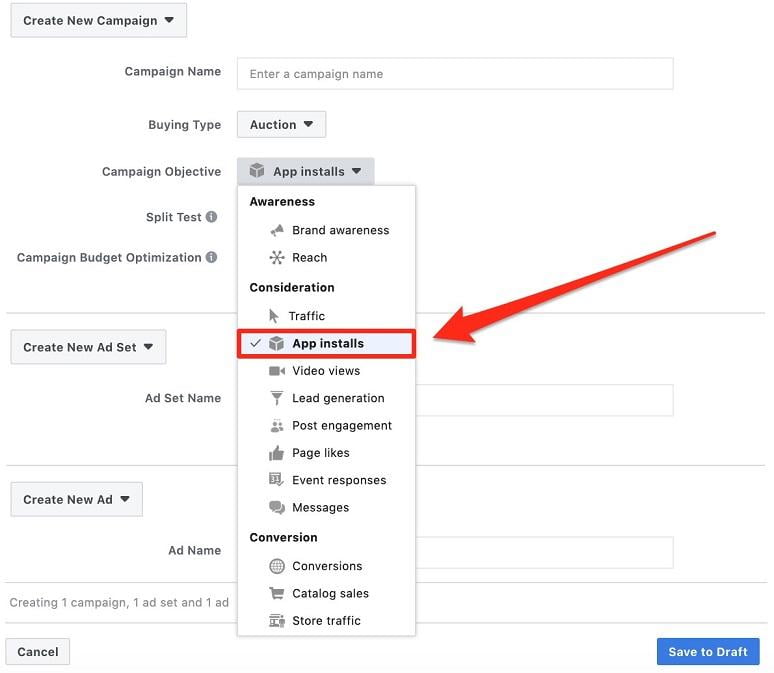
This particular campaign objective works its magic by showcasing your mobile app install ads to the individuals within your target audience (more on that later) who exhibit a higher likelihood of actually installing your app. The campaign’s optimization process will revolve entirely around this objective.
Going Beyond Installs with Conversion Campaigns
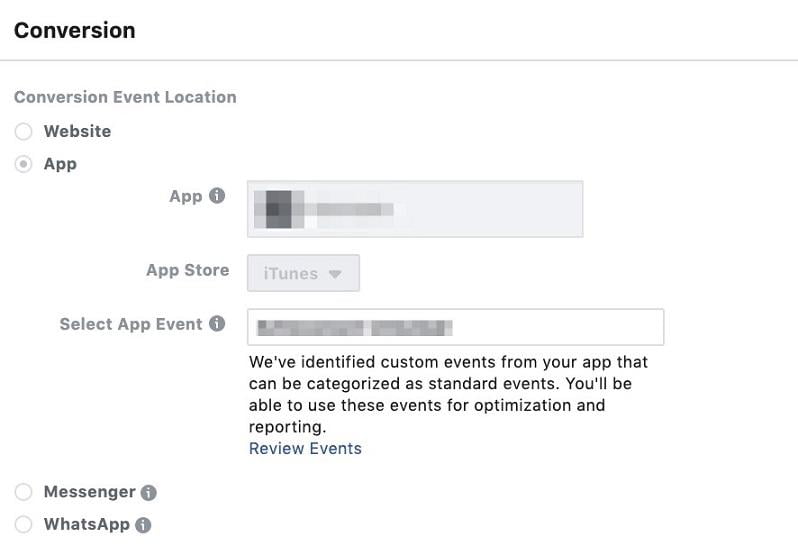
If you’re looking to engage with a warmer audience, specifically those who have already installed your app, and encourage them to dive back in, experimenting with other campaign objectives like “Conversions” can be a game-changer. When opting for this campaign objective, remember to specify a conversion event location—your app—at the ad set level. This involves selecting your app, the app store where it’s available for this specific campaign and ad set (iTunes or Google Play), and finally, the app event you want to focus your optimization efforts on, such as in-app purchases, as illustrated below.
Zeroing in on the Right Audience for Your Mobile App Campaigns
With your campaign objectives defined, let’s navigate to the ad set level where the magic of audience targeting happens. Who are you trying to reach? Who would find your app most valuable and engaging? Remember, it’s all about testing and learning! While the targeting possibilities are virtually limitless, adapting to your specific target market and business goals, there are several effective strategies for reaching potential users at different stages of the marketing funnel. Whether you’re looking to create awareness and drive installs from a cold audience or re-engage a warmer audience and keep them hooked on your app, testing various strategies is key to finding what works best for you and your unique audience. Here are a few Facebook targeting options to get you started!
Casting a Wide Net with Broad Targeting
If you’re just starting out, unsure about who to target, and have some budget allocated for these ads, opting for broader targeting can be an effective approach. You can refine your targeting based on age, gender, and location to identify which demographics show the most promise and, importantly, which one reigns supreme. Once you’ve identified those high-performing demographics, you can start scaling back, gradually removing underperforming segments based on your findings.
Precision is Key with Detailed Targeting
For those working with a tighter budget and just dipping their toes into the advertising waters, we often suggest starting with a more focused audience that’s more likely to express interest in your app, particularly if it caters to a niche market. Navigate down to the Detailed Targeting section within the ad set level and begin typing in relevant keywords. Not sure where to begin? Try brainstorming interests that align with your potential users. For instance, if you have a food delivery app, target individuals interested in food, pizza (if you offer it), dining out, and so on. Another effective tactic is targeting individuals who’ve shown interest in your competitors.
Finding Your Tribe with Lookalike Custom Audiences
Another powerful strategy for uncovering new, engaged users is by leveraging lookalike audiences within the Audiences tab in Facebook Ads Manager.
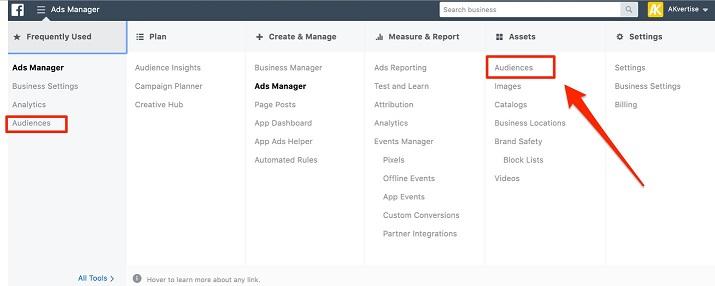
This handy feature allows you to craft custom audiences by uploading existing email lists you might have, such as leads, newsletter subscribers, or valued customers. Alternatively, you can utilize your website pixel to create custom audiences, such as those who have visited your website. And, since we’re focusing on mobile apps, you can even create custom audiences based on significant app events, including installs, adding items to carts, in-app purchases, and more. Once these custom audiences are established and have at least 100 individuals, you unlock the ability to create a lookalike audience. But what exactly is a lookalike audience? Simply put, it’s an audience that shares similarities with one of your existing audiences. Facebook takes an audience you’ve already created and generates a new audience of individuals who are likely to be interested in your app based on shared interests and behaviors. Let’s illustrate this with an example: if you take your in-app purchase custom audience and create a lookalike, Facebook will generate a new audience for your app install campaigns, filled with individuals who resemble your existing customers. This is a highly effective tactic, and we strongly encourage testing it out. To create a lookalike audience, begin by selecting an existing custom audience you’ve set up. Then, click the dropdown menu, as shown below, and choose “Create Lookalike.”
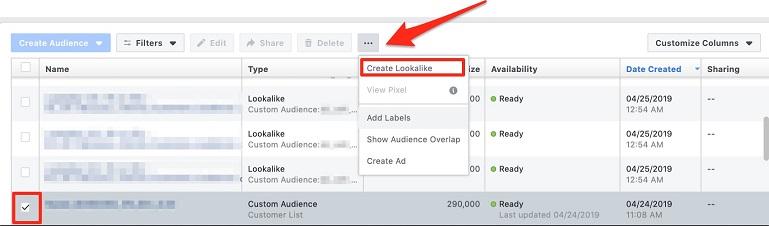
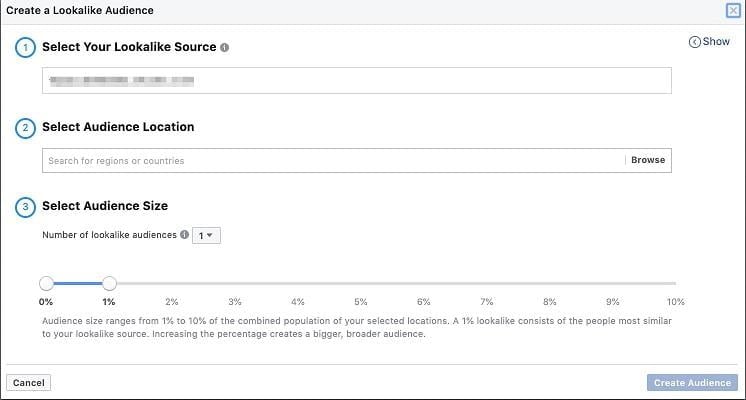
A new window will pop up, prompting you to select the audience location and desired audience size. When starting out, we suggest opting for the automatic 1% lookalike suggestion, as this audience will closely mirror your original custom audience. Keep in mind, the larger the percentage, the broader the reach of your lookalike targeting. Begin with 1% and gradually increase that percentage reach over time if you’re looking to expand your horizons and target a wider, newer audience.
Crafting Eye-Catching Facebook Ads that Convert
With your campaign and ad set levels meticulously set up, let’s move on to the final piece of the puzzle: creating compelling ads. App ads offer similar features to other ad formats, allowing you to incorporate text above your creative, a captivating headline, and a clear call-to-action button. Instead of a website URL landing page, you also have the option to integrate a deep link. Here’s how to leverage each of these ad components to create high-performing Facebook ads for mobile apps:
1. The Power of Compelling Ad Copy
When crafting your ad copy, make sure it aligns with your campaign objective, resonates with your target audience, and effectively communicates your app’s value proposition, whether it’s through highlighting its solutions, benefits, unique features, or any special promotions designed to entice new users to install. There’s no one-size-fits-all when it comes to ad copy length, so don’t hesitate to experiment with both concise and longer variations to determine what captures your audience’s attention most effectively. While shorter copy tends to outperform its longer counterparts in most cases, we’ve observed instances where longer-form copy yielded better results for specific accounts and campaigns.
2. Making a Statement with a Strong Headline
Make a memorable first impression with a bold, concise headline that piques your audience’s interest. When targeting a new audience to drive engagement, provide a clear and concise summary of your app, ensuring to include its name. If you’re engaging with a warmer, more familiar remarketing audience, test out a special promotion, emphasize a key solution, or highlight an exciting aspect of your app to encourage their return.
3. Choosing Visuals that Captivate
The visuals you choose should perfectly complement your ad copy. Facebook and Instagram welcome both static images and video creatives for app campaigns, so leverage the power of both formats for optimal results. While images can be highly effective, videos tend to outperform them as they bring your app to life, providing a more immersive experience that allows users to connect with your brand and offering more quickly and effectively. In today’s fast-paced, visually driven world, incorporating subtle motion into your ads as users scroll through their feeds can be a powerful way to capture their attention and make your ad stand out.
When it comes to images, opt for bright, attention-grabbing visuals that pop against the predominantly white background of social media feeds. If relevant to your app, consider using lifestyle photos. For example, if you have an on-demand dog walking app, showcasing images of different dog breeds being walked by smiling individuals can be incredibly effective. Don’t be afraid to test out both carousel and single-image ads to maximize your ad real estate and increase the likelihood of your ad resonating with your target audience. When utilizing video, showcase your app in action, perhaps through a brief demonstration or by featuring someone using the app. This allows viewers to understand how the app works and visualize themselves using it. For instance, if you have an on-demand massage app, show a relatable scenario, like someone feeling sore after a long day, and then highlight how easy and convenient it is to use your app to book a relaxing back massage.
4. Seamlessly Guiding Users with Deep Links
Integrating deep links can make the app download process smoother and more intuitive for users, ultimately boosting your conversion rates and minimizing bounce rates. Deep links not only direct users from your ad to your app but can also take them to a specific piece of content within your app, creating a more personalized and engaging experience. Let’s revisit the example of the food delivery app to illustrate this further. If your ad specifically promotes pizza, incorporating a deep link that directs users to the pizza ordering section within the app would be more effective than simply sending them to the app’s homepage and expecting them to navigate to the desired section themselves.
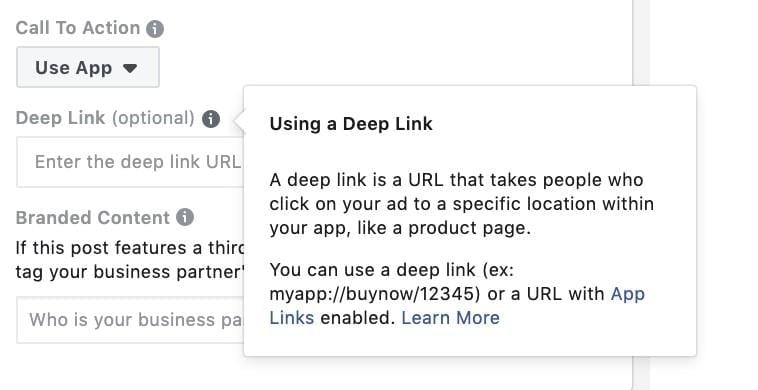
For a deeper understanding of deep links and how to implement them effectively, take a look at Facebook’s Deep Linking in App Ads in their developer section.
5. Driving Action with Clear Call-to-Action Buttons
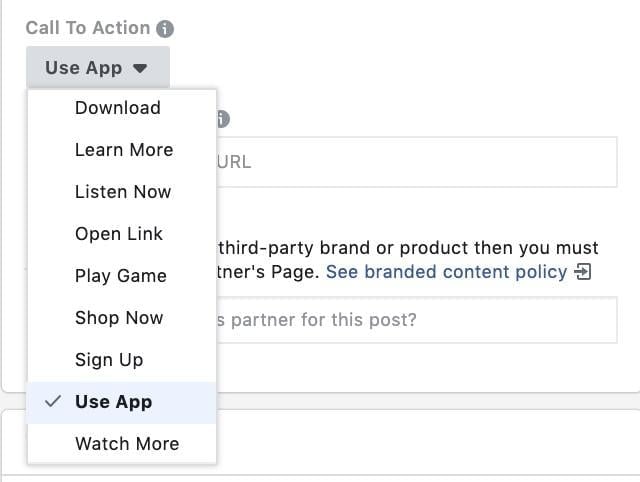
Want to encourage users to take that crucial next step? Always include a clear and concise CTA button that guides them towards accomplishing the desired goal, whether it’s installing your app, starting using it, or any other relevant action, as illustrated below.
Facebook also allows you to create compelling click-to-call ads for both Reach and Website Traffic campaigns. Time to Launch! Congratulations! Your initial Facebook mobile app ads campaigns are prepped and ready to go live. Allow them to run their course and monitor their performance. Once you’ve gathered enough performance data to make informed, statistically relevant optimization decisions, dive into those reports and identify what’s working well and what might need some adjustments. From there, start experimenting with the myriad of variables at your disposal—from campaign objectives and ad set targeting to ad level components—and watch your campaign performance soar to new heights. Most importantly, have fun, embrace your creativity, and keep those users engaged long after they’ve installed your app!