In June 2022, responsive search ads (RSAs) took over from expanded text ads (ETAs). With RSAs, you give Google a variety of headlines and descriptions, and their system mixes and matches them based on factors like search terms and their own data to show the most effective ads to users.
While this type of ad offers great flexibility, it can be a bit tricky to master. This post will provide a comprehensive look at what responsive search ads are, how to create them, and answer common questions, plus offer tips and best practices to maximize your success.
Table of contents
- What are responsive search ads?
- How do RSAs work?
- Responsive search ad character counts
- How to create a responsive search ad in Google
- Tips and best practices for Google responsive search ads
What are responsive search ads?
Responsive search ads are Google’s most versatile and largest search ad format. Unlike older, static text ads where you manually craft headlines and descriptions, RSAs let you write up to 15 different headlines and 4 different descriptions. These can be combined in 43,680 ways, providing almost limitless opportunities for testing!
How do responsive search ads work?
Google automatically tests various headline and description combinations, learning which perform best. Over time, your RSAs will show the optimal message to different users based on their search terms, device, browsing history, and other signals.
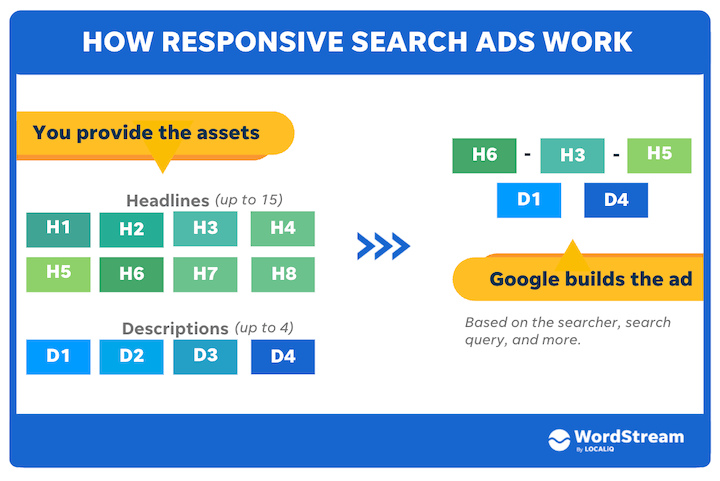
What are the character counts for responsive search ads?
RSAs can display up to three 30-character headlines, a display URL with two 15-character display paths, and up to two 90-character descriptions. You can further enhance their visibility on search results pages by using ad extensions.
| Ad component | Responsive search ad | |
| # Headlines Shown | Up to 3 | |
| Headline Length | 30 Characters | |
| Domain | Taken from your ad’s Final URL | |
| # Display URL Path Fields Shown | 2 (Optional) | |
| Display URL Path Field Length | 15 Characters | |
| # Descriptions Shown | Up to 2 | |
| Description Length | 90 Characters | |
| Total Max Length | 300 |
However, your RSA will consistently show at least two headlines and one description, ensuring it’s never smaller than an expanded text ad!
How do I create responsive search ads in Google Ads?
To create an RSA, click the plus sign to start a new campaign and select “responsive search ad”:
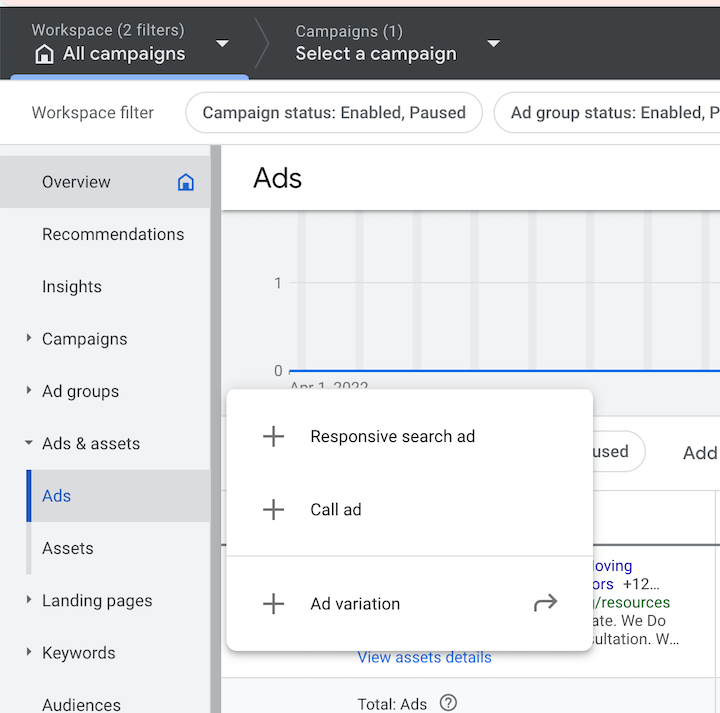 You’ll then need to choose an ad group for your new ad. Afterward, you’ll be guided through creating each part of the RSA:
- Final URL
- Display URL paths
- Up to 15 different headlines
- Up to 4 different descriptions You can also include a tracking template by expanding the ad URL options.
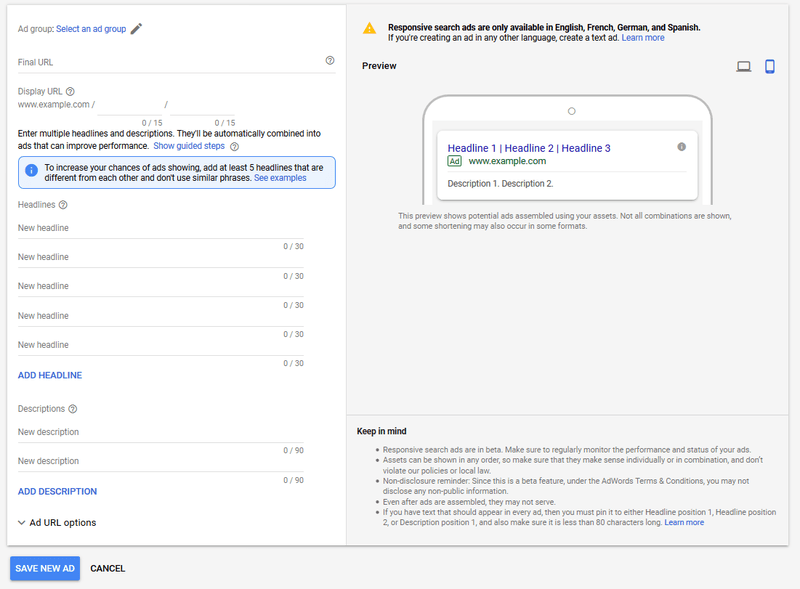
Click “Save New Ad,” and after review, your new RSA will go live if approved!
 Free guide >> PPC 101: The Beginner’s Guide to PPC
How do Google’s responsive search ads perform?
RSAs offer significant advantages over expanded text ads. Google reports that they achieve a 5-15% higher click-through rate compared to standard search ads! However, averages can be misleading, and results vary. To get the most out of your RSAs, follow these best practices.
Google responsive search ad tips & best practices
Now that we’ve covered the basics, let’s explore some tips and strategies to maximize your success with this innovative ad format. Here’s a quick reference guide:
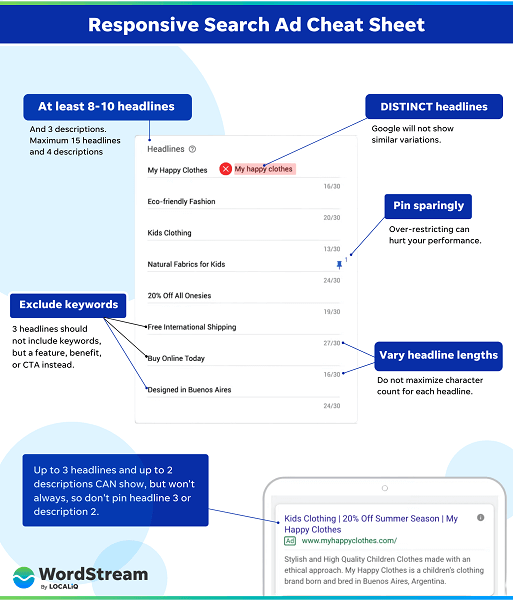
1. Use multiple headlines & descriptions
While RSAs require a minimum of three headlines and two descriptions, aiming for the bare minimum isn’t ideal. The power of RSAs lies in their ability to test more variations than traditional ads. Utilize this by striving for at least 10 different headlines and 3 descriptions.
2. Highlight something different in each headline & description
Avoid creating repetitive or dull variations of the same message. Google might not even display your RSA if your headlines or descriptions are too similar.
A well-crafted RSA contains diverse and unique messages. Be creative and highlight different value propositions, offers, and calls to action within each element.
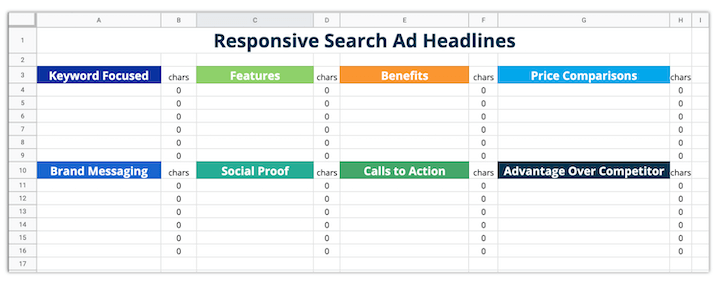
Our responsive search ad template can be a valuable tool for this.
3. Don’t include keywords in all headlines
Include your primary keyword in at least two headlines. You can leverage Dynamic Keyword Insertion to automatically insert keywords into your RSAs.
However, ensure that at least three headlines don’t include your keywords. This prevents repetition and allows you to highlight more value to potential customers.
4. Vary up headline & description lengths
This increases the chances of your ad displaying a third headline or second description. Don’t feel obligated to maximize the character count for every element.
Are you making any mistakes in Google Ads?
Find out instantly with the Free Google Ads Performance Grader.
5. Pin headlines & descriptions to specific positions
Google’s RSAs will automatically test different headlines and descriptions in various positions to determine the best performers. Not every headline will appear every time, and the same applies to descriptions. This optimization process helps Google identify the ideal message for each user, keyword, and device.
If you have specific messaging that you always want to include (such as a brand message or disclaimer), you can “pin” that headline or description to ensure its consistent presence.
When writing a crucial headline that you want to be displayed consistently, hover to the right of that headline, and a pin icon will appear. Clicking this icon provides options to control its display. You can do the same for important description text.
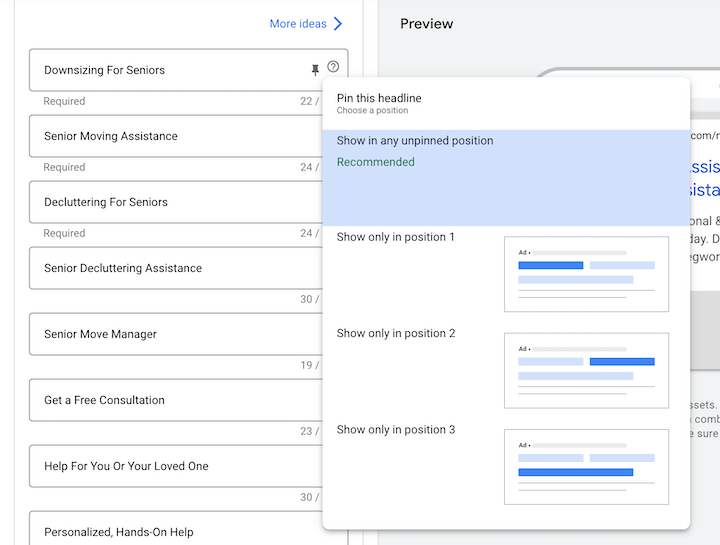 Choosing “Showing this headline in any unpinned position” guarantees that your message will always be shown, but it might appear in headline positions 1, 2, or 3. If you need a message to appear in a specific headline or description spot, you can specify that as well. Keep in mind that headlines 3 and descriptions 2 don’t always show, so pinned messages in those positions won’t always be visible.
6. Pin very sparingly!
While pinning headlines or descriptions ensures the display of essential information, it also limits the automatic testing and message variations that Google performs, potentially impacting your ad’s performance. Pinning even one headline reduces Google’s testing capacity by over 75%! Pinning two headlines further reduces it to 99.5%!
7. Use the combinations report
The combinations report reveals how many impressions each asset combination in your RSA receives. While RSAs have over 43,000 potential permutations, Google won’t use all of them. This report shows you which ones are being utilized.
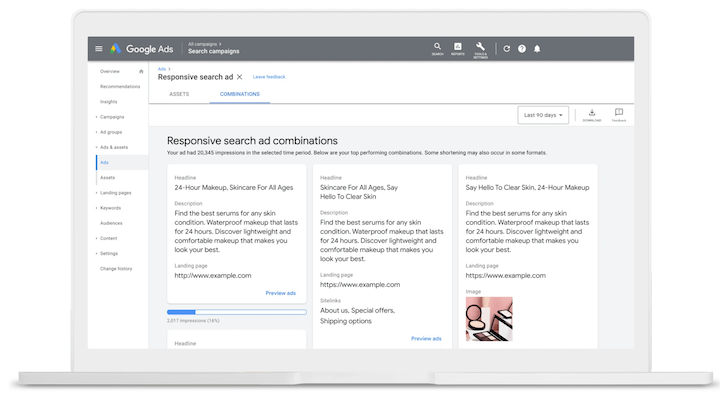 Image source
Remember: Higher impressions for one combination don’t necessarily mean you should pin your assets to only serve that combination. RSAs prioritize combinations that align with real-time signals like the user’s search query, their profile, and other factors. One combination might perform well for a specific, frequently used search term.
Image source
Remember: Higher impressions for one combination don’t necessarily mean you should pin your assets to only serve that combination. RSAs prioritize combinations that align with real-time signals like the user’s search query, their profile, and other factors. One combination might perform well for a specific, frequently used search term.
7. Use your top-performing static ads to come up with RSA assets
Analyze your existing ads and leverage tools like the Google Ads Grader to identify your top performers. Use those elements as inspiration for alternative headlines and descriptions in your RSAs. Mine your account for all the successful messages, value propositions, offers, and calls to action.
Improve your responsive search ads today
Let’s wrap up with a recap of the best practices for Google RSAs:
- Use at least 8-10 headlines and at least three descriptions.
- Highlight a different aspect in each headline.
- Ensure that some headlines don’t include your target keyword.
- Vary your headline and description lengths.
- Pin headlines strategically when necessary…
- …but avoid excessive pinning.
- Generate ideas for headlines and descriptions using tools like the Google Ads Grader.